
Introduction
Thank you for purchasing the ZHIWHIS Portable Digital Pocket Radio, Model ZWS-605. This compact and versatile device offers AM, FM, and Shortwave (SW) radio reception, along with MP3 playback capabilities. It features a high-sensitivity DSP digital tuner, a large-capacity rechargeable battery, and a clear LCD display. Please read this manual carefully to ensure proper use and to maximize your listening experience.
Package Contents
Verify that all items are present in your package:
- 1 x ZHIWHIS Portable Digital Pocket Radio (Model ZWS-605)
- 1 x Stereo Earphones
- 1 x Storage Bag
- 1 x Multi-function Strap
- 1 x USB Charging Cable
- 1 x User Manual (English/Japanese)

Figure 1: All items included in the ZWS-605 package.
Product Overview
Familiarize yourself with the radio's components and controls:

Figure 2: Front and side view of the ZWS-605 with labeled controls.
- Speaker: Integrated speaker for audio output.
- LCD Display: Shows frequency, time, volume, battery status, and other information. Features a bright white backlight.
- Volume Control (Long Press) / Channel Selection (Short Press): Adjusts audio volume or navigates saved channels.
- DC 5V Port (External Power Input): Used for charging the radio.
- TUN - (Tune Down / Previous Track): Decreases frequency or selects the previous MP3 track.
- TUN + (Tune Up / Next Track): Increases frequency or selects the next MP3 track.
- 3.5mm Earphone Port: For connecting stereo earphones.
- TF Card Jack: Slot for inserting a Micro SD (TF) card for MP3/WAV playback.
- Antenna: Extendable 6-section steel antenna for improved reception.
- Power/Mode Switch: Slide switch to turn the radio ON/OFF and select between FM, AM, SW, and MP3 modes.
Setup
- Initial Charge: Before first use, fully charge the radio using the provided USB cable. Connect the USB cable to the DC 5V port on the radio and to a standard USB power adapter (not included) or a computer USB port. The battery indicator on the LCD will show charging status. A full charge takes approximately 3.5 hours.
- Insert TF Card (Optional): If you wish to use the MP3 player function, insert a Micro SD (TF) card (up to 128GB, not included) containing MP3 or WAV audio files into the TF card jack. Ensure the card is inserted correctly.
- Attach Strap: Secure the multi-function strap to the designated loop on the radio for convenient carrying.

Figure 3: Inserting a TF (Micro SD) card for MP3 playback.
Operating Instructions
Power On/Off and Mode Selection
- Slide the Power/Mode switch to turn the radio ON.
- Slide the switch to select between FM, AM, SW, or MP3 modes.
- To power off, slide the switch to the OFF position.
Radio Reception (FM/AM/SW)
- Select Band: Slide the Power/Mode switch to FM, AM, or SW.
- Extend Antenna: For optimal FM and SW reception, fully extend the telescopic antenna. For AM, the internal magnetic antenna is used, but adjusting the radio's orientation may improve reception.
- Automatic Station Scan: Long press the 'SCAN' button (often combined with 'BAND' or 'TIME' button, refer to specific button labels on your device if different from Figure 2). The radio will automatically scan and save available stations. Up to 90 stations can be stored (20 FM, 20 MW, 50 SW).
- Manual Tuning: Short press the 'TUN +' or 'TUN -' buttons to fine-tune the frequency.
- Selecting Saved Stations: After an automatic scan, short press the 'Volume/Channel' button to cycle through saved stations.
- Volume Adjustment: Long press the 'Volume/Channel' button to adjust the volume level.
MP3 Playback
- Select MP3 Mode: Slide the Power/Mode switch to MP3. Ensure a TF card with audio files is inserted.
- Play/Pause: In MP3 mode, short press the 'Volume/Channel' button to play or pause the current track.
- Next/Previous Track: Short press the 'TUN +' button for the next track or 'TUN -' for the previous track.
Clock and Alarm Functions
- Setting Time: In OFF mode, long press the 'Volume/Channel' button to enter time setting mode. Use 'TUN +' and 'TUN -' to adjust hours and minutes, then short press 'Volume/Channel' to confirm.
- Setting Alarm: In OFF mode, long press the 'Volume/Channel' button to set the alarm time. Use 'TUN +' and 'TUN -' to adjust, then short press 'Volume/Channel' to confirm. The alarm will sound at the set time.
Charging
The ZWS-605 radio is equipped with a 500mAh 3.7V rechargeable lithium battery. When the battery indicator on the LCD display shows low power, connect the radio to a 5V DC power source using the provided USB cable. The battery indicator will animate during charging and show full when complete. A full charge provides approximately 14 hours of continuous use at moderate volume.
Maintenance
- Keep the device dry. Avoid exposure to rain, moisture, or liquids.
- Clean the radio with a soft, dry cloth. Do not use abrasive cleaners or solvents.
- Avoid extreme temperatures. Store the radio in a cool, dry place.
- Do not attempt to disassemble or modify the radio, as this will void the warranty and may cause damage.
Troubleshooting
| Problem | Possible Cause | Solution |
|---|---|---|
| No power/Radio does not turn on. | Battery is depleted. | Charge the radio fully. |
| Poor radio reception. | Antenna not extended; weak signal; interference. | Fully extend the antenna. Try repositioning the radio. Move away from electronic devices causing interference. |
| MP3 playback not working. | TF card not inserted or corrupted; unsupported file format. | Ensure TF card is correctly inserted. Check if audio files are MP3 or WAV format. Try a different TF card. |
| Buttons unresponsive. | Temporary software glitch. | Turn the radio off and then on again. If the issue persists, contact customer support. |
Specifications
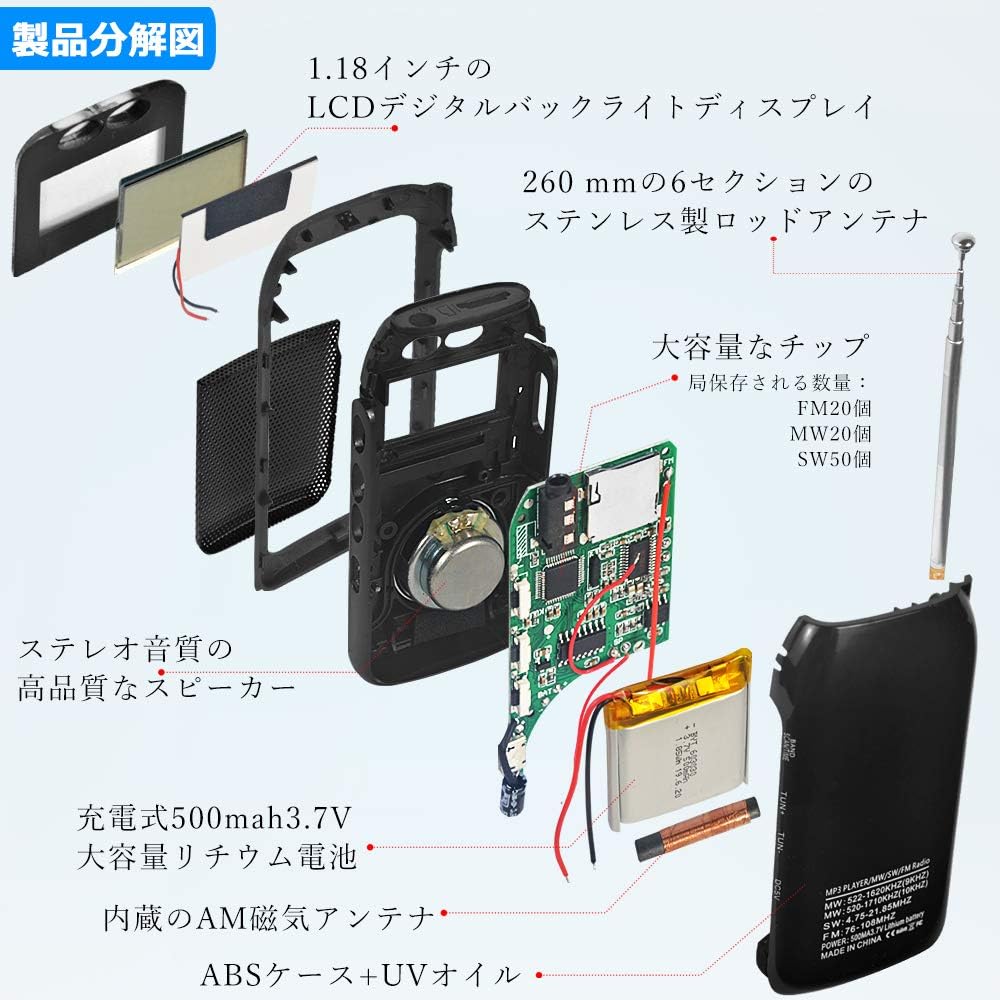
Figure 4: Internal components of the ZWS-605 radio.
- Brand: ZHIWHIS
- Model: ZWS-605
- Color: Black
- Dimensions (L x W x H): 88 x 46 x 18 mm (3.46 x 1.81 x 0.71 inches)
- Weight: Approximately 0.1 kg (3.5 oz)
- Material: Plastic (ABS case with UV oil finish)
- Display: 1.18-inch LCD with backlight
- Frequency Range:
- FM: 76-108 MHz
- AM: 522-1620 KHz (9KHz step)
- SW: 4.75-21.85 MHz
- Sensitivity:
- FM: ≤8 μV
- AM: ≤20 mV
- SW: ≤31 μV
- Signal-to-Noise Ratio (SNR):
- FM: ≥40 dB
- AM: ≥30 dB
- SW: ≥25 dB
- Speaker: Φ28mm / 6Ω / 2W
- Earphone Jack: Φ3.5mm / 32Ω x 2
- Power Source: 500mAh 3.7V Lithium-ion battery (included)
- External Power Input: DC 5V (via USB)
- Minimum Operating Voltage: 3.3V
- TF Card Support: Up to 128GB (Micro SD)
- Audio Formats: WAV, MP3
- Preset Stations: 90 total (20 FM, 20 MW, 50 SW)
Warranty and Support
ZHIWHIS provides a 1-year warranty from the date of purchase for this product. If you encounter any issues or have questions regarding your ZWS-605 radio within this period, please contact our customer support. We aim to respond and resolve your inquiries within 24 hours.
For support, please refer to the contact information provided in your product packaging or on the official ZHIWHIS website.