
1. Introduction
This manual provides comprehensive instructions for the installation, programming, operation, and maintenance of the CAME TOPD4FKS Dual Frequency 4-Channel Remote Control. Please read this manual carefully before using the device to ensure proper function and longevity.
The CAME TOPD4FKS is a fixed code remote control designed to manage multiple operators across two distinct frequencies: 433.92 MHz and 868.35 MHz. Its compact design and dual-frequency capability offer enhanced versatility and security for various access control systems.
2. Product Overview
The CAME TOPD4FKS remote control features four independent channels, allowing control of up to four different devices or functions. It operates on both 433.92 MHz and 868.35 MHz frequencies, providing flexibility for various systems. The device is powered by a single CR2032 lithium battery and includes a low battery alert function.
- Model: TOPD4FKS
- Channels: 4
- Frequencies: 433.92 MHz and 868.35 MHz (Dual Frequency)
- Code Type: Fixed Code
- Battery: CR2032 (3V Lithium)
- Dimensions: 34 x 70 x 13 mm
- Maximum Range: 10 meters

Figure 2.1: Two CAME TOPD4FKS remote controls, black in color, with four circular buttons each. The CAME logo is visible on the lower right of each remote.

Figure 2.2: A single CAME TOPD4FKS remote control, black, featuring four circular buttons arranged in a diamond pattern. The CAME logo is embossed on the bottom right.
3. Setup and Programming
The CAME TOPD4FKS remote control uses a fixed code system and can be programmed by cloning an existing, already programmed remote control. Ensure you have an existing, functional remote (referred to as "A") and the new TOPD4FKS remote (referred to as "B") for this process.
3.1. Programming a New Remote (Cloning)
- Step 1: Prepare the New Remote (B)
On the new CAME TOPD4FKS remote (B), press and hold the desired button for approximately 5 seconds. The LED indicator on the remote should illuminate or flash, indicating it is ready for programming. - Step 2: Activate the Existing Remote (A)
Take your existing, programmed remote (A). Press the corresponding button on remote (A) that you wish to clone. - Step 3: Record the Code
While holding the button on remote (A), bring it close to the new remote (B). The new remote (B) will record the code from remote (A). This process typically takes up to 10 seconds. The LED on remote (B) will change its flashing pattern or illuminate steadily to confirm successful programming. - Step 4: Repeat for Other Buttons
Repeat steps 1-3 for each of the remaining three buttons on the new remote (B) if you wish to program them for different functions or devices.
Note: If programming fails, ensure both remotes have fresh batteries and are held in close proximity during the recording phase. Refer to the packaging diagram for visual guidance.

Figure 3.1: Detailed diagram on the back of the CAME TOPD4FKS packaging illustrating the three-step programming process for cloning a new remote from an existing one. It shows pressing a button on the new remote for 5 seconds, then pressing a button on the programmed remote, and finally recording the code on the new remote for 10 seconds.
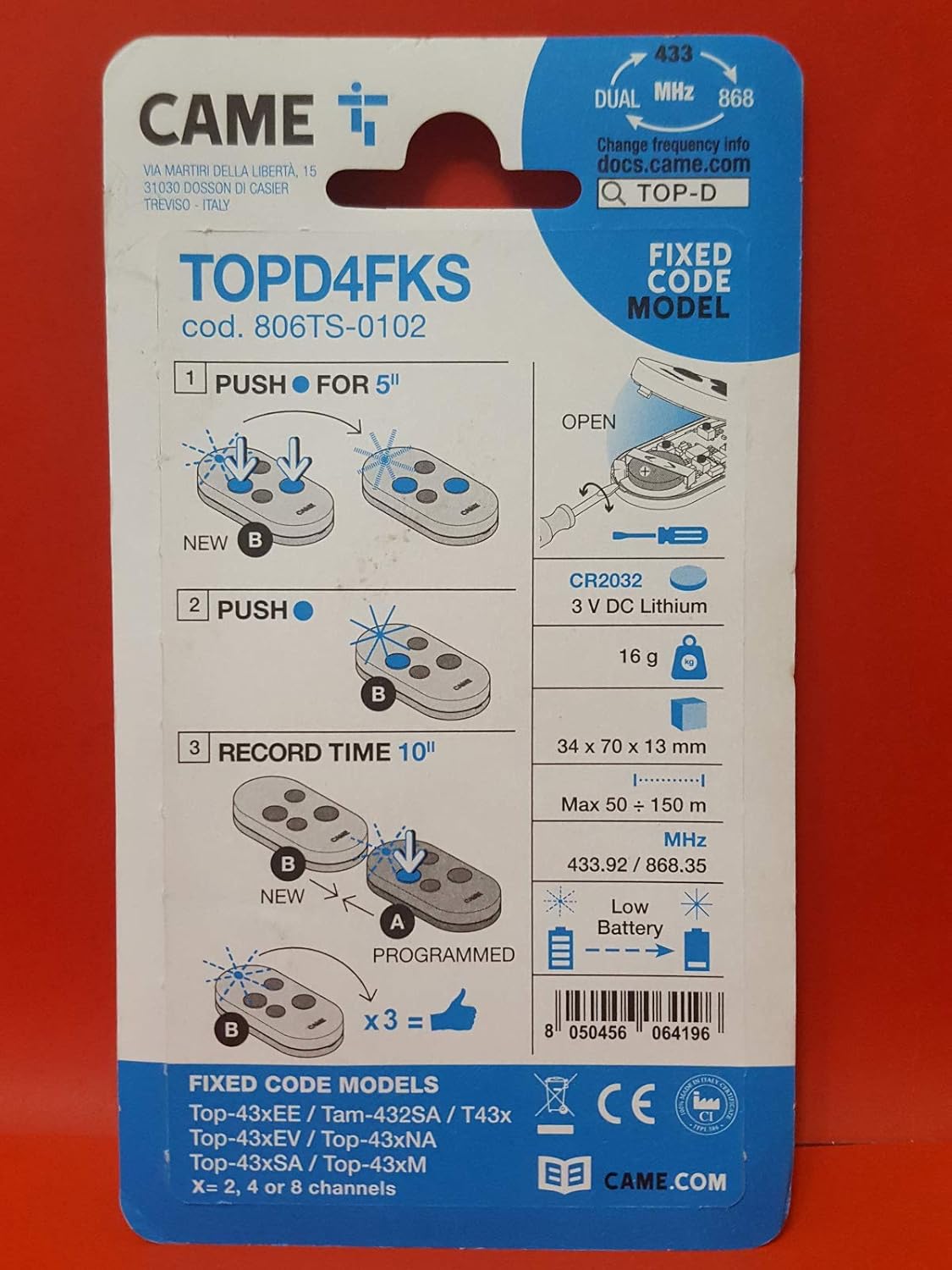
Figure 3.2: Front of the CAME TOPD4FKS product packaging, displaying the model number (806TS-0102), dual frequency (433 MHz and 868 MHz), and a visual representation of the remote control.
3.2. Battery Installation
The remote control uses a CR2032 3V lithium battery. When the battery is low, the remote will provide a low battery alert. To replace the battery:
- Carefully open the remote control casing. A small screwdriver may be required to gently pry open the two halves.
- Remove the old CR2032 battery.
- Insert a new CR2032 3V lithium battery, ensuring the correct polarity (+ side up).
- Close the remote control casing securely.

Figure 3.3: Diagram illustrating the process of opening the CAME remote control to access the battery compartment. It shows a screwdriver being used to open the case and indicates the CR2032 3V lithium battery.
4. Operating Instructions
Once programmed, the CAME TOPD4FKS remote control is ready for use. Each of the four buttons corresponds to a programmed function or device.
- Activating a Function: Press the desired button firmly. The remote's LED indicator will briefly illuminate to confirm transmission.
- Range: The remote control has a maximum operating range of 10 meters under optimal conditions. Obstructions, interference, and battery level can affect this range.
5. Maintenance
To ensure optimal performance and extend the lifespan of your CAME TOPD4FKS remote control, follow these maintenance guidelines:
- Cleaning: Clean the remote control with a soft, dry cloth. Do not use abrasive cleaners, solvents, or liquids, as these can damage the casing or internal components.
- Battery Replacement: Replace the CR2032 battery promptly when the low battery alert is indicated or when the remote's performance degrades. Refer to Section 3.2 for battery replacement instructions.
- Storage: Store the remote control in a dry place, away from extreme temperatures, direct sunlight, and high humidity.
- Impact: Avoid dropping the remote control or subjecting it to strong impacts, which can damage internal circuitry.
6. Troubleshooting
If you encounter issues with your CAME TOPD4FKS remote control, refer to the following troubleshooting steps:
| Problem | Possible Cause | Solution |
|---|---|---|
| Remote not working after programming. |
|
|
| Reduced operating range. |
|
|
| LED indicator does not light up. |
|
|
7. Specifications
| Feature | Detail |
|---|---|
| Brand | Came |
| Model Name | TOPD4FKS |
| Model Number | 806TS-0102 |
| Color | Black |
| Number of Channels | 4 |
| Frequencies | 433.92 MHz, 868.35 MHz (Dual Frequency) |
| Connectivity Technology | Radio Frequency |
| Controller Type | Remote Control |
| Battery Type | CR2032 (3V Lithium) |
| Dimensions (L x W x H) | 70 x 34 x 13 mm |
| Maximum Range | 10 Meters |
| Special Features | Dual Frequency, Low Battery Alert |
8. Warranty and Support
The CAME TOPD4FKS remote control comes with a 3-year warranty from the date of purchase, covering manufacturing defects. Please retain your proof of purchase for warranty claims.
For technical support, troubleshooting assistance beyond this manual, or warranty inquiries, please contact your retailer or the official CAME support channels. Refer to the product packaging or the CAME website for contact information.
Manufacturer: CAME


