
Retevis RT49
Retevis RT49 Two-Way Radio Instruction Manual
Model: RT49
1. Product Overview
The Retevis RT49 is a rechargeable, waterproof two-way radio designed for reliable communication in various outdoor and indoor environments. Featuring 22 FRS channels, NOAA weather alerts, VOX functionality, and a built-in flashlight, it is suitable for adults and beginners alike. Its robust design ensures performance even in wet or dusty conditions.

Figure 1: Retevis RT49 Walkie Talkies with charging base and batteries.

Figure 2: Key features of the Retevis RT49, including 22 channels, long range, NOAA weather alert, clear sound, USB charging, keypad lock, 1200mAh NiMH batteries, and 20 call tones.
2. What's in the Box
Your Retevis RT49 package includes the following items:
- 2 x RT49 Two-Way Radios
- 6 x AA NiMH Rechargeable Batteries (1200mAh)
- 2 x Belt Clips
- 1 x Desktop Dual Charging Dock
- 1 x Micro-USB Cable
- 1 x User Manual
- 4 x Earphones

Figure 3: All components included in the Retevis RT49 package.
3. Setup
3.1. Battery Installation
The RT49 radios use 3 AA NiMH rechargeable batteries per unit. Follow these steps to install the batteries:
- Remove the belt clip by pushing the tab and sliding it upwards.
- Open the battery compartment cover on the back of the radio.
- Insert 3 AA NiMH rechargeable batteries, ensuring correct polarity (+/-).
- Replace the battery compartment cover and reattach the belt clip.
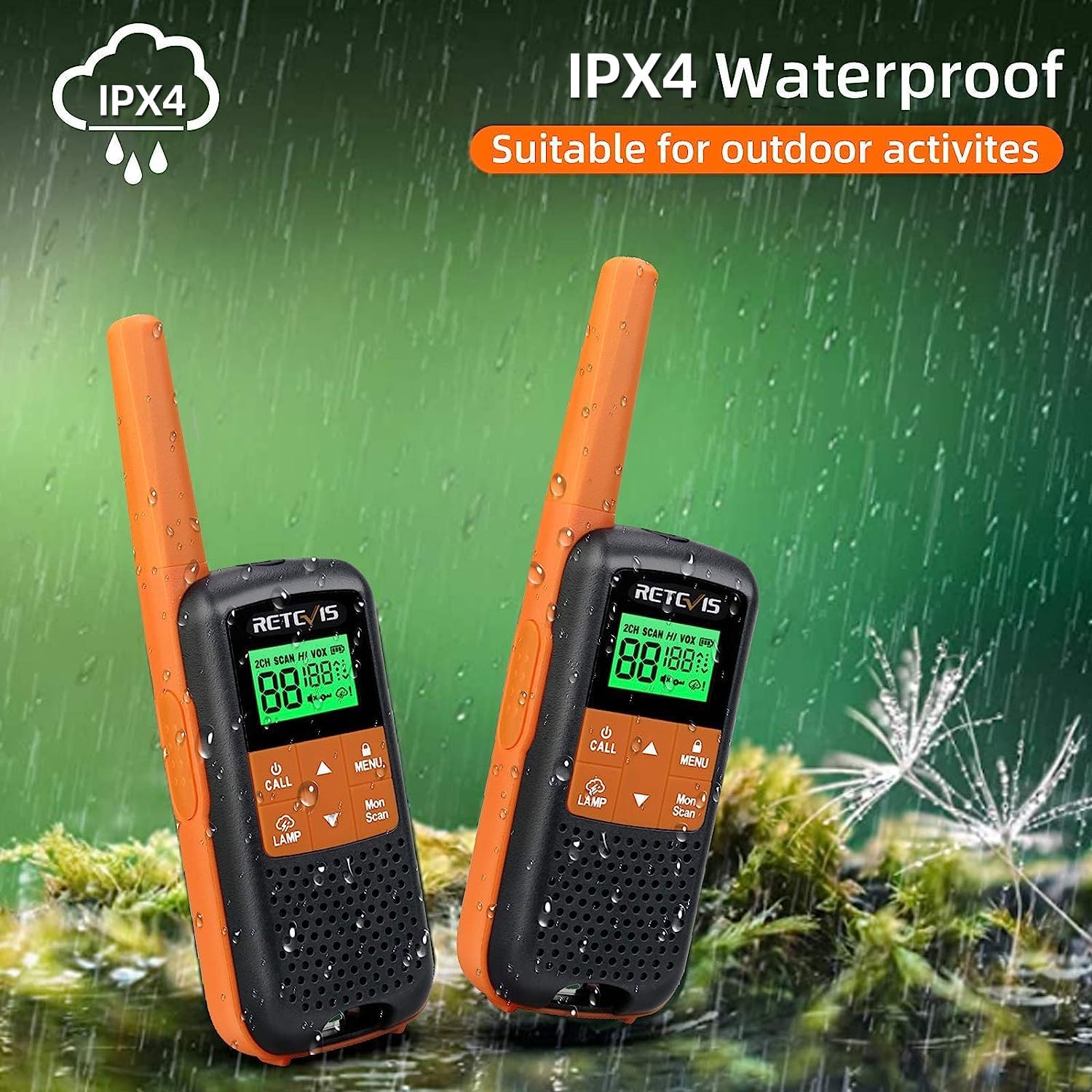
Figure 4: The RT49 is IPX4 water-resistant, suitable for outdoor activities. This image also shows the battery compartment cover.
Video 1: Demonstration of battery installation and basic setup for the Retevis RT49 FRS Two-Way Radio.
3.2. Charging the Radios
You can charge your RT49 radios using the included desktop charging dock or directly via the Micro-USB port.
Using the Desktop Charging Dock:
- Connect the Micro-USB cable to the desktop charging dock and then to a power source.
- Place the radios into the charging slots on the dock. Ensure the charging contacts align.
- The charging indicator light on the radio will illuminate to show charging status.
Direct Micro-USB Charging:
- Locate the Micro-USB port on the side of the radio (under a protective cover).
- Connect the Micro-USB cable directly to the radio and a power source.
- The charging indicator light on the radio will illuminate.

Figure 5: The RT49 offers flexible charging options: via the dual charging base or directly through a Micro-USB cable.
4. Operating Instructions
4.1. Power On/Off
To power on or off the radio, press and hold the Power button located on the top of the unit.
4.2. Channel Selection
The RT49 has 22 FRS channels. To change the channel:
- Press the MENU button once. The channel number will flash.
- Use the UP (▲) or DOWN (▼) buttons to select your desired channel.
- Press the MENU button again or the PTT button to confirm your selection.
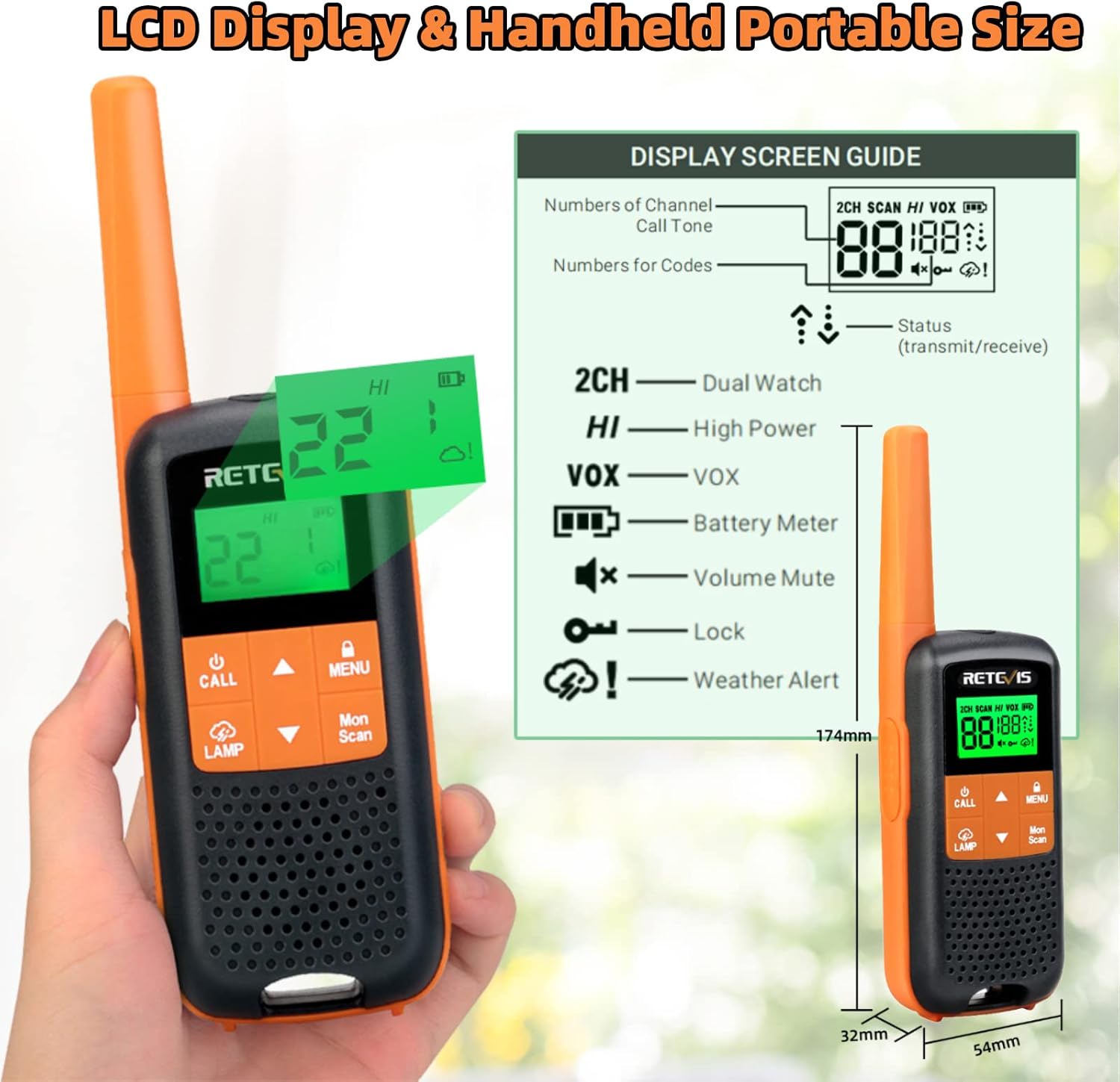
Figure 6: Detailed guide to the LCD display and controls of the Retevis RT49.
4.3. Privacy Codes (CTCSS/DCS)
The RT49 supports 121 privacy codes (38 CTCSS codes and 83 DCS codes) to help reduce interference from other users on the same channel.
- Press the MENU button twice. The privacy code number will flash.
- Use the UP (▲) or DOWN (▼) buttons to select your desired privacy code.
- Press the MENU button again or the PTT button to confirm.
4.4. Transmitting and Receiving (PTT)
To transmit, press and hold the PTT (Push-To-Talk) button on the side of the radio and speak clearly into the microphone. Release the PTT button to receive.
4.5. VOX Function (Hands-Free Operation)
VOX (Voice Operated Exchange) allows you to transmit without pressing the PTT button. The radio will automatically transmit when it detects your voice.
- Press the MENU button until the VOX icon flashes.
- Use the UP (▲) or DOWN (▼) buttons to select the VOX sensitivity level (1-3, with 3 being most sensitive) or turn it off (OF).
- Press the MENU button or PTT to confirm.
4.6. NOAA Weather Alert
The RT49 includes 11 NOAA weather alert channels to keep you informed about severe weather conditions.
- Press the MENU button until the NOAA icon flashes.
- Use the UP (▲) or DOWN (▼) buttons to select a NOAA channel.
- Press the MENU button or PTT to confirm. The radio will monitor the selected NOAA channel and alert you to severe weather.

Figure 7: The RT49 provides NOAA weather alerts, crucial for outdoor safety.
Video 2: Overview of the Retevis RT49's NOAA weather alert and waterproof features.
4.7. Flashlight Operation
The RT49 features a built-in flashlight for convenience in low-light conditions.
- Press the LAMP button to turn the flashlight on.
- Press the LAMP button again to turn the flashlight off.
Video 3: Demonstrates how the RT49's features, including the flashlight, can be useful during camping.
4.8. Keypad Lock
To prevent accidental changes to your settings, you can lock the keypad.
- Press and hold the MENU button until the Keypad Lock icon appears on the display.
- To unlock, press and hold the MENU button again until the icon disappears.
4.9. Dual Watch
The Dual Watch feature allows you to monitor two channels simultaneously, ensuring you don't miss any calls.
- Press the MENU button until the Dual Watch icon flashes.
- Use the UP (▲) or DOWN (▼) buttons to select the second channel you wish to monitor.
- Press the MENU button or PTT to activate Dual Watch.
5. Maintenance
5.1. Cleaning
To clean your radio, use a soft, damp cloth. Do not use harsh chemicals or abrasive cleaners. Ensure the radio is powered off and all port covers are securely closed before cleaning.
5.2. Battery Care
- Always use the provided rechargeable batteries and charging equipment.
- Do not attempt to charge non-rechargeable batteries.
- Store batteries in a cool, dry place when not in use.
- If the radio will not be used for an extended period, remove the batteries.
5.3. Water Resistance
The Retevis RT49 is rated IPX4 water-resistant, meaning it is protected against splashing water from any direction. This makes it suitable for use in light rain or dusty environments. However, it is not designed for submersion in water.
- Ensure all port covers (e.g., Micro-USB, earphone jack) are securely closed when using the radio in wet conditions.
- Avoid exposing the radio to strong jets of water or prolonged heavy rain.
Figure 8: The RT49 is designed to withstand splashes, making it durable for outdoor use.
6. Troubleshooting
| Problem | Possible Cause | Solution |
|---|---|---|
| Radio does not power on. | Batteries are low or incorrectly installed. | Charge or replace batteries. Ensure correct polarity. |
| Cannot communicate with other radios. | Different channels or privacy codes. Out of range. | Ensure all radios are on the same channel and privacy code. Move closer to other radios. |
| Static or poor audio quality. | Out of range. Obstructions. Low battery. | Move closer. Avoid large obstructions. Charge batteries. |
| Keypad is unresponsive. | Keypad lock is activated. | Press and hold the MENU button to unlock the keypad. |
7. Specifications
| Feature | Description |
|---|---|
| Model | RT49 |
| Brand | Retevis |
| Channels | 22 FRS Channels |
| Privacy Codes | 121 (38 CTCSS, 83 DCS) |
| Frequency Range | 462-467 MHz |
| Power Source | 6 x AA NiMH Rechargeable Batteries (1200mAh included) |
| Charging | Desktop Dual Charging Dock, Micro-USB Direct Charging |
| Water Resistance | IPX4 (Protected against splashing water) |
| Special Features | NOAA Weather Alert, VOX, Flashlight, Keypad Lock, Dual Watch |
| Item Weight | 1.32 pounds |
| Product Dimensions | 2 x 1.22 x 6.61 inches |
8. Warranty and Support
Retevis provides a 2-year warranty for the radio body and a 1-year warranty for accessories. If you encounter any issues with your product, please contact Retevis customer support via Amazon. They aim to reply within 12 hours and process requests in a hassle-free manner.
For more information or support, please visit the official Retevis store on Amazon: Retevis Store
Related documentsRT49


Ask a question about this manual
Ask about setup, troubleshooting, compatibility, parts, safety, or missing instructions. Manuals+ will review the question and use this page’s manual context to help answer it.