
1. Introduction
This manual provides essential information for the safe and efficient use of your PKPOWER AC DC Adapter. Please read these instructions carefully before using the product and retain them for future reference. This adapter is designed to provide reliable power to compatible Asus Wireless WiFi Cards in gaming laptops and PCs.

Image 1.1: Overview of the PKPOWER AC DC Adapter. This image displays the main adapter unit with its attached power cords, illustrating its compact design and standard black color.
2. Safety Instructions
To ensure safe operation and prevent damage, always follow these safety guidelines:
- Do not expose the adapter to water, rain, or excessive moisture.
- Avoid dropping or subjecting the adapter to strong impacts.
- Do not disassemble or attempt to repair the adapter yourself. Refer all servicing to qualified personnel.
- Ensure the adapter is used within its specified input voltage range (100-240V AC).
- Keep the adapter away from heat sources and direct sunlight.
- Always unplug the adapter from the power outlet when not in use for extended periods.
- Verify that the adapter's output specifications match the power requirements of your device.

Image 2.1: Diagram illustrating the built-in safety protections of the adapter. This image highlights features such as Over Charge Protection, Over Voltage Protection, Short-circuit Protection, Over Current Protection, and Over Temperature Protection, indicating the internal circuitry designed for safety.
3. Setup
Follow these steps to connect your AC DC Adapter:
- Inspect the Adapter: Before connecting, visually inspect the adapter and cables for any signs of damage.
- Connect to Device: Plug the DC output connector of the adapter firmly into the power input port of your Asus Wireless WiFi Card equipped laptop or PC. Ensure a secure connection.
- Connect to Power Outlet: Insert the AC input plug of the adapter into a standard wall power outlet (100-240V AC).
- Verify Power: Once connected, your device should receive power. Check for any power indicator lights on your device.

Image 3.1: Detailed view of the adapter's components. This image shows the 2-pin AC input plug, the DC output connector, and highlights the heat-resistant materials used in the cable, emphasizing the firm and stable connection points.
4. Operating Instructions
The PKPOWER AC DC Adapter is designed for straightforward operation:
- Once properly connected, the adapter will automatically supply power to your device.
- The adapter is designed for continuous use, but it is recommended to disconnect it when the device is fully charged or not in use for extended periods to conserve energy.
- Monitor your device's charging indicator to confirm it is receiving power.
5. Maintenance
Proper maintenance ensures the longevity and performance of your adapter:
- Cleaning: Use a soft, dry cloth to clean the adapter. Do not use liquid cleaners or aerosols.
- Storage: Store the adapter in a cool, dry place when not in use. Avoid extreme temperatures.
- Cable Care: Do not bend or crimp the cables excessively. Avoid placing heavy objects on the cables.
- Inspection: Periodically check the adapter and cables for any signs of wear or damage. Discontinue use if damage is observed.
6. Troubleshooting
If you encounter issues with your adapter, refer to the following common solutions:
- No Power to Device:
- Ensure both the AC plug and DC connector are securely plugged in.
- Try a different power outlet to rule out an issue with the outlet.
- Verify that your device's power input port is clean and free of debris.
- Adapter Overheating:
- Ensure the adapter is in a well-ventilated area and not covered.
- If overheating persists, disconnect the adapter immediately and contact customer support.
- Intermittent Power:
- Check for loose connections at both ends of the cable.
- Inspect the cable for any visible damage or fraying.
If these steps do not resolve the issue, please contact PKPOWER customer support.
7. Specifications
| Feature | Detail |
|---|---|
| Input Voltage | 100-240V AC, 50-60Hz |
| Output Protection | OVP (Over Voltage Protection), OCP (Over Current Protection), SCP (Short Circuit Protection) |
| Certifications | CE, FCC, RoHS |
| Color | Black |
| Power Source | Corded Electric |
| UPC | 791625681001 |

Image 7.1: The AC adapter unit displaying its product label. This image provides a clear view of the adapter's specifications printed on its surface, including input/output details and certifications.
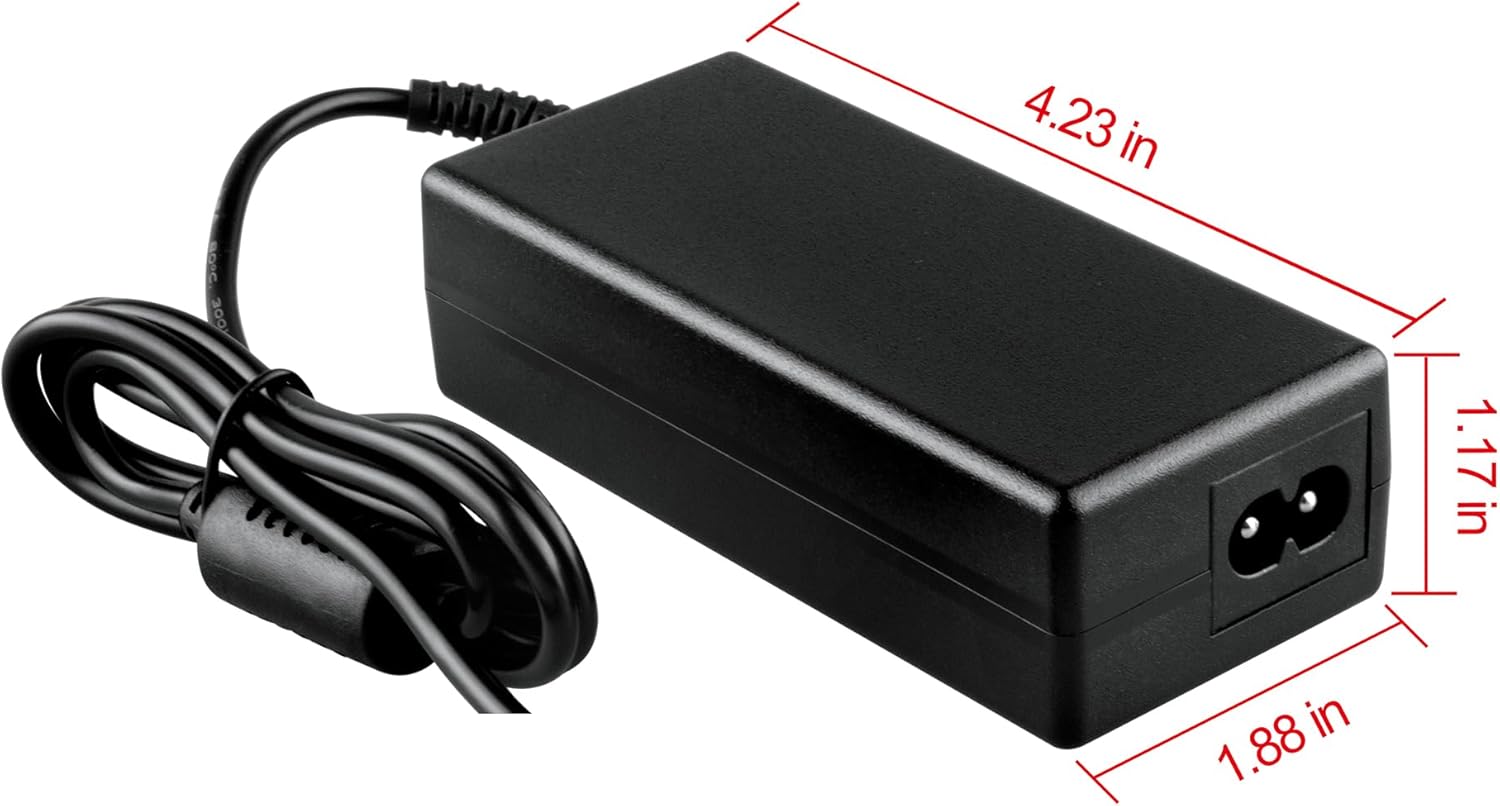
Image 7.2: Visual representation of the adapter's dimensions. This image shows the length (4.23 in), width (1.88 in), and height (1.17 in) of the main adapter body, providing a clear understanding of its physical size.
8. Warranty and Support
PKPOWER products are designed for reliability and performance. We stand by the quality of our products.
- Return Policy: This product is eligible for a refund or replacement within 30 days of purchase, subject to the retailer's return policy.
- Customer Service: For any questions, concerns, or technical assistance, our friendly and reliable customer service team is available to respond within 24 hours. Please refer to your purchase documentation for contact details or visit the PKPOWER store page.