Introduction
Thank you for purchasing the HAVIT M3 Speaker Alarm Clock Radio. This device combines multiple functions into one compact unit: a dual alarm clock, FM radio, Bluetooth speaker, internal thermometer, microphone for calls, and a clear time display. Please read this manual carefully to ensure proper use and optimal performance of your device.
Product Overview and Controls
Familiarize yourself with the various parts and controls of your HAVIT M3 device.
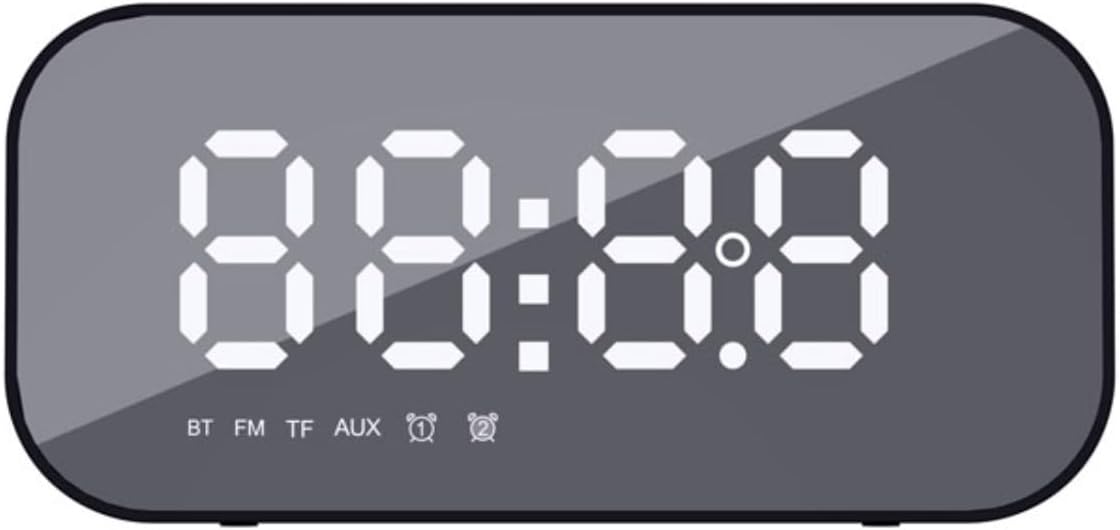
Figure 1: Front view of the HAVIT M3, showing the large LED display for time and mode indicators (BT, FM, TF, AUX, Alarm 1, Alarm 2).
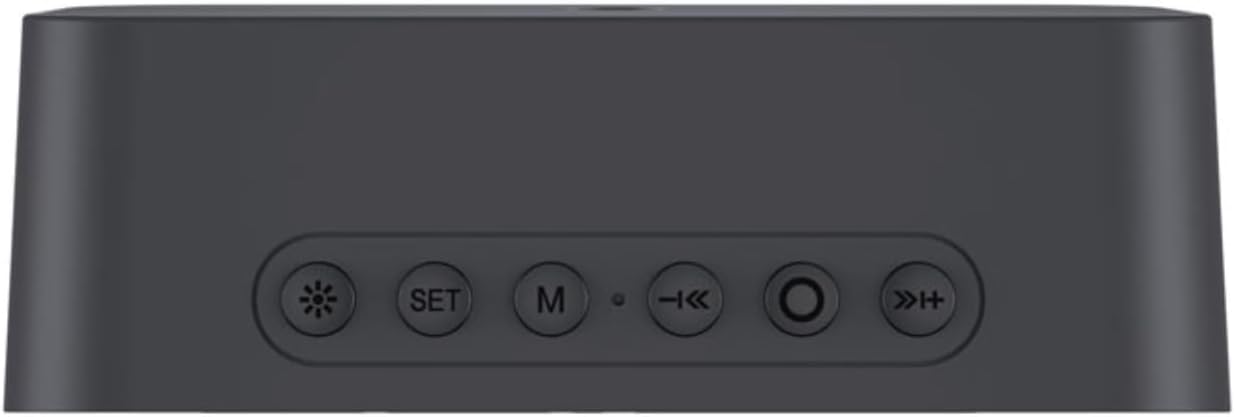
Figure 2: Top panel of the HAVIT M3, illustrating the control buttons: Brightness, SET, Mode (M), Previous/Volume Down, Play/Pause/Call, Next/Volume Up.
Button Functions:
- ☀ (Brightness Button): Short press to adjust display brightness (3 levels). Long press to turn off/on the display.
- SET Button: Short press to enter time/alarm setting mode. Long press to confirm settings.
- M (Mode Button): Short press to switch between modes (Bluetooth, FM Radio, TF Card, AUX).
- ◀◀ (Previous/Volume Down): Short press for previous track/station. Long press to decrease volume.
- ►► (Play/Pause/Call): Short press to play/pause. Short press to answer/end call. Long press to reject call. Double press to redial last number.
- ►► (Next/Volume Up): Short press for next track/station. Long press to increase volume.
Additional ports are located on the side/back of the device, including the charging port (Micro USB), TF card slot, and AUX input.
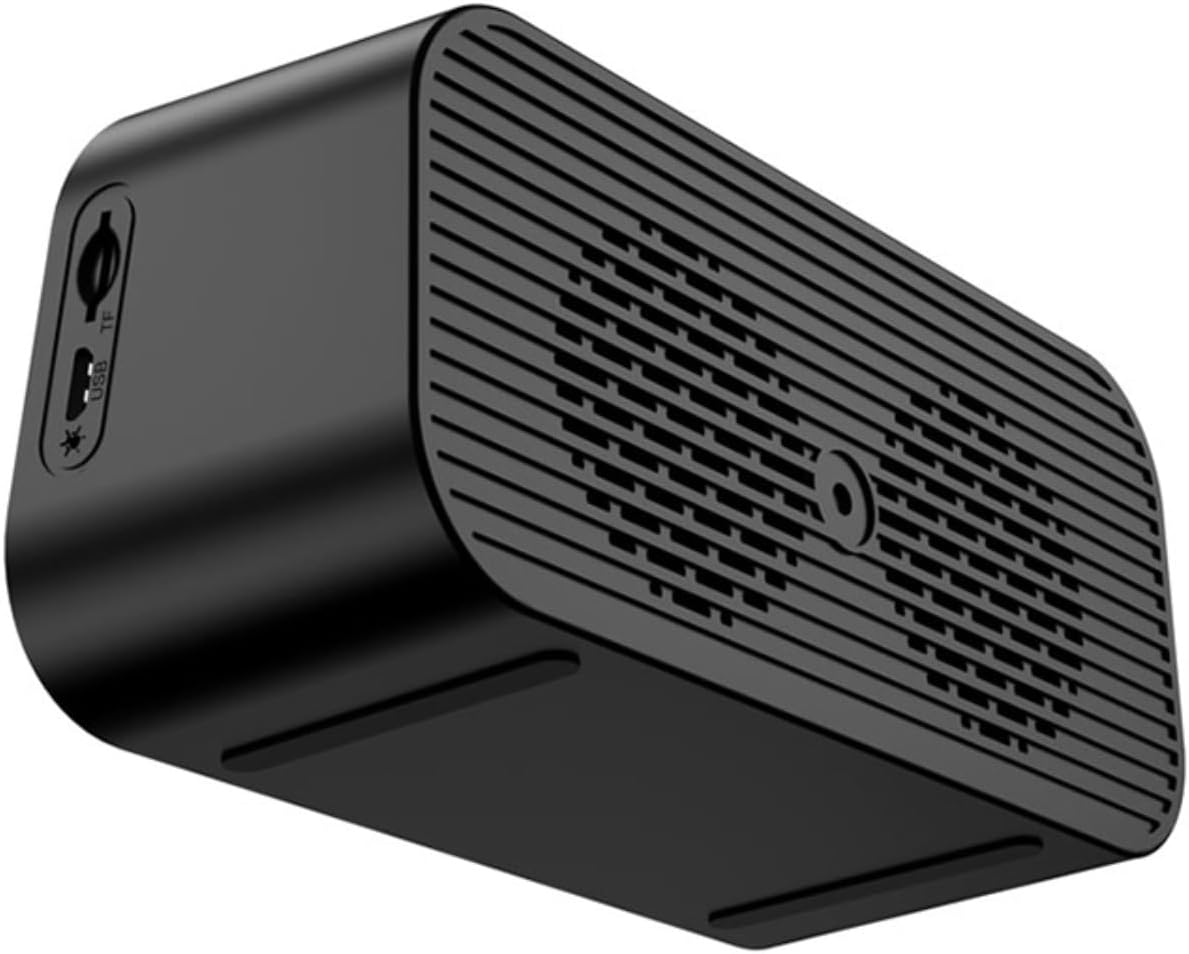
Figure 3: Side view of the HAVIT M3, highlighting the Micro USB charging port and the TF (MicroSD) card slot.
Setup
1. Charging the Device
Before first use, fully charge the HAVIT M3. Connect the provided Micro USB cable to the charging port on the device and the other end to a USB power adapter (not included) or a computer's USB port. The charging indicator light will illuminate during charging and turn off when fully charged.
2. Power On/Off
To power on the device, press and hold the ►► (Play/Pause) button for a few seconds until the display lights up. To power off, press and hold the same button until the display turns off.
Operating Instructions
1. Setting Time and Date
- In time display mode, short press the SET button. The hour digits will flash.
- Use the ◀◀ and ►► buttons to adjust the hour.
- Short press SET again to move to minute setting. Adjust minutes using ◀◀ and ►►.
- Continue pressing SET to cycle through year, month, and day settings, adjusting each with ◀◀ and ►►.
- Long press SET to confirm and exit time/date setting mode.
2. Setting Alarms (Alarm 1 & Alarm 2)
The HAVIT M3 supports two independent alarms.
- In time display mode, long press the SET button. "AL1" will appear, and the alarm hour digits will flash.
- Use ◀◀ and ►► to set the alarm hour.
- Short press SET to move to alarm minute setting. Adjust minutes.
- Short press SET again to select alarm sound source (FM radio or built-in melody). Use ◀◀ and ►► to choose.
- Short press SET to set alarm volume.
- Long press SET to confirm Alarm 1 settings.
- Repeat steps for Alarm 2 if desired.
- To enable/disable an alarm, short press the ☀ (Brightness) button while in time display mode to toggle between Alarm 1 on/off, Alarm 2 on/off, and both off. The corresponding alarm icon will appear/disappear on the display.
3. Bluetooth Pairing
- Turn on the HAVIT M3. The device will automatically enter Bluetooth pairing mode, indicated by "BT" flashing on the display.
- On your smartphone or other Bluetooth-enabled device, enable Bluetooth and search for "HAVIT M3".
- Select "HAVIT M3" from the list to pair. Once connected, "BT" will stop flashing and remain solid.
- You can now play audio from your device through the HAVIT M3 speaker.
4. FM Radio Operation
- Short press the M (Mode) button to switch to FM radio mode. "FM" will appear on the display.
- Long press the ►► (Play/Pause) button to automatically scan and save available FM stations.
- Once scanning is complete, use the ◀◀ and ►► buttons to switch between saved stations.
- Adjust volume using long presses of the ◀◀ and ►► buttons.
5. TF Card / AUX Mode
- TF Card: Insert a MicroSD (TF) card with MP3 audio files into the TF card slot. The device will automatically switch to TF card mode and begin playback. Use ◀◀ and ►► for track navigation.
- AUX Mode: Connect an audio device using a 3.5mm audio cable (not included) to the AUX input port. Short press the M (Mode) button until "AUX" appears on the display. Audio will play from the connected device.
6. Thermometer Function
The HAVIT M3 features a built-in thermometer that displays the ambient temperature on the screen. This reading is automatic and does not require manual activation.
7. Hands-Free Calling
When connected via Bluetooth to your smartphone, the HAVIT M3 can be used for hands-free calls:
- Answer/End Call: Short press the ►► (Play/Pause/Call) button.
- Reject Call: Long press the ►► (Play/Pause/Call) button.
- Redial Last Number: Double press the ►► (Play/Pause/Call) button.
Maintenance
- Clean the device with a soft, dry cloth. Do not use abrasive cleaners or solvents.
- Keep the device away from water, moisture, and extreme temperatures.
- Avoid dropping or subjecting the device to strong impacts.
- When not in use for extended periods, store the device in a cool, dry place and charge it periodically to maintain battery health.
Troubleshooting
| Problem | Possible Cause | Solution |
|---|---|---|
| Device does not power on. | Low battery. | Charge the device fully. |
| No sound from speaker. | Volume too low; incorrect mode; device not paired (Bluetooth). | Increase volume. Ensure correct mode (BT, FM, TF, AUX). Re-pair Bluetooth device. |
| Bluetooth pairing fails. | Device too far; Bluetooth not enabled on source; interference. | Ensure devices are within 10m. Enable Bluetooth on source device. Move away from other wireless devices. |
| FM radio reception is poor. | Weak signal; environmental interference. | Reposition the device. Extend any external antenna if available (not specified for M3, but general advice). Perform auto-scan again. |
| Alarm does not sound. | Alarm not enabled; alarm volume too low; incorrect time set. | Ensure alarm icon is displayed. Increase alarm volume. Verify alarm time is correct. |
Specifications
| Feature | Detail |
|---|---|
| Model Number | M3 |
| Brand | havit |
| Product Dimensions | 5.71 x 2.7 x 2.15 inches |
| Item Weight | 1.01 pounds (460 Grams) |
| Connectivity Technology | Bluetooth |
| Speaker Maximum Output Power | 3 Watts |
| Speaker Size | 1 Inches |
| Batteries | 1 Lithium Ion battery required (included) |
| Color | Mirror Black |
| Mounting Type | Tabletop Mount |
Warranty and Support
HAVIT products are designed to meet high quality standards. For warranty information and technical support, please refer to the warranty card included with your purchase or visit the official HAVIT website. Keep your purchase receipt as proof of purchase for warranty claims.
For further assistance, you may visit the havit Store on Amazon.