
1. Introduction
The KUIYN K100B Wireless Presenter is a versatile tool designed to enhance your presentations. It features a 2-in-1 USB-A and Type-C receiver for broad compatibility and a red visual indicator for highlighting key points. This manual provides detailed instructions for its proper use and maintenance.
Package Contents:
- 1x KUIYN K100B Wireless Presenter
- 1x 2-in-1 USB & Type-C Receiver
- 1x Instruction Manual (this document)

Image 1.1: KUIYN K100B Wireless Presenter with its integrated 2-in-1 USB and Type-C receiver.
2. Product Features
- 2-in-1 USB Type-C Receiver: Combines USB-A and Type-C connectivity for broad device compatibility.
- 2.4GHz RF Wireless Technology: Provides a stable connection with a wireless control range of up to 30 meters (100 feet).
- Red Visual Indicator: Class 3R, 1mW output, with an irradiation distance of up to 200 meters (656 feet).
- Multiple Operating Modes: Supports PPT Mode, Prezi Mode, and Web Browsing Mode.
- Universal Compatibility: Plug-and-play functionality with Windows, Linux, and Mac OS systems.
- Ergonomic Design: Comfortable to hold and operate.
- Integrated Receiver Storage: The USB receiver stores securely within the presenter body.

Image 2.1: Overview of KUIYN K100B features.
3. Setup
3.1 Battery Installation
- Open the battery compartment cover on the back of the presenter.
- Insert one AAA battery, ensuring correct polarity (+/-).
- Close the battery compartment cover securely.

Image 3.1: Battery and receiver installation.
3.2 Receiver Connection
- Remove the 2-in-1 USB & Type-C receiver from its storage slot within the presenter.
- Plug the receiver into an available USB-A port or a Type-C port on your computer or device. The system will automatically detect and install the necessary drivers (Plug-and-Play).
- The presenter is now ready for use.

Image 3.2: Connecting the 2-in-1 USB Type-C receiver.
4. Operating Instructions
4.1 Button Functions
The KUIYN K100B features intuitive buttons for presentation control:
- Laser Button: Activates the red visual indicator.
- Page Up Button: Moves to the previous slide/page.
- Page Down Button: Moves to the next slide/page.
- Black Screen / Full Screen Button: Toggles between a black screen and full screen presentation mode.
- Mode Switch Button: Cycles through PPT Mode, Prezi Mode, and Web Browsing Mode.
4.2 Mode Switching
The presenter supports three distinct modes, indicated by the LED:
- PPT Mode: Default mode for PowerPoint, Keynote, and Google Slides. Page Up/Down buttons function as Left/Right arrow keys.
- Prezi Mode: Optimized for Prezi presentations. Page Up/Down buttons function as Up/Down arrow keys.
- Web Browsing Mode: For general web navigation. Page Up/Down buttons function as Page Up/Page Down keys.
Press the Mode Switch button to cycle between these modes. The presenter has a memory function to save the previously used mode.
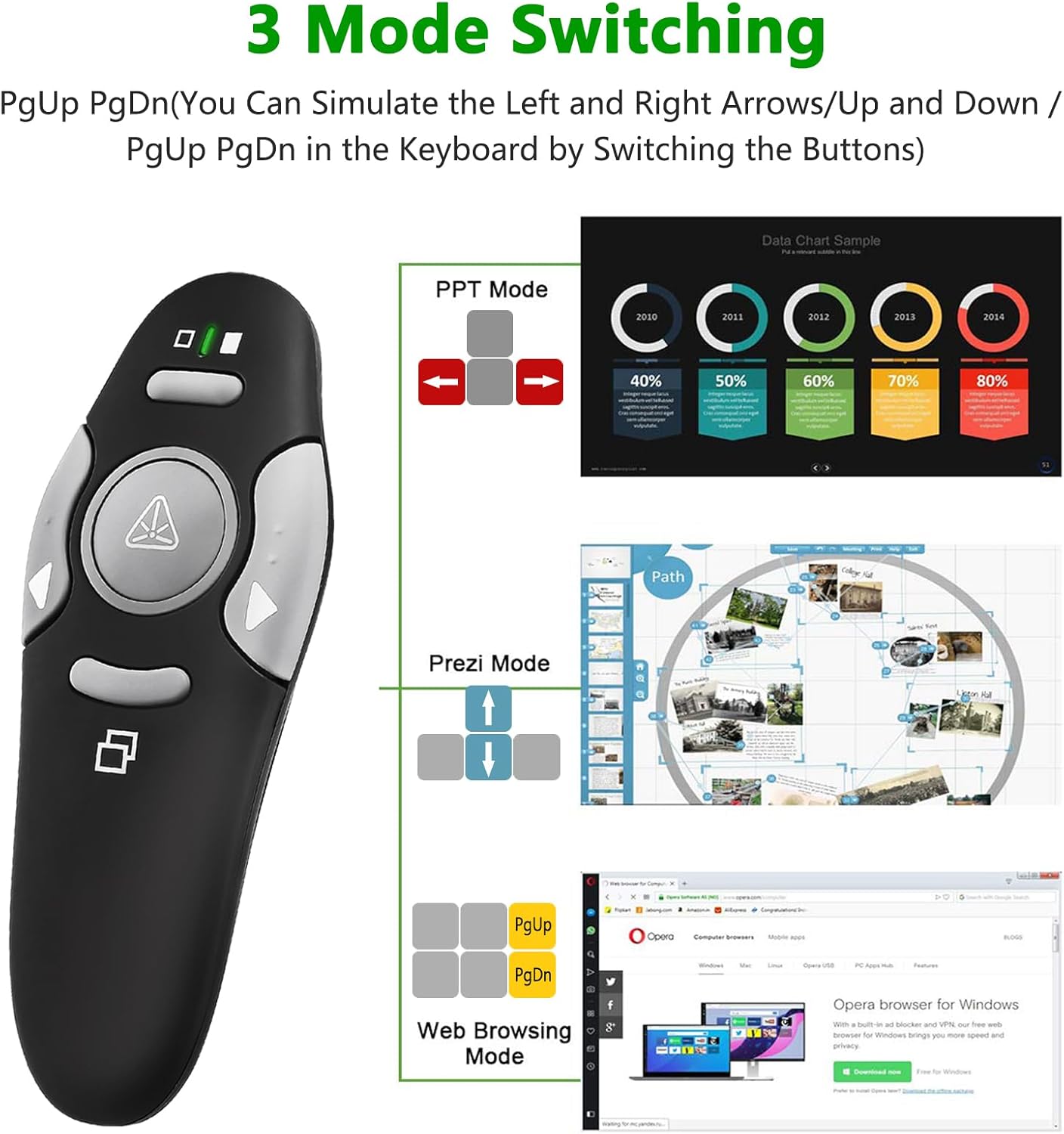
Image 4.1: Button functions and mode switching.
4.3 Laser Pointer Usage
Press and hold the Laser Button to activate the red visual indicator. Release the button to turn it off.
Safety Warning:
- DO NOT stare directly into the visual indicator beam.
- DO NOT point the visual indicator at people or animals' eyes.
- DO NOT point the visual indicator at aircraft or vehicles.
- Keep out of reach of children. This is not a toy.
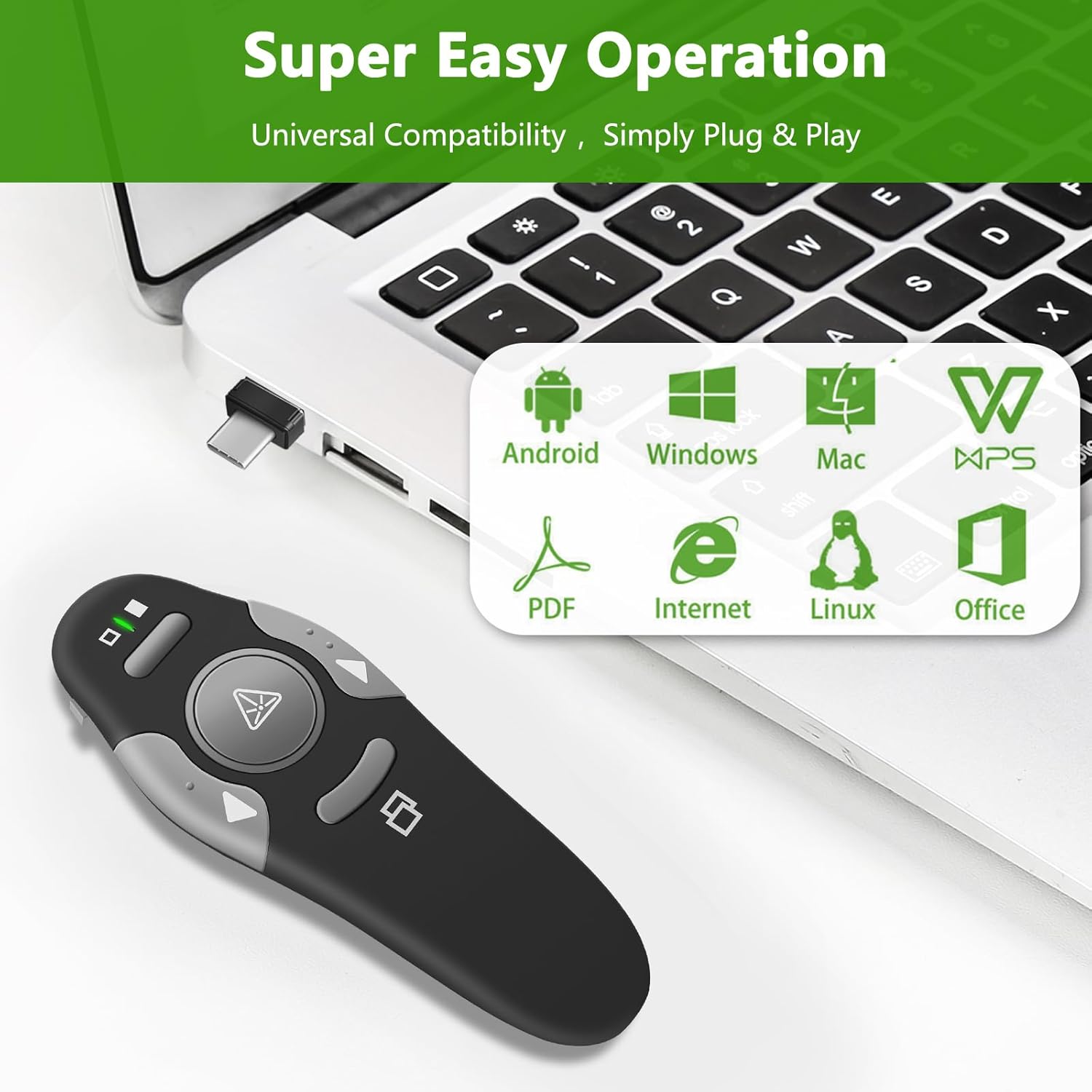
Image 4.2: Laser pointer in use with safety warning.
5. Compatibility
The KUIYN K100B Wireless Presenter offers broad compatibility with various operating systems and presentation software:
- Operating Systems: Windows, Linux, Mac OS, Android.
- Compatible Software: PowerPoint, Prezi, ProPresenter, MS Word, Excel, ACD See, iWork (Keynote, Numbers, Pages), Google Slides, PDF viewers, Internet browsers.

Image 5.1: Universal compatibility with various operating systems and software.
6. Maintenance
6.1 Battery Replacement
When the presenter's LED indicator blinks or its performance degrades, it is time to replace the AAA battery. Follow the steps in Section 3.1 for battery installation.
6.2 Cleaning
Wipe the presenter with a soft, dry cloth. Avoid using harsh chemicals or abrasive cleaners, as these may damage the surface or internal components. Do not use alcohol wipes as they may cause the coating to peel.
6.3 Storage
When not in use, store the presenter in a cool, dry place. Ensure the USB receiver is securely stored within the presenter's body to prevent loss.
7. Troubleshooting
- Presenter not responding:
- Ensure the receiver is properly plugged into a USB or Type-C port.
- Check if the battery is correctly installed and has sufficient power. Replace if necessary.
- Try plugging the receiver into a different USB/Type-C port or a different computer to rule out port issues.
- Laser pointer not working:
- Ensure the battery has sufficient power.
- Confirm you are pressing the correct button for the laser.
- Buttons not performing expected actions:
- Verify that the presenter is in the correct operating mode (PPT, Prezi, Web Browsing) for your application. Adjust using the Mode Switch button.
- Ensure your presentation software is active and in focus.
- Intermittent connection or poor range:
- Reduce the distance between the presenter and the receiver.
- Ensure there are no large metallic objects or other 2.4GHz wireless devices causing interference.
8. Specifications
| Brand | KUIYN |
| Model Number | K100B |
| Item Weight | 1.41 ounces |
| Product Dimensions | 4 x 1 x 0.39 inches |
| Batteries Required | 1 AAA battery (not included) |
| Wireless Technology | 2.4GHz RF |
| Wireless Range | Up to 30 meters (100 feet) |
| Visual Indicator Type | Class 3R Red Laser |
| Visual Indicator Output | 1mW Max |
| Visual Indicator Wavelength | CW: 650 nm |
| Visual Indicator Distance | Up to 200 meters (656 feet) |
| Interface | USB1.1/2.0 |
| Power Supply (Receiver) | USB Bus Power 5V DC |
| Compatible Devices | Laptop, Personal Computer |
9. Warranty and Support
KUIYN provides comprehensive technical and customer support. For any issues or inquiries, please contact our support team.
Contact Information:
- Email: successservice2@hotmail.com
This device complies with part 15 of the FCC Rules. Operation is subject to the following two conditions: (1) This device may not cause interference, and (2) This device must accept any interference, including interference that may cause undesired operation of the device.