
Introduction
This manual provides essential instructions for the safe and effective use of your AUVON DS-W Blood Glucose Monitoring System. Please read this manual thoroughly before using the device for the first time. Keep it in a safe place for future reference.
The AUVON DS-W Blood Glucose Monitoring System is intended for in vitro diagnostic self-testing by people with diabetes in a home setting as an aid to monitor the effectiveness of diabetes control. It is not intended to diagnose or screen for diabetes.
What's in the Box
Your AUVON DS-W Blood Glucose Monitor Kit includes the following components:
- 1 x AUVON Blood Glucose Monitor
- 50 x Blood Test Strips
- 50 x 30 Gauge Lancets
- 1 x Lancing Device
- 1 x Storage Bag
- 1 x Battery (pre-installed)
- 1 x Log Book
- 1 x Meter User Guide
- 1 x Test Strip User Guide

Image: The AUVON DS-W Blood Glucose Monitor Kit, showing the meter, test strips, lancets, lancing device, and carrying case.
Setup
1. Battery Installation
The AUVON DS-W monitor comes with a pre-installed battery. To activate it, gently pull out the plastic tab extending from the battery compartment. If the battery needs replacement, open the battery cover on the back of the meter and insert a new CR2032 lithium metal battery, ensuring correct polarity.
2. Setting Up the Lancing Device
- Unscrew the lancing device cap.
- Insert a new sterile lancet firmly into the lancet holder.
- Twist off the protective cap of the lancet.
- Replace the lancing device cap.
- Adjust the puncture depth by rotating the cap. Settings range from 1 (shallowest) to 5 (deepest). Choose a depth suitable for your skin type (e.g., 1-3 for delicate skin, 4-6 for general skin, 7-10 for thick skin).
- Pull back the sliding barrel until it clicks, indicating it is cocked and ready for use.

Image: A close-up of the AUVON lancing device, highlighting its adjustable depth settings for different skin types.
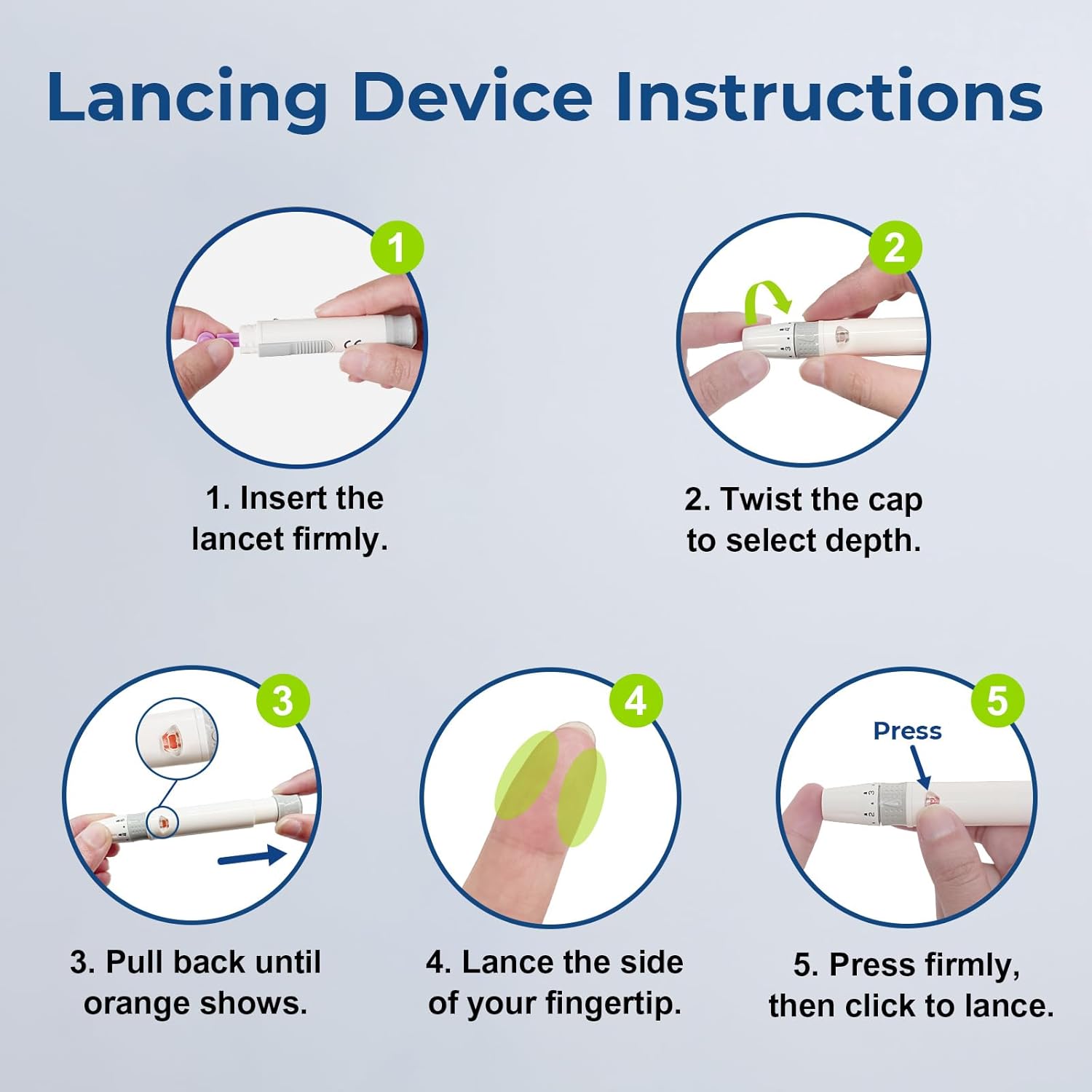
Image: A visual guide showing five steps to prepare and use the lancing device, from inserting the lancet to pressing the button for lancing.
Operating: Performing a Blood Glucose Test
Follow these steps to perform a blood glucose test:
- Wash your hands with warm, soapy water and dry them thoroughly.
- Remove a test strip from its vial and immediately close the vial cap tightly.
- Insert the test strip into the meter with the blue side facing up. The meter will automatically turn on.
- When the flashing blood drop symbol appears on the display, the meter is ready for a blood sample.
- Prick the side of your fingertip with the lancing device. Gently squeeze your finger to obtain a blood drop.
- Touch the tip of the test strip to the blood drop. The blood will be drawn into the strip. Do not apply blood to the top of the strip.
- The meter will beep and begin counting down. Your blood glucose result will appear in 6 seconds.
- Remove the used test strip from the meter. The meter will automatically turn off.
- Dispose of the used lancet and test strip safely in a sharps container.

Image: A visual representation of the five steps to use the AUVON blood glucose monitor, from choosing a test strip to getting the result.

Image: Detailed steps for correct blood sampling, emphasizing dry hands, proper strip insertion, and ensuring the sample fully fills the sensor area.
Video Guide: How to Use AUVON DS-W Blood Glucose Monitor Kit
Video: This official AUVON Inc. video provides a comprehensive guide on how to use the AUVON DS-W Blood Glucose Monitor Kit, covering all steps from preparation to obtaining results.
Checking Memory Records
The AUVON DS-W monitor automatically stores your test results. You can review past results and average readings:
- With the meter off, press the query button (usually the main button on the front) to turn on the meter.
- Press the query button repeatedly to cycle through the 7-day, 14-day, and 30-day average results.
- Continue pressing the query button to check previous test results, starting from the most recent test.

Image: The AUVON Blood Glucose Monitor displaying a blood sugar reading, along with icons indicating its features like no coding, small blood sample, and 6-second reading.
Maintenance
Cleaning the Meter and Lancing Device
Regular cleaning helps maintain the accuracy and longevity of your device:
- Wipe the exterior of the meter and lancing device with a soft, damp cloth.
- Do not immerse the meter or lancing device in water or any cleaning solution.
- Avoid using harsh chemicals or abrasive cleaners.
Storage
- Store the meter and test strips in a cool, dry place between 39.2°F and 86°F (4°C and 30°C).
- Keep test strips in their original vial with the cap tightly closed.
- Do not store in direct sunlight or in areas with high humidity.
- Keep out of reach of children.
Troubleshooting
If you encounter issues with your AUVON DS-W Blood Glucose Monitor, refer to the following common problems and solutions:
- Trouble: Meter does not turn on after inserting a test strip.
- Cause: The test strip may be inserted incorrectly, the battery is not installed, or the battery is installed incorrectly.
Solution: Ensure the battery is correctly installed and the plastic tab is removed. Reinsert the test strip with the blue side facing up, ensuring it is fully inserted into the test strip port straightly. - Trouble: The test cannot be started, or there is no beep sound from the meter after applying the blood sample.
- Cause: The blood sample is not enough.
Solution: Repeat the test with a new test strip and collect more blood samples (more than 0.7µL). Do not add more blood to the test strip after the first drop is applied. - Trouble: Inaccurate readings.
- Causes: Damaged or outdated test strips, insufficient blood sample, dirty lancing device/needle, or testing at different times/locations.
Solution: Always use fresh, unexpired test strips. Ensure adequate blood is applied. Clean the lancing device and use a new sterile lancet for each test. Be aware that blood glucose levels fluctuate throughout the day. - Trouble: Meter turned off automatically after setting year, date, and time.
- Cause: This is normal behavior. Once the settings are finished, the meter will turn off automatically.
Solution: No action needed.
Video Guide: Safety Precautions for AUVON Blood Glucose Monitoring System
Video: This official AUVON Inc. video outlines important safety precautions to observe when using the AUVON Blood Glucose Monitoring System.
Specifications
| Feature | Detail |
|---|---|
| Model Name | DS-W |
| Manufacturer | AUVON |
| Operating Time | 6 Seconds |
| Battery Type | 1 Lithium Metal battery (included) |
| Item Weight | 6.7 ounces |
| Package Dimensions | 6.57 x 3.66 x 2.05 inches |
| UPC | 195028000177 |
Warranty and Support
AUVON prioritizes customer satisfaction. For any questions, concerns, or technical support regarding your AUVON DS-W Blood Glucose Monitor Kit, please refer to the contact information provided in your product packaging or visit the official AUVON website. The product comes with an exclusive lifetime warranty and technical support.
For additional information and support, you may visit the AUVON Store on Amazon.


