
1. Introduction
This manual provides essential instructions for the safe and effective use of your HZPOWEN AC/DC Adapter Charger. Please read this manual thoroughly before using the product and retain it for future reference.
The HZPOWEN AC/DC Adapter Charger is designed to provide reliable power for various compatible jump starters and portable power stations. It features a universal input voltage range and specific output for charging your devices.
2. Important Safety Instructions
- Do not expose the adapter to rain or moisture.
- Do not disassemble the adapter. Refer all servicing to qualified personnel.
- Ensure the adapter's voltage and current ratings match your device's requirements before connecting. Incorrect voltage can damage your device.
- Avoid using the adapter if the cord or plug is damaged.
- Keep the adapter away from heat sources and direct sunlight.
- Unplug the adapter from the power outlet when not in use.

Image 1: HZPOWEN AC/DC Adapter Charger. This image displays the main unit of the adapter with its attached power cord and barrel connector. The label on the adapter shows input and output specifications.
3. Product Specifications
| Feature | Specification |
|---|---|
| Model | HP-13510 |
| Input Voltage Range | AC 100-240V, 50/60Hz |
| Output Voltage | DC 13.5V |
| Output Current | 1A |
| Connector Size | 5.5mm x 2.5mm (Barrel Connector) |
| Certifications | CE / FCC / RoHS |
| Dimensions | Approx. 3.1 x 1.96 x 1.18 inches (main body) |
| Weight | Approx. 3.84 ounces |

Image 2: Adapter Dimensions. This image illustrates the physical dimensions of the adapter, including its length, width, and height in inches.
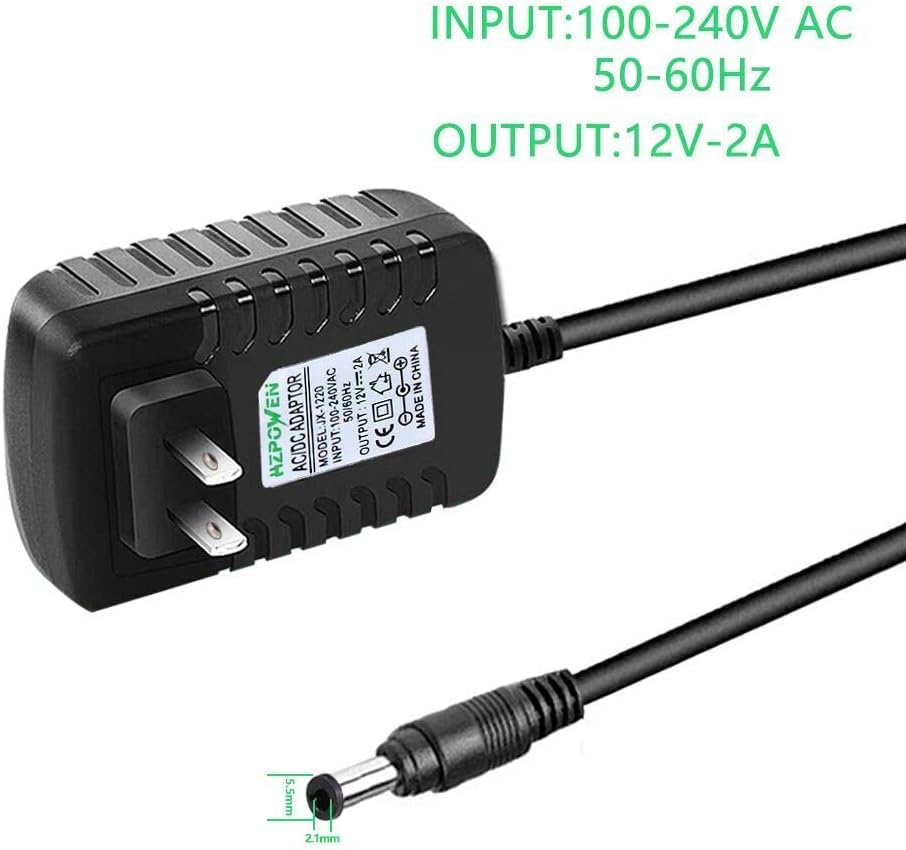
Image 3: Connector Size. This image highlights the barrel connector, showing its outer diameter of 5.5mm and inner diameter of 2.1mm. Note: The product description states a 5.5mm x 2.5mm connector. Please verify your device's required inner diameter for compatibility.
4. Compatibility
This adapter is designed to be compatible with a range of jump starters and portable power stations, including but not limited to:
- Peak Stanley FATMAX 700 Peak 350 AMP J7CSR, J7CS Jump Starter
- Peak 300, 450, 600, 700 Amp Jump Starters
- Duralast Gold BP-DLG, BP-DL900 (700 AMP, 900 Amp) Jump Starter
- Duracell Powerpack 450 Amp, 300 Amp
- Stanley J309, J3B09 (600 Peak 300 Amp)
Important Note:
Always verify the input voltage and connector size requirements of your specific device before connecting this adapter. While this adapter is rated for 13.5V 1A with a 5.5mm x 2.5mm connector (as per product description), some compatible devices may have slightly different requirements (e.g., 12V output or 5.5mm x 2.1mm connector as seen in some product images). Using an adapter with incorrect specifications can damage your device.
5. Setup Instructions
- Inspect the Adapter: Before first use, visually inspect the adapter and its cable for any signs of damage. Do not use if damaged.
- Verify Device Compatibility: Confirm that your jump starter or portable power station requires a 13.5V DC input and has a compatible 5.5mm x 2.5mm barrel connector.
- Connect to Device: Insert the barrel connector of the HZPOWEN adapter firmly into the charging port of your jump starter or portable power station.
- Connect to Power Outlet: Plug the AC prongs of the adapter into a standard AC 100-240V wall outlet.
- Initiate Charging: Once connected, your device should begin charging. Refer to your device's manual for specific charging indicators (e.g., LED lights).
6. Operating Instructions
The HZPOWEN AC/DC Adapter Charger operates automatically once connected to a power source and a compatible device. It is designed for continuous charging until the connected device reaches full capacity, or until disconnected.
- Charging Time: Charging duration will vary depending on the capacity and current charge level of your jump starter or portable power station. Consult your device's manual for estimated charging times.
- Overcharge Protection: The adapter is equipped with built-in safety protections, including overcharge protection, to prevent damage to your device from excessive charging.
- Temperature Monitoring: The adapter includes temperature protection to ensure safe operation.

Image 4: Built-in Safety Protections. This diagram illustrates the various safety features integrated into the adapter, including protection against temperature fluctuations, overloads, overcharging, and short circuits.
7. Care and Maintenance
- Cleaning: Disconnect the adapter from all power sources before cleaning. Use a soft, dry cloth to wipe the exterior. Do not use liquid cleaners or solvents.
- Storage: Store the adapter in a cool, dry place away from direct sunlight and extreme temperatures. Coil the cable loosely to prevent kinks or damage.
- Inspection: Periodically inspect the adapter and cable for any signs of wear, cuts, or damage. Replace the adapter if any damage is observed.
8. Troubleshooting
| Problem | Possible Cause | Solution |
|---|---|---|
| Device not charging |
|
|
| Adapter feels hot during use |
|
|
9. Warranty and Support
HZPOWEN products are typically covered by a manufacturer's warranty. For specific warranty details, including duration and terms, please refer to the product packaging or contact HZPOWEN customer support directly.
For technical assistance, troubleshooting, or warranty claims, please contact your retailer or the manufacturer. Keep your purchase receipt as proof of purchase.
Manufacturer: HZPOWEN
Website: Visit HZPOWEN Store on Amazon