
ATUMTEK ATSS002
ATUMTEK Selfie Stick Tripod User Manual
Model: ATSS002
Brand: ATUMTEK
Introduction
This manual provides detailed instructions for the ATUMTEK Selfie Stick Tripod, an integrated 3-in-1 aluminum Bluetooth selfie stick with a wireless remote and tripod stand. It is designed for use with various smartphones, including iPhone and Samsung models.
Key Features
- Integrated Innovative Design: Combines selfie stick and tripod for exceptional stability. The extendable pole is constructed with aviation-grade aluminum alloy.
- Adjustable Angle & Rotatable Phone Holder: Features a 270-degree rotatable phone holder for horizontal and vertical clamping, and 180-degree head rotation for optimal angles. Accommodates devices up to 3.42 inches wide.
- Detachable Bluetooth Remote & Impressive Battery Life: Bluetooth control distance up to 33ft. Built-in 50mAh rechargeable Lithium battery allows up to 15,000 photos per full charge via USB Type-C. Compatible with IOS 7.0, Android 5.0, and above.
- Super Lightweight & Convenient to Carry: Discreet retractable design with a folded size of only 7.7 inches, extending up to 31.3 inches. Easily portable.
- Simple to Use & Universally Compatible: Quick Bluetooth connection and effortless shutter control. Versatile for self-photography, wider scenery, or as a desktop phone holder.

The ATUMTEK Selfie Stick Tripod in its various configurations: as a tripod stand with a phone in portrait mode, collapsed for portability, and extended as a selfie stick with a phone in landscape mode. The detachable Bluetooth remote is also shown.
What's in the Box
- 1x 31.3" Selfie Stick Tripod
- 1x Bluetooth Remote Shutter
- 1x USB C Cable
- 1x User Manual
Contents of the ATUMTEK Selfie Stick Tripod package, including the collapsed selfie stick, Bluetooth remote, USB-C charging cable, and user manual.
Setup Guide
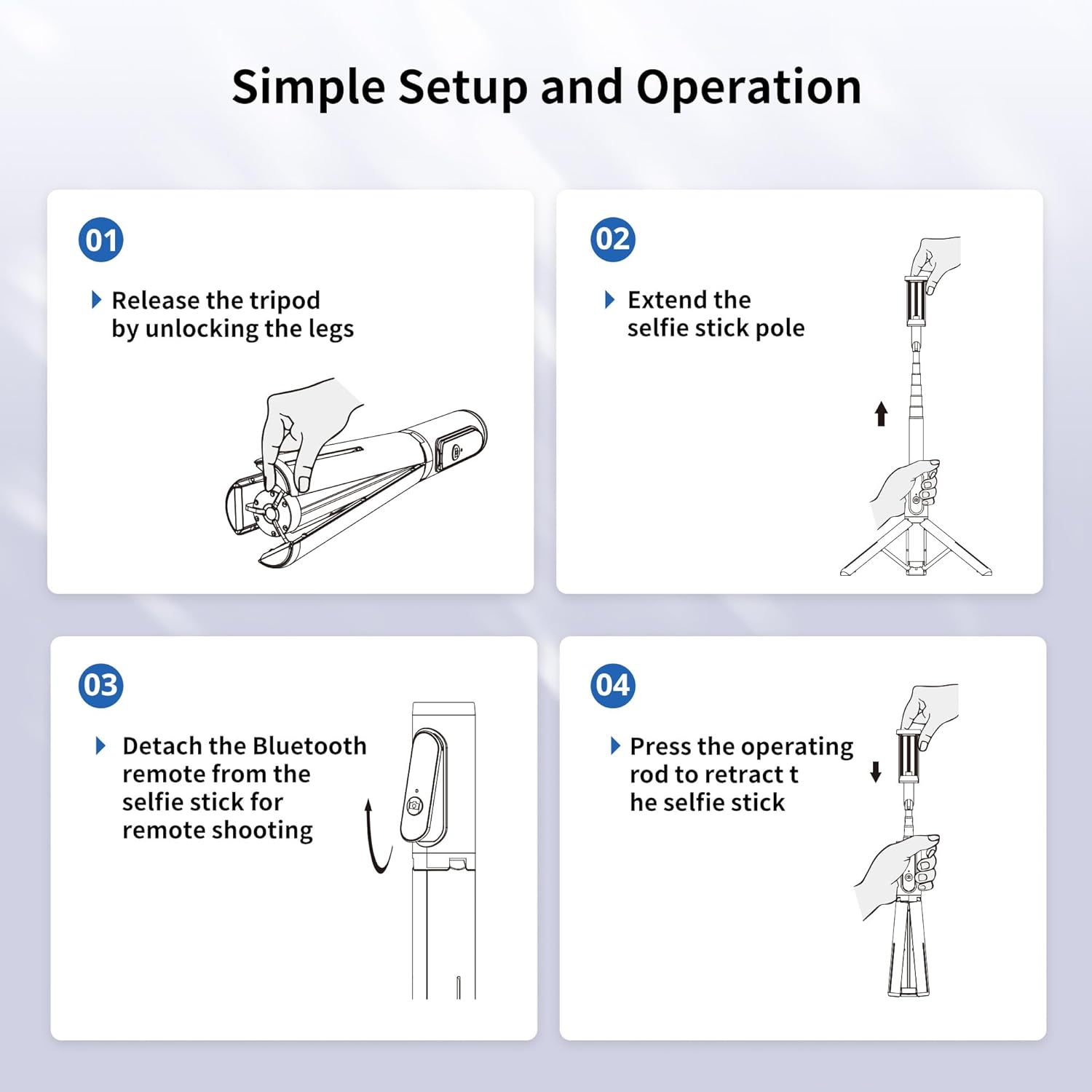
Unfolding the Tripod
- Gently unlock the tripod legs from the base.
- Extend the selfie stick pole fully. This action will automatically spread the tripod legs for stability.

Diagram illustrating the first two steps of setting up the ATUMTEK Selfie Stick Tripod: releasing the tripod legs and extending the pole.
Attaching Your Smartphone
The phone holder supports devices with widths up to 3.42 inches. Gently pull apart the phone holder clamps and insert your smartphone. Ensure it is securely seated.
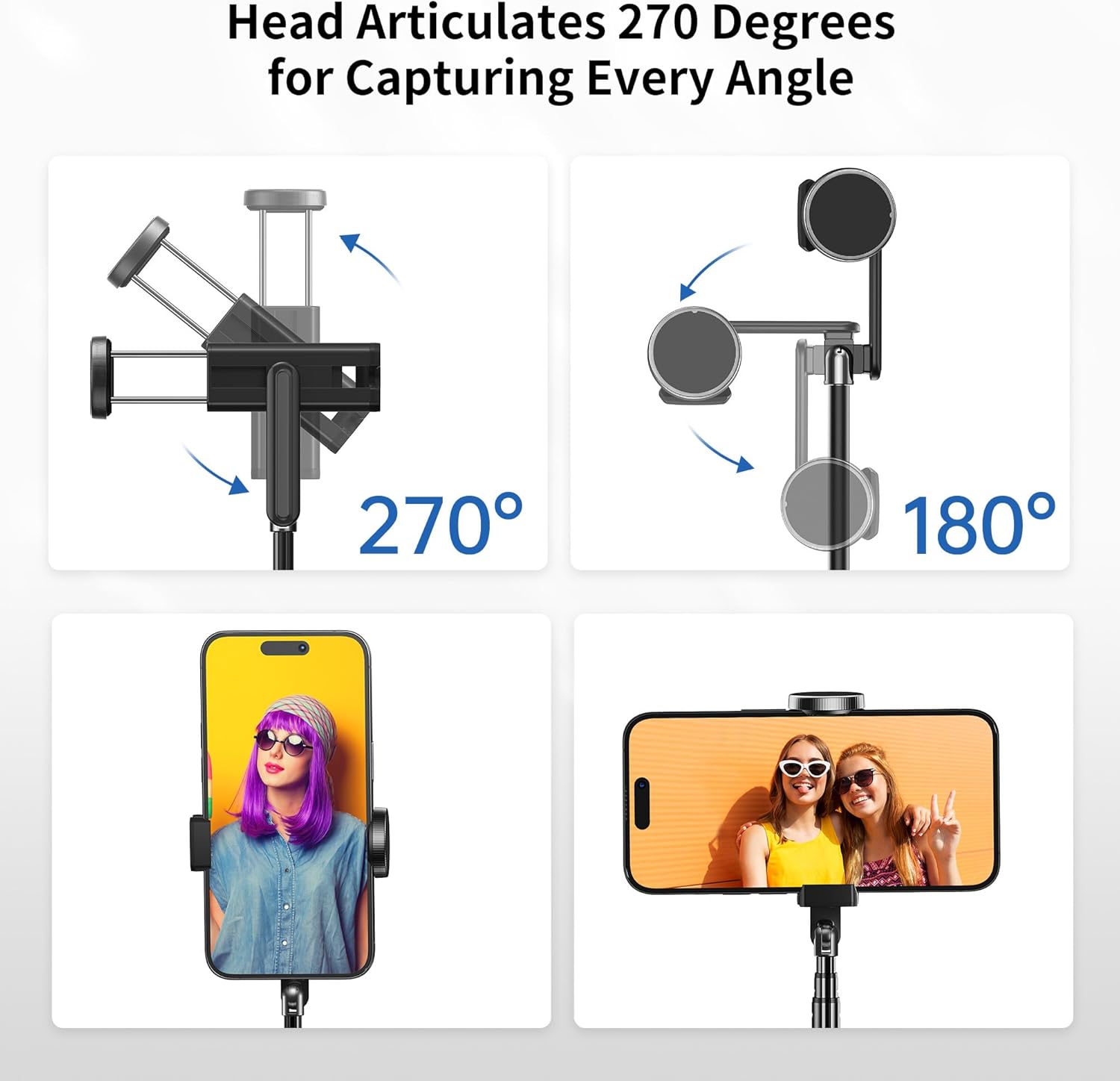
Illustrations showing the 270-degree rotatable phone holder and 180-degree head articulation, allowing for both horizontal and vertical phone clamping and various shooting angles.
Operation
Bluetooth Pairing
- Ensure the Bluetooth remote is charged.
- Turn on the Bluetooth remote by pressing and holding the button until the indicator light flashes.
- On your smartphone, go to Bluetooth settings and search for "ATUMTEK" or a similar device name.
- Select the device to pair. The indicator light on the remote will stop flashing once successfully paired.
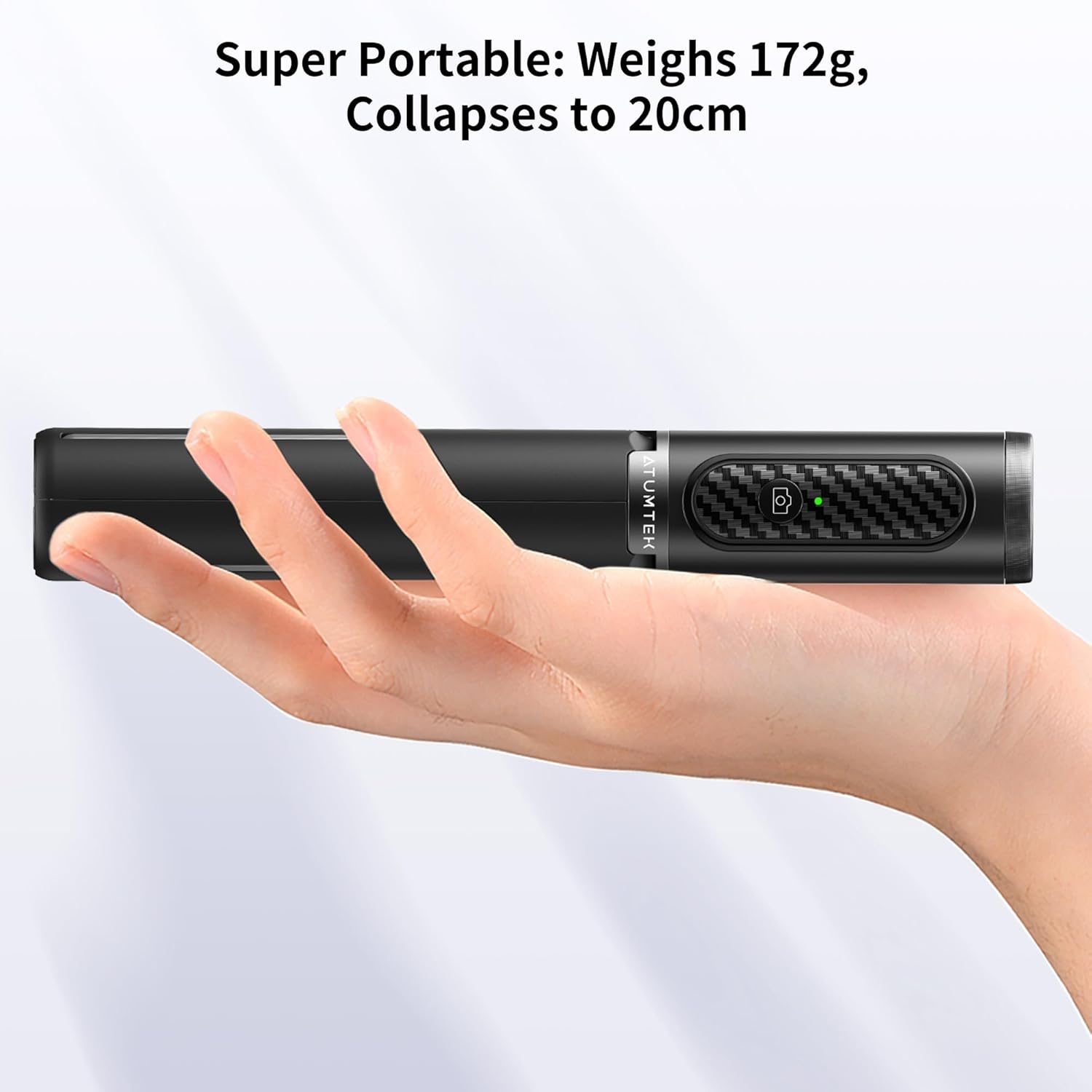
The detachable Bluetooth remote control for the ATUMTEK Selfie Stick Tripod, showing its Type-C charging port and the remote in use with a phone on the tripod.
Taking Photos/Videos
- Open your smartphone's camera application.
- Position your phone as desired, utilizing the 270-degree rotatable holder and 180-degree head articulation for optimal angle.
- For remote shooting, detach the Bluetooth remote from the selfie stick.
- Press the shutter button on the Bluetooth remote to capture photos or start/stop video recording.
Using as a Selfie Stick
With the tripod legs folded and locked, extend the aluminum pole to your desired length (up to 31.3 inches) for handheld selfie shots.
Using as a Tripod
With the tripod legs extended and stable, place the unit on a flat surface. Adjust the pole height and phone angle for stable hands-free shooting or viewing.
Demonstration of the ATUMTEK Selfie Stick Tripod's versatility, showcasing its use as both a selfie stick and a stable tripod for various shooting scenarios.
Maintenance
To ensure the longevity of your ATUMTEK Selfie Stick Tripod, follow these maintenance guidelines:
- Cleaning: Wipe the device with a soft, dry cloth. Avoid using harsh chemicals or abrasive materials.
- Storage: Store the selfie stick in a cool, dry place when not in use. Keep it away from extreme temperatures and direct sunlight.
- Battery Care: Recharge the Bluetooth remote regularly, even if not in frequent use, to maintain battery health. Avoid fully draining the battery for extended periods.
- Handling: Do not force the telescoping sections or tripod legs. Always follow the proper unfolding and folding procedures to prevent damage.
Troubleshooting
| Problem | Possible Cause | Solution |
|---|---|---|
| Bluetooth remote not pairing. | Remote battery low or off. | Ensure the remote is charged and turned on. |
| Bluetooth remote not pairing. | Bluetooth not enabled on phone. | Enable Bluetooth on your smartphone. |
| Bluetooth remote not pairing. | Interference or previously paired device. | Turn off Bluetooth on other nearby devices. Forget the device in your phone's Bluetooth settings and try pairing again. |
| Selfie stick unstable as a tripod. | Legs not fully extended or on uneven surface. | Ensure the pole is fully extended to spread the legs. Place on a flat, stable surface. |
| Phone not fitting in holder. | Phone width exceeds maximum capacity. | The holder accommodates phones up to 3.42 inches wide. Do not force larger phones. |
Specifications
| Feature | Detail |
|---|---|
| Model Number | ATSS002 |
| Product Dimensions (Folded) | 7.9 x 2.4 x 1.8 inches |
| Item Weight | 6 ounces (170 Grams) |
| Folded Size | 7.7 inches |
| Maximum Extended Length | 31.3 inches |
| Battery Type | 1 Lithium Polymer battery (included) |
| Battery Capacity (Remote) | 50mAh |
| Charging Port | USB Type-C |
| Bluetooth Control Distance | Up to 33ft |
| Compatible Devices | IOS 7.0+, Android 5.0+ (Smartphones up to 3.42 inches wide) |
| Manufacturer | ATUMTEK |
| Country of Origin | China |
Warranty and Support
For warranty information, technical support, or customer service inquiries, please visit the official ATUMTEK brand store or contact their customer support channels.
Official ATUMTEK Store: ATUMTEK Store on Amazon
Related documentsATSS002


Ask a question about this manual
Ask about setup, troubleshooting, compatibility, parts, safety, or missing instructions. Manuals+ will review the question and use this page’s manual context to help answer it.