
1. Safety Instructions
Please read these safety instructions carefully before operating the device. Failure to comply with these instructions may result in electric shock, fire, or serious injury.
- Always connect the dehumidifier to a properly grounded power outlet.
- Do not operate the unit with a damaged power cord or plug. If damaged, contact qualified service personnel.
- Keep the unit away from water and other liquids. Do not immerse the unit in water.
- Ensure adequate ventilation around the unit. Do not block air inlets or outlets.
- Do not insert objects into the air vents.
- Unplug the unit before cleaning, maintenance, or when not in use.
- This appliance is not intended for use by persons (including children) with reduced physical, sensory or mental capabilities, or lack of experience and knowledge, unless they have been given supervision or instruction concerning use of the appliance by a person responsible for their safety.
- Children should be supervised to ensure that they do not play with the appliance.
2. Product Overview
The TROTEC TTK 71 E is a comfort dehumidifier designed for efficient moisture control in residential and office spaces. It features electronic humidistat control, automatic defrost, a two-stage fan, a timer function, and a digital display.
Key Features:
- Electronic humidistat control for precise humidity settings.
- Automatic defrost function.
- Two-stage fan for adjustable air circulation.
- Timer function for scheduled operation.
- Digital display showing current humidity levels.
- Option for continuous drainage.
Components:
Familiarize yourself with the main components of your TTK 71 E dehumidifier.

Image 1: Front view of the TROTEC TTK 71 E dehumidifier. This image shows the compact design of the unit, highlighting its dimensions: approximately 22 cm in width, 35 cm in depth, and 55 cm in height. The Trotec logo is visible on the front panel.
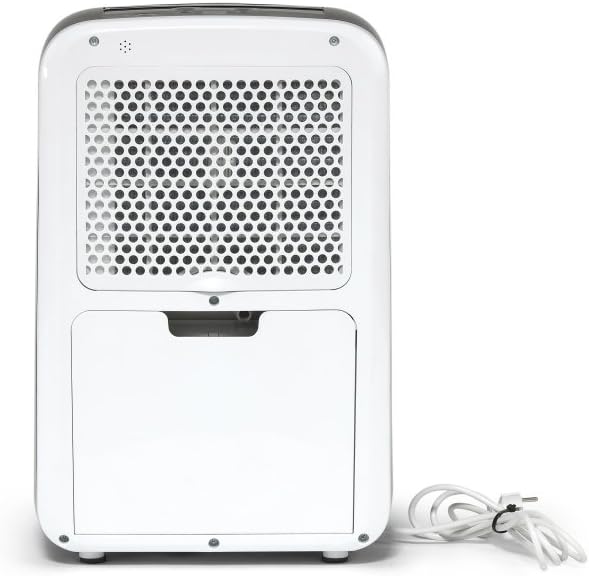
Image 2: Rear view of the TROTEC TTK 71 E dehumidifier. The back panel features a large grille covering the air filter and the power cord neatly coiled to the side.

Image 3: Rear view of the TROTEC TTK 71 E dehumidifier with the water tank removed. This view exposes the internal compartment where the water tank sits, and the continuous drainage port is visible for hose connection.

Image 4: Close-up of the top control panel of the TROTEC TTK 71 E dehumidifier. The digital display and various control buttons (Fan, Mode, Auto, Timer, Defrost, On/Off) are visible, with the air outlet vent in a closed position.

Image 5: Close-up of the top control panel of the TROTEC TTK 71 E dehumidifier with the air outlet vent open. This shows the operational state where air is expelled from the top of the unit.
3. Setup
Unpacking and Placement:
- Carefully remove the dehumidifier from its packaging.
- Place the unit upright on a firm, level surface.
- Ensure there is at least 20 cm of space around the unit for proper air circulation.
- The TTK 71 E is suitable for rooms up to 50 m² (125 m³).
Power Connection:
- Plug the power cord into a grounded electrical outlet with the correct voltage (refer to the rating label on the unit).
Water Tank Installation:
- Ensure the water tank is correctly inserted into its compartment at the rear of the unit. The unit will not operate if the tank is not properly seated or is full.
Continuous Drainage (Optional):
For continuous operation without manually emptying the water tank, you can connect a hose for direct drainage.
- Locate the continuous drainage port at the rear of the unit (visible when the water tank is removed).
- Connect a suitable drainage hose (not included) to this port.
- Ensure the hose is routed downwards to a drain or container, allowing gravity to facilitate water flow. Avoid kinks or blockages in the hose.
4. Operating Instructions
Control Panel:
The control panel is located on the top of the unit and features a digital display and several buttons.
- On/Off Button: Powers the unit on or off.
- Mode Button: Selects operating modes (e.g., automatic, continuous).
- Fan Button: Adjusts fan speed (Low, High).
- Humidity Setting Buttons (Up/Down Arrows): Adjusts the desired humidity level.
- Timer Button: Sets the operating timer.
- Digital Display: Shows current room humidity, set humidity, or timer settings.
Basic Operation:
- Power On: Press the On/Off button to start the dehumidifier. The digital display will show the current room humidity.
- Set Desired Humidity: Use the Up/Down arrow buttons to set your target humidity level. The adjustable range is between 30% and 80% relative humidity, in 10% increments. The unit will automatically turn on when the room humidity exceeds the set value and turn off when the desired level is reached.
- Adjust Fan Speed: Press the Fan button to cycle between Low and High fan speeds.
- Timer Function: Press the Timer button to set an operating duration (e.g., 2, 4, 8 hours). The unit will automatically turn off after the set time.
- Continuous Operation: Select the continuous operation mode (often indicated by a 'Cont' or similar symbol via the Mode button) for non-stop dehumidification, ideal for very damp environments or when using continuous drainage.
- Power Off: Press the On/Off button again to turn off the unit.
5. Maintenance
Regular maintenance ensures optimal performance and extends the lifespan of your dehumidifier.
Emptying the Water Tank:
- When the water tank is full, the unit will automatically stop operating, and an indicator light will illuminate.
- Carefully pull out the water tank from the rear of the unit.
- Empty the collected water.
- Reinsert the empty water tank firmly into its position. The unit will resume operation if the humidity level is above the set point.
Cleaning the Air Filter:
The air filter should be cleaned every two weeks or more frequently depending on usage and air quality.
- Turn off the unit and unplug it from the power outlet.
- Remove the air filter cover located at the rear of the unit.
- Gently remove the air filter.
- Clean the filter with a vacuum cleaner or wash it with lukewarm water and a mild detergent.
- Allow the filter to dry completely before reinserting it.
- Replace the air filter and secure the cover.
Cleaning the Unit Exterior:
- Wipe the exterior of the unit with a soft, damp cloth. Do not use abrasive cleaners or solvents.
Storage:
- If storing the unit for an extended period, ensure the water tank is empty and clean, and the filter is clean and dry.
- Store the unit in an upright position in a cool, dry place, away from direct sunlight.
6. Troubleshooting
Before contacting customer support, please refer to the following troubleshooting guide for common issues.
| Problem | Possible Cause | Solution |
|---|---|---|
| Unit does not turn on. | No power supply. Water tank full or incorrectly inserted. | Check power cord connection and outlet. Empty and correctly reinsert the water tank. |
| Unit is running but not dehumidifying. | Air filter is clogged. Room temperature is too low. Humidity setting is too high. | Clean the air filter. Dehumidifiers operate less efficiently in very cold conditions. Lower the desired humidity setting. |
| Water tank full indicator is on, but tank is not full. | Water tank incorrectly inserted. Float switch malfunction. | Ensure the water tank is fully and correctly seated. Contact customer support if the issue persists. |
| Unit is noisy. | Unit not on a level surface. Air filter clogged. | Place the unit on a flat, stable surface. Clean the air filter. |
7. Specifications
Technical data for the TROTEC TTK 71 E dehumidifier.
- Brand: TROTEC
- Model Number: 1120000071
- Product Dimensions: 22 x 35 x 55 cm (Width x Depth x Height)
- Item Weight: 13 kg
- Dehumidification Capacity: Max 24 L/day
- Recommended Room Size: Up to 50 m² / 125 m³
- Sound Level: 50 Decibel
- Hygrostat Adjustment Range: 30% to 80% Relative Humidity (in 10% steps)
8. Warranty and Support
For warranty information and customer support, please refer to the documentation provided with your purchase or visit the official TROTEC website. Keep your proof of purchase for any warranty claims.
- Manufacturer: TROTEC
- ASIN: B07TTP56GP
- First Available Date: January 17, 2021


