
1. Introduction
This manual provides essential information for the safe and efficient use of your PK Power AC DC Adapter, model YS35-1203000. This adapter is designed as a replacement power supply for various electronic devices requiring a 12V output, such as monitors. Please read this manual thoroughly before use and retain it for future reference.
2. Safety Information
To prevent electric shock, fire, or damage to the product, always follow these safety precautions:
- Ensure the adapter's input voltage (100-240V) matches your local power supply.
- Do not expose the adapter to water, moisture, or extreme temperatures.
- Avoid dropping or subjecting the adapter to strong impacts.
- Do not disassemble or attempt to repair the adapter. Refer servicing to qualified personnel.
- Keep the adapter away from children.
- Unplug the adapter from the power outlet when not in use for extended periods.
- Ensure proper ventilation around the adapter during operation to prevent overheating.
- This product is CE, FCC, and RoHS certified, indicating compliance with safety and environmental standards.
3. Product Features
The PK Power AC DC Adapter YS35-1203000 offers the following features:
- Universal Input: 100-240V AC, 50-60Hz, suitable for worldwide use.
- Safety Certifications: CE, FCC, RoHS certified for quality and safety.
- Advanced Protection: Features OVP (Over Voltage Output Protection), OCP (Over Current Output Protection), and SCP (Short Circuit Output Protection) to safeguard your devices.
- Durable Design: Constructed for reliable and long-lasting performance.
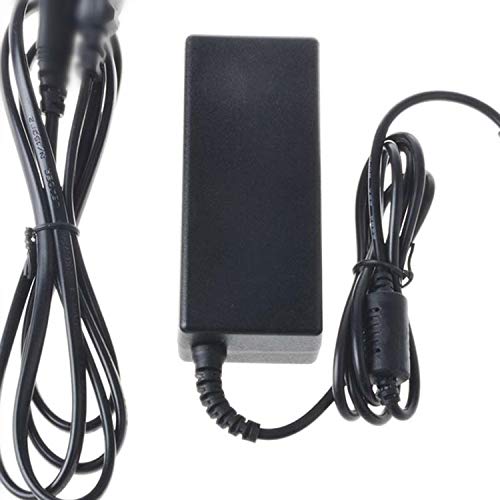
Image 1: The PK Power AC DC Adapter YS35-1203000. This image shows the black rectangular power brick with its attached power cord and connector.
4. Setup
Follow these steps to set up your AC DC adapter:
- Verify Compatibility: Ensure that your device requires a 12V power supply and that the connector type of this adapter matches your device's input port.
- Connect to Device: Plug the output connector of the adapter firmly into the power input port of your electronic device (e.g., monitor).
- Connect to Power Outlet: Insert the AC input plug of the adapter into a standard wall power outlet (100-240V).
- Power On: Once connected, your device should receive power. Turn on your device as usual.
5. Operating Instructions
The PK Power AC DC Adapter operates automatically once connected. It converts the AC wall current to the appropriate DC voltage required by your device.
- Always ensure a secure connection between the adapter, the power outlet, and your device.
- Do not overload the adapter by connecting it to devices that exceed its specified output power.
- If the adapter feels excessively hot, disconnect it immediately and check for proper ventilation or potential issues with the connected device.
6. Maintenance
Proper maintenance ensures the longevity and safe operation of your adapter:
- Cleaning: Disconnect the adapter from power and device before cleaning. Use a dry, soft cloth to wipe the surface. Do not use liquid cleaners.
- Storage: Store the adapter in a cool, dry place when not in use. Avoid wrapping the cable too tightly around the adapter body.
- Cable Inspection: Regularly inspect the power cord and connectors for any signs of damage, fraying, or bending. Discontinue use if damage is found.
7. Troubleshooting
If you encounter issues with your adapter, refer to the following common solutions:
- No Power to Device:
- Ensure the adapter is securely plugged into both the wall outlet and the device.
- Test the wall outlet with another device to confirm it is functional.
- Verify that the adapter's specifications match your device's power requirements.
- Adapter Overheating:
- Ensure adequate ventilation around the adapter. Do not cover it.
- Disconnect the adapter and allow it to cool down. Reconnect only if the temperature returns to normal.
- Confirm that the connected device is not drawing excessive power.
- Device Malfunction:
- If your device is not functioning correctly after connecting the adapter, disconnect the adapter and try using the device with its original power supply (if available) to isolate the issue.
If problems persist, contact customer support.
8. Specifications
| Feature | Specification |
|---|---|
| Model | YS35-1203000 |
| Input Voltage | 100-240V AC |
| Input Frequency | 50-60Hz |
| Output Voltage | 12V DC (Typical for this type of adapter, confirm with device) |
| Color | Black |
| Connector Type | Auxiliary (Specific barrel size not provided, verify visually) |
| Certifications | CE, FCC, RoHS |
| Protection Features | OVP, OCP, SCP |
| Manufacturer | PKPOWER |
| UPC | 751332989166 |
9. Warranty and Support
Your PK Power AC DC Adapter is covered by a 1-year manufacturer's warranty from the date of purchase. This warranty covers defects in materials and workmanship under normal use.
For warranty claims, technical support, or any inquiries, please contact PK-Power customer service. Our friendly and reliable customer service team aims to respond within 24 hours.
Return Policy: This product is eligible for a refund or replacement within 30 days of purchase, subject to the seller's return policy.