
Introduction
Thank you for choosing the WOBANE Under Counter Light Dimmable LED Under Cabinet Lighting kit. This manual provides detailed instructions for the safe and efficient installation, operation, and maintenance of your new lighting system. Please read this manual thoroughly before use and retain it for future reference.
Product Overview
The WOBANE Under Counter Light kit features 6 dimmable LED strip light bars, a remote control, and all necessary accessories for easy installation. Designed for various indoor applications, it provides bright, adjustable 6000K white light with timing functions.

Figure 1: Before and after installation of WOBANE under cabinet lights in a kitchen, showing enhanced illumination.
Setup and Installation
This LED lighting kit is designed for simple, tool-free installation. Follow these steps for optimal setup:
- Prepare the Surface: Ensure the installation surface is clean, dry, and smooth. Wipe away any dust or grease.
- Plan Layout: Determine the desired layout for your LED strips. The kit includes 6 pre-cut strips, each 20 inches long, totaling 9.8 ft. You can connect them in various configurations:
- Option 1 (One Line): Connect all strips in a single line for a total length of 9.8 ft.
- Option 2 (Two Lines): Connect strips to form two parallel lines, each approximately 4.9 ft.
- Option 3 (Three Lines): Connect strips to form three parallel lines, each approximately 3.3 ft.
- Apply Strips: Peel off the adhesive backing from each LED strip and firmly press it onto the desired surface.
- Use Connectors (Optional): For corners or to bridge gaps, use the included 'U' style or straight connectors. These flexible connectors allow for various configurations without cutting the strips.
- Secure Cables: Use the provided cable holders to keep wiring tidy and secure.
- Connect to Adapter: Connect the LED strips to the LED controller, then connect the controller to the 24W adapter.
- Power On: Plug the adapter into a standard 110V power outlet.
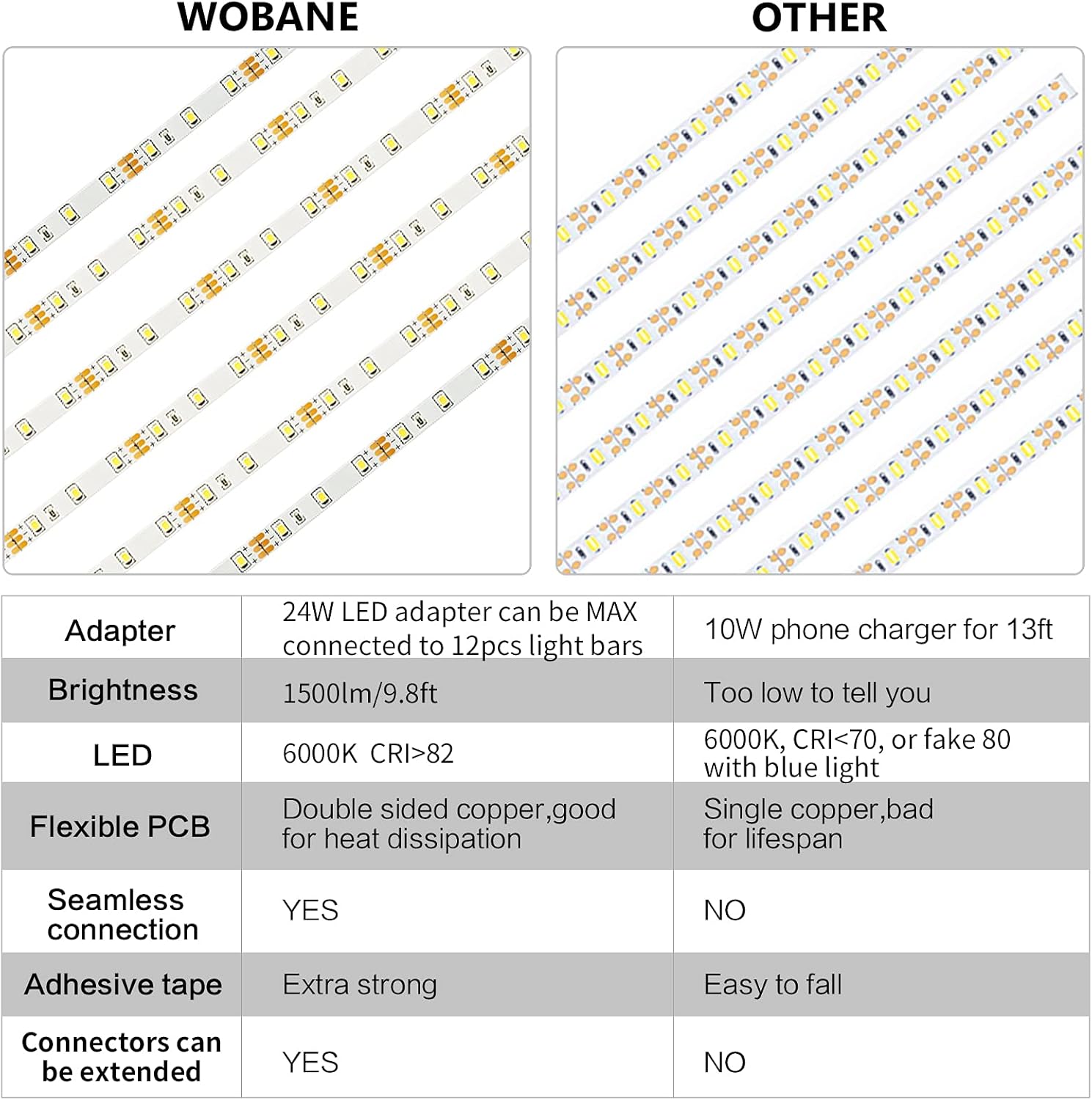
Figure 2: Visual guide for easy installation steps.

Figure 3: Various connection options for LED strip length customization.

Figure 4: Flexible connectors for custom layouts, including corners and combining strips.
Video 1: This video demonstrates the installation and features of the WOBANE under-cabinet LED lighting, including remote control operation and brightness adjustments.
Video 2: This video showcases the WOBANE under-cabinet LED lights in a kitchen setting, highlighting their ease of installation and various lighting modes.
Operating Instructions
Your WOBANE LED Under Cabinet Lighting kit comes with an RF wireless remote control for convenient operation. The remote has a range of up to 60 feet and can control multiple kits.
Remote Control Functions:
- ON/OFF: Press the 'ON' button to turn the lights on, and 'OFF' to turn them off.
- Brightness Adjustment: Use the up/down arrow buttons to adjust the brightness. There are 10 adjustable levels and 4 pre-set brightness options (100%, 75%, 50%, 25%).
- Timing Off: Set a timer for the lights to automatically turn off after 3, 5, 15, 30, or 60 minutes.
- Dynamic Functions: The remote includes hot buttons for various dynamic lighting effects.
- Re-match Function: To pair multiple light kits to one remote, or to re-pair a remote: When the light strip is off, long press the button on the LED controller until the light flashes. Then, use the remote to turn it on/off. This will match the remote to the controller.

Figure 5: Features and functions of the RF wireless remote control.

Figure 6: Instructions for re-matching the remote control to the LED strips.
Maintenance
To ensure the longevity and optimal performance of your WOBANE LED Under Cabinet Lights, follow these simple maintenance guidelines:
- Cleaning: Disconnect the power before cleaning. Use a soft, dry cloth to gently wipe the LED strips and controller. Avoid using abrasive cleaners or solvents, as these can damage the product.
- Inspection: Periodically check the adhesive for secure attachment. Reapply or reinforce if necessary. Inspect cables for any signs of wear or damage.
- Storage: If storing the lights for an extended period, ensure they are clean, dry, and stored in a cool, dry place away from direct sunlight.
Troubleshooting
If you encounter any issues with your WOBANE LED Under Cabinet Lights, refer to the following common troubleshooting tips:
- Lights Not Turning On:
- Ensure the power adapter is securely plugged into a working outlet.
- Check all connections between the LED strips, controller, and adapter.
- Verify the remote control battery is functional and correctly inserted.
- Remote Control Not Responding:
- Ensure there are no obstructions between the remote and the LED controller.
- Replace the remote control battery if it is low.
- Try the re-match function as described in the Operating Instructions to re-pair the remote with the controller.
- Inconsistent Brightness:
- Check for loose connections along the LED strips.
- Ensure the power adapter is providing sufficient power (24W adapter can support up to 14PCS/22.96ft of WOBANE LED light bars).
If the problem persists after trying these steps, please contact WOBANE customer support for assistance.
Specifications
| Feature | Detail |
|---|---|
| Brand | WOBANE |
| Model Name | CS6 CW (ZH103) |
| Color | White |
| Material | Plastic, Polycarbonate |
| Light Source Type | LED |
| Number of Light Sources | 180 |
| Brightness | 1500 Lumens |
| Color Temperature | 6000 Kelvin |
| Color Rendering Index (CRI) | 83.00 |
| Wattage | 16 watts |
| Voltage | 110 Volts |
| Power Source | Corded Electric |
| Control Method | Remote Control (RF) |
| Special Features | Adjustable, Dimmable, Remote Control, Timing Function |
| Installation Type | Under Cabinet, Flush Mount |
| Indoor/Outdoor Usage | Indoor use only |
| Product Dimensions | 3.15"L x 1.57"W x 3.15"H (Controller) |
| Item Weight | 5.3 ounces (150 Grams) |
| Included Components | 6PCS *20inch strip bar, 24W Adapter, LED controller, connectors, RF remote |
| UPC | 742025007236 |

Figure 7: Detailed dimensions and components of the WOBANE LED lighting kit.
Warranty Information
This WOBANE product comes with a Limited Warranty. For specific terms and conditions, please refer to the product packaging or contact WOBANE customer support.
Customer Support
For further assistance, technical support, or warranty inquiries, please visit the official WOBANE store or contact their customer service department.
WOBANE Store: Visit the WOBANE Store on Amazon