
1. Introduction
The Jansite Tire Pressure Monitoring System (TPMS) is designed to provide real-time monitoring of your vehicle's tire pressure and temperature, enhancing driving safety and extending tire life. This system features dual charging methods (solar and USB), intelligent on/off functionality, and a clear LCD display for easy readability. Its waterproof sensors ensure reliable performance in various weather conditions.
2. Safety Information
Please read all instructions carefully before installation and use. Failure to follow these instructions may result in product malfunction, property damage, or personal injury.
- Do not attempt to disassemble or modify the device or sensors.
- Ensure proper installation of sensors to prevent air leakage.
- Keep the display unit away from extreme temperatures or direct sunlight for prolonged periods to avoid damage.
- While the TPMS provides real-time data, it is not a substitute for regular manual tire pressure checks.
- Always consult a professional for tire-related issues if you are unsure.
3. Package Contents
Verify that all items are present in your package:
- 1 x TPMS Display Unit
- 4 x External Tire Pressure Sensors
- 1 x USB Charging Cable
- 1 x Anti-slip Mat
- 4 x Anti-theft Nuts
- 1 x Spanner Tool
- 1 x User Manual

Figure 3.1: Complete package contents of the Jansite TPMS.
4. Setup
4.1 Charging the Display Unit
The TPMS display unit supports two charging methods: solar and USB. For initial use, it is recommended to fully charge the unit via USB.
- Solar Charging: Place the display unit on your dashboard where it can receive direct sunlight. The upgraded large-area solar panel ensures efficient charging during daylight hours.
- USB Charging: Connect the provided USB cable to the display unit and a 5V USB power source (e.g., car charger, computer USB port). This method is ideal for charging when sunlight is insufficient or for a quick charge.

Figure 4.1: Solar and USB charging options for the display unit.
Video 4.1: Official video demonstrating the solar charging capabilities and unboxing of the Jansite TPMS.
4.2 Receiver Installation
The display unit can be securely placed on your vehicle's dashboard using the provided anti-slip mat. Ensure the solar panel faces upwards to maximize solar charging efficiency.

Figure 4.2: Placement of the display unit on the dashboard for optimal viewing and solar charging.
4.3 Sensor Installation
The four external sensors are designed for easy installation on your tire valve stems. Each sensor is labeled (e.g., FL for Front Left, FR for Front Right, RL for Rear Left, RR for Rear Right) to ensure correct placement.
- Unscrew the original valve cap from the tire valve stem.
- Screw on the anti-theft nut onto the valve stem.
- Screw the corresponding sensor onto the valve stem until it is hand-tight.
- Use the provided spanner tool to tighten the anti-theft nut against the sensor to secure it and prevent theft.
- Check for any air leaks using soapy water around the valve stem and sensor connection.

Figure 4.3: Step-by-step guide for installing the external tire sensors.
Video 4.2: Official video demonstrating the installation process and features of the Jansite TPMS.
5. Operating Instructions
5.1 Real-Time Monitoring
Once installed and powered on, the display unit will automatically receive data from the sensors. It simultaneously monitors the real-time pressure and temperature of all four tires. The LCD screen clearly shows the tire's pressure and temperature in real-time, visible in both low and strong light conditions.
- Pressure units can be displayed in Bar or Psi.
- Temperature units can be displayed in Celsius (℃) or Fahrenheit (℉).
Figure 5.1: Real-time display of tire pressure and temperature on the LCD screen.
5.2 Alarm Modes
The TPMS is equipped with 5 types of alarm modes to alert you to abnormal tire conditions:
- Fast Leak Alarm: Alerts you to a rapid decrease in tire pressure.
- High Pressure Alarm: Activates if tire pressure exceeds a safe limit.
- Low Pressure Alarm: Activates if tire pressure falls below a safe limit.
- High Temperature Alarm: Alerts you if tire temperature becomes excessively high.
- Sensor Fault Alarm: Indicates a malfunction or loss of signal from a sensor.
When an alarm is triggered, the display unit will provide an audio alert and visually indicate the problematic tire, helping you address issues promptly and ensure driving safety.
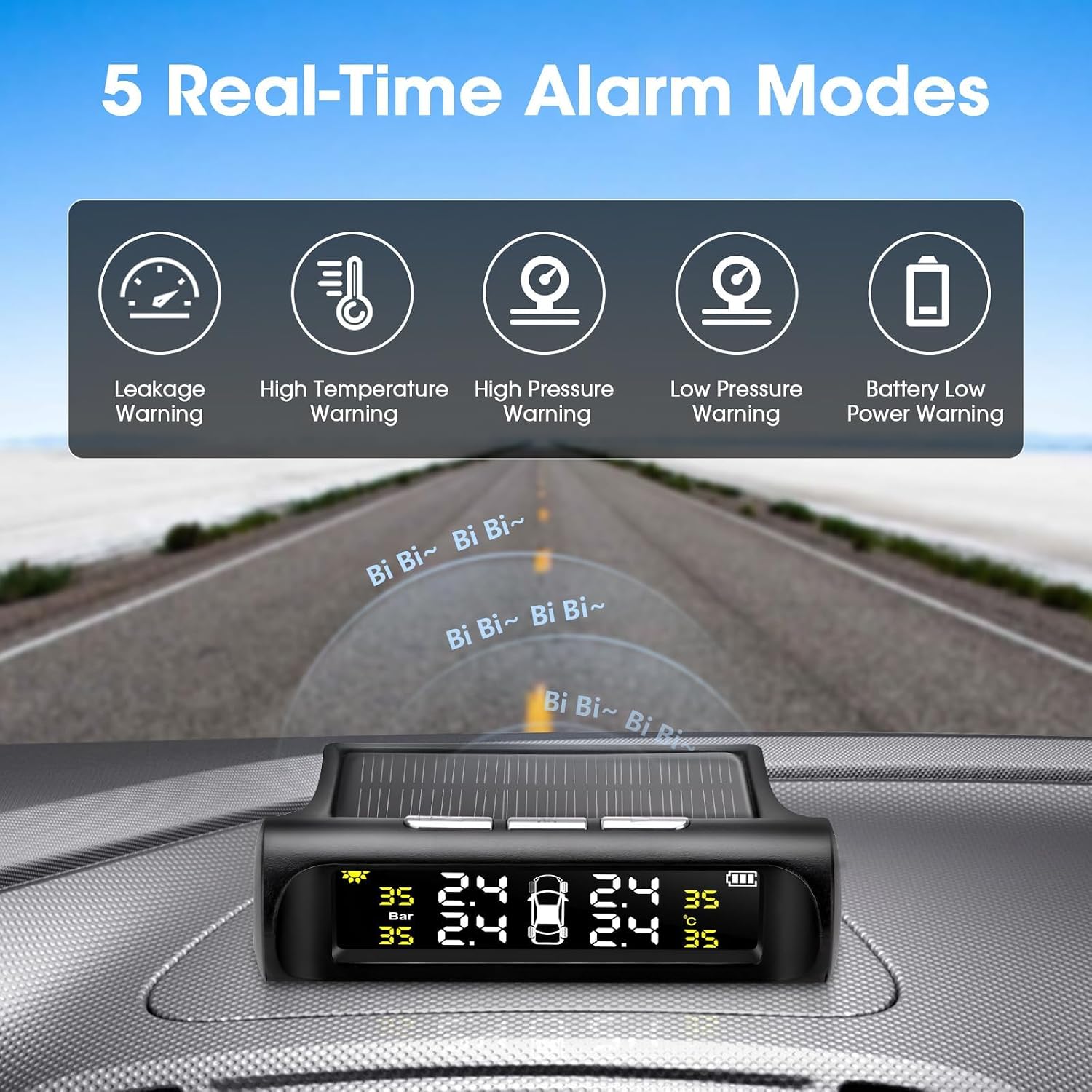
Figure 5.2: Visual representation of the 5 real-time alarm modes.
5.3 Automatic Sleep/Wake Function
To conserve energy and extend battery life, the monitor will automatically turn off its screen if no vibration is detected for approximately 5 minutes. When vibration is felt (e.g., when you start driving), the monitor will automatically turn back on and resume displaying tire data.

Figure 5.3: Illustration of the intelligent on/off feature based on vehicle vibration.
6. Maintenance
The Jansite TPMS is designed for durability and low maintenance.
- Sensor Durability: The sensors are IP67 waterproof, dustproof, and anti-corrosion, allowing them to function reliably in various weather conditions including rain, snow, and dusty environments.
- Sensor Battery: The batteries within the external sensors are designed for long life, typically lasting over 1 year. Replacement batteries (CR1632) can be easily installed when needed.
- Cleaning: Wipe the display unit and sensors with a soft, dry cloth. Avoid using harsh chemicals or abrasive cleaners.

Figure 6.1: The IPX7 waterproof sensors are built to withstand diverse weather conditions.
7. Troubleshooting
If you encounter issues with your Jansite TPMS, please refer to the following common solutions:
| Problem | Possible Cause | Solution |
|---|---|---|
| Display shows "0.0" or no readings. | Sensors not paired or signal interference. | Ensure sensors are correctly installed and tightened. Drive for a few minutes to allow sensors to transmit data. If issues persist, try re-pairing the sensors according to the detailed instructions in the full manual. |
| Inaccurate pressure/temperature readings. | Sensor not fully seated, air leak, or sensor malfunction. | Re-check sensor installation for tightness and air leaks. Compare readings with a reliable manual gauge. If a sensor is faulty, it may need replacement. Note that temperature can fluctuate with driving conditions. |
| Display unit not holding charge. | Insufficient solar exposure or internal battery degradation. | Ensure the solar panel is clean and exposed to direct sunlight. Charge the unit via USB regularly, especially during cloudy weather or if parked indoors. If the internal battery is significantly degraded after extended use, contact customer support. |
| Alarm sounds frequently. | Tire pressure/temperature is genuinely outside safe limits or alarm thresholds are set too sensitively. | Check actual tire pressure and temperature immediately. Adjust alarm thresholds if necessary (refer to full manual for settings). Address any underlying tire issues. |
8. Specifications
| Feature | Detail |
|---|---|
| Brand | Jansite |
| Model Number | 468 |
| Item Weight | 7.8 ounces |
| Package Dimensions | 10 x 5.35 x 2.09 inches |
| Country of Origin | China |
| Batteries | 1 Lithium Ion battery required (included) |
| Pressure Range | 0-87 PSI (approx. 0-6 Bar) |
| Waterproof Rating | IP67 (sensors) |
| Display Type | LCD |
8.1 Compatibility
The Jansite TPMS is suitable for a wide range of vehicles with tire pressure less than 4.0 Bar (approximately 58 PSI), including:
- Cars
- SUVs
- Trucks (light-duty)
- Sports Cars
- MPVs
- RVs / Trailers (within pressure limits)
Figure 8.1: Examples of vehicle types compatible with the TPMS.
9. Warranty and Support
Jansite is committed to providing high-quality products and excellent customer service. If you encounter any problems during the use of your TPMS, please do not hesitate to contact us. We are dedicated to quickly resolving any issues you may have.
For support, please refer to the contact information provided with your product packaging or visit the official Jansite website.


