1. Introduction
This manual provides essential information for the installation, operation, and maintenance of your Olideauto WiFi Electric Swing Door Opener. This device is designed to automate residential swing doors, offering convenience and accessibility through its WiFi connectivity and compatibility with smart home systems like Alexa and Google Assistant.
The system supports both automatic and manual operation modes. In manual mode, the door can be opened with minimal pressure and closes slowly, which is beneficial for accessibility. The robust design incorporates a durable motor and wide voltage technique for stable performance across various power conditions.
2. Safety Information
- Always ensure the power supply is disconnected before performing any installation, maintenance, or troubleshooting.
- Installation and adjustments must be carried out according to the instructions provided in this manual and the detailed installation guide.
- Do not use the device beyond its stipulated voltage or frequency.
- Do not expose the unit to dampness, vibration, or corrosive gases.
- The system includes a safety feature that automatically re-opens the door if an object is detected in the closing path. For disabled access, it is recommended to install an optional motion safety scanner to extend the re-opening time and enhance safety.
- Ensure all wiring connections are secure and comply with local electrical codes.
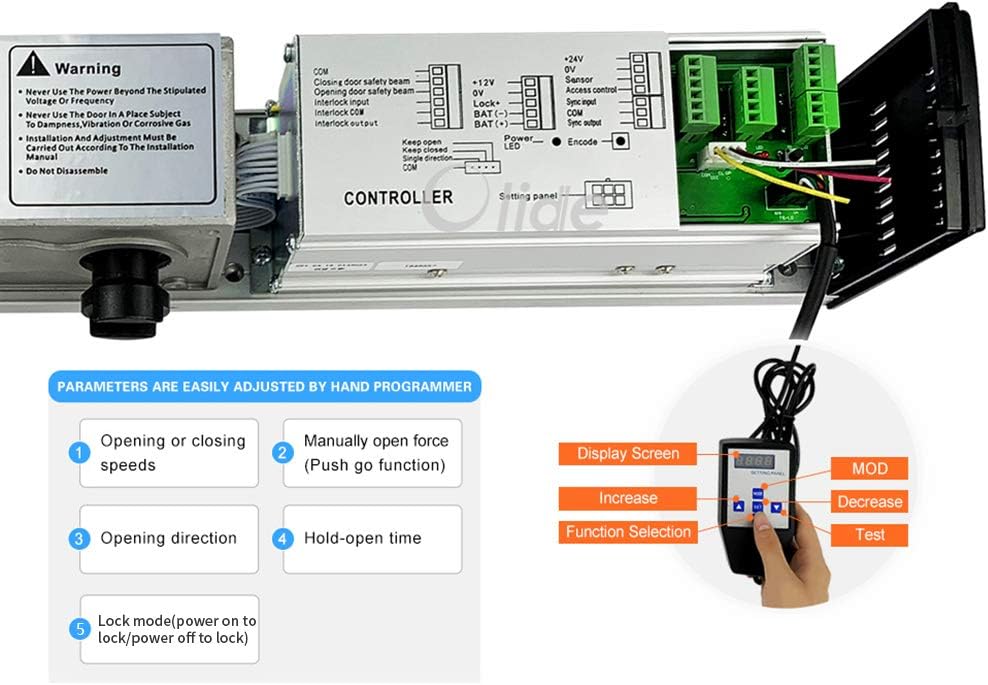
Image: Internal view of the Olideauto door opener controller board, showing connection terminals and a warning label regarding proper installation and usage conditions.
3. Package Contents
The Olideauto WiFi Electric Swing Door Opener (Black Color Kit 1) package typically includes the following components:
- Automatic Door Opener Main Unit
- Swing Arm Assembly
- Handheld Programmer
- Power Cable
- Wireless Push Panels (2 units)
- Wireless Receiver Controller
- Remote Controls (2 units)
- Installation Tools (e.g., Allen wrenches)
- Mounting Hardware

Image: A complete overview of all components included in the Olideauto WiFi Electric Swing Door Opener kit, laid out against a white background. This includes the main opener unit, swing arm, handheld programmer, power cables, two wireless push panels, two remote controls, and small tools.
4. Setup and Installation
Proper installation is crucial for the safe and efficient operation of your door opener. This device is suitable for both inswinging and outswinging doors. Please refer to the detailed Official Installation Manual (PDF) for comprehensive step-by-step instructions, diagrams, and safety guidelines.
4.1 Key Installation Considerations:
- Door Type: Confirm whether your door is inswinging (opens inward) or outswinging (opens outward) to select the correct mounting configuration for the swing arm.
- Mounting Location: The main unit should be securely mounted above the door frame. Ensure sufficient clearance for the swing arm's movement.
- Power Supply: Connect the opener to a stable 110-220 VAC power source.
- Wireless Components: Position the wireless push panels and receiver controller within effective range (up to 30 meters for push panels, 10 meters for receiver). The push panels are designed for easy installation with 3M adhesive onto a wall or door.
- Door Lock: If an existing mechanical door lock is present, it must be removed or modified to allow the door to open freely, unless an electronic lock system that releases the door strike is integrated.

Image: Visual representation of the door opener installed on both an outswing pull open door and an inswing push open door, illustrating different mounting configurations.

Image: A diagram detailing the features of the wireless push panel, highlighting its narrow design, 2.4GHz wireless operation, easy installation with 3M adhesive, maximum signal transmission of 30 meters, and low power consumption.
5. Operation
5.1 Modes of Operation
- Automatic Mode: The door opens and closes automatically based on activation signals from connected devices (e.g., push panels, remote controls, smart home commands).
- Manual Mode: The door can be opened and closed manually with minimal physical effort. This mode is particularly useful for individuals requiring accessibility assistance.
5.2 Activating the Door Opener
- Wireless Push Panels: Press the "PRESS" button on the wireless push panel to activate the door. The entire panel is effective when pressed.
- Remote Controls: Use the provided remote controls to open and close the door from a distance.
- Smart Home Integration (WiFi): The door opener is compatible with Alexa, Google Assistant, and the Tuya Smart Home App.
- Voice Control: Once configured with your smart home system, you can use voice commands such as "Alexa, open the door" or "Google, open the door."
- Smartphone App: Control the door remotely via the Tuya app on your smartphone.

Image: An illustration demonstrating hands-free voice control, with individuals using Google Home and Alexa smart speakers to command the door opener. The image also shows the wireless push panels and the WiFi compatibility logos.

Image: A detailed view of the OlideSmart wireless receiver controller (Model: Olide-510FW), showing its dimensions, 2.4GHz radio frequency, and adjustable settings for 'keep open or auto close' and 'buzzer on/off'. It also highlights the WiFi smart function for control via Phone App, Alexa, and Google Home.
6. Parameter Adjustment
The Olideauto door opener allows for easy adjustment of various operational parameters using the provided handheld programmer. This enables customization to suit specific door requirements and user preferences.
Adjustable Parameters:
- Opening or Closing Speeds: Control how quickly the door opens and closes.
- Manually Open Force (Push Go Function): Adjust the minimal force required to manually open the door.
- Opening Direction: Configure the direction of door opening.
- Hold-Open Time: Set the duration the door remains open before automatically closing.
- Lock Mode: Define the behavior of an electric lock (e.g., power on to lock, power off to lock).
Refer to the handheld programmer's specific instructions for navigating menus and adjusting each parameter.
Image: A close-up view of the door opener's internal controller board alongside the handheld programmer. The image highlights the display screen, function selection buttons (Increase, Decrease, MOD, Test), and lists the five key parameters that can be adjusted.
7. Maintenance
Regular maintenance ensures the longevity and optimal performance of your Olideauto door opener. Perform the following checks periodically:
- Cleaning: Keep the main unit and sensors clean and free from dust or debris. Use a soft, dry cloth for cleaning.
- Hardware Check: Periodically inspect all mounting screws and connections to ensure they are tight and secure.
- Movement Check: Observe the door's opening and closing cycle for any unusual noises, jerky movements, or obstructions.
- Sensor Functionality: Test the safety re-opening feature regularly by placing an object in the door's path during closing.
- Battery Check: The system requires 2 x 12V batteries. Ensure they are in good condition and replace them as needed.
For any complex maintenance or repairs, it is recommended to contact qualified technical support.
8. Troubleshooting
This section addresses common issues you might encounter with your Olideauto door opener. For more complex problems, refer to the full installation manual or contact customer support.
| Problem | Possible Cause | Solution |
|---|---|---|
| Door does not open/close | No power; loose connection; remote/sensor not paired; obstruction. | Check power supply; inspect wiring; re-pair remote/sensor; remove obstructions. |
| Door opens/closes slowly or with difficulty | Incorrect speed setting; mechanical friction; low battery. | Adjust opening/closing speed with programmer; check for physical obstructions; replace batteries. |
| Door re-opens unexpectedly during closing | Safety sensor triggered by obstruction. | Clear the door path; ensure sensors are clean and unobstructed. |
| WiFi connectivity issues | Out of WiFi range; incorrect network settings; interference. | Ensure device is within WiFi range; reconfigure WiFi settings via Tuya app; minimize interference. |
| Voice control not working | Incorrect smart home integration; device not linked to Alexa/Google Assistant. | Verify integration steps with Alexa/Google Assistant; check Tuya app connection. |
9. Technical Specifications
| Parameter | Value |
|---|---|
| Model | Black Color Kit 1 |
| Installation Type | Screw-In |
| Recommended Uses | Residential use, voice-activated control, accessibility assistance for the disabled (with optional motion safety scanner) |
| Specification Met | ADA |
| UPC | 763891906331 |
| Manufacturer | Chinentech Industrial Limited |
| Item Weight | 20.1 pounds |
| Product Dimensions (Opener) | 21.45"L x 3.35"W x 3.74"H (545mm L x 85mm W x 95mm H) |
| Wireless Receiver Controller Dimensions | 50mm W x 123mm H (1.97in W x 4.84in H) |
| Batteries Required | 2 x 12V batteries (included) |
| Battery Cell Type | Alkaline |
| Maximum Weight Capacity (Door) | 264 Pounds |
| Material | Aluminum |
| Color | Black |
| Voltage | 110-220 VAC +/-10% |
| Motor | DC 24V brushless motor |
| Power Consumption | 50W |
| Opening Time | 3-7 sec. @ 90 degrees |
| Hold Open Time | 1-30 sec. Adjustable |
| Max. Door Frame Depth (with push arm) | 200mm / 7.87" |
| Door Width | Max. 1200mm / 47.2" Min. 660mm / 26" |
| Max. Opening Angle | 120 degrees |
| Environment Temperature | -20C to 50C (-4F to 122F) |
| Operation Noise | Less than 55db |

Image: A detailed dimensional diagram of the Olideauto door opener main unit and its swing arm, showing various measurements in both inches and millimeters.
10. Warranty and Support
Olideauto is committed to providing high-quality automatic entry systems and excellent after-sales service.
- Warranty: This product comes with a 60-month (5-year) product warranty, reflecting the manufacturer's confidence in its durability and performance.
- Technical Support: USA-based technical phone support is available for assistance with installation, debugging, and any operational queries.

Image: An infographic showcasing Olideauto's commitment to quality, featuring statistics such as 1 million non-stop operating tests, 30 years of innovation, a 60-month product warranty, and distribution in 108 countries.