
1. Introduction
This manual provides essential instructions for the safe and effective use of your Accessory USA AC/DC Adapter. This power supply is designed to provide reliable power to compatible Samsung 32-inch HD LED Smart TVs, including models UA32J4303, UA32J4303AKPXD, UA32J4303AK, and UA32J4303AKXXT. Please read this manual thoroughly before connecting and operating the adapter.
2. Safety Information
Your safety is paramount. Please observe the following precautions:
- Certification: This product is CE, FCC, and RoHS certified, indicating compliance with relevant safety and environmental standards.
- Protection Features: The adapter incorporates Over Voltage output Protection (OVP), Over Current output Protection (OCP), and Short Circuit output Protection (SCP) to safeguard your devices.
- Compatibility Check: Before connecting, always verify that the adapter's specifications match the power requirements of your Samsung TV model. Refer to your TV's original power supply or user manual for exact specifications.
- Proper Use: Use the adapter only for its intended purpose. Avoid exposing it to moisture, extreme temperatures, or physical damage.
- Ventilation: Ensure adequate ventilation around the adapter during operation to prevent overheating.
3. Product Overview
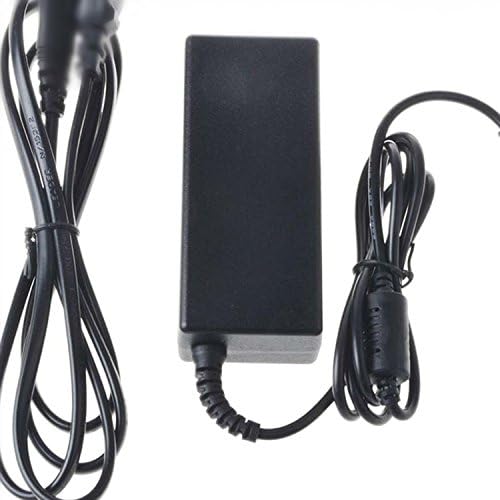
The Accessory USA AC/DC Adapter is a replacement power supply unit designed for specific Samsung Smart TV models. It consists of a power brick and integrated cables for connecting to both the electrical outlet and the television.
4. Setup Instructions
- Verify Compatibility: Before proceeding, ensure that this adapter is compatible with your specific Samsung TV model (e.g., UA32J4303, UA32J4303AKPXD, UA32J4303AK, UA32J4303AKXXT). Check the voltage and amperage requirements of your TV against the adapter's specifications.
- Unplug TV: Ensure your television is completely powered off and unplugged from the wall outlet before connecting the new adapter.
- Connect to TV: Locate the power input port on your Samsung TV. Carefully insert the barrel connector of the adapter's output cable into this port. Ensure a snug and secure connection.
- Connect to Power Outlet: Plug the adapter's input cable (the one with the 2-pin connector) into a standard, grounded electrical wall outlet.
- Power On: Once both connections are secure, you may power on your television.
5. Operating Instructions
Once properly connected, the adapter operates automatically. It converts the AC power from your wall outlet into the DC power required by your Samsung TV. Simply use your TV as you normally would.
- Ensure the adapter is always connected to a stable power source.
- Avoid disconnecting the adapter while the TV is actively in use, if possible, to prevent potential data loss or system instability.
6. Maintenance
To ensure the longevity and optimal performance of your AC/DC adapter, follow these simple maintenance guidelines:
- Cleaning: Disconnect the adapter from the power outlet and the TV before cleaning. Use a soft, dry cloth to wipe the exterior. Do not use liquid cleaners or abrasive materials.
- Storage: When not in use for extended periods, store the adapter in a cool, dry place, away from direct sunlight and extreme temperatures. Avoid tightly coiling the cables to prevent damage.
- Inspection: Periodically inspect the cables and connectors for any signs of wear, fraying, or damage. If any damage is observed, discontinue use immediately and replace the adapter.
7. Troubleshooting
If you encounter issues with your adapter, consider the following troubleshooting steps:
- No Power to TV:
- Ensure the adapter is securely plugged into both the TV and a working wall outlet.
- Test the wall outlet with another device to confirm it has power.
- Check for any visible damage to the adapter's cables or connectors.
- Intermittent Power:
- Ensure all connections are firm and not loose.
- Avoid placing heavy objects on the cables or bending them sharply.
- Adapter Overheating:
- Ensure the adapter is in a well-ventilated area and not covered.
- If overheating persists, discontinue use and contact support.
If these steps do not resolve the issue, please refer to the support section.
8. Specifications
| Feature | Detail |
|---|---|
| Brand | Accessory USA |
| Compatible Devices | Samsung 32" HD LED Smart TVs (UA32J4303, UA32J4303AKPXD, UA32J4303AK, UA32J4303AKXXT) |
| Connector Type | Barrel Connector |
| Input Voltage | 240 Volts (AC) |
| Power Source | Corded Electric |
| Main Power Connector Type | 2 Pin |
| Certifications | CE, RoHS |
| Special Feature | Travel-friendly design |
| UPC | 607182564155 |
9. Warranty and Support
For warranty information or technical support regarding your Accessory USA AC/DC Adapter, please contact the manufacturer directly. Details for contacting Accessory USA can typically be found on their official website or through your purchase documentation.
When contacting support, please have your product model number (UA32J4303 series) and purchase details readily available.