
1. Introduction
Thank you for choosing the Metaltex Digital Kitchen Scale. This manual provides essential information for the safe and efficient operation of your new kitchen scale. Please read it thoroughly before first use and keep it for future reference.
This digital kitchen scale is designed for precise measurements, offering convenience and accuracy for all your cooking and baking needs. Its compact design and durable construction ensure reliable performance.
Key Features:
- Precise Measurement Capability
- User-Friendly Operation
- Durable Construction
- Compact Design for Easy Storage
2. Package Contents
Please check the package contents upon opening. You should find:
- Metaltex Digital Kitchen Scale (Model 259242)
- CR2032 3V Battery (may be pre-installed or included separately)
- User Manual (this document)

Image 1: The Metaltex Digital Kitchen Scale packaging, illustrating the product, its 5 kg maximum capacity, and the included CR2032 3V battery.
3. Setup
3.1 Battery Installation
- Locate the battery compartment on the underside of the scale.
- Open the battery compartment cover.
- Insert the CR2032 3V battery, ensuring the correct polarity (+/-) as indicated inside the compartment.
- Close the battery compartment cover securely.
3.2 Placement
Place the scale on a flat, stable, and level surface to ensure accurate measurements. Avoid placing it on soft or uneven surfaces, or near strong electromagnetic fields.
4. Operating Instructions
4.1 Powering On/Off
- To turn on the scale, press the "ON/TARE/OFF" button. The display will show "0" or "0.0".
- To turn off the scale, press and hold the "ON/TARE/OFF" button for a few seconds until the display turns off. The scale will also automatically turn off after a period of inactivity to conserve battery life.

Image 2: A clear view of the Metaltex Digital Kitchen Scale's weighing surface and the multi-function button for power and tare.
4.2 Weighing Items
- Turn on the scale. Ensure the display shows "0" or "0.0".
- Carefully place the item to be weighed onto the center of the scale's platform.
- Read the weight displayed on the LCD screen.

Image 3: A detailed shot of the scale's digital display and the single control button.
4.3 Tare Function (Zeroing)
The tare function allows you to weigh multiple ingredients in the same container or to subtract the weight of a container.
- Place an empty container on the scale. The display will show its weight.
- Press the "ON/TARE/OFF" button once. The display will reset to "0" or "0.0".
- Add your ingredient to the container. The display will now show only the weight of the ingredient.
- Repeat step 2 and 3 for additional ingredients.
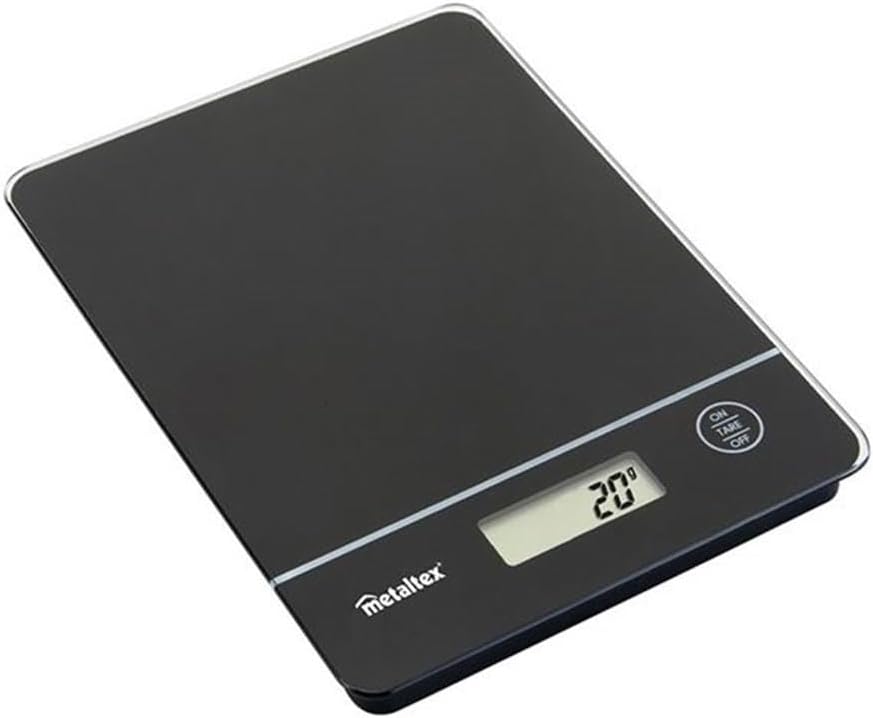
Image 4: The Metaltex Digital Kitchen Scale in operation, showing a measurement on its digital display.
4.4 Unit Conversion (If Applicable)
This model typically operates in kilograms (kg) or grams (g). If your model supports other units (e.g., pounds, ounces), there will be a dedicated "UNIT" button or the "ON/TARE/OFF" button may cycle through units with a quick press when the scale is on and showing a weight. Refer to the specific markings on your scale if this feature is present.
5. Maintenance
5.1 Cleaning
- Wipe the scale surface with a soft, damp cloth.
- Do not immerse the scale in water or use abrasive cleaners.
- Ensure the scale is completely dry before storage or next use.
5.2 Storage
Store the scale in a cool, dry place. Its compact design allows for easy storage in drawers or cabinets.
5.3 Battery Replacement
If the display shows a low battery indicator (e.g., "Lo") or becomes dim, replace the CR2032 3V battery following the instructions in Section 3.1.
6. Troubleshooting
| Problem | Possible Cause | Solution |
|---|---|---|
| Scale does not turn on. | Battery is dead or incorrectly installed. | Check battery polarity or replace the CR2032 3V battery. |
| Inaccurate readings. | Scale is on an uneven surface; overloaded; or internal error. | Place on a flat, stable surface. Ensure weight does not exceed 5 kg. Turn off and on again. |
| Display shows "Lo". | Low battery. | Replace the CR2032 3V battery. |
| Display shows "O-Ld" or "Err". | Overload. | Remove item immediately. Do not exceed the maximum capacity of 5 kg. |
7. Specifications
| Feature | Detail |
|---|---|
| Brand | Metaltex |
| Model | 259242 |
| Color | Black |
| Material | Glass |
| Product Weight | 0.46 Kilogram |
| Maximum Capacity | 5 kg (as indicated on packaging) |
| Battery Type | CR2032 3V |
8. Warranty and Support
Metaltex products are manufactured to high-quality standards. For specific warranty information, please refer to the documentation included with your purchase or contact Metaltex customer support directly. Keep your proof of purchase for any warranty claims.
For technical support or inquiries, please visit the official Metaltex website or contact their customer service department. Contact details are typically found on the product packaging or their official website.