
Estry CS-SDC26SL
Estry 300mAh Battery Replacement User Manual
Model: CS-SDC26SL
Introduction
This user manual provides essential information for the safe and effective use of your Estry 300mAh Ni-MH Battery Replacement. This battery is engineered to meet the exact specifications of original equipment, ensuring reliable performance for compatible devices such as the SWR-1, Prohunter SD-2400, ST100-P, MH700AAA10YC, 650-053, and DC-26. Please read this manual thoroughly before installation and operation.
Product Overview
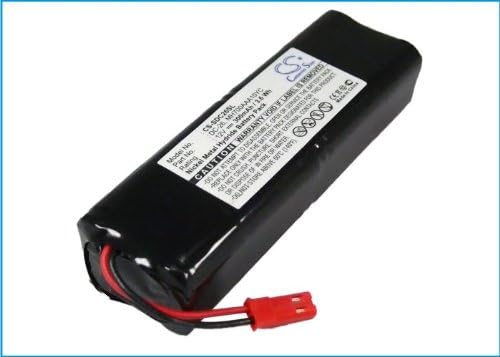
Image 1: The Estry 300mAh Ni-MH Battery Replacement, showing its overall form factor and label.

Image 2: A different perspective of the Estry battery, highlighting its compact design.
The Estry 300mAh Ni-MH Battery Replacement is a high-quality power source designed for specific electronic devices. It features a robust construction and incorporates protection mechanisms against overcharge, over-discharge, over-voltage, and short circuits to enhance battery life and user safety. The battery is equipped with a fully decoded chip, ensuring seamless compatibility and functionality akin to the original battery.
Setup and Installation
Before installing the new battery, ensure your device is powered off and disconnected from any charging source. Refer to your device's original manual for specific battery compartment access and removal procedures.
- Preparation: Carefully remove the old battery from your device. Note its orientation and connection type.
- Battery Insertion: Align the Estry replacement battery with the battery compartment. Ensure the connectors on the battery match the terminals in the device.
- Connectors: Gently push the battery into place until it is securely seated. If applicable, connect the battery's plug to the device's port.

Image 3: A close-up view of the battery's red connector, illustrating its two-pin design for proper connection.
Confirm that the battery is firmly in place and the compartment cover (if any) is properly closed. Your device should now be ready for initial charging or operation.
Operating Instructions
The Estry 300mAh Ni-MH battery operates similarly to your device's original battery. For optimal performance, follow these guidelines:
- Initial Charge: It is recommended to fully charge the battery before its first use. Connect your device to its original charger.
- Charging Cycles: Ni-MH batteries benefit from full discharge and recharge cycles periodically to maintain capacity. Avoid frequent partial charges if possible.
- Temperature: Operate the battery within the recommended temperature range of your device. Extreme temperatures can affect battery performance and lifespan.
- Compatibility: This battery is designed to work seamlessly with compatible models due to its fully decoded chip, ensuring accurate power reporting and device functionality.
Maintenance and Care
Proper maintenance can significantly extend the life of your Estry replacement battery:
- Storage: If storing the battery for an extended period, ensure it is charged to approximately 50% capacity and stored in a cool, dry place away from direct sunlight and extreme temperatures.
- Cleaning: Keep the battery contacts clean and free of dust or debris. Use a dry, soft cloth for cleaning.
- Disposal: Do not dispose of batteries in household waste. Follow local regulations for proper battery recycling.
- Safety: Do not disassemble, puncture, or expose the battery to fire or water. The battery is designed with overcharge, over-discharge, over-voltage, and short-circuit protection for safety.

Image 4: Side view of the Estry battery, showing its sealed casing and robust construction.
Troubleshooting
If you encounter issues with your Estry replacement battery, consider the following common solutions:
- Battery Not Charging:
- Ensure the charger is properly connected and functional.
- Verify that the battery is correctly seated in the device and its connectors are clean.
- Check if the device's charging port is free of debris.
- Device Not Powering On:
- Confirm the battery is fully charged.
- Re-install the battery to ensure a secure connection.
- Test the device with another known working battery if available, to rule out device issues.
- Shortened Battery Life:
- Ensure the battery is being fully charged.
- Avoid operating the device in extreme temperatures.
- Review usage patterns; continuous heavy use can deplete the battery faster.
If problems persist after attempting these steps, please refer to the Warranty and Support section.
Specifications
| Feature | Detail |
|---|---|
| Model Number | CS-SDC26SL |
| Battery Type | Ni-MH (Nickel-Metal Hydride) |
| Capacity | 300mAh |
| Watt-Hours (WH) | 3.60Wh |
| Voltage | 12.0V |
| Dimensions (L x W x H) | 86.97 x 28.50 x 21.13mm (3.42 x 0.83 x 1.12 inches) |
| Weight | 150g / 5.29oz |
| Compatible Models | SWR-1, Prohunter SD-2400, ST100-P |
| Compatible Part Numbers | 650-053, DC-26, MH700AAA10YC |
| Certifications | ISO9001, RoHS, CE |
| Recommended Uses | Laptop, Camera, GPS (as per general battery use cases) |
Warranty and Support
Your Estry 300mAh Battery Replacement comes with a commitment to quality and customer satisfaction.
- Warranty: A 12-month warranty is provided from the date of purchase, covering manufacturing defects and performance issues under normal use.
- Money Back Guarantee: A 14-day money-back guarantee is offered, allowing you to return the product for a full refund if you are not satisfied.
For any questions, technical assistance, or warranty claims, please contact the manufacturer or your point of purchase. When contacting support, please have your product model number (CS-SDC26SL) and purchase details ready.
Ask a question about this manual
Ask about setup, troubleshooting, compatibility, parts, safety, or missing instructions. Manuals+ will review the question and use this page’s manual context to help answer it.