
Tronsmart T6-PLUS-US
Tronsmart Element T6 Plus Bluetooth Speaker User Manual
Model: T6-PLUS-US | Brand: Tronsmart
Product Overview
The Tronsmart Element T6 Plus is a versatile and powerful portable Bluetooth speaker designed for robust audio performance in various environments. Featuring 40W stereo sound, True Wireless Stereo pairing, and multiple bass effects, it delivers a rich listening experience. Its IPX6 waterproof rating ensures durability against splashes and rain, making it suitable for outdoor activities. The speaker also includes a built-in power bank function for charging mobile devices.

Figure 1: Tronsmart Element T6 Plus Bluetooth Speaker
Key Features
- 40W Stereo Sound: Delivers powerful and clear audio output.
- True Wireless Stereo (TWS): Allows pairing two T6 Plus speakers for immersive stereo sound.
- Tri-Bass Effects: Customize your audio with Vocal, 3D Deep Bass, and Extra Bass modes.
- 15-Hour Playtime: Extended battery life for prolonged listening.
- IPX6 Waterproof: Resistant to heavy splashes, rain, and sweat.
- Built-in Power Bank: USB-A output port for charging external devices.
- Bluetooth 5.0: Provides stable and efficient wireless connectivity.
- Micro SD/TF Card & AUX Input: Multiple playback options.
Package Contents
- Tronsmart Element T6 Plus Bluetooth Speaker
- USB-C charging cable
- AUX cable
- User manual
Getting Started
Charging the Speaker
Before first use, fully charge the speaker using the provided USB-C charging cable. The charging indicator light will show the charging status.
Powering On/Off
Press and hold the Power button (⏻) for 2-3 seconds to turn the speaker on or off. A blue light will illuminate when the speaker is on.
Bluetooth Pairing
- Turn on the Tronsmart Element T6 Plus speaker. It will automatically enter Bluetooth pairing mode, indicated by a flashing blue light.
- Enable Bluetooth on your device (smartphone, tablet, etc.).
- Select "Tronsmart Element T6 Plus" from the list of available devices.
- Once connected, the blue light will remain solid.
True Wireless Stereo (TWS) Pairing
To achieve a true stereo sound experience, you can pair two Tronsmart Element T6 Plus speakers together.

Figure 2: True Wireless Stereo Setup
- Ensure both T6 Plus speakers are powered on and not connected to any other Bluetooth device.
- On one speaker, press the TWS button. The indicator light will flash.
- The two speakers will automatically connect to each other. Once connected, the TWS indicator light on both speakers will remain solid.
- Connect your device to one of the paired speakers via Bluetooth. Both speakers will now play audio in stereo.
Operating Instructions
Controls Overview

Figure 3: Speaker Controls
- Multifunction Wheel: Rotate to adjust volume. Press to play/pause music or answer/end calls. Hold for 3 seconds to activate voice assistant.
- Previous/Next Track Buttons: Skip tracks.
- TWS Button: Initiate True Wireless Stereo pairing.
- EQ Button: Cycle through Tri-Bass Effects.
- Mode (M) Button: Switch between Bluetooth, Micro SD/TF, and AUX modes.
- Power Button: Turn the speaker on/off.
Tri-Bass Effects (EQ)
The speaker offers three distinct equalizer audio modes to suit different music genres:

Figure 4: Tri-Bass Effects
- Vocal: Default mode, optimized for clear vocals.
- 3D Deep Bass: Enhances bass and provides a wider soundstage.
- Extra Bass: Delivers powerful, deep bass.
Press the EQ button to cycle through these modes. The indicator light will change color to show the active mode.
Using the USB Charging Port (Power Bank)
The Element T6 Plus features a built-in power bank, allowing you to charge your mobile devices directly from the speaker.

Figure 5: USB Charging Capability
Connect your device's charging cable to the USB-A output port on the speaker. The speaker will begin charging your device.
Micro SD/TF Card Playback & AUX Input
Insert a Micro SD/TF card into the designated slot for direct music playback. Alternatively, connect an external audio device using the provided AUX cable to the 3.5mm AUX input port.
Hands-Free Calling
When connected via Bluetooth, you can use the speaker for hands-free calls. Press the Multifunction Wheel to answer or end a call. Press and hold to reject a call.
Official Product Video
This video provides an overview of the Tronsmart T6 Plus speaker's features, including its waterproof design, sound quality, and various functionalities.
Care and Maintenance
IPX6 Water Resistance
The Element T6 Plus is IPX6 waterproof, meaning it can withstand powerful water jets and heavy splashes. It is suitable for use in rainy conditions or near water sources like pools. Do not submerge the speaker in water. Ensure the charging port cover is securely closed before exposing the speaker to water.
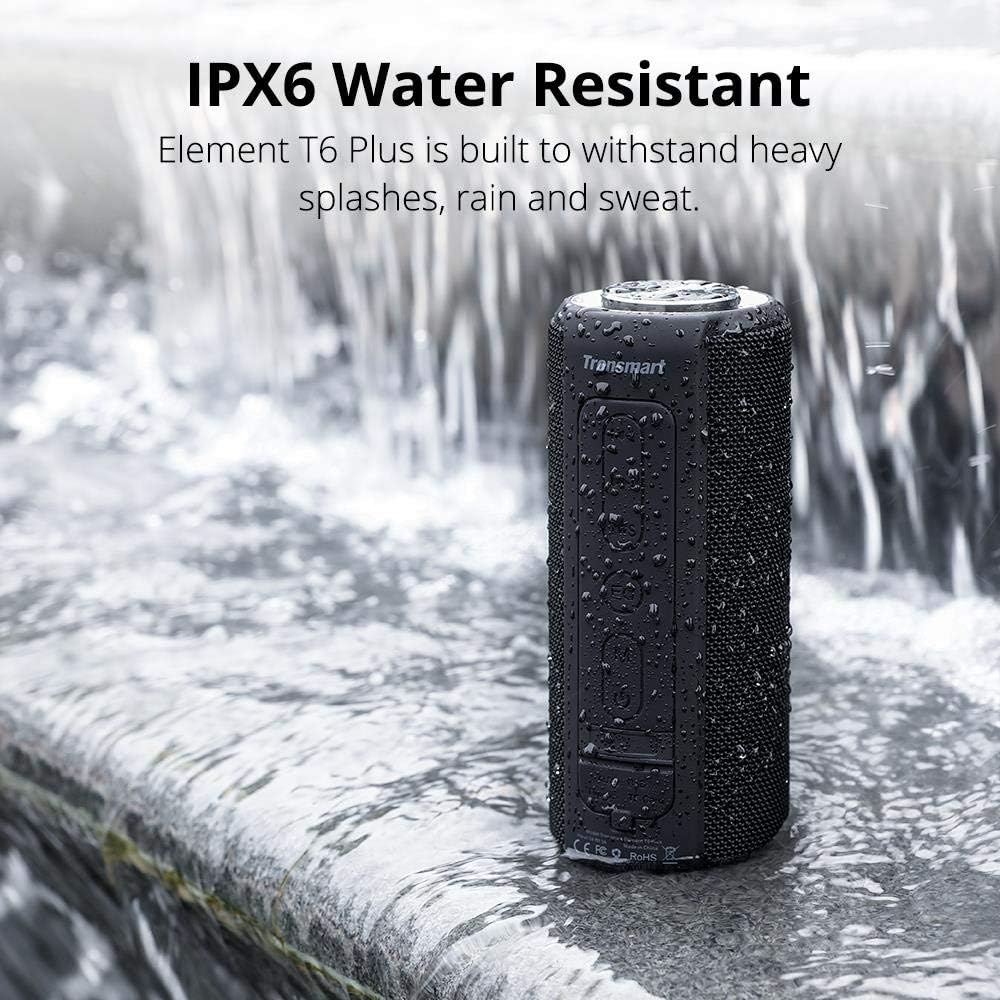
Figure 6: IPX6 Water Resistance
Cleaning
Wipe the speaker with a soft, damp cloth. Do not use harsh chemicals or abrasive cleaners.
Troubleshooting
| Issue | Possible Cause | Solution |
|---|---|---|
| Speaker does not turn on | Low battery | Charge the speaker fully. |
| Cannot pair via Bluetooth | Speaker not in pairing mode / Device Bluetooth off / Already connected to another device | Ensure speaker is in pairing mode (flashing blue light). Turn device Bluetooth on. Disconnect from other devices. |
| No sound | Volume too low / Incorrect mode / Device not playing audio | Increase speaker and device volume. Check mode (Bluetooth, AUX, SD card). Ensure audio is playing on your device. |
| Poor sound quality | Low battery / Obstructions / Distance from device | Charge the speaker. Reduce distance between speaker and device. Remove obstructions. |
| TWS pairing failed | Speakers too far apart / Already paired to other devices | Ensure speakers are close to each other. Disconnect both speakers from any other Bluetooth devices before TWS pairing. |
Product Specifications
| Feature | Detail |
|---|---|
| Model Name | T6 Plus |
| Speaker Type | Surround Sound, Outdoor |
| Special Feature | Waterproof |
| Connectivity Technology | Bluetooth, Auxiliary |
| Wireless Communication Technology | Bluetooth |
| Bluetooth Range | 10 Meters |
| Speaker Maximum Output Power | 40 Watts |
| Battery Life | 15 Hours |
| Water Resistance Level | Waterproof (IPX6) |
| Item Weight | 1.48 pounds (671 Grams) |
| Product Dimensions | 3.23"D x 3.23"W x 7.99"H |
| Power Source | Battery Powered |
| Number of Batteries | 2 Lithium Ion batteries required |
Warranty and Support
Warranty Information
Tronsmart products typically come with a limited warranty. Please refer to the warranty card included in your package or visit the official Tronsmart website for detailed warranty terms and conditions.
Customer Support
For any product inquiries, technical assistance, or warranty claims, please contact Tronsmart customer support through their official website or the contact information provided in your user manual.
Related documentsT6-PLUS-US


Ask a question about this manual
Ask about setup, troubleshooting, compatibility, parts, safety, or missing instructions. Manuals+ will review the question and use this page’s manual context to help answer it.