
Douk Audio T3
Nobsound T3 MM Phono Preamplifier
Model: T3
1. Introduction
The Nobsound T3 is a Moving Magnet (MM) phono preamplifier designed to convert phono signals from a turntable to line-level signals. This device is essential for connecting a turntable to audio systems that lack a dedicated phono input, such as stereo amplifiers or active speakers. It features a volume control to adjust the output level.

Image: The Nobsound T3 phono preamplifier integrated into a home audio setup with a turntable and speakers.
2. Safety Information
- Ensure the power adapter voltage matches your local power supply.
- Do not expose the device to moisture or extreme temperatures.
- Avoid disassembling the unit; refer servicing to qualified personnel.
- Place the unit on a stable, flat surface to prevent accidental falls.
- Keep out of reach of children.
3. Package Contents
- Nobsound T3 MM Phono Preamplifier
- DC 12V Power Adapter
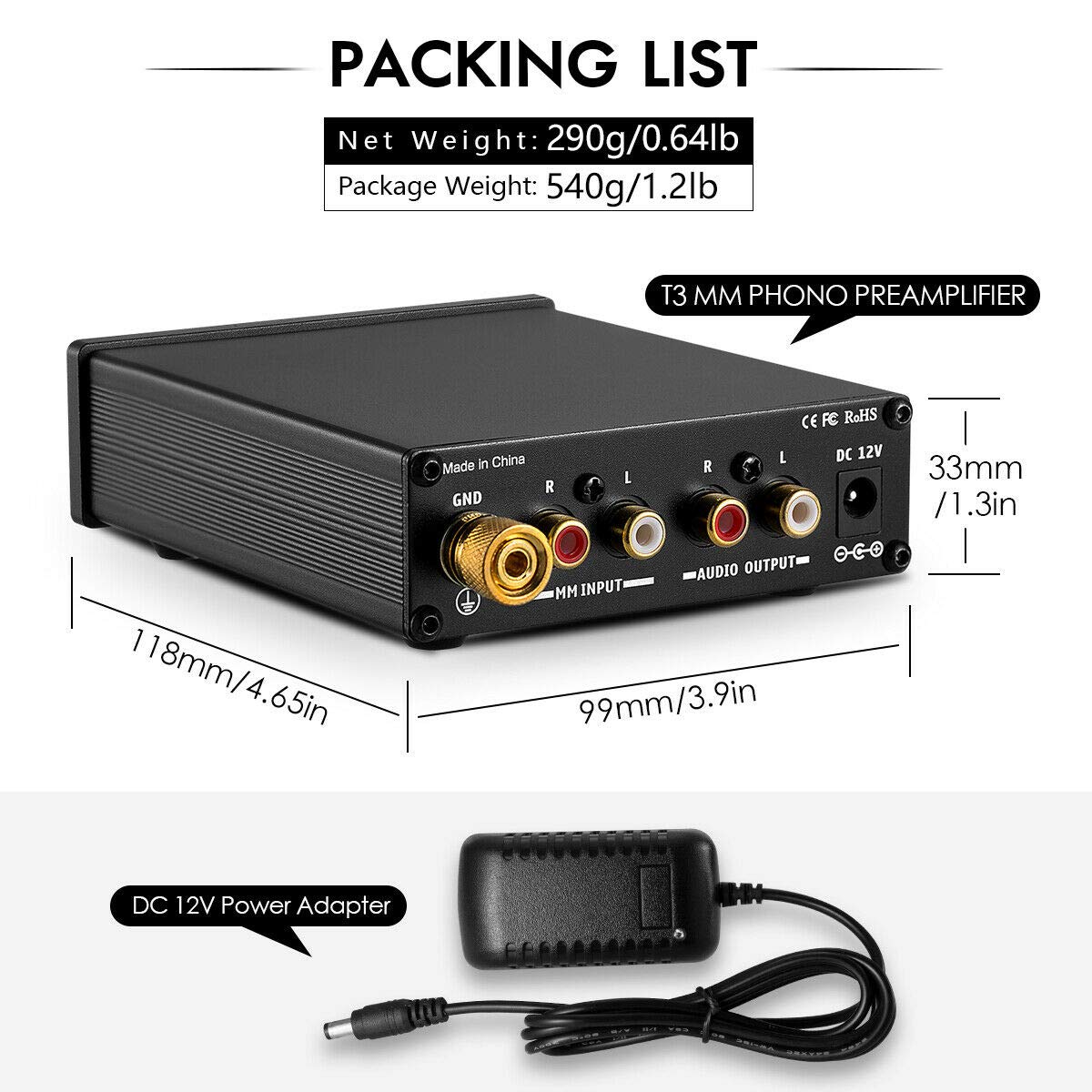
Image: The Nobsound T3 phono preamplifier and its included DC 12V power adapter.
4. Product Overview
The Nobsound T3 features a compact design with essential controls and connections for seamless integration into your audio system.
Front Panel
- POWER Switch: Toggles the unit on/off. Features a red indicator light when active.
- VOLUME Knob: Adjusts the output level of the preamplifier.
Rear Panel
- GND Terminal: Ground connection for the turntable to reduce hum and noise.
- MM INPUT (R/L): RCA inputs for connecting your Moving Magnet (MM) turntable.
- AUDIO OUTPUT (R/L): RCA outputs for connecting to your amplifier or active speakers.
- DC 12V: Power input for the included 12V DC adapter.

Image: Detailed view of the Nobsound T3's front panel (Power switch, Volume knob) and rear panel (GND, MM Input, Audio Output, DC 12V).
5. Setup
Follow these steps to connect your Nobsound T3 phono preamplifier to your audio system:
- Connect Turntable to MM Input: Use RCA cables to connect the audio output of your MM turntable to the MM INPUT (R/L) jacks on the rear panel of the Nobsound T3. Ensure left (white) and right (red) channels are matched.
- Connect Ground Wire: Attach the ground wire from your turntable to the GND terminal on the Nobsound T3. This helps to minimize hum and noise.
- Connect to Amplifier/Speakers: Use another set of RCA cables to connect the AUDIO OUTPUT (R/L) jacks of the Nobsound T3 to an available line-level input (e.g., AUX, CD, LINE IN) on your amplifier or active speakers. Do not connect to a phono input on your amplifier, as this unit already provides phono pre-amplification.
- Connect Power: Plug the DC 12V power adapter into the DC 12V input on the rear panel of the Nobsound T3, then plug the adapter into a power outlet.
- Power On: Press the POWER switch on the front panel to turn on the unit. The red indicator light will illuminate.

Image: Connection diagram illustrating how to integrate the Nobsound T3 into an audio system.
6. Operating Instructions
Once the Nobsound T3 is properly set up, operating it is straightforward:
- Ensure all connections are secure and the unit is powered on.
- Start playing a record on your turntable.
- Adjust the VOLUME knob on the front panel of the Nobsound T3 to achieve the desired output level.
- Further volume adjustments can be made using your amplifier or active speakers' volume control.
Video: An official demonstration of the Nobsound T3 Phono Preamp for MM Turntables, showcasing its features and operation.
7. Maintenance
- Clean the unit with a soft, dry cloth. Do not use liquid cleaners or solvents.
- Keep the unit free from dust and debris to ensure proper ventilation.
- Periodically check all cable connections for tightness and wear.
8. Troubleshooting
No Sound Output
- Ensure the Nobsound T3 is powered on (red indicator light is lit).
- Verify all RCA cables are securely connected to the correct input/output jacks.
- Check the volume level on both the Nobsound T3 and your amplifier/active speakers.
- Confirm your amplifier/active speakers are set to the correct input source.
Hum or Noise
- Ensure the turntable's ground wire is properly connected to the GND terminal on the Nobsound T3.
- Check for loose cable connections.
- Move the unit away from other electronic devices that may cause interference.
- Try using different RCA cables, as faulty shielding can cause hum.
9. Specifications
| Model | T3 |
| Input Type | MM (Moving Magnet) Phono |
| Output Type | RCA Line Level |
| Power Supply | DC 12V |
| Material | Aluminum |
| Dimensions (L x W x H) | Approximately 118mm x 99mm x 33mm (4.65in x 3.9in x 1.3in) |
| Item Weight | Approximately 0.59 kg (1.3 lbs) |

Image: The Nobsound T3 phono preamplifier shown in hand, highlighting its compact dimensions.
10. Warranty and Support
For warranty information and technical support, please refer to the documentation provided with your purchase or contact Douk Audio customer service. Keep your purchase receipt for warranty claims.
Related documentsT3


Ask a question about this manual
Ask about setup, troubleshooting, compatibility, parts, safety, or missing instructions. Manuals+ will review the question and use this page’s manual context to help answer it.