
1. Introduction
This instruction manual provides essential information for the installation, operation, and maintenance of your DS leddess 120mm CPU Cooling Fan. Please read this manual thoroughly before installation to ensure proper function and longevity of the product. This fan is designed to provide efficient cooling for compatible Intel LGA processors while adding aesthetic appeal with its fixed RGB lighting.
2. Product Features
- Broad Compatibility: Designed for Intel LGA Sockets 775, 1150, 1151, 1155, 1156, and 1366.
- Fixed RGB Lighting: Features a 120mm diameter fan with static, multi-color RGB illumination, creating a vibrant visual effect.
- Efficient Cooling: Operates at 1500 RPM with a 40mm aluminum heatsink fin design, providing an effective solution for CPU thermal management.
- Optimized for Entry-Level Systems: Suitable for 3rd and 4th generation Intel Core i3, i5, and i7 processors.
- Unique Design: The fan's halo arc-shaped frame enhances the visual presentation within your PC case.
3. Package Contents
Verify that all items listed below are present in your package. If any components are missing or damaged, please contact customer support.
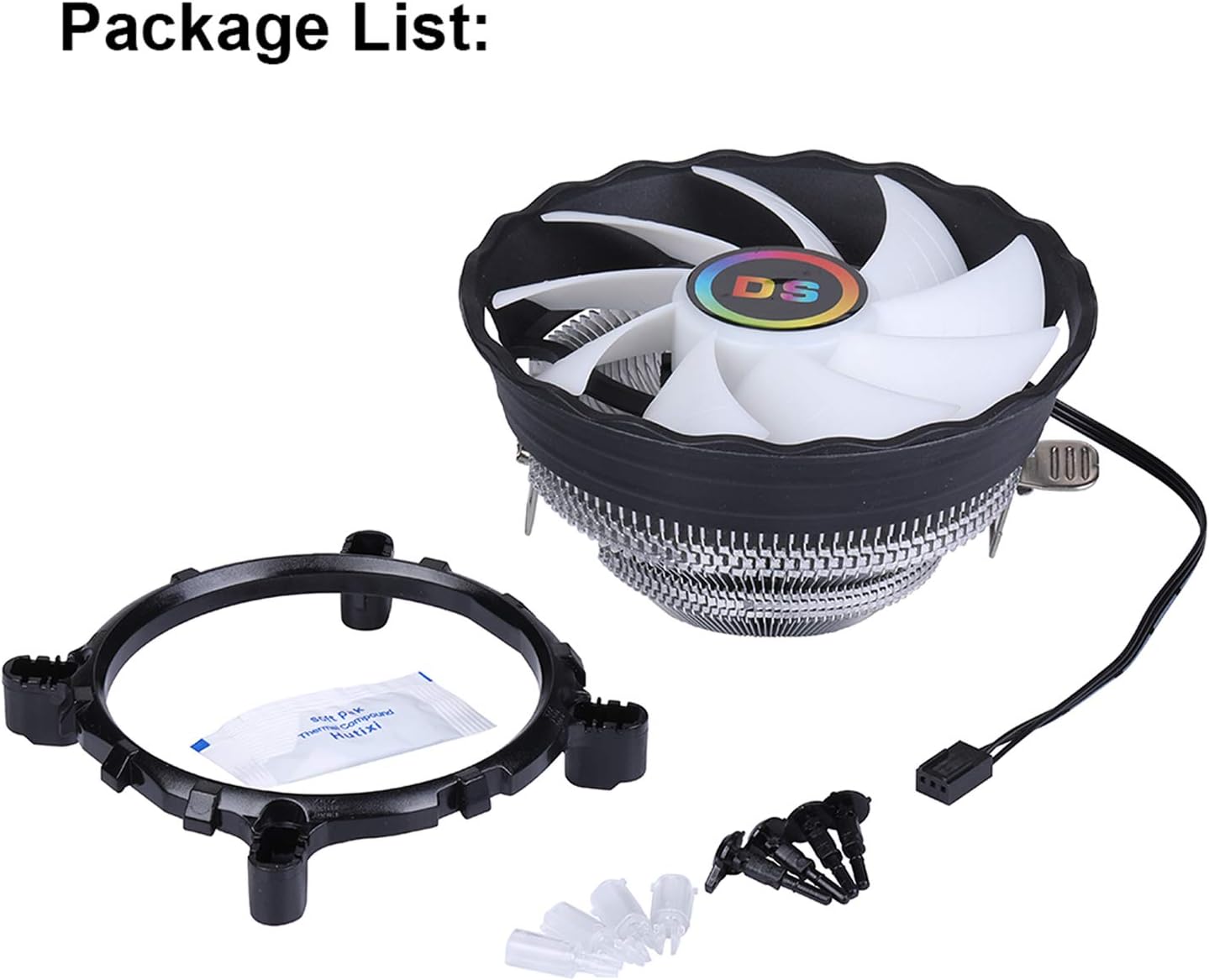
Image: The package includes the CPU fan, a universal mounting bracket, a small packet of thermal paste, and several push-pin fasteners.
- DS leddess 120mm CPU Cooling Fan (Model DS-C03)
- Intel LGA Mounting Bracket
- Thermal Paste Packet
- Push-Pin Fasteners (4 pieces)
4. Specifications
| Feature | Specification |
|---|---|
| Product Dimensions (LxWxH) | 4.72 x 4.72 x 2.56 inches (120mm x 120mm x 65mm) |
| Fan Diameter | 120mm |
| Maximum Rotational Speed | 1500 RPM |
| Air Flow Capacity | 40 Cubic Feet Per Minute (CFM) |
| Noise Level | 25 Decibels (dB) |
| Power Connector Type | 3-Pin |
| Voltage | 12 Volts |
| Wattage | 3.8 watts |
| Material | Aluminum, LED, Plastic |
| Item Weight | 7 ounces |

Image: Product dimensions illustrating the 120mm fan width and 40mm heatsink height.
5. Compatibility
The DS leddess CPU Cooling Fan is compatible with the following Intel LGA sockets:
- LGA 775
- LGA 1150
- LGA 1151
- LGA 1155
- LGA 1156
- LGA 1366
It is recommended for use with 3rd and 4th generation Intel Core i3, i5, and i7 processors.
6. Installation Guide (Setup)
Follow these steps carefully to install your CPU cooling fan. Ensure your computer is powered off and unplugged before beginning installation.
- Prepare the Motherboard: If you have an existing CPU cooler, carefully remove it. Clean any old thermal paste from the CPU surface using isopropyl alcohol and a lint-free cloth.
- Apply Thermal Paste: Apply a small, pea-sized amount of the provided thermal paste to the center of your CPU's integrated heat spreader (IHS). Do not spread it manually; the pressure from the cooler will distribute it evenly.
- Position the Mounting Bracket: Place the Intel LGA mounting bracket onto the motherboard, aligning its holes with the four mounting holes around the CPU socket.
- Attach the Cooler: Carefully place the CPU cooler onto the CPU, ensuring the heatsink base makes full contact with the thermal paste. Align the cooler's mounting clips with the bracket.
- Secure the Cooler: Press down firmly and evenly on the four push-pin fasteners until they click into place, securing the cooler to the motherboard. Ensure all four pins are fully engaged.
- Connect the Fan Cable: Locate the 3-pin fan header on your motherboard, usually labeled "CPU_FAN" or similar. Connect the fan's 3-pin power cable to this header.

Image: The CPU fan correctly installed on a motherboard, demonstrating its position relative to the CPU socket and surrounding components.

Image: A detailed view of the cooler's base, showing the aluminum fins and direct contact technology designed for efficient heat transfer from the CPU.
7. Operation
Once installed and connected, the DS leddess CPU Cooling Fan will begin operating automatically when your computer is powered on. The fan will spin at its rated speed of 1500 RPM, and the fixed RGB lighting will illuminate, providing continuous cooling and visual enhancement.

Image: A comparison showing the CPU fan with its RGB lighting off and then illuminated, highlighting the static multi-color effect.
Official Product Video
Video: This video demonstrates the DS leddess 1900RPM CPU Cooler Fan (similar model) in operation, showcasing its RGB lighting and cooling capabilities within a PC build.
8. Maintenance
Regular maintenance helps ensure optimal performance and extends the lifespan of your CPU cooler.
- Dust Removal: Periodically (every 3-6 months, or more frequently in dusty environments) use compressed air to blow dust out of the heatsink fins and fan blades. Hold the fan blades gently to prevent over-spinning during cleaning.
- Inspection: Check the fan for any signs of wear, such as loose blades or unusual noises. Ensure the power cable remains securely connected.
- Thermal Paste: The thermal paste typically lasts for several years. If you notice a significant increase in CPU temperatures, consider reapplying thermal paste. This requires removing the cooler, cleaning the old paste, and applying new paste as per installation instructions.
9. Troubleshooting
If you encounter issues with your CPU cooling fan, refer to the following common problems and solutions:
- Fan Not Spinning:
- Ensure the 3-pin fan cable is securely connected to the CPU_FAN header on the motherboard.
- Check BIOS/UEFI settings to ensure the CPU fan header is enabled and configured correctly.
- Verify that the power supply is functioning correctly.
- High CPU Temperatures:
- Confirm the cooler is securely mounted and making firm contact with the CPU.
- Ensure thermal paste was applied correctly and is evenly spread. Reapply if necessary.
- Clean any dust accumulation from the heatsink fins and fan blades.
- Verify adequate airflow within your PC case.
- RGB Lights Not Working:
- The RGB lighting is fixed and does not require a separate connection beyond the 3-pin fan power. If the fan spins but the lights are off, there may be an internal issue with the fan's LEDs.
- Ensure the fan is receiving power.
- Unusual Noises:
- Check for any cables or obstructions touching the fan blades.
- Dust buildup can sometimes cause rattling. Clean the fan.
- If the noise persists and is excessive, the fan bearing may be worn.
If these steps do not resolve your issue, please contact DS leddess customer support for further assistance.
10. Warranty and Support
For warranty information and technical support, please refer to the product packaging or contact DS leddess directly through their official website or the retailer where the product was purchased. Keep your proof of purchase for warranty claims.