
1. Introduction
Welcome to your new Volkano Tornado Series Portable Bluetooth Speaker. This manual provides essential information for setting up, operating, and maintaining your device to ensure optimal performance and longevity. Please read these instructions carefully before use.
2. Product Overview
Key Features
- Integrated auxiliary, USB, and Micro SD card reader inputs.
- Control buttons for play/pause, mode selection, and track skipping.
- Designed for portability with a convenient carry strap.
- Integrated 1500 mAh rechargeable battery for extended playtime.
- Delivers 13W peak power output with stereo sound, rich bass, and clear audio, driven by a 4-inch speaker driver.
- Multiple audio input options: Bluetooth wireless connectivity, Micro SD card reader, auxiliary input, and USB port.
- Built-in FM Radio function.
Package Contents
- Volkano Tornado Series Bluetooth Speaker
- Auxiliary Cable
- Micro USB Charging Cable
- Instruction Manual
- Carry Handle (pre-attached)
3. Product Components

Figure 3.1: Detailed diagram of the Volkano Tornado Series speaker, labeling key components such as the handle strap, control panel, input panel, protective mesh, and firm stand.
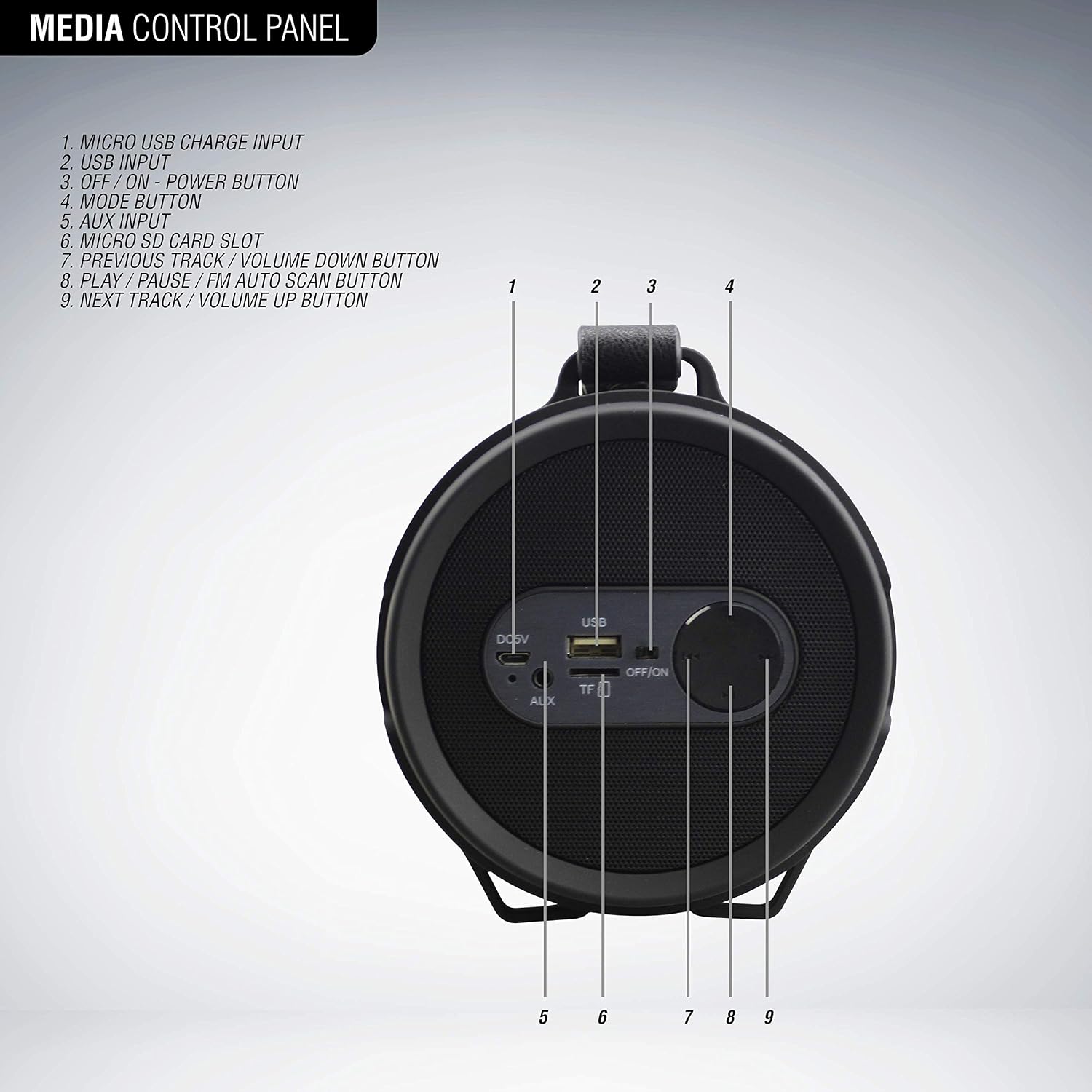
Figure 3.2: Close-up diagram of the speaker's control panel, identifying each button and input:
1. Micro USB Charge Input
2. USB Input
3. OFF/ON Power Button
4. Mode Button
5. AUX Input
6. Micro SD Card Slot
7. Previous Track / Volume Down Button
8. Play / Pause / FM Auto Scan Button
9. Next Track / Volume Up Button
4. Setup Guide
4.1. Charging the Speaker
- Connect the Micro USB charging cable to the Micro USB Charge Input (1) on the speaker.
- Connect the other end of the cable to a standard USB charging adapter (not included) or a computer's USB port.
- The charging indicator light will illuminate during charging and turn off when fully charged. A full charge takes approximately 4 hours.
4.2. Powering On/Off
- To power on the speaker, slide the OFF/ON Power Button (3) to the 'ON' position.
- To power off the speaker, slide the OFF/ON Power Button (3) to the 'OFF' position.
4.3. Bluetooth Pairing
- Ensure the speaker is powered on and in Bluetooth mode. If not, press the Mode Button (4) until you hear the Bluetooth pairing prompt.
- Enable Bluetooth on your device (smartphone, tablet, etc.).
- Search for available Bluetooth devices and select "Volkano Tornado" from the list.
- Once paired, the speaker will emit a confirmation tone, and the Bluetooth indicator light will remain solid.
4.4. Connecting via Auxiliary Input
- Connect one end of the provided Auxiliary Cable to the AUX Input (5) on the speaker.
- Connect the other end of the cable to the audio output jack of your external device.
- Press the Mode Button (4) to switch to AUX mode. Audio will now play through the speaker.
4.5. Using USB and Micro SD Card
- Insert a USB flash drive into the USB Input (2) or a Micro SD card into the Micro SD Card Slot (6).
- The speaker will automatically switch to USB/SD mode and begin playing audio files. If not, press the Mode Button (4) to select the correct input.
- Supported file formats typically include MP3.
5. Operating Instructions
5.1. Basic Controls
- Play/Pause: Press the Play / Pause / FM Auto Scan Button (8) to play or pause the current track.
- Volume Up: Press and hold the Next Track / Volume Up Button (9) to increase the volume.
- Volume Down: Press and hold the Previous Track / Volume Down Button (7) to decrease the volume.
- Next Track: Short press the Next Track / Volume Up Button (9) to skip to the next track.
- Previous Track: Short press the Previous Track / Volume Down Button (7) to go to the previous track.
- Mode Selection: Press the Mode Button (4) to cycle through available input modes (Bluetooth, FM Radio, AUX, USB, Micro SD).
5.2. FM Radio Operation
- Press the Mode Button (4) to switch to FM Radio mode.
- To auto-scan and save available stations, press and hold the Play / Pause / FM Auto Scan Button (8). The speaker will scan and store stations automatically.
- Once scanning is complete, use the Previous Track / Volume Down Button (7) and Next Track / Volume Up Button (9) to navigate between saved stations.
5.3. True Wireless Stereo (TWS) Pairing

Figure 5.1: Two Volkano Tornado Series speakers shown together, illustrating the True Wireless Stereo (TWS) feature for synchronized audio playback.
The Volkano Tornado Series speaker supports True Wireless Stereo (TWS) functionality, allowing you to pair two Tornado Series speakers together for a synchronized stereo audio experience.
- Ensure both Volkano Tornado Series speakers are powered on and in Bluetooth mode, but not yet paired to any device.
- On one of the speakers (this will be your primary speaker), press and hold the Mode Button (4) for a few seconds until you hear a pairing tone.
- The two speakers will automatically connect to each other. Once connected, you will hear a confirmation tone.
- Now, connect your device (smartphone, tablet, etc.) to the primary speaker via Bluetooth as described in section 4.3.
- Audio will now play in stereo across both speakers.
6. Maintenance
- Clean the speaker with a soft, dry cloth. Do not use abrasive cleaners or solvents.
- Keep the speaker away from water, moisture, and extreme temperatures.
- Avoid dropping the speaker or subjecting it to strong impacts.
- Store the speaker in a cool, dry place when not in use for extended periods.
7. Troubleshooting
| Problem | Possible Solution |
|---|---|
| Speaker does not power on. | Ensure the battery is charged. Connect the speaker to a power source using the Micro USB cable. |
| Cannot pair via Bluetooth. | Ensure the speaker is in Bluetooth pairing mode. Check that Bluetooth is enabled on your device and that "Volkano Tornado" is selected. Move the speaker closer to your device. |
| No sound from speaker. | Check the volume level on both the speaker and your connected device. Ensure the correct input mode (Bluetooth, AUX, USB, SD) is selected. |
| FM Radio reception is poor. | Try repositioning the speaker to improve signal reception. Perform an auto-scan again to find stronger stations. |
| USB/Micro SD card not playing. | Ensure the card/drive is inserted correctly. Check that the audio files are in a supported format (e.g., MP3). Press the Mode Button to select the correct input. |
8. Technical Specifications
| Feature | Specification |
|---|---|
| Brand | Volkano |
| Model Name | Tornado Series |
| Bluetooth Version | 5.0 |
| Audio Decoding Profile | A2DP/AVRCP |
| Operating Distance | 32 feet / 10 meters |
| Battery Capacity | 1500 mAh |
| Charge Time | 4 Hours |
| Playtime | 5 Hours |
| Speaker Driver Size | 4 inches |
| Impedance | 4 Ohm |
| Maximum Speaker Power Output | 13 Watts |
| Connectivity Technology | Wireless (Bluetooth), Aux, USB |
| Audio Output Mode | Stereo |
| Special Features | FM Radio, USB Port, Micro SD Card Reader, Carry Strap |
| Control Method | Button |
| Color | Black |
9. Warranty and Support
9.1. Warranty Information
The Volkano Tornado Series Portable Bluetooth Speaker comes with a 1-year limited warranty from the date of purchase. This warranty covers manufacturing defects and workmanship. Please retain your proof of purchase for warranty claims. The warranty does not cover damage caused by misuse, accidents, unauthorized modifications, or normal wear and tear.
9.2. Customer Support
For any questions, technical assistance, or warranty inquiries, please refer to the contact information provided on the product packaging or the official Volkano website. Our customer support team is available to assist you.