
Introduction
Thank you for choosing the Benro Phonographer P1 Handheld Gimbal Stabilizer. This device is designed to provide smooth, stable footage for your smartphone videos, enhancing your mobile filmmaking experience. Please read this manual thoroughly before use to ensure proper operation and to maximize the potential of your P1 gimbal.

Image: The Benro Phonographer P1 Handheld Gimbal Stabilizer, showcasing its compact design.
What's in the Box
Upon unboxing, please verify that all the following items are included:
- Benro Phoneographer P1 Gimbal for Smartphones
- USB-C to USB-C Cable
- Audio Cable
- Power Cord
- Storage Bag

Image: Retail packaging of the Benro Phonographer P1, indicating included accessories.
Key Features
- 310g Maximum Payload: Supports a wide range of smartphones.
- Folding Super Compact Design: Easy to carry and store.
- Switch between Horizontal and Vertical: Quickly change shooting orientation.
- Up to 24 Hour Battery Life: Extended usage for long shooting sessions.
- Wireless Charging: Convenient charging for compatible smartphones.
- External Microphone Input: Enhance audio quality with an external microphone.
- 4-way Joystick, Trigger Button, and Custom Button: Intuitive controls for precise adjustments.
- App with Face Tracking and Time-lapse Support: Advanced shooting modes and intelligent tracking.
Setup Guide
1. Unfolding the Gimbal
Gently unfold the gimbal from its compact storage position. Ensure all joints click into place securely.
2. Mounting Your Smartphone
- Extend the phone clamp on the gimbal.
- Carefully place your smartphone into the clamp, ensuring it is centered and secure.
- Adjust the phone's position within the clamp to achieve a balanced state. While critical balancing is often not required, a roughly balanced phone will optimize motor performance and battery life.

Image: The Benro Phonographer P1 with a smartphone securely mounted, ready for use.
3. Powering On/Off
- To power on: Press and hold the power button until the indicator light illuminates.
- To power off: Press and hold the power button until the indicator light turns off.
4. App Connection (Benro Phonographer App)
- Download the "Benro Phonographer" app from your smartphone's app store.
- Enable Bluetooth on your smartphone.
- Open the Benro Phonographer app and follow the on-screen instructions to connect to your P1 gimbal.
- Ensure the gimbal is powered on during the connection process.
Operating Instructions
Basic Controls
- 4-way Joystick: Controls the pan and tilt movements of the gimbal.
- Trigger Button: Typically used for quick mode changes or recentering the gimbal. Refer to the app for specific functionalities.
- Custom Button: Programmable button for frequently used functions within the app, such as focus pull or zoom.
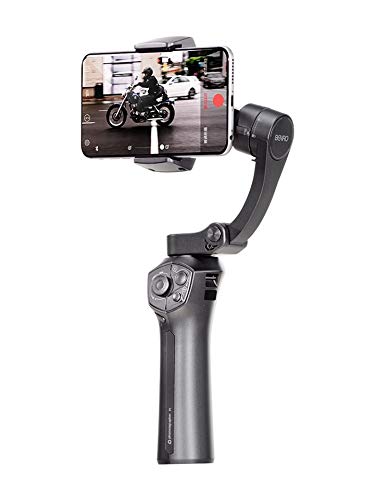
Image: The Benro Phonographer P1 in action, demonstrating its ergonomic design and smartphone integration.
Switching Orientation (Horizontal/Vertical)
The P1 gimbal allows for quick switching between horizontal (landscape) and vertical (portrait) shooting modes. This is typically done via a dedicated button or a gesture within the Benro Phonographer app. Consult the app's interface for precise instructions.
Wireless Charging
For smartphones equipped with wireless charging capabilities, the P1 gimbal can provide power while in use. Ensure your phone is correctly positioned in the clamp for optimal wireless charging contact.
External Microphone Input
Connect an external microphone to the dedicated input port on the gimbal handle using the provided audio cable to significantly improve audio recording quality.
Advanced App Features
- Face Tracking: Utilize the app's intelligent face tracking feature to keep subjects automatically in frame.
- Time-lapse: Create dynamic time-lapse videos with customizable settings through the app.
- Explore other creative modes and settings available within the Benro Phonographer app for enhanced video production.
Maintenance
- Cleaning: Use a soft, dry cloth to clean the gimbal. Avoid using liquid cleaners or solvents.
- Storage: When not in use, fold the gimbal into its compact form and store it in the provided storage bag to protect it from dust and damage.
- Battery Care: For optimal battery longevity, avoid fully discharging the battery frequently. Charge the gimbal regularly, even if not in active use, to maintain battery health.
Troubleshooting
| Problem | Possible Cause | Solution |
|---|---|---|
| Gimbal does not power on. | Low battery or power button not pressed correctly. | Charge the gimbal using the provided power cord. Ensure the power button is pressed and held for a few seconds. |
| Smartphone not balancing correctly. | Smartphone not centered in the clamp. | Adjust the smartphone's position in the clamp until it is as balanced as possible. |
| App connection issues. | Bluetooth off, app not open, or gimbal not powered on. | Ensure Bluetooth is enabled, the Benro Phonographer app is open, and the gimbal is powered on. Restart both the app and gimbal if necessary. |
| Face tracking or object tracking not working. | App software issue or environmental factors. | Ensure good lighting conditions. Update the Benro Phonographer app to the latest version. Some mobile phone models may have compatibility limitations. |
| Gimbal motors feel weak or unstable. | Smartphone weight exceeds maximum payload or improper balancing. | Verify your smartphone's weight is within the 310g limit. Re-adjust the phone's position for better balance. |
Specifications
| Feature | Detail |
|---|---|
| Brand | BENRO |
| Model Name | P1 GIMBAL |
| Item Model Number | P1GRY |
| Compatible Devices | Cellphone |
| Maximum Payload | 310g |
| Product Dimensions | 10.6 x 5 x 17.8 cm |
| Folded Size | 50 mm x 106 mm x 178 mm |
| Item Weight | 480 g |
| Battery Type | Lithium Ion (1 included) |
| Battery Average Life | Up to 24 Hours |
| Date First Available | 11 July 2019 |
Warranty and Support
The Benro Phonographer P1 Handheld Gimbal Stabilizer comes with a 1 Year Warranty from the date of purchase. This warranty covers manufacturing defects and ensures your product functions as intended under normal use.
For warranty claims, technical support, or further assistance, please contact Benro customer service through their official website or the contact information provided with your purchase documentation.
Please retain your proof of purchase for warranty validation.