
De'Longhi TRDX41025E
Contents
De'Longhi TRDX41025E Oil Filled Radiator User Manual
Model: TRDX41025E
1. Important Safety Warnings
Please read all instructions carefully before using this appliance. Failure to follow these instructions may result in electric shock, fire, or serious injury.
- Do not cover the radiator. Covering the radiator can cause overheating and fire.
- Do not use this radiator in the immediate surroundings of a bath, a shower or a swimming pool.
- Do not use this radiator if it has been dropped.
- Do not use this radiator if there are visible signs of damage to the radiator.
- Keep children and pets away from the appliance when it is in operation. The surface can become very hot.
- Ensure the voltage indicated on the rating label corresponds to the mains voltage in your home.
- Do not use extension cords or multi-sockets. Plug the radiator directly into a wall outlet.
- Always unplug the radiator when not in use or before cleaning.
- Do not insert any objects into the radiator's openings.
- This appliance is for indoor use only.
2. Product Overview
The De'Longhi TRDX41025E Dragon 4 Pro Oil Filled Radiator is designed to provide efficient and consistent heating for your living space. It features a digital control panel, multiple heat settings, and an ECO function for energy saving.

Figure 2.1: Front view of the De'Longhi TRDX41025E Oil Filled Radiator, showcasing its sleek design and integrated control panel.
Components:
- Radiator Fins (Oil-filled heating elements)
- Digital Control Panel with LED Display
- Power Cord and Plug
- Pre-assembled Rubberised Wheels (for easy mobility)
- Integrated Cord Storage
3. Setup and First Use
The De'Longhi TRDX41025E radiator comes with pre-assembled wheels, making initial setup straightforward. Ensure the radiator is placed on a stable, level surface and is at a safe distance from walls, furniture, and curtains.
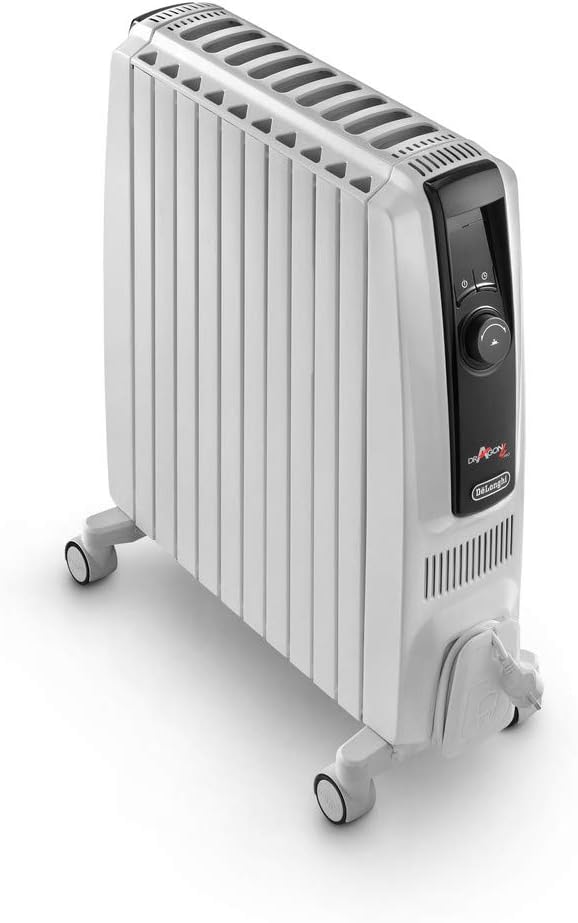
Figure 3.1: Side view of the radiator, highlighting the pre-assembled wheels and convenient cord storage area at the base.
- Unpacking: Carefully remove the radiator from its packaging. Retain packaging for future storage or transport.
- Positioning: Place the radiator upright on a firm, level surface. Ensure there is at least 50 cm (20 inches) of clear space around the top and sides, and 10 cm (4 inches) at the front.
- Power Connection: Unwind the power cord completely from the cord storage. Plug the radiator directly into a suitable 230V, 50Hz mains power outlet. Do not use adapter plugs or extension cords.
- Initial Odour: It is normal for the radiator to emit a slight odour during its first few hours of operation. This is due to the protective coating on the heating elements and will dissipate quickly. Ensure the room is well-ventilated during this period.
4. Operating Instructions
4.1 Control Panel Overview

Figure 4.1: Detailed view of the digital control panel, featuring the LED display, power button, mode selection, timer, and temperature dial.
- LED Display: Shows current temperature, timer settings, and active functions.
- Power Button (⑁): Turns the radiator On or Off.
- Mode Button (ⓘ): Cycles through heat settings (Min, Med, Max) and ECO function.
- Timer Button (⏱): Activates and sets the 24-hour digital timer.
- Temperature Dial: Adjusts the desired room temperature.
4.2 Setting Heat and Temperature
- Plug in the radiator and press the Power Button (⑁) to turn it on.
- Rotate the Temperature Dial to set your desired room temperature. The display will show the set temperature.
- Press the Mode Button (ⓘ) to select the desired heat setting:
- Min: Low heat output.
- Med: Medium heat output.
- Max: Maximum heat output (up to 2500 watts).
- The radiator will automatically adjust its power consumption to maintain the set temperature.
4.3 ECO Function
The exclusive ECO function helps optimize energy consumption while maintaining a comfortable temperature. When activated, the radiator intelligently selects the most appropriate power level to minimize energy waste.
- With the radiator on, press the Mode Button (ⓘ) until the "ECO" indicator appears on the LED display.
- The radiator will now operate in energy-saving mode.
4.4 Digital Timer (24-Hour)
The 24-hour digital timer allows you to program the radiator to turn on and off automatically at specific times.
- Press the Timer Button (⏱). The display will show "00h" and flash.
- Rotate the Temperature Dial to set the desired delay time (in hours) before the radiator turns on or off.
- Press the Timer Button (⏱) again to confirm. The timer indicator will illuminate.
- To cancel the timer, press the Timer Button (⏱) until the timer indicator disappears.
4.5 Anti-Frost Protection
This feature prevents the room temperature from falling below 5°C (41°F), protecting against freezing in cold environments. The radiator will automatically turn on if the room temperature drops below this threshold, regardless of other settings.

Figure 4.2: Illustration demonstrating the efficient heat distribution from the top and sides of the oil-filled radiator, ensuring even room heating.
5. Maintenance and Storage
Regular maintenance ensures the longevity and efficient operation of your De'Longhi radiator.
- Cleaning:
- Always unplug the radiator from the power outlet and allow it to cool completely before cleaning.
- Wipe the exterior surfaces with a soft, damp cloth. Do not use abrasive cleaners or solvents.
- Do not immerse the radiator in water or allow water to drip into the appliance.
- Storage:
- If the radiator is not used for extended periods, store it in a dry, dust-free place.
- Wrap the power cord around the integrated cord storage to prevent damage.
6. Troubleshooting
If you experience issues with your radiator, please consult the table below before contacting customer support.
| Problem | Possible Cause | Solution |
|---|---|---|
| Radiator does not turn on. | Not plugged in; power outlet not working; power button not pressed. | Ensure plug is fully inserted. Check power outlet with another appliance. Press the power button. |
| Radiator emits an unusual smell during first use. | Protective coating burning off. | This is normal for initial use. Ensure good ventilation. Odour will dissipate. |
| Radiator is not heating sufficiently. | Temperature setting too low; room too large; heat setting too low. | Increase the set temperature. Select a higher heat setting (Med or Max). Ensure room is adequately insulated. |
| Radiator turns off unexpectedly. | Overheat protection activated; timer set. | Unplug, allow to cool for 30 minutes, then plug back in. Check if timer is active. |
7. Technical Specifications
| Specification | Value |
|---|---|
| Model Number | TRDX41025E |
| Brand | De'Longhi |
| Type | Oil Filled Radiator |
| Power Output | Up to 2500 Watts (Max setting) |
| Voltage | 230 Volts |
| Frequency | 50 Hertz |
| Dimensions (WxDxH) | 57.5 x 16.0 x 66.5 cm |
| Colour | White |
| Special Features | Digital Display, 24-Hour Timer, ECO Function, Anti-frost Protection |
8. Warranty and Support
De'Longhi products are manufactured to the highest quality standards. For information regarding your product's warranty, please refer to the warranty card included with your purchase or visit the official De'Longhi website.
For technical assistance, spare parts, or repair services, please contact De'Longhi customer support. Contact details can typically be found on the official De'Longhi website or in your product's packaging.
Online Resources:
Ask a question about this manual
Ask about setup, troubleshooting, compatibility, parts, safety, or missing instructions. Manuals+ will review the question and use this page’s manual context to help answer it.