
1. Introduction
The Eton American Red Cross FRX2 is a versatile emergency radio designed to keep you informed and connected during power outages or outdoor activities. It features AM/FM and all seven NOAA (National Oceanic and Atmospheric Administration) weather band stations, ensuring access to critical information. The FRX2 offers multiple power options, including a hand turbine, solar panel, and mini-USB input, along with a built-in LED flashlight and a USB port for charging smartphones.

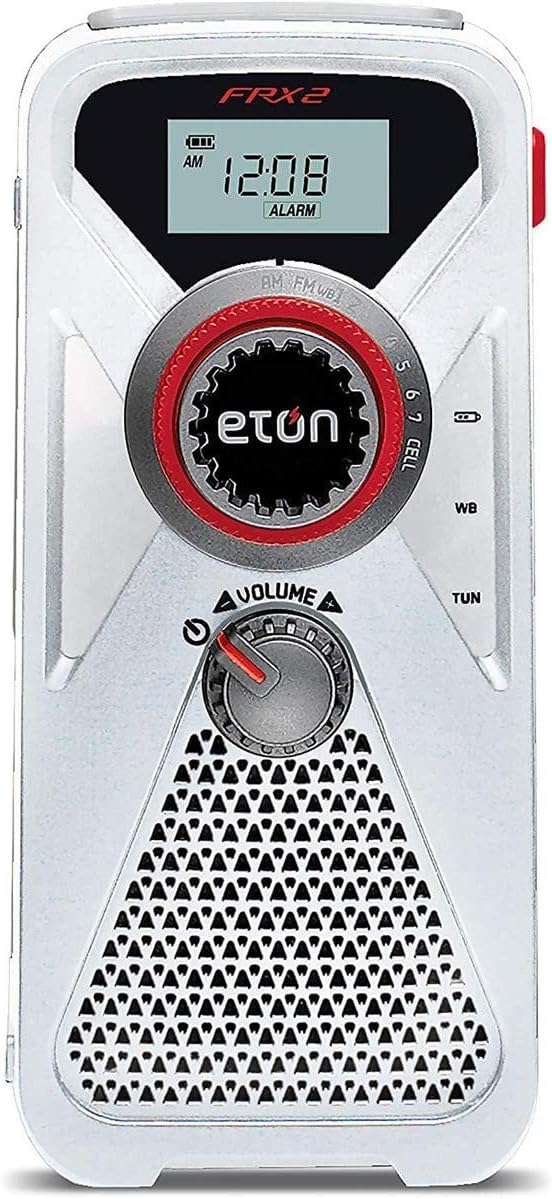
Front view of the Eton American Red Cross FRX2 Hand Turbine Radio.
2. Setup
2.1 Initial Charging
Before first use, fully charge the FRX2 using one of the following methods:
- USB Charging: Connect the included mini-USB cable to the FRX2's DC input port and plug the other end into a powered USB source (e.g., computer, wall adapter). The internal 1000 mAh Li-ion battery will charge.
- Solar Charging: Place the FRX2 with its solar panel facing direct sunlight. This method provides a passive charge and is ideal for maintaining battery levels or for extended use in sunny conditions.
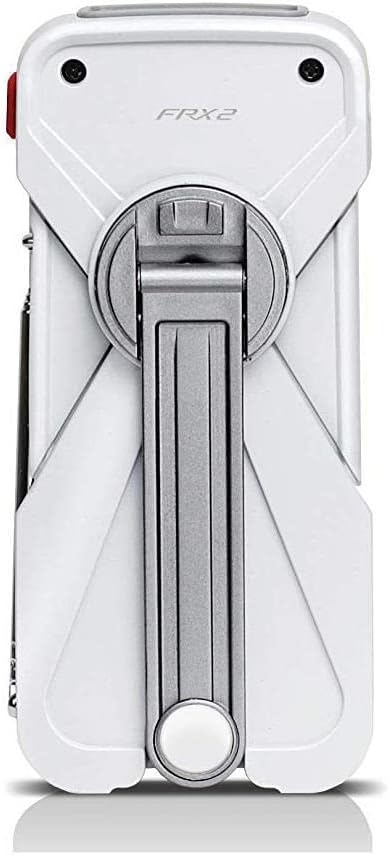
- Hand Turbine: Extend the hand turbine crank handle and rotate it clockwise for approximately 1 minute to gain 10-15 minutes of radio and flashlight use. For a full charge, continuous cranking over a longer period is required.

The FRX2 radio with its solar panel exposed for charging.
2.2 Antenna Setup
For optimal radio reception, extend the telescopic antenna fully. Adjust its direction for the clearest signal.
Video demonstrating the extension and adjustment of the FRX2's telescopic antenna for improved reception. (Source: Paulina & Josh)
3. Operating Instructions
3.1 Power On/Off and Volume Control
Rotate the VOLUME knob clockwise to turn the radio on and increase the volume. Rotate counter-clockwise to decrease volume and turn off the radio.
3.2 Radio Tuning (AM/FM/NOAA Weather Band)
Use the TUN dial to select your desired frequency. The digital display will show the current frequency. Switch between AM, FM, and WB (Weather Band) modes using the dedicated band selector switch.
Front panel of the FRX2 showing the display, tuning dial, and volume control.
Video demonstrating how to operate the FRX2 radio, including tuning and volume adjustments. (Source: JPL Reviews)
3.3 Flashlight Operation
The FRX2 features a built-in LED flashlight. Locate the flashlight button, typically on the side or front, and press it to turn the flashlight on or off.
Close-up view of the FRX2's integrated LED flashlight.
Video demonstrating the functionality of the FRX2's LED flashlight. (Source: Karisa - Healing At The Root)
3.4 Smartphone Charging
The FRX2 can charge your smartphone via its USB output port. Connect your smartphone's charging cable to the FRX2's USB port. Ensure the FRX2 has sufficient charge from its internal battery, hand turbine, or solar panel to provide power.

The FRX2 connected to a smartphone for charging.
Video showcasing the FRX2's capability to charge a smartphone. (Source: Blue Is Shopping With You💖)
3.5 Glow-in-the-Dark Locator
The FRX2 features a glow-in-the-dark locator to help you find it easily in low-light conditions or during a power outage.
3.6 Headphone Output
For private listening, connect standard 3.5mm headphones to the headphone output jack on the side of the unit.

Side view of the FRX2, highlighting the USB, mini-USB, and headphone ports.
4. Maintenance
4.1 General Care
- Keep the FRX2 clean by wiping it with a soft, damp cloth. Avoid harsh chemicals or abrasive cleaners.
- Store the radio in a cool, dry place when not in use.
- Avoid exposing the unit to extreme temperatures or direct moisture for prolonged periods.
4.2 Battery Care
The FRX2 contains an internal 1000 mAh Lithium-Ion battery. To prolong battery life:
- Fully charge the battery at least once every three months, even if not in regular use.
- Avoid completely draining the battery frequently.
5. Troubleshooting
| Problem | Possible Cause | Solution |
|---|---|---|
| No power/Radio not turning on | Battery is depleted. | Charge the unit using the mini-USB cable, solar panel, or hand turbine. |
| Poor radio reception | Antenna not extended or poor signal area. | Fully extend the telescopic antenna and adjust its position. Try moving to an open area. |
| Smartphone not charging | FRX2 battery low or phone requires more power. | Ensure the FRX2 is fully charged. Note that the FRX2 is designed for emergency calls/texts, not full smartphone charges. |
| Hand turbine is stiff or not charging | Mechanism obstruction or improper rotation. | Ensure the crank is fully extended and rotate it smoothly in a clockwise direction. Do not force it. |
6. Specifications
- Brand: Eton
- Model: FRX2 (ARCFRX2WXW)
- Color: White and Red
- Connectivity Technology: USB
- Product Dimensions: 37"L x 9"W x 6"H
- Tuner Technology: AM, FM
- Power Source: Battery Powered (Internal 1000 mAh Lithium Ion), Hand Turbine, Solar Panel, DC via Mini-USB
- Radio Bands Supported: AM/FM/Weather (all 7 NOAA/Environment Canada weather band stations)
- Included Components: Manual and Charging Cable
- Display Type: LED
- Hardware Interface: USB
- Enclosure Material: Plastic

The FRX2 radio with its hand crank extended for manual power generation.
7. Warranty & Support
7.1 Warranty Information
The Eton American Red Cross FRX2 Hand Turbine AM/FM/NOAA Weather Radio comes with a Limited Warranty. Please refer to the warranty card included in your product packaging for specific terms, conditions, and duration of coverage.
7.2 Customer Support
For technical assistance, troubleshooting, or warranty claims, please contact Eton customer support. Visit the official Eton website for contact information and additional resources.


