1. Introduction
The KETOTEK KT550D is a versatile infrared thermometer designed for both non-contact surface temperature measurement and contact temperature measurement using a K-type thermocouple probe. It features dual laser targeting for enhanced accuracy, adjustable emissivity for various surfaces, and additional functions such as humidity measurement and non-contact AC voltage detection. This device is suitable for a wide range of applications, including industrial settings, automotive maintenance, cooking, and household use.

Image 1.1: The KETOTEK KT550D Infrared Thermometer in various application scenarios, including automotive, baking, and beverage temperature checks.

Image 1.2: Overview of the KETOTEK KT550D's features, including dual lasers, voltage detection, LED flashlight, K-type thermocouple, adjustable emissivity, and humidity measurement.
2. Safety Information
WARNING: This infrared thermometer is NOT intended for measuring human body temperature. Using it for this purpose may result in inaccurate readings and improper medical assessment.
Please read and understand all safety instructions before using the device. Failure to follow these instructions may result in injury or damage to the device.
- Do not point the laser directly at eyes or indirectly off reflective surfaces.
- Do not immerse the device in water or other liquids.
- Keep the device away from strong electromagnetic fields.
- Do not attempt to disassemble or modify the device.
- Dispose of batteries properly according to local regulations.

Image 2.1: Visual warning indicating that the device is not suitable for measuring human body temperature.
3. Package Contents
Upon opening the package, please verify that all the following items are included:
- 1 x KETOTEK KT550D Infrared Thermometer
- 1 x K-Type Thermocouple Probe
- 1 x 9V Battery (6F22 type)
- 1 x Carrying Pouch
- 1 x User Manual (this document)

Image 3.1: The KETOTEK KT550D Infrared Thermometer shown with its K-type thermocouple probe, 9V battery, and carrying pouch.

Image 3.2: A detailed view of all components included in the KETOTEK KT550D package.
4. Product Overview
Familiarize yourself with the components and controls of your KETOTEK KT550D Infrared Thermometer:

Image 4.1: Diagram illustrating the various parts and display elements of the KETOTEK KT550D Infrared Thermometer.
- Laser Holes: Emits dual laser beams for targeting.
- LED Flashlight: Provides illumination in dark environments.
- K-Type Thermocouple Socket: Port for connecting the K-type probe.
- Trigger: Activates measurement and laser.
- Battery Cover: Access point for battery installation.
- LCD Display: Shows temperature readings, emissivity, humidity, and other indicators.
- °C/°F Selection/Down Button: Toggles between Celsius and Fahrenheit, or navigates menu down.
- LED Flashlight/Laser/Up Button: Toggles LED flashlight and laser, or navigates menu up.
- Mode Button: Cycles through measurement modes and settings.
Display Indicators:
- Sign of Low Battery Power: Indicates when the battery needs replacement.
- Data Hold: Freezes the current reading on the display.
- Environmental Temperature: Displays ambient temperature.
- Environmental Humidity: Displays ambient humidity.
- NCV Detecting: Indicates Non-Contact Voltage detection is active.
- Surface Temperature: The primary infrared temperature reading.
- NCV Warning Light: Flashes when AC voltage is detected.
- Emissivity: Current emissivity setting (E).
- Measured By Infrared: Icon indicating infrared measurement mode.
- Temperature Unit: °C or °F.
- Measured By K Type Thermocouple: Icon indicating K-type thermocouple measurement mode.
- Laser On Signal: Indicates the laser is active.
5. Setup
5.1. Battery Installation
- Locate the battery cover on the handle of the thermometer.
- Open the battery cover.
- Insert the included 9V (6F22) battery, ensuring correct polarity (+/-).
- Close the battery cover securely.
5.2. K-Type Thermocouple Probe Connection
To use the K-type thermocouple probe for contact temperature measurement:
- Locate the K-Type Thermocouple Socket on the side of the device.
- Insert the K-type thermocouple probe connector firmly into the socket.
- The device will automatically switch to K-type measurement mode or can be selected via the Mode button.
6. Operation
6.1. Infrared (Non-Contact) Temperature Measurement
This mode measures the surface temperature of an object without physical contact.
- Point the thermometer at the target object.
- Press and hold the Trigger. The dual lasers will activate, indicating the measurement area.
- The temperature reading will appear on the LCD display within 0.5 seconds.
- Release the Trigger to hold the reading (Data Hold function).
Distance to Spot Ratio (D:S): The KT550D has a D:S ratio of 12:1. This means that at a distance of 12 inches, the measurement spot diameter is 1 inch. For optimal accuracy, ensure the target area is larger than the spot size. For best precision, position the thermometer approximately 14 inches (36 cm) from the object.

Image 6.1: The KETOTEK KT550D demonstrating fast measurement response time and accuracy with dual laser indication.
Adjustable Emissivity: Emissivity (E) is the ability of a material to emit thermal energy. Different materials have different emissivity values. The KT550D allows you to adjust emissivity from 0.1 to 1.0 for more accurate readings on various surfaces.
- Press the Mode button until the 'E' symbol flashes on the display.
- Use the Up/Down buttons to adjust the emissivity value.
- Press the Mode button again to confirm and exit.
Common Emissivity Values:
| Material | Emissivity (E) |
|---|---|
| Water | 0.98 |
| Wood | 0.90 |
| Marble | 0.94 |
| Painted Surfaces | 0.93-0.96 |
| Aluminum (oxidized) | 0.20-0.40 |
| Copper (oxidized) | 0.78 |

Image 6.2: The KETOTEK KT550D demonstrating adjustable emissivity for accurate temperature readings on different materials, along with the LED flashlight feature.

Image 6.3: Examples of different emissivity values for materials like ice, water, metal pipes, and pottery.
Dual Laser Targeting: The dual lasers help to precisely define the measurement area, improving accuracy compared to single-laser models.

Image 6.4: A close-up view of the dual laser emitters on the KETOTEK KT550D, which assist in precise targeting.
6.2. K-Type Thermocouple Measurement
This mode allows for direct contact measurement of internal temperatures.
- Ensure the K-type thermocouple probe is securely connected to the device.
- Press the Mode button to select the K-type measurement mode (indicated by a specific icon on the display).
- Insert the metal tip of the probe into the substance or object to be measured.
- The temperature reading will be displayed on the LCD.
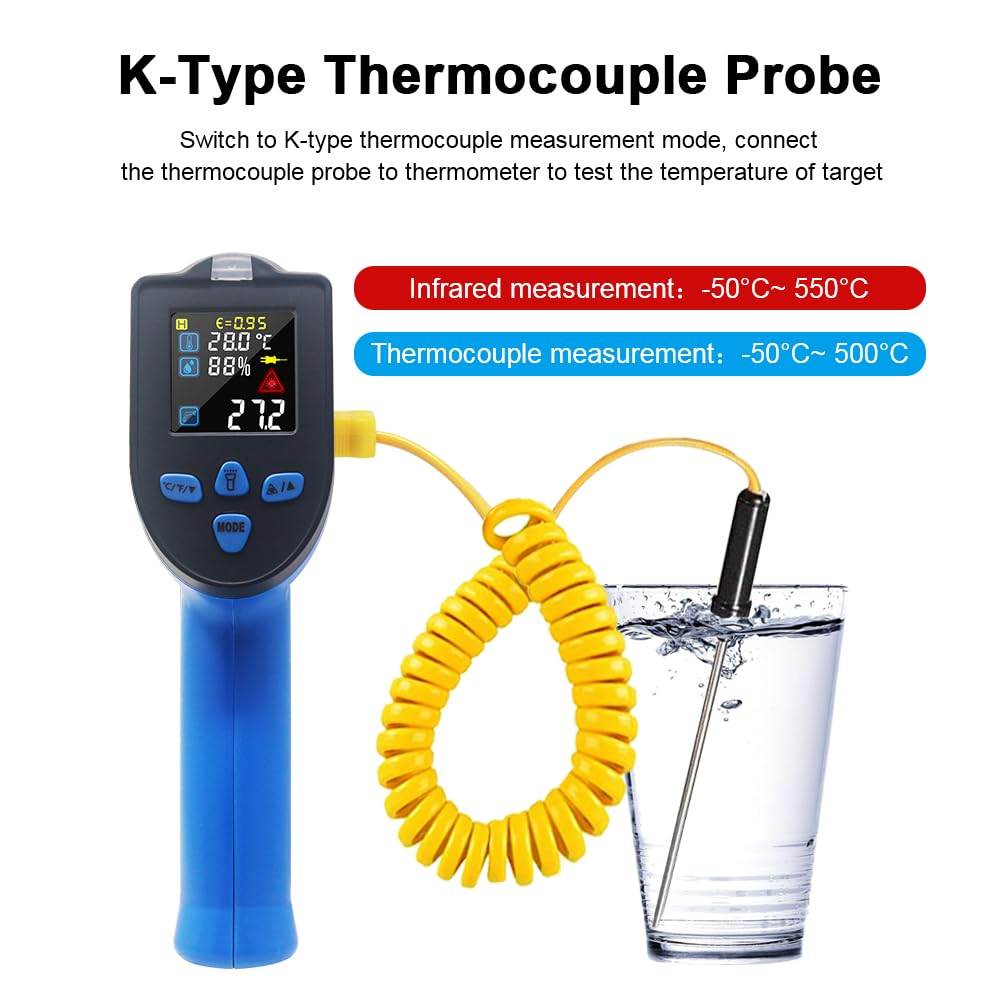
Image 6.5: The KETOTEK KT550D using the K-type thermocouple probe to measure the temperature of a liquid.

Image 6.6: The K-type thermocouple probe being used to measure the internal temperature of cooked food.
6.3. Additional Functions
- Humidity Measurement: The device can display ambient humidity levels. This reading is shown on the LCD alongside the environmental temperature.
- Non-Contact AC Voltage (NCV) Detection: The NCV function allows for detection of live AC voltage without direct contact. When AC voltage is detected, the device will beep and flash a red warning light.
- LED Flashlight: Press the LED Flashlight/Laser/Up Button to turn the built-in LED flashlight on or off, assisting in measurements in low-light conditions.
- °C/°F Switch: Use the °C/°F Selection/Down Button to toggle between Celsius and Fahrenheit temperature units.
- MAX/HOLD Data Function: The device can display the maximum temperature recorded during a continuous scan or hold the current reading on the display. Refer to the on-screen indicators for activation.
- Automatic Shut-off: The device will automatically power off after 30 seconds of inactivity to conserve battery life.
- Low Battery Indicator: An icon on the display will indicate when the battery level is low, prompting replacement.

Image 6.7: The KETOTEK KT550D displaying relative humidity, comparing its reading with another humidity sensor.

Image 6.8: The KETOTEK KT550D detecting non-contact AC voltage near a power strip.

Image 6.9: The KETOTEK KT550D's LED flashlight illuminating a dark area for easier targeting.
7. Maintenance
- Cleaning: Wipe the device with a soft, damp cloth. Do not use abrasive cleaners or solvents.
- Storage: Store the device in a cool, dry place when not in use. Remove the battery if storing for extended periods.
- Care Instructions: Do not immerse the device in water. Protect the lens from scratches and dirt.
8. Troubleshooting
If you encounter issues with your KETOTEK KT550D, consider the following common solutions:
- Inaccurate Readings:
- Check and adjust the emissivity setting for the material being measured.
- Ensure the distance to spot ratio is appropriate for the target size.
- Clean the infrared lens if it is dirty.
- Verify the K-type probe is fully inserted if using contact measurement.
- Device Not Powering On:
- Check if the 9V battery is installed correctly with proper polarity.
- Replace the battery if the low battery indicator is shown or if the battery is old.
- Laser Not Activating:
- Ensure the trigger is pressed firmly.
- Check battery level.
- NCV Not Working:
- Ensure the device is in NCV detection mode (if applicable, or that the function is active).
- Confirm there is actual AC voltage present.
For further assistance, please contact KETOTEK customer support.
9. Specifications
| Feature | Specification |
|---|---|
| Item Model Number | KT550D |
| Brand | KETOTEK |
| Infrared Temperature Range | -50°C to 550°C (-58°F to 1022°F) |
| K-Type Thermocouple Range | -50°C to 500°C (-58°F to 932°F) |
| Accuracy | ±2% or 2°C (whichever is greater) |
| Response Time | 0.5 seconds |
| Distance to Spot Ratio (D:S) | 12:1 |
| Emissivity | Adjustable 0.1 to 1.0 |
| Special Features | Automatic Shut-off, Backlit LCD, Non-contact, Dual Laser, Humidity Measurement, NCV Detection, LED Flashlight |
| Display Type | Digital |
| Connectivity Technology | Infrared |
| Power Source | 1 x 9V (6F22) Battery (included) |
| Product Dimensions (L x W x H) | 18.5 x 12.6 x 4.8 cm |
| Weight | 369 grams |
| Exterior Material | Plastic |
| Compliant Specifications | CE, FCC |
| Country of Origin | China |
10. Warranty and Support
KETOTEK products are manufactured to high-quality standards. For warranty information, technical support, or service inquiries, please refer to the contact information provided with your purchase or visit the official KETOTEK website. Please retain your proof of purchase for warranty claims.


