
Geloo GPS Speedometer 0-120MPH
Geloo 85MM GPS Speedometer Gauge User Manual
Model: GPS Speedometer 0-120MPH
Brand: Geloo
1. Product Overview
The Geloo 85MM GPS Speedometer Gauge is a high-precision instrument designed for accurate measurement of vehicle and boat speed and mileage. It receives speed signals directly from satellites via a dedicated GPS antenna, ensuring reliable performance across various applications.

Image: The Geloo 85MM GPS Speedometer Gauge displaying its multiple backlight color options, including red, green, blue, white, yellow, orange, and purple. The main dial shows speed in MPH and Km/h, with digital readouts for TRIP and ODO.
Key Features:
- GPS Signal Acquisition: Speed signal derived directly from satellite, eliminating the need for traditional speed sensors.
- Wide Application: Suitable for cars, tractors, vans, motorcycles, racing vehicles, boats, yachts, RVs, trucks, and buses.
- Display Functions: Shows current speed, trip mileage (resettable), and total odometer (non-resettable).
- Measurement Range: 0-80 MPH (0-120 Km/h).
- Multi-Color Backlight: Features 7 backlight colors (red, green, blue, white, yellow, orange, purple) selectable via a back button.
- Durable Construction: IP67 waterproof and dustproof grade, with a curved anti-fog glass and 316L stainless steel front cover, ensuring longevity in harsh environments.
- Wide Operating Voltage: Designed for 9-32VDC long-term operation.

Image: An illustration depicting the wide range of applications for the Geloo GPS Speedometer, including cars, yachts, trucks, RVs, and buses, highlighting its versatility.
2. Package Contents
Upon opening the package, verify that all the following components are present and in good condition:
- 1 x GPS Speedometer Gauge
- 1 x GPS Antenna
- 1 x Wiring Harness
- 1 x Instruction Manual
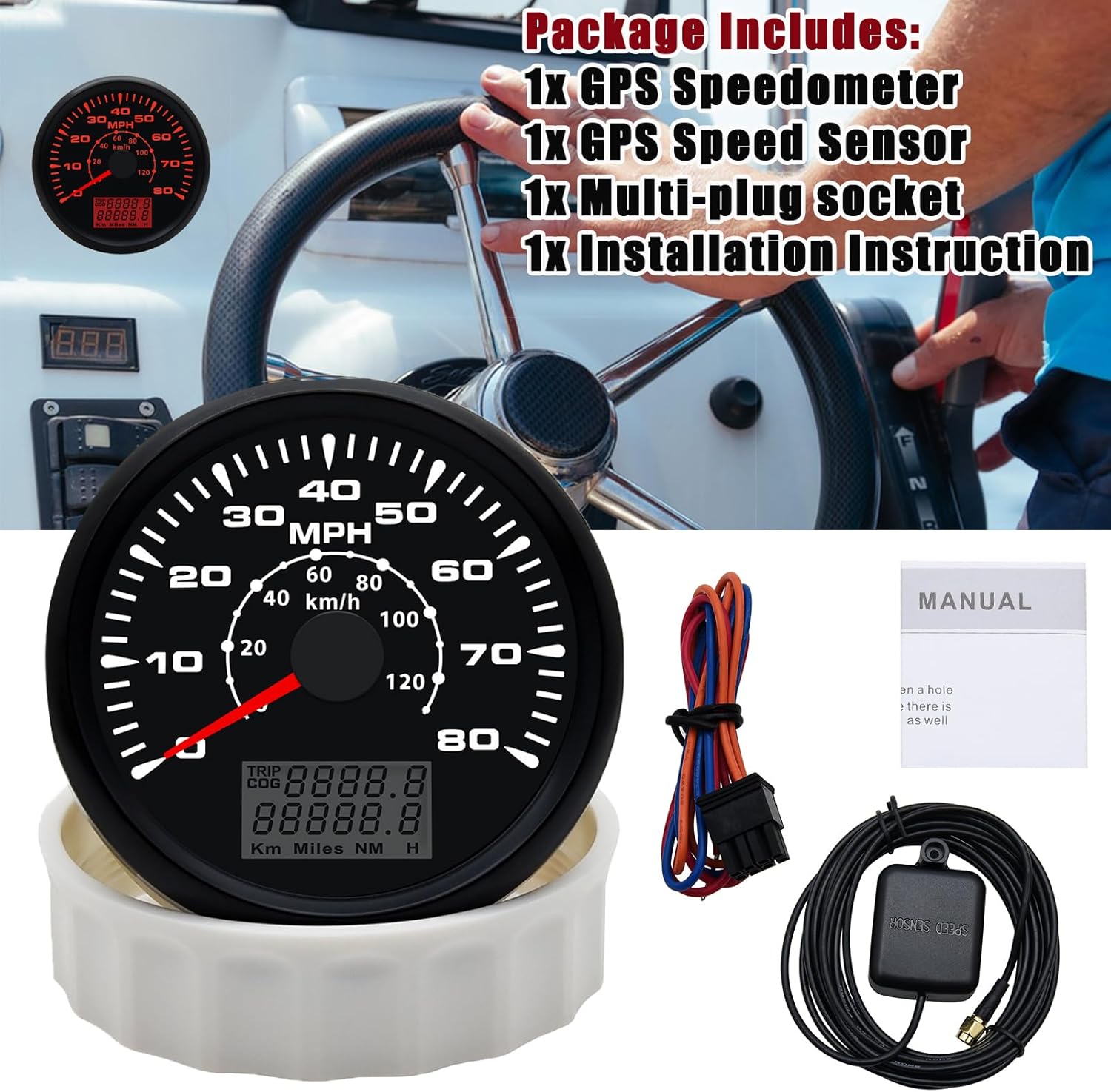
Image: A visual representation of the package contents, including the GPS speedometer gauge, GPS antenna, wiring harness, and the instruction manual.
3. Specifications
| Attribute | Value |
|---|---|
| Brand | Geloo |
| Model Number | GPS Speedometer 0-120MPH |
| Material | Stainless Steel |
| Operating Voltage | 9-32VDC |
| Operating Current | ≤100mA (at 24V) |
| Operating Temperature | -30°C to +75°C |
| Storage Temperature | -40°C to +85°C |
| Waterproof Rating | IP67 |
| Item Dimensions (L x W x H) | 4.06 x 4.02 x 3.74 inches |
| Item Weight | 10.24 ounces |
| Installation Hole Diameter | 85mm (3 3/8 inches) |
| Installation Depth | 2-3/4 inches (70mm) |

Image: A technical drawing illustrating the precise dimensions of the speedometer, including its 90.5mm face diameter, 75mm body diameter, and 51mm depth.

Image: A visual representation highlighting the IP67 dustproof and waterproof rating of the speedometer, showing it resistant to both dust and water splashes.
4. Installation Guide
Follow these steps for proper installation of your GPS Speedometer:
- Prepare the Mounting Hole: Before installation, create a circular hole with a diameter of 85mm (3 3/8 inches) in your dashboard or mounting panel. Ensure there is at least 70mm (2-3/4 inches) of clear space behind the panel for the gauge body.
- Insert the Gauge: Gently insert the speedometer gauge into the prepared hole.
- Secure the Gauge: Twist the cover onto the back of the gauge and screw it down firmly to secure the gauge in place.
- Connect Wiring: Refer to the wiring diagram below for correct electrical connections.
- Red Wire: Connect to +9-32VDC power supply.
- Blue Wire: Connect to Ground (-).
- Orange Wire: Connect to Backlight (+) (9-32VDC).
- Install GPS Antenna: Connect the GPS antenna to the designated port on the back of the speedometer. Position the GPS antenna in a location with a clear, unobstructed view of the sky for optimal signal reception. Avoid placing it under metal objects or inside enclosed compartments.

Image: A detailed diagram illustrating the installation process, including hole dimensions and how to mount the gauge. It also provides a summary of operation and troubleshooting tips.

Image: A clear wiring diagram showing the connections for the red (positive), blue (ground), and orange (backlight) wires, along with the GPS antenna connection.
5. Operating Instructions
The GPS Speedometer features simple operation for display and backlight control.
5.1 Backlight Color Selection:
To change the backlight color, press the "Set" button located on the back of the gauge (less than 1 second). The colors will cycle in the following sequence:
- Red (Default)
- Green
- Blue
- White
- Yellow
- Orange
- Purple
- Auto Mode (cycles through colors every two seconds)
In Auto Mode, the backlight will be off for approximately two seconds before switching to the next color, providing a sequential display.

Image: The speedometer face illuminated with different backlight colors, demonstrating the customizable display options.
5.2 Display Mode Selection (TRIP/COG):
To switch between TRIP (Trip Odometer) and COG (Course Over Ground) display, press and hold the "Mode" button on the back of the gauge for three seconds.
- TRIP (Default): Displays the single accumulative total mileage for one working cycle. This value will clear when power is turned off.
- TRIP 02: Displays total mileage for one working cycle, which will be recorded when power is turned off. To reset this, users must hold the "Set" button for 3-5 seconds.
- COG 00: Azimuth instantly indicating, data will not be recorded.
The unit of Trip, total mileage, and the dial are all the same (e.g., MPH for speed, Miles for distance).
6. Troubleshooting
If you encounter issues with your GPS Speedometer, refer to the following common problems and solutions:
- Problem: Characters "COG" and "TRIP" are flickering.
Solution: This indicates there is no positive GPS signal. When the GPS speedometer is connected, it will search for a positive GPS signal within 300 seconds. It will then automatically display the speed second by second, showing it at the trip part. Ensure the GPS antenna has a clear view of the sky. - Problem: E01 error displayed.
Solution: E01 means there is no positive GPS signal, although it is turned on. Check the GPS antenna connection and its placement. - Problem: E02 error displayed.
Solution: E02 indicates the speedometer works well but suddenly lost signal. The gauges will display the same speed as previously if the GPS signal returns within 30 seconds, otherwise, the speedometer will return to zero. - Problem: E03 error displayed.
Solution: E03 means the speedometer could not receive any data from internal components. The gauges will display the same speed as previously if the GPS signal returns within 10 seconds, otherwise, the speedometer will return to zero.
For issues not covered here, please contact Geloo customer support.
7. Maintenance
The Geloo GPS Speedometer is designed for durability and requires minimal maintenance. To ensure optimal performance and longevity:
- Cleaning: Wipe the gauge face and body with a soft, damp cloth. Avoid using abrasive cleaners or solvents that could damage the finish or anti-fog coating.
- Connections: Periodically check all wiring connections to ensure they are secure and free from corrosion, especially in marine environments.
- GPS Antenna: Ensure the GPS antenna remains in a position with a clear view of the sky. Obstructions can degrade signal quality.
- Storage: If the vehicle or boat is stored for an extended period, ensure the power supply to the speedometer is stable or disconnected to prevent battery drain.
8. Warranty and Support
Geloo is committed to providing high-quality products. For information regarding warranty coverage, please refer to the documentation provided with your purchase or visit the official Geloo website. In case of any product inquiries, technical assistance, or warranty claims, please contact Geloo customer support.
Return Policy: This product is eligible for a refund or replacement within 30 days of purchase, subject to the seller's return policy.
Manufacturer: Hot car parts
9. Safety Information
Please read and understand all safety precautions before installing or operating this product.
- Always disconnect the vehicle's battery before performing any electrical work to prevent short circuits and electrical shock.
- Ensure all wiring is correctly connected according to the provided diagram to avoid damage to the unit or vehicle's electrical system.
- Do not attempt to disassemble or modify the speedometer. This may void the warranty and could lead to malfunction or damage.
- Install the GPS antenna in a secure location where it will not be damaged or interfere with vehicle operation.
- Ensure the mounting location is stable and can support the weight of the gauge to prevent it from coming loose during operation.
Ask a question about this manual
Ask about setup, troubleshooting, compatibility, parts, safety, or missing instructions. Manuals+ will review the question and use this page’s manual context to help answer it.