
1. Introduction
The BEAMNOVA 12-Channel Digital Kitchen Timer is designed for efficient time management in busy kitchen environments. It features 12 independent timer channels, each capable of setting countdowns and multiple reminders. Constructed from durable stainless steel with a waterproof panel, this timer is built for reliability and ease of use.

Figure 1: Front view of the BEAMNOVA 12-Channel Digital Kitchen Timer.
2. Product Features
- 12 Independent Channels: Each time window can be set independently from 0 to 99 minutes and 59 seconds (or 0 to 99 hours and 59 minutes).
- Multiple Reminders: Each timer setting can include up to three interval reminders, useful for tasks like basket shaking.
- Adjustable Loud Alarm: Features a high-decibel buzzer with adjustable volume, ensuring alerts are heard even in noisy environments.
- User-Friendly Design: Equipped with a waterproof panel and responsive key-press buttons for easy operation and cleaning.
- Durable Construction: Made from thick, lead-free stainless steel, resistant to kitchen fumes and easy to maintain.
- Versatile Placement: Includes a bracket for standing on a surface or wall mounting, with three adjustable height and angle settings.
- Compact Size: Designed to fit conveniently on kitchen countertops.
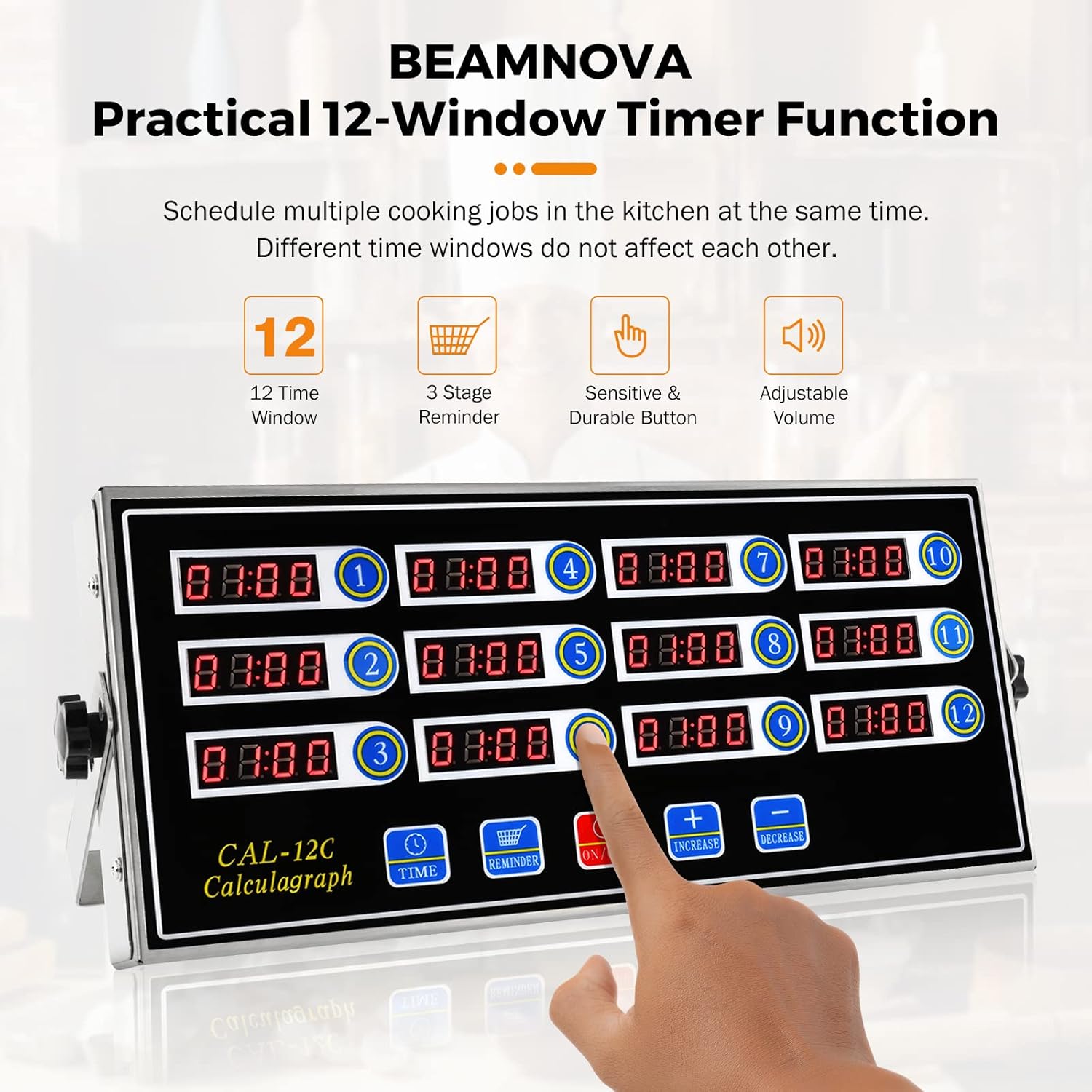
Figure 2: Overview of the timer's practical functions and design elements.

Figure 3: Close-up of user-friendly design features including the adjustable bracket, loud buzzer, waterproof panel, and stainless steel body.
Video 1: This video demonstrates the adjustable loud ringing, waterproof panel, three-level height adjustable bracket, and stainless steel body of the BEAMNOVA 12-Channel Digital Kitchen Timer.
3. Setup
3.1 Unpacking
Carefully remove the timer from its packaging. Inspect for any damage. Retain packaging for future storage or transport.
3.2 Placement
The timer can be placed in various configurations:
- Lay Flat on a Table: Position the timer directly on a stable, flat surface.
- Standing on a Table: Utilize the integrated bracket to prop the timer upright. The bracket has three holes for adjusting the height and angle. Secure the desired position by tightening the knob on the side.
- Wall Mounted: The timer can be mounted to a wall using appropriate hardware (not included) and the integrated bracket. Ensure the mounting surface is secure.

Figure 4: Examples of the timer being laid flat, standing on a table, and wall-mounted.
3.3 Power Connection
Connect the power cord to a suitable electrical outlet. The timer will power on and display the current settings or default values.
4. Operating Instructions
This section details how to operate your BEAMNOVA 12-Channel Digital Kitchen Timer. Refer to Video 2 for visual guidance on these steps.
Video 2: This video provides a step-by-step guide on how to operate the BEAMNOVA 12-Channel Digital Kitchen Timer, including volume adjustment, mode switching, countdown setting, and multiple reminder setup.
4.1 General Controls
- TIME Button: Used to enter the total time setting mode for a selected channel.
- REMINDER Button: Used to enter the reminder (interval) time setting mode for a selected channel.
- ON/OFF Button: Powers the unit on or off.
- INCREASE (+) Button: Increases the time value during setting.
- DECREASE (-) Button: Decreases the time value during setting and saves settings.
- Number Keys (1-12): Select individual timer channels.
4.2 Adjusting Volume
To adjust the alarm volume:
- While the timer is operating, press the INCREASE (+) button to increase the volume.
- Press the DECREASE (-) button to decrease the volume.
4.3 Switching Time Modes (Min-Sec / Hr-Min)
The timer can display time in either minutes-seconds (N-S) or hours-minutes (H-N) format.
- Ensure the timer is in the shutdown state.
- Hold the TIME button until "N-S" or "H-N" is displayed on the screen.
- Press any number key (1-12) to cycle through the channels. The display for each channel will show its current mode.
- To switch a channel's mode, press the corresponding number key twice. For example, pressing '1' twice will toggle channel 1 between "N-S" and "H-N".
- Press the DECREASE (-) button to save the selected mode.
4.4 Setting a Countdown Timer
Each of the 12 channels can be set independently.
- Press the TIME button to enter the total time setting mode.
- Press the number key (1-12) for the channel you wish to set. The display for that channel will flash.
- Use the INCREASE (+) and DECREASE (-) buttons to adjust the desired time.
- Press the TIME button again to confirm and save the setting.
- To start the countdown, press the corresponding number key for the channel. Pressing it again will pause/resume.
4.5 Setting Multiple Reminders (Interval Reminders)
Each channel can have up to three interval reminders (AL-1, AL-2, AL-3) in addition to the main countdown.
- Press the REMINDER button to enter the reminder setting mode.
- Press the number key (1-12) for the channel you wish to set. The display will show "AL-1".
- Use the INCREASE (+) and DECREASE (-) buttons to set the time for the first reminder (AL-1).
- Press the REMINDER button again to move to the second reminder (AL-2). Repeat the setting process.
- Press the REMINDER button a third time to move to the third reminder (AL-3). Repeat the setting process.
- After setting all desired reminders, press the DECREASE (-) button to save.
5. Maintenance
5.1 Cleaning
The timer features a waterproof panel, making it easy to clean. Wipe the surface with a damp cloth and mild detergent if necessary. Avoid abrasive cleaners or harsh chemicals that could damage the display or finish.
5.2 Material Care
The stainless steel body is designed to resist corrosion from kitchen fumes. Regular cleaning will help maintain its appearance and longevity.
6. Troubleshooting
- Timer Not Powering On: Ensure the power cord is securely plugged into both the timer and a functional electrical outlet.
- Alarm Not Audible: Check the volume setting as described in Section 4.2. Increase the volume if it is too low.
- Incorrect Time Display (e.g., minutes instead of hours): Verify the time mode setting (Min-Sec / Hr-Min) for the affected channel as described in Section 4.3.
- Buttons Unresponsive: If individual buttons become unresponsive, ensure the panel is clean and dry. If the issue persists, contact customer support.
- Timer Malfunction: For any persistent issues or unexpected behavior, refer to the warranty and support information.
7. Specifications
| Specification | Detail |
|---|---|
| Brand | BEAMNOVA |
| Model Number | BI0B02M701 |
| Material | Metal, Stainless Steel |
| Product Dimensions | 2"D x 9"W x 5"H (50mm D x 230mm W x 130mm H) |
| Item Weight | 2.01 Pounds (approx. 0.91 kg) |
| Number of Channels | 12 |
| Time Range | 0-99 minutes 59 seconds or 0-99 hours 59 minutes |
| UPC | 769135210547 |
8. Warranty and Support
For warranty information, technical assistance, or any product-related inquiries, please contact BEAMNOVA customer support. Keep your purchase receipt and product model number (BI0B02M701) handy when contacting support.