
1. Introduction
This user manual provides essential information for the proper installation, operation, and maintenance of your FITHOOD Replacement Battery. Please read this manual thoroughly before using the battery to ensure safe and efficient performance. This battery is designed as a high-quality replacement for specific Garmin dog tracking system models.
2. Product Overview
Key Features
- High quality replacement battery for GARMIN Dog Collar systems.
- Battery Specifications: Capacity: 2600mAh, WH: 9.62Wh, Type: Li-ion, Voltage: 3.7V.
- Features a new fully decoded chip that functions identically to the original battery.
- Dimensions: 66.00 x 18.35mm; Weight: 80g / 2.82oz.
- All batteries are Certificated with ISO9001, RoHS, and CE for quality and safety assurance.
Compatible Models
- GARMIN DC40 battery
- GARMIN DC30 battery
- GARMIN Astro System DC20 battery
- GARMIN DC20 battery
- GARMIN Dog Tracking DC 20 battery
Compatible Battery Part Numbers
- 010-10806-0
- 010-10806-00
- 010-10806-01
- 010-10806-20
- 361-00029-00
Product Images
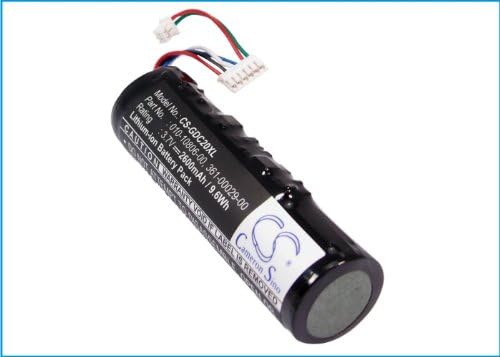
Front view of the FITHOOD replacement battery, highlighting the model number CS-GDC20XL and capacity.

Angled view of the battery, emphasizing the connector and wiring for installation.
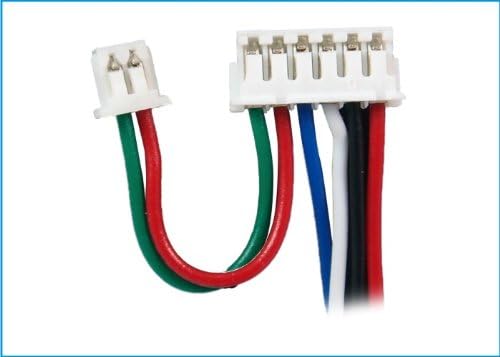
Detailed close-up of the battery's white connector plug and colored wires (red, green, blue, white, black) for precise connection.
3. Setup
Unpacking
- Carefully remove the battery from its packaging.
- Inspect the battery for any visible damage. Do not use if damaged.
- Retain packaging materials for future storage or return if necessary.
Initial Charge
It is recommended to fully charge the battery before its first use to optimize performance and battery life.
- Install the battery into your compatible Garmin device as per the device's specific instructions.
- Connect your Garmin device to its original charger.
- Allow the device to charge until the battery indicator shows a full charge.
4. Operating Instructions
Installation
Refer to your Garmin device's original user manual for specific battery compartment access and installation procedures. The general steps are as follows:
- Ensure your Garmin device is powered off before beginning installation.
- Locate and open the battery compartment on your Garmin device.
- Carefully disconnect and remove the old battery.
- Align the connector of the FITHOOD replacement battery with the port inside the device and gently push until it clicks into place. Ensure the connection is secure.
- Carefully place the battery into the compartment, ensuring no wires are pinched.
- Close the battery compartment securely.
- Power on your Garmin device to confirm proper installation.
Usage Tips
- Always use the original or a certified compatible charger for your Garmin device.
- Avoid completely draining the battery frequently, as this can reduce its overall lifespan.
- If the device will not be used for an extended period, store the battery with approximately 50% charge.
- Operating the device in extreme temperatures (very hot or very cold) can affect battery performance and lifespan.
5. Maintenance
Storage
- Store the battery in a cool, dry place away from direct sunlight and extreme temperatures.
- For long-term storage, charge the battery to about 50% capacity.
- Avoid storing the battery in a fully charged or fully discharged state for prolonged periods.
Cleaning
- Ensure the battery is disconnected from the device before cleaning.
- Wipe the battery's exterior with a clean, dry, soft cloth.
- Do not use liquid cleaners or solvents, as they may damage the battery or its contacts.
6. Troubleshooting
| Problem | Possible Solution |
|---|---|
| Battery not charging. |
|
| Short battery life. |
|
| Device does not power on after battery installation. |
|
7. Specifications
| Attribute | Value |
|---|---|
| Brand | FITHOOD |
| Model Number | CS-GDC20XL |
| Battery Cell Composition | Lithium Ion |
| Battery Capacity | 2600 Milliampere Hour (mAh) |
| Voltage | 3.7V |
| Watt-hours (Wh) | 9.62Wh |
| Item Weight | 2.82 ounces |
| Dimensions | 66.00 x 18.35mm |
| Number of Batteries | 1 Lithium Ion batteries required. (included) |
| Certifications | ISO9001, RoHS, CE |
8. Warranty Information
FITHOOD replacement batteries are manufactured to high-quality standards and are certified with ISO9001, RoHS, and CE, ensuring toxic-free materials and quality assurance. While specific warranty terms may vary, these certifications attest to the product's adherence to international safety and quality benchmarks. For detailed warranty claims or information, please refer to your purchase documentation or contact customer support.
9. Support
If you encounter any issues or have questions regarding your FITHOOD Replacement Battery, please ensure both the model and battery part number are matched with your device before contacting support. If you are unsure about compatibility or require further assistance, please send an email to us with your battery details or pictures. Our professional support team will provide guidance and suggestions.
For the most up-to-date support information, please visit the official FITHOOD website or refer to the contact details provided with your purchase.