
1. Product Overview
The Philips 20W Equivalent T4 G8 Bi-Pin Base LED Special Purpose Light Bulb offers long life and significant energy savings compared to traditional halogen T4 capsules. It features a compact form factor and is ideal for various applications including landscape lighting, accent lighting, and puck lighting. This LED bulb provides bright, energy-efficient illumination with a G8 bi-pin base for easy installation.

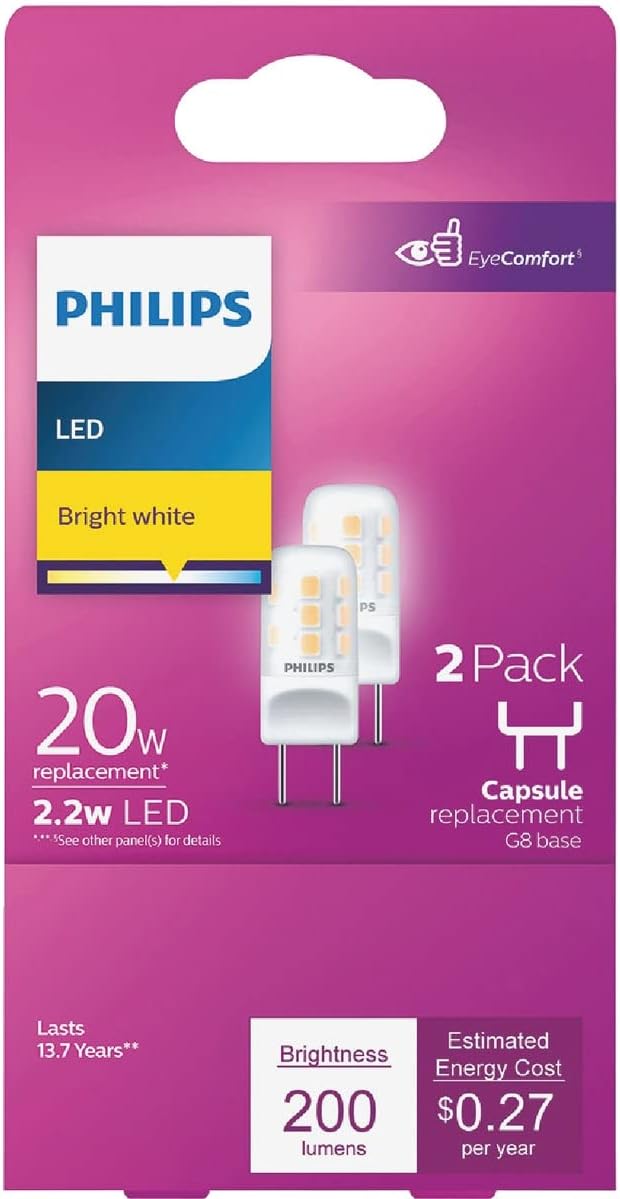
This image shows the retail packaging for the Philips 20W Equivalent T4 G8 Bi-Pin Base LED Light Bulb, sold as a 2-pack. The packaging highlights key features such as 'LED', 'Bright white', '20W replacement', '2.2W LED', '2 Pack', and 'G8 base capsule replacement'. It also indicates a lifespan of '13.7 Years' and brightness of '200 lumens' with an estimated energy cost of '$0.27 per year'.
2. Setup and Installation
Before installing, ensure the power to the fixture is turned off at the circuit breaker to prevent electrical shock. These bulbs are designed for fixtures with a G8 bi-pin base. Always handle the bulb by its plastic or ceramic base, avoiding contact with the glass or LED components.
- Power Off: Turn off the power to the light fixture at the main circuit breaker or wall switch.
- Remove Old Bulb: Allow the old bulb to cool completely before attempting to remove it. Gently pull the old G8 bi-pin bulb straight out from its socket. Do not twist.
- Insert New Bulb: Align the two pins of the new Philips LED bulb with the holes in the G8 socket. Gently push the bulb straight into the socket until it is fully seated. Do not force the bulb.
- Restore Power: Once the bulb is securely in place, restore power to the fixture.
- Test: Turn on the light switch to confirm the bulb is working correctly.
Important Safety Note: This bulb is not designed for use with dimmers unless explicitly stated on the product packaging or specifications. Using it with an incompatible dimmer may cause flickering or damage to the bulb.
This image provides a close-up view of a single Philips T4 G8 Bi-Pin LED light bulb. The bulb features a compact, rectangular shape with two metal pins extending from the base for electrical connection. The LED chips are visible on the surface, and the Philips logo is printed on the side.
3. Operation
The Philips T4 G8 Bi-Pin LED bulb operates like a standard light bulb. Once properly installed and power is supplied to the fixture, it will illuminate when the light switch is turned to the 'ON' position. To turn off the light, simply flip the switch to the 'OFF' position.
This LED bulb provides a consistent 'Bright White' light at 3000 Kelvin. Based on customer feedback, these bulbs are generally not dimmable. If dimming functionality is required, please verify compatibility with your specific dimmer switch and consult the manufacturer's guidelines for dimmable LED G8 bulbs.
4. Maintenance
Philips LED bulbs are designed for long-term, maintenance-free operation. However, occasional cleaning may be necessary to maintain optimal light output.
- Cleaning: Before cleaning, ensure the power to the fixture is off and the bulb has cooled down. Use a soft, dry, lint-free cloth to gently wipe the surface of the bulb. Do not use liquid cleaners, abrasive cleaners, or sprays directly on the bulb.
- Replacement: Due to their long lifespan, frequent replacement is not expected. If a bulb needs replacement, follow the installation steps outlined in Section 2.
5. Troubleshooting
If your Philips LED bulb is not functioning as expected, consider the following troubleshooting steps:
- Bulb Not Lighting:
- Ensure the power switch is in the 'ON' position.
- Check the circuit breaker to ensure power is supplied to the fixture.
- Verify that the bulb is fully and correctly seated in the G8 socket. Gently push it in further if it feels loose.
- Test the bulb in another compatible fixture, if available, to determine if the issue is with the bulb or the fixture.
- Flickering:
- Flickering can occur if the bulb is used with an incompatible dimmer switch. Ensure your fixture is not connected to a dimmer, or that the dimmer is compatible with non-dimmable LED bulbs.
- Check for loose connections in the fixture or wiring.
- Reduced Brightness:
- Ensure the bulb's surface is clean and free of dust or debris.
- Verify the fixture's voltage matches the bulb's specified voltage (120 Volts).
If these steps do not resolve the issue, contact Philips customer support for further assistance.
6. Technical Specifications
| Feature | Specification |
|---|---|
| Brand | PHILIPS |
| Model Number | 479212 |
| Light Type | LED |
| Equivalent Wattage | 20W (replaces 20W incandescent) |
| Actual Wattage | 2.2W |
| Bulb Shape Size | T4 |
| Bulb Base | G8 Bi-Pin |
| Light Color | Bright White |
| Color Temperature | 3000 Kelvin |
| Brightness | 200 Lumens |
| Voltage | 120 Volts |
| Product Dimensions | 3.9 x 5.3 x 0.65 inches |
| Item Weight | 0.634 ounces |
| Quantity | 2 bulbs per pack |
| UPC | 046677479213 |
| Special Feature | Energy Efficient |
7. Warranty and Support
For information regarding the product warranty, please refer to the official Philips website or the warranty documentation included with your purchase. Philips provides customer support for product inquiries, technical assistance, and warranty claims.
Contact Information: Please visit the official PHILIPS website or refer to the contact details provided on the product packaging for the most current support information.


