
Introduction
The Sony WF-1000XM3 earbuds offer industry-leading noise canceling technology, powered by Sony’s proprietary HD Noise Canceling Processor QN1e. Designed for a truly wireless experience, these earbuds combine advanced audio processing with smart features for enhanced listening and communication. This manual provides essential information for setting up, operating, and maintaining your WF-1000XM3 earbuds.
What's in the Box
- Charging Case
- Triple Comfort Earbuds (S, M, L × 2)
- Long Hybrid Silicone Rubber Earbuds (SS, S, M, L × 2)
- Warranty Card
- Operating Instruction (this manual)
- Reference Guide
- USB Type-C™ cable (Approx. 20cm)
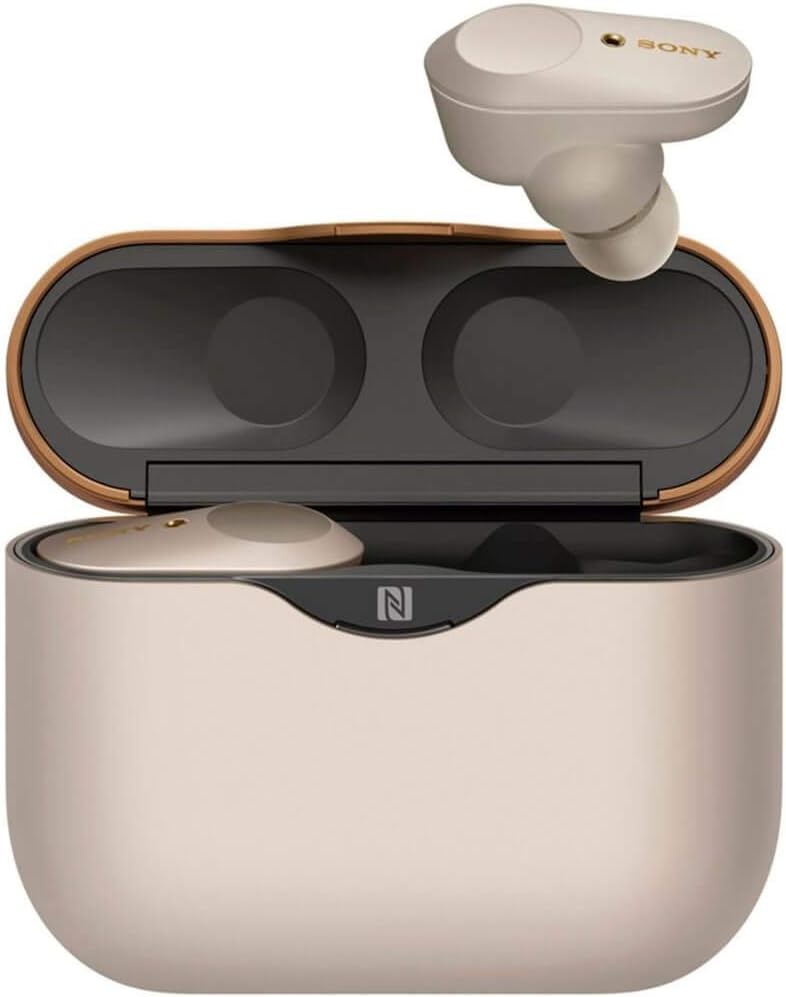
Image: Sony WF-1000XM3 earbuds, charging case, and various ear tip sizes included in the package.
Setup
1. Initial Charging
Before first use, fully charge the earbuds and the charging case. Connect the USB Type-C™ cable to the charging case and a USB power source. The indicator light on the case will show charging status.
2. Fitting the Earbuds
Select the earbud tips that provide the most comfortable and secure fit for your ears. A proper fit is crucial for optimal sound quality and noise canceling performance. Gently twist the earbuds into your ears to ensure a secure seal.

Image: A person demonstrating the correct way to insert a Sony WF-1000XM3 earbud into their ear for a secure fit.
3. Pairing with a Device
The earbuds will automatically turn on and enter pairing mode once removed from the charging case. On your device (smartphone, tablet, etc.), go to Bluetooth settings and select "WF-1000XM3" from the list of available devices. For NFC-enabled devices, simply tap your device to the charging case to initiate pairing.
For advanced settings and customization, download the "Sony | Headphones Connect" app for Android/iOS.
Video: An instructional video demonstrating the setup and basic usage of the Sony WF-1000XM3 earbuds.
Operating the Earbuds
Touch Controls
The WF-1000XM3 earbuds feature intuitive touch controls on each earbud for various functions:
- Play/Pause: Single tap on the right earbud.
- Next Track: Double tap on the right earbud.
- Previous Track: Triple tap on the right earbud.
- Noise Canceling/Ambient Sound Mode: Single tap on the left earbud to cycle through modes.
- Quick Attention Mode: Place your hand over the left earbud to instantly lower volume and hear ambient sound.
- Voice Assistant (Alexa/Google Assistant): Tap and hold the right earbud to activate.
- Answer/End Call: Double tap on either earbud.

Image: A visual representation of the touch control areas on the Sony WF-1000XM3 earbuds and their corresponding functions.
Noise Canceling and Ambient Sound
The WF-1000XM3 offers three sound modes:
- Noise Canceling: Blocks out ambient noise for an immersive listening experience.
- Ambient Sound Mode: Allows you to hear your surroundings while still enjoying your audio. The level of ambient sound can be adjusted via the Sony | Headphones Connect app.
- Off: Disables both noise canceling and ambient sound.
Use the Sony | Headphones Connect app to customize these settings, including Adaptive Sound Control, which automatically adjusts ambient sound settings based on your activity (e.g., walking, traveling, waiting).
Video: A promotional video highlighting the noise-canceling capabilities and truly wireless freedom of the Sony WF-1000XM3 earbuds.
Charging
The earbuds provide up to 6 hours of playback with noise canceling on, and up to 8 hours with noise canceling off. The portable charging case offers an additional 3 charges, extending total battery life up to 24 hours (with NC on) or 32 hours (with NC off).
- Earbud Charging: Place the earbuds into the charging case. They will magnetically snap into place and begin charging.
- Case Charging: Connect the USB Type-C™ cable to the charging port on the back of the case and a USB power source.
- Quick Charge: A 10-minute quick charge provides approximately 90 minutes of playback.

Image: The closed Sony WF-1000XM3 charging case, indicating its compact and portable design.
Maintenance
To ensure longevity and optimal performance of your earbuds:
- Cleaning: Regularly clean the earbud tips and the mesh filters to prevent wax buildup. Use a soft, dry cloth. Do not use liquids or harsh chemicals.
- Ear Tip Replacement: If the earbud tips become worn or damaged, replace them with new ones from the included set or genuine Sony replacements. Ensure the new tips are securely attached.
- Storage: When not in use, store the earbuds in their charging case to protect them from dust and damage.
- Water Resistance: These earbuds are not water resistant. Avoid exposure to water, sweat, or high humidity.
Troubleshooting
No Sound/Poor Sound Quality
- Ensure earbuds are properly seated in your ears with a good seal. Try different ear tip sizes.
- Check Bluetooth connection and ensure earbuds are paired correctly.
- Verify volume levels on both your device and the earbuds.
Noise Canceling Not Effective
- Ensure earbuds are properly fitted and creating a tight seal in your ear canals.
- Check the noise canceling mode in the Sony | Headphones Connect app.
Earbuds Not Charging
- Ensure earbuds are correctly placed in the charging case and the charging contacts are clean.
- Verify the charging case itself has sufficient battery or is connected to a power source.
- Use the provided USB Type-C™ cable.
Specifications
| Brand | Sony |
| Model Name | WF-1000XM3 |
| Ear Placement | In Ear |
| Noise Control | Active Noise Cancellation |
| Connectivity Technology | Bluetooth, NFC |
| Bluetooth Version | 5.0 |
| Bluetooth Range | 10 Meters |
| Battery Average Life | 8 Hours (earbuds, NC off) |
| Battery Charge Time | Approx. 1.5 hours (earbuds), Approx. 3.5 hours (case) |
| Control Method | Touch, Voice |
| Water Resistance Level | Not Water Resistant |
| Item Weight | 4 Grams (each earbud) |
Warranty and Support
Warranty Information
The Sony WF-1000XM3 earbuds come with a 1-year limited warranty. Please refer to the included Warranty Card for full details on coverage and terms.
Customer Support
For further assistance, troubleshooting, or product inquiries, please visit the official Sony support website or contact Sony customer service. Links to support resources can typically be found in the Reference Guide or on the Sony website.


