
1. Introduction
Thank you for choosing the ALASKA MAC2320C Portable Air Conditioner. This manual provides important information for the proper use, maintenance, and troubleshooting of your appliance. Please read it thoroughly before operation and keep it for future reference.
The ALASKA MAC2320C is a versatile portable air conditioner designed for cooling, ventilation, and dehumidification of rooms up to 15 m2. It features an energy efficiency class A rating, a 3-level fan, LED display, 24-hour timer, and comes with a remote control for convenient operation.
2. Safety Instructions
Always follow basic safety precautions when using electrical appliances to reduce the risk of fire, electric shock, and injury to persons.
- Read all instructions before using the appliance.
- Ensure the power supply matches the voltage specified on the rating label.
- Do not operate the unit with a damaged cord or plug.
- Keep the appliance away from heat sources and direct sunlight.
- Do not block air inlets or outlets.
- This appliance uses R290 refrigerant, which is flammable. Handle with care and ensure proper ventilation.
- Only use the appliance in an upright position.
- Unplug the unit before cleaning or maintenance.
3. Package Contents
Please check the package contents upon unpacking:
- ALASKA MAC2320C Portable Air Conditioner Unit
- Remote Control (requires 2 x 1.5V DC AAA batteries, included)
- Extendable Air Outlet Hose (1.5 m)
- Window Kit (if applicable, not explicitly mentioned but common)
- User Manual (this document)
4. Setup
Follow these steps to set up your portable air conditioner:
- Placement: Place the unit on a flat, stable surface. Ensure there is at least 30 cm (12 inches) of space around the unit for proper air circulation. The unit is equipped with 4 transport wheels for easy movement.
- Exhaust Hose Installation: Attach the extendable air outlet hose to the exhaust port on the back of the unit. Extend the hose and direct the hot air outside through a window or door opening. Use the provided window kit (if included) for a more secure and efficient seal.
- Power Connection: Plug the power cord into a grounded electrical outlet. Ensure the outlet meets the power requirements of the unit (2300 W, 2.3E+2 Volts AC).

Figure 4.1: Front view of the ALASKA MAC2320C Portable Air Conditioner, showing the top control panel and air outlet.
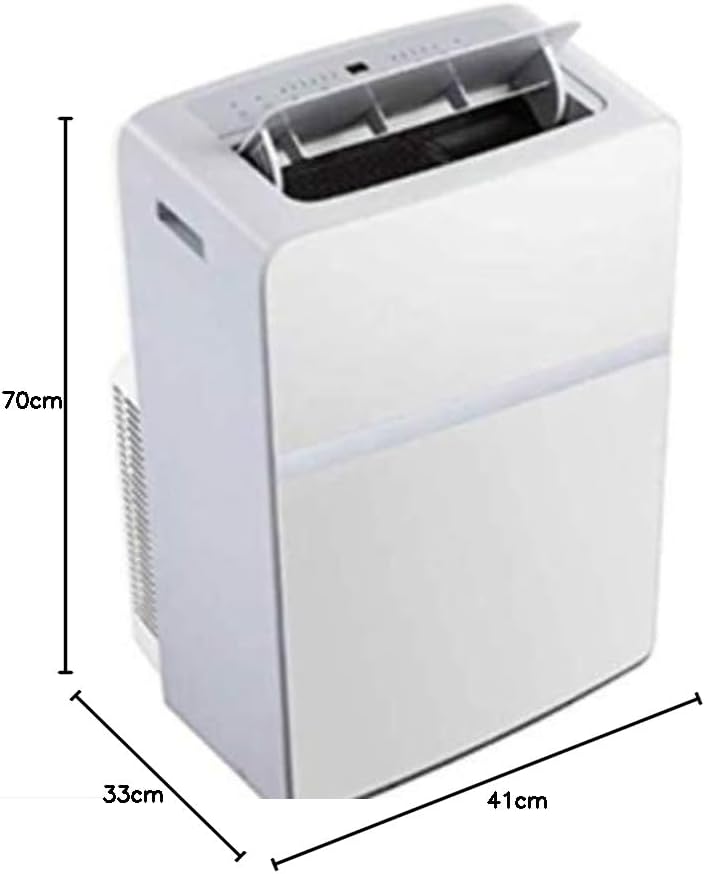
Figure 4.2: Side view of the ALASKA MAC2320C Portable Air Conditioner, illustrating its dimensions: approximately 70cm height, 41cm width, and 33cm depth.
5. Operating Instructions
5.1 Control Panel and Remote Control
The unit can be operated via the LED display control panel on top of the unit or the included remote control.
5.2 Operating Modes
- Cooling Mode: Select cooling mode to lower the room temperature. Adjust the desired temperature between 16 °C and 32 °C.
- Fan Mode: Circulates air without cooling. Choose from 3 fan speed levels (low, medium, high).
- Dehumidification Mode: Removes excess moisture from the air.
5.3 Timer Function
The 24-hour timer allows you to set the unit to turn on or off automatically after a specified period.
5.4 Sleep Function
Activate the sleep function for quieter operation and gradual temperature adjustment during the night.
6. Maintenance
Regular maintenance ensures optimal performance and extends the lifespan of your air conditioner.
- Cleaning the Air Filter: The unit has a washable air filter. Clean it every two weeks or more frequently depending on usage.
- Unplug the unit from the power outlet.
- Remove the air filter from its housing.
- Wash the filter with lukewarm water and mild detergent.
- Rinse thoroughly and allow it to air dry completely before reinserting.
- Draining Water: In dehumidification mode or high humidity, the unit may accumulate water. Refer to the specific instructions in your full manual for draining procedures.
- External Cleaning: Wipe the exterior of the unit with a soft, damp cloth. Do not use harsh chemicals or abrasive cleaners.
7. Troubleshooting
Before contacting customer service, please refer to the following common issues and solutions:
| Problem | Possible Cause | Solution |
|---|---|---|
| Unit does not turn on | No power supply; Power cord not plugged in; Circuit breaker tripped | Check power connection; Reset circuit breaker |
| Insufficient cooling | Air filter dirty; Exhaust hose blocked or improperly installed; Room size too large | Clean air filter; Check hose for kinks/blockages and proper installation; Ensure room size is within 15 m2 |
| Unit is noisy | Unit not on a flat surface; Fan obstruction | Place on a flat surface; Check for obstructions in fan area |
8. Specifications
| Feature | Detail |
|---|---|
| Model Number | MAC 2320 C |
| Cooling Capacity | 2300 W (8000 BTU/h) |
| Refrigerant | R290 |
| Energy Efficiency Class | A |
| Room Size (Max) | 15 m2 |
| Temperature Range | 16 – 32 °C |
| Air Circulation | 380 m3/h |
| Fan Speeds | 3 levels |
| Power Supply | 2.3E+2 Volts (AC) |
| Power Consumption | 2300 W |
| Dimensions (L x W x H) | 70 x 41 x 33.5 cm (approx.) |
| Control Method | LED Display, Remote Control |
| Special Features | 24-hour timer, Sleep function, Washable air filter, Cable storage, 4 transport wheels, 1.5m extendable air outlet hose |
9. Warranty and Support
This product comes with a limited warranty. For detailed warranty information and customer support, please refer to the warranty card included with your purchase or visit the official ALASKA website. Please have your model number (MAC 2320 C) and purchase date ready when contacting support.
For technical assistance or spare parts, please contact your local ALASKA service center.
