
1. Introduction
The Little Experimenter Interactive 9-inch Talking Globe is an educational tool designed to introduce children to geography and world facts. It features a wireless smart pen that interacts with the globe to provide information and engage users with trivia questions.

Image: Two children engaging with the interactive globe and smart pen.
2. Package Contents
- 1 x Interactive 9-inch Globe
- 1 x Wireless Smart Pen
- 1 x User Manual (this document)

Image: Product packaging highlighting features and warranty.
3. Setup
- Unboxing: Carefully remove all components from the packaging. Ensure all listed items in Section 2 are present.
- Battery Installation (Smart Pen): The Smart Pen requires batteries (not included). Open the battery compartment on the pen, insert the required batteries, and close the compartment securely.
- Globe Placement: Place the globe on a stable, flat surface. The non-tip desktop base ensures stability during use.
Video: An unboxing and initial setup demonstration of the Little Experimenter Talking Globe.
4. Operating Instructions
4.1 Smart Pen Functions
The Smart Pen is the primary interface for interacting with the globe. Familiarize yourself with its buttons:
- Power On/Off Button: Press to turn the pen on or off.
- Volume Control: Adjusts the audio output level.
- Mode Selection: Cycles through different information modes (Country, Area, Capital, Geography, National Anthem, Language, Population, Currency, Area Code, Climate).
- Repeat Button: Repeats the last spoken information.
- Stop Button: Stops current audio playback.
- Sensor Tip: The tip of the pen used to touch points on the globe.

Image: Detailed view of the Smart Pen with labeled functions.
4.2 Interacting with the Globe
- Turn on the Smart Pen using the Power On/Off button.
- Select your desired information mode (e.g., 'Country' or 'Capital') by pressing the Mode Selection button on the pen or the corresponding icon on the globe's base.
- Gently touch the Sensor Tip of the Smart Pen to any country, ocean, or specific point of interest on the globe.
- The pen will audibly provide information relevant to the selected mode and touched location.
- To play a trivia game, select the 'Trivia' mode (represented by a question mark icon) and follow the audio prompts. The globe features 300 trivia questions.
Video: A child demonstrating how to use the Smart Pen to interact with the globe and learn facts.
Video: Demonstration of the talking globe's interactive features and trivia questions.
5. Features
- Interactive Smart Pen: Provides real-time audio information about countries, capitals, geography, national anthems, languages, populations, currencies, area codes, and climate.
- Engaging Trivia Questions: Includes 300 trivia questions to test knowledge and encourage learning.
- Educational Content: Covers a wide range of geographical and cultural facts.
- Versatile Use: Suitable for home learning or classroom environments.
- Durable Design: Features a non-tip desktop base for stability.
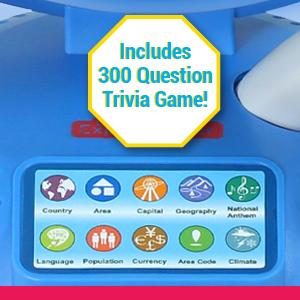
Image: Close-up of the globe highlighting its detailed map.
6. Maintenance
- Cleaning: Wipe the globe and Smart Pen with a soft, dry cloth. Do not use abrasive cleaners or immerse in water.
- Storage: Store the globe and pen in a cool, dry place away from direct sunlight when not in use.
- Battery Care: Remove batteries from the Smart Pen if it will not be used for an extended period to prevent leakage.
7. Troubleshooting
- No Sound from Smart Pen:
- Ensure the pen is powered on.
- Check battery levels and replace if necessary.
- Adjust the volume using the volume control buttons on the pen.
- Incorrect Information/No Response:
- Ensure the Smart Pen's sensor tip is making firm contact with the globe surface.
- Verify that the correct mode is selected for the information you are seeking.
- Restart the Smart Pen.
- Pen Not Reading Specific Areas:
- Ensure the globe surface is clean and free from obstructions.
- Try touching the area multiple times with firm, gentle pressure.
Video: A user experiencing a potential issue with the globe's functionality, which may be useful for troubleshooting.
8. Specifications
| Feature | Detail |
|---|---|
| Model Number | LE-2602 |
| Item Diameter | 9 Inches (22.5 cm) |
| Base Material | Plastic |
| Globe Material | Plastic |
| Item Weight | 1.7 pounds (0.77 Kilograms) |
| Batteries Required | Yes (for Smart Pen, not included) |
| Map Type | Interactive World Map |
| Color | Blue |

Image: The globe with its 8.9-inch diameter indicated.
9. Warranty and Support
The Little Experimenter Interactive 9-inch Talking Globe comes with a 90-day warranty from the date of purchase. This warranty covers manufacturing defects under normal use.
For technical support, troubleshooting assistance, or warranty claims, please contact Little Experimenter customer service through their official website or the contact information provided in your product packaging.

Image: Little Experimenter brand logo.