
Introduction
Thank you for choosing the LORA TAP Smart Wi-Fi Roller Shutter Switch. This device allows you to control your roller shutters, blinds, or awnings conveniently via touch, a smartphone application, or voice commands through Amazon Alexa and Google Home. This manual provides essential information for safe installation, operation, and maintenance of your smart switch.
The switch features an updated function for adjusting the motor's operation time, enabling partial opening or closing (e.g., 30% or 50%) by setting the duration in the Smart Life app.

This image displays the LORA TAP Smart Wi-Fi Roller Shutter Switch, highlighting its key features such as remote control via a smartphone app, integrated timer functions, responsive touch control, and compatibility with voice assistants.
Setup
1. Compatibility Check
This switch is compatible only with 4-wire motors (2 output wires, 1 neutral wire, 1 ground wire). It is not compatible with 3-wire motors or motors that already have a remote control device.
2. Wiring Diagram and Installation
Important: Installation should be performed by a qualified electrician to ensure safety and proper functionality. Always turn off the main power supply before installation.
- Ensure the power is off at the circuit breaker.
- Connect the wires according to the diagram provided. The switch requires a live wire (L) and a neutral wire (N) for power, and two output wires (L1, L2) for the motor (Up/Down).
- Mount the switch securely into the wall box.
- Attach the tempered glass panel.
- Restore power and test the switch manually.

This image showcases the safety and durability of the LORA TAP Smart Wi-Fi Roller Shutter Switch, featuring a tempered glass panel that allows safe operation even with wet hands. It also provides detailed dimensions and a clear wiring diagram for installation.
3. App Pairing (Smart Life / Tuya App)
- Download the 'Smart Life' or 'Tuya Smart' app from your smartphone's app store (iOS or Android).
- Register or log in to your account.
- Ensure your Wi-Fi network is 2.4 GHz (802.11 b/g/n). The switch does not support 5 GHz Wi-Fi.
- Follow the in-app instructions to add a new device. Typically, this involves putting the switch into pairing mode (often by pressing and holding a button until an indicator light flashes).
- Once paired, you can rename the switch and configure its settings.
Operating Instructions
1. Touch Control
The switch features a responsive touch panel. Simply touch the 'Up' arrow to open, 'Down' arrow to close, or the 'Pause' button to stop the shutter at any position. The LED indicators will light up only when touched, ensuring no disturbance during sleep.

This image highlights the intelligent LED design of the LORA TAP Smart Wi-Fi Roller Shutter Switch. The LED indicators only illuminate when touched, ensuring no disruptive light during sleep.
2. App Control (Smart Life / Tuya App)
- Remote Control: Control your shutters from anywhere using the app.
- Scheduling: Set specific times for your shutters to open or close automatically.
- Partial Opening/Closing: Adjust the motor's operation time in the app to achieve desired partial opening percentages (e.g., 30%, 50%).
- Group Control: Control up to 20 switches simultaneously by grouping them in the app.
- Device Sharing: Share control of the switch with family members through the app.

This image illustrates the convenience of scheduling your roller shutters and controlling them with voice commands through Amazon Alexa. You can program opening and closing times, or use phrases like 'Alexa, open the roller blind at 7 AM tomorrow morning'.

This image demonstrates the device sharing capability of the LORA TAP Smart Wi-Fi Roller Shutter Switch, allowing multiple family members to control the switch from their own devices.
3. Voice Control (Alexa & Google Home)
The LORA TAP Smart Wi-Fi Roller Shutter Switch is compatible with Amazon Alexa and Google Home for hands-free voice control. Ensure your switch is linked to your Alexa or Google Home account via the Smart Life/Tuya app.
- To Open: Say "Alexa/Hey Google, turn on [Switch Name]" or "Alexa/Hey Google, open [Switch Name]".
- To Close: Say "Alexa/Hey Google, turn off [Switch Name]" or "Alexa/Hey Google, close [Switch Name]".
- To Stop: You can create routines in Alexa to temporarily stop the shutter via voice.
Maintenance
The tempered glass panel is durable and easy to clean. Use a soft, damp cloth to wipe the surface. Avoid abrasive cleaners or harsh chemicals that could damage the finish. The switch has an IP41 international protection rating, indicating protection against solid objects larger than 1mm and vertically falling drops of water.
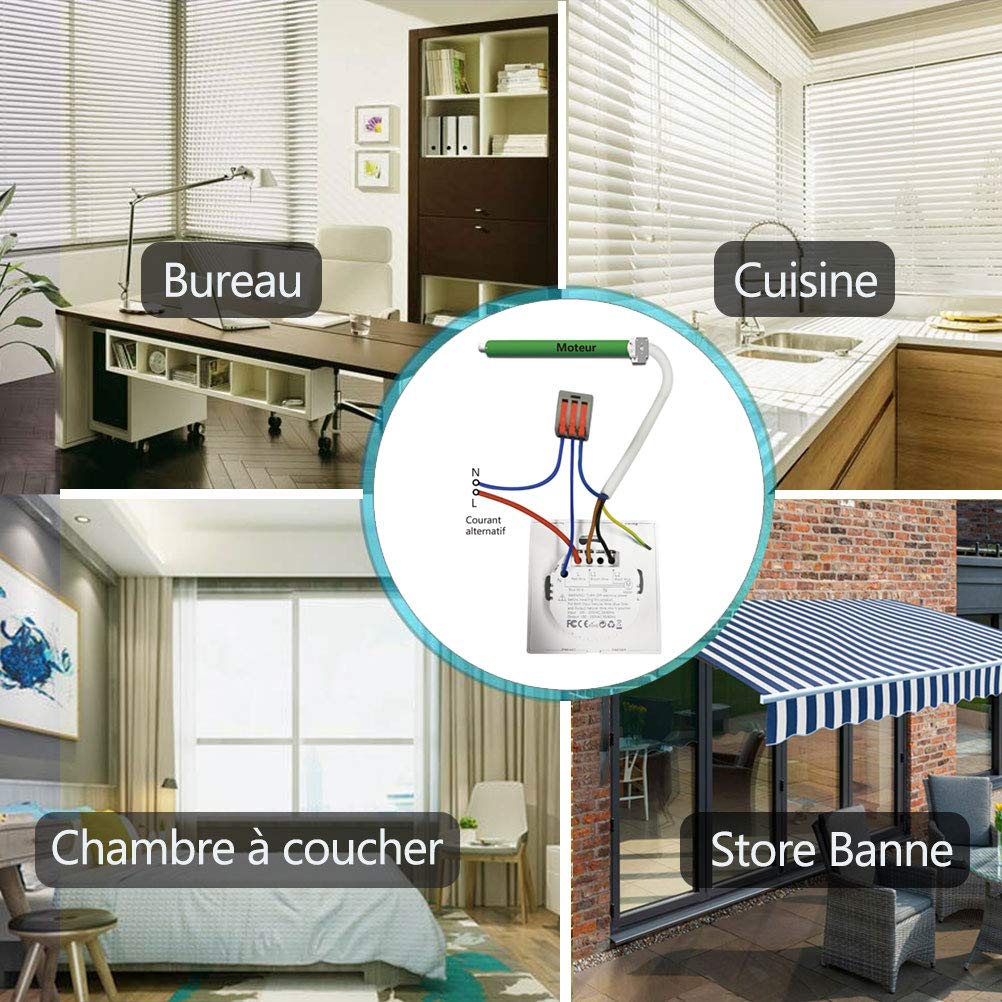
This image illustrates the versatility of the LORA TAP Smart Wi-Fi Roller Shutter Switch, suitable for controlling roller shutters in various environments such as offices, kitchens, bedrooms, and even outdoor awnings.
Troubleshooting
- Switch not responding: Check power supply. Ensure Wi-Fi connection is stable and 2.4 GHz. Re-pair with the app if necessary.
- Voice control not working: Verify the switch name in the Smart Life/Tuya app matches the name used in Alexa/Google Home. Ensure the smart assistant device is connected to the internet.
- Motor not moving: Confirm the motor is a 4-wire type. Check all wiring connections are secure and correct according to the diagram.
- Partial opening/closing inaccurate: Adjust the motor operation time settings within the Smart Life/Tuya app.
Specifications
| Feature | Specification |
|---|---|
| Brand | LORA TAP |
| Model Number | HU-XI-201 |
| Input Voltage | 100-240V AC, 50/60Hz |
| Wiring | Live wire, Neutral wire |
| Max Load Capacity | ≤600W |
| Max Current | 10A |
| Max Power | 2400W |
| Panel Material | 4mm Tempered Glass |
| Wi-Fi Type | 2.4 GHz 802.11 b/g/n |
| Standby Consumption | ≤0.5W |
| Operating Temperature | -30°C ~ 70°C |
| IP Rating | IP41 |
| Certifications | CE |
| Compatible Motor | 4-wire motor |
| Control Method | App, Voice, Touch |
| Number of Switches (in pack) | 2 |
| UPC | 744790153170 |
| ASIN | B07TCCD334 |
Warranty
LORA TAP provides a 3-year warranty for this product. As a company specializing in smart switches for over 10 years, LORA TAP ensures all products are certified according to European standards.
Support
For further assistance, technical support, or warranty claims, please refer to the contact information provided with your purchase or visit the official LORA TAP website. Our dedicated support team is ready to help you with any questions or issues you may encounter.