
1. Introduction
Thank you for choosing the POWERPLUS POWDP4060 20V Li-ion Multifunction Tool. This manual provides essential information for the safe and efficient operation, maintenance, and troubleshooting of your tool. Please read these instructions carefully before use and keep them for future reference.
2. General Safety Instructions
Always follow basic safety precautions to reduce the risk of fire, electric shock, and personal injury. Keep this manual with the tool for future reference.
2.1 Work Area Safety
- Keep the work area clean and well-lit. Cluttered or dark areas invite accidents.
- Do not operate power tools in explosive atmospheres, such as in the presence of flammable liquids, gases, or dust. Power tools create sparks which may ignite the dust or fumes.
- Keep children and bystanders away while operating a power tool. Distractions can cause you to lose control.
2.2 Electrical Safety
- Power tool plugs must match the outlet. Never modify the plug in any way. Do not use any adapter plugs with earthed (grounded) power tools. Unmodified plugs and matching outlets will reduce risk of electric shock.
- Avoid body contact with earthed or grounded surfaces, such as pipes, radiators, ranges and refrigerators. There is an increased risk of electric shock if your body is earthed or grounded.
- Do not expose power tools to rain or wet conditions. Water entering a power tool will increase the risk of electric shock.
2.3 Personal Safety
- Stay alert, watch what you are doing and use common sense when operating a power tool. Do not use a power tool while you are tired or under the influence of drugs, alcohol or medication.
- Use personal protective equipment. Always wear eye protection. Protective equipment such as dust mask, non-skid safety shoes, hard hat, or hearing protection used for appropriate conditions will reduce personal injuries.
- Prevent unintentional starting. Ensure the switch is in the off-position before connecting to battery pack, picking up or carrying the tool.
- Remove any adjusting key or wrench before turning the power tool on. A wrench or a key left attached to a rotating part of the power tool may result in personal injury.
- Do not overreach. Keep proper footing and balance at all times. This enables better control of the power tool in unexpected situations.
- Dress properly. Do not wear loose clothing or jewelry. Keep your hair and clothing away from moving parts. Loose clothes, jewelry or long hair can be caught in moving parts.
2.4 Power Tool Use and Care
- Do not force the power tool. Use the correct power tool for your application. The correct power tool will do the job better and safer at the rate for which it was designed.
- Do not use the power tool if the switch does not turn it on and off. Any power tool that cannot be controlled with the switch is dangerous and must be repaired.
- Disconnect the battery pack from the power tool before making any adjustments, changing accessories, or storing power tools. Such preventative safety measures reduce the risk of starting the power tool accidentally.
- Store idle power tools out of the reach of children and do not allow persons unfamiliar with the power tool or these instructions to operate the power tool. Power tools are dangerous in the hands of untrained users.
- Maintain power tools and accessories. Check for misalignment or binding of moving parts, breakage of parts and any other condition that may affect the power tool’s operation. If damaged, have the power tool repaired before use. Many accidents are caused by poorly maintained power tools.
- Keep cutting tools sharp and clean. Properly maintained cutting tools with sharp cutting edges are less likely to bind and are easier to control.
- Use the power tool, accessories and tool bits etc. in accordance with these instructions, taking into account the working conditions and the work to be performed. Use of the power tool for operations different from those intended could result in a hazardous situation.
2.5 Battery Tool Use and Care
- Recharge only with the charger specified by the manufacturer. A charger that is suitable for one type of battery pack may create a risk of fire when used with another battery pack.
- Use power tools only with specifically designated battery packs. Use of any other battery packs may create a risk of injury and fire.
- When battery pack is not in use, keep it away from other metal objects, like paper clips, coins, keys, nails, screws or other small metal objects, that can make a connection from one terminal to another. Shorting the battery terminals together may cause burns or a fire.
- Under abusive conditions, liquid may be ejected from the battery; avoid contact. If contact accidentally occurs, flush with water. If liquid contacts eyes, additionally seek medical help. Liquid ejected from the battery may cause irritation or burns.
3. Product Overview
The POWERPLUS POWDP4060 is a versatile 20V Li-ion multifunction tool designed for various tasks such as sanding, cutting, and scraping. It features a robust design with user-friendly controls.
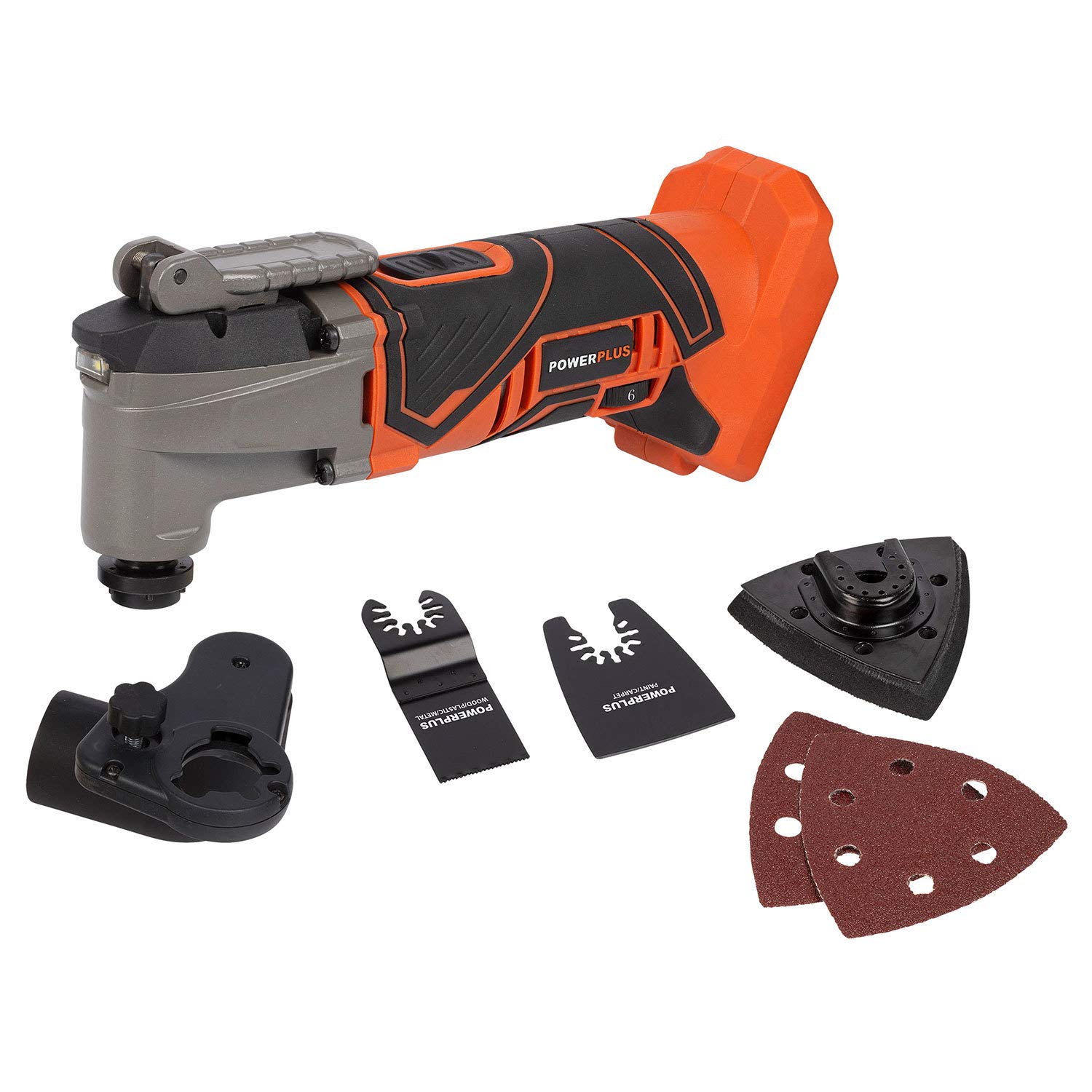
Figure 1: Overview of the POWERPLUS POWDP4060 Multifunction Tool with a sanding pad attached. The image shows the main body, handle, battery slot (outlined), and the oscillating head with a triangular sanding pad.
Key Components:
- On/Off Switch: Controls power to the tool.
- Speed Adjustment Dial: Allows selection of different oscillation speeds.
- Accessory Release Lever: For quick and tool-free accessory changes.
- Battery Slot: For inserting the 20V Li-ion battery pack (battery not included).
- Oscillating Head: Where various accessories are attached.
- Soft Grip Handle: Provides comfort and control during operation.
- Dust Extraction Port: For connecting a dust extraction system (optional accessory).
4. Setup and Assembly
4.1 Battery Installation and Removal
- Ensure the tool is switched off before installing or removing the battery.
- To install: Align the battery pack with the battery slot on the tool. Slide the battery into the slot until it clicks securely into place.
- To remove: Press the battery release button (if present) and slide the battery pack out of the tool.
4.2 Attaching and Removing Accessories
The POWDP4060 features a tool-free accessory change system.
- Ensure the tool is switched off and the battery is removed.
- Lift the accessory release lever located on the tool head.
- Align the desired accessory (e.g., sanding pad, saw blade, scraper) with the accessory mount on the oscillating head. Ensure it fits correctly onto the pins or grooves.
- Push the accessory release lever back down until it locks the accessory firmly in place. Verify the accessory is secure before use.
- To remove an accessory, repeat step 2 and carefully pull the accessory off the mount.

Figure 2: A hand demonstrating the process of lifting the accessory release lever to attach or remove an accessory from the multifunction tool. The battery slot is visible as an outline.
4.3 Dust Extraction Attachment (Optional)
For cleaner operation, a dust extraction adapter can be attached.
- Ensure the tool is switched off and the battery is removed.
- Attach the dust extraction adapter to the designated port on the tool.
- Connect a suitable vacuum cleaner hose to the dust extraction adapter.

Figure 3: The POWERPLUS POWDP4060 multifunction tool shown with the dust extraction attachment connected to the tool head, ready for use with a vacuum system.
5. Operating Instructions
5.1 Switching On/Off
- To switch on: Slide the On/Off switch to the "I" (On) position.
- To switch off: Slide the On/Off switch to the "O" (Off) position.
- Always ensure a firm grip on the tool before switching it on.
5.2 Speed Adjustment
The tool features a variable speed adjustment dial.
- Rotate the speed adjustment dial to select the desired oscillation speed. Lower settings are suitable for delicate work or softer materials, while higher settings are for faster material removal or harder materials.
- Experiment with different speeds on scrap material to find the optimal setting for your task.
5.3 General Usage Tips
- Apply light pressure. Let the tool do the work. Excessive pressure can reduce efficiency and damage the tool or workpiece.
- Move the tool steadily across the workpiece. Avoid dwelling in one spot, especially when sanding or cutting, to prevent uneven results or burning.
- Always secure your workpiece. Use clamps or a vise to prevent movement during operation.
- For cutting applications, ensure the cutting path is clear and free of obstructions.
- For sanding, ensure the correct grit sandpaper is used for the material and desired finish.

Figure 4: The multifunction tool configured with a sanding pad, illustrating its use for surface preparation. The battery slot is visible as an outline.

Figure 5: The multifunction tool equipped with a saw blade, demonstrating its capability for cutting tasks. The tool's ergonomic design is visible.
6. Maintenance
Regular maintenance ensures the longevity and optimal performance of your tool.
6.1 Cleaning
- Always disconnect the battery before cleaning.
- Clean the tool's ventilation openings regularly to prevent overheating. Use a soft brush or compressed air.
- Wipe the tool housing with a soft, damp cloth. Do not use harsh chemicals or abrasive cleaners.
- Remove any dust or debris from the accessory mount area.
6.2 Accessory Care
- Inspect accessories before each use for wear or damage. Replace worn or damaged accessories immediately.
- Keep cutting blades sharp and clean for best performance.
6.3 Battery Care and Charging
- Only use the charger specified by POWERPLUS for your 20V Li-ion battery.
- Do not charge batteries in extreme temperatures.
- Store batteries in a cool, dry place away from direct sunlight and metal objects.
- Do not fully discharge Li-ion batteries. Recharge them before they are completely empty to prolong their lifespan.
6.4 Storage
- Store the tool and accessories in a dry, secure place out of reach of children.
- Remove the battery pack from the tool before storage.
7. Troubleshooting
Before attempting any repairs, always disconnect the battery pack.
| Problem | Possible Cause | Solution |
|---|---|---|
| Tool does not start. | Battery not installed correctly or discharged. On/Off switch not engaged. | Ensure battery is fully charged and properly inserted. Check On/Off switch position. |
| Reduced performance or excessive vibration. | Worn or damaged accessory. Incorrect speed setting. Overloading the tool. | Replace accessory. Adjust speed setting. Reduce pressure on the tool. |
| Tool overheats. | Blocked ventilation slots. Continuous heavy use. | Clean ventilation slots. Allow tool to cool down. Reduce workload. |
| Accessory not holding securely. | Accessory release lever not fully engaged. Accessory mount dirty or damaged. | Ensure lever is fully locked. Clean accessory mount. Inspect for damage. |
8. Specifications
Technical data for the POWERPLUS POWDP4060 Multifunction Tool.
| Feature | Value |
|---|---|
| Brand | POWER plus |
| Model Number | POWDP4060 |
| Voltage | 20 Volt |
| Power Source | Battery-Powered |
| Recommended Product Applications | Power Tool |
| Color | Orange |
| Special Features | Dust-proof button, Overload protection, Soft grip, Battery level indicator, Self-adhesive system, Dust extraction, Soft start, Adjustable speed, Quick access, Tool-free assembly, Power indicator |
| Included Components | POWERPLUS POWDP4060 - Multifunction Tool 20V Li-ion (battery not included) |
| Item Dimensions (L x W x H) | 37 x 14.5 x 11 centimeters |
| Quantity | 1.0 Unit |
| GTIN | 05400338079535 |
| Manufacturer | POWERPLUS |
| ASIN | B07TBH65GW |
9. Warranty and Support
For warranty information, technical support, or service inquiries, please refer to the official POWERPLUS website or contact their customer service department. Keep your purchase receipt as proof of purchase.
Online Resources: www.powerplus.eu
Note: Specific warranty terms may vary by region and retailer. Please consult your purchase documentation for details.