Introduction
This manual provides essential information for the safe and effective operation of your OSITO TENS EMS Foot Massager. Please read it thoroughly before first use and retain it for future reference.
The OSITO Foot Circulation Stimulator uses Electrical Muscle Stimulation (EMS), Transcutaneous Electrical Nerve Stimulation (TENS), and Electronic Pulse Therapy (EPT) to help relieve foot pain, improve circulation, and strengthen muscles. It is an FDA-cleared Class II medical device and is FSA/HSA eligible.
Safety Information
WARNING:
- Keep away from water. Do not use while sleeping.
- Do not use if pregnant or if suffering from certain medical conditions. Consult your physician before use if you have a cardiac pacemaker, implanted defibrillator, or other implanted electronic devices.
- Do not use if you are being treated for, or have symptoms of, an existing Deep Vein Thrombosis (DVT).
- Refer to the user manual for a comprehensive list of safety warnings and contraindications.
Package Contents
Upon opening the package, please verify that all components are present and undamaged:
- 1x OSITO Foot Blood Circulation Machine
- 1x Power Adapter
- 1x User Manual (this document)
- 1x Remote Control
- 2x Connection Cables for Electrode Pads
- 4x Electrode Pads

Image: Contents of the OSITO Foot Massager package, including the main unit, remote, power adapter, cables, and electrode pads.
Product Overview
The OSITO TENS EMS Foot Massager is designed to provide therapeutic relief through electrical stimulation. Key features include:
- 25 Stimulation Modes
- 99 Intensity Levels
- 25-minute Auto-Off Timer
- Quiet Operation with no vibration or odor
- Wireless Remote Control for easy adjustment
- Large LED Display for clear settings readout
- Dual Channel System: one for foot stimulation, one for body stimulation via electrode pads.
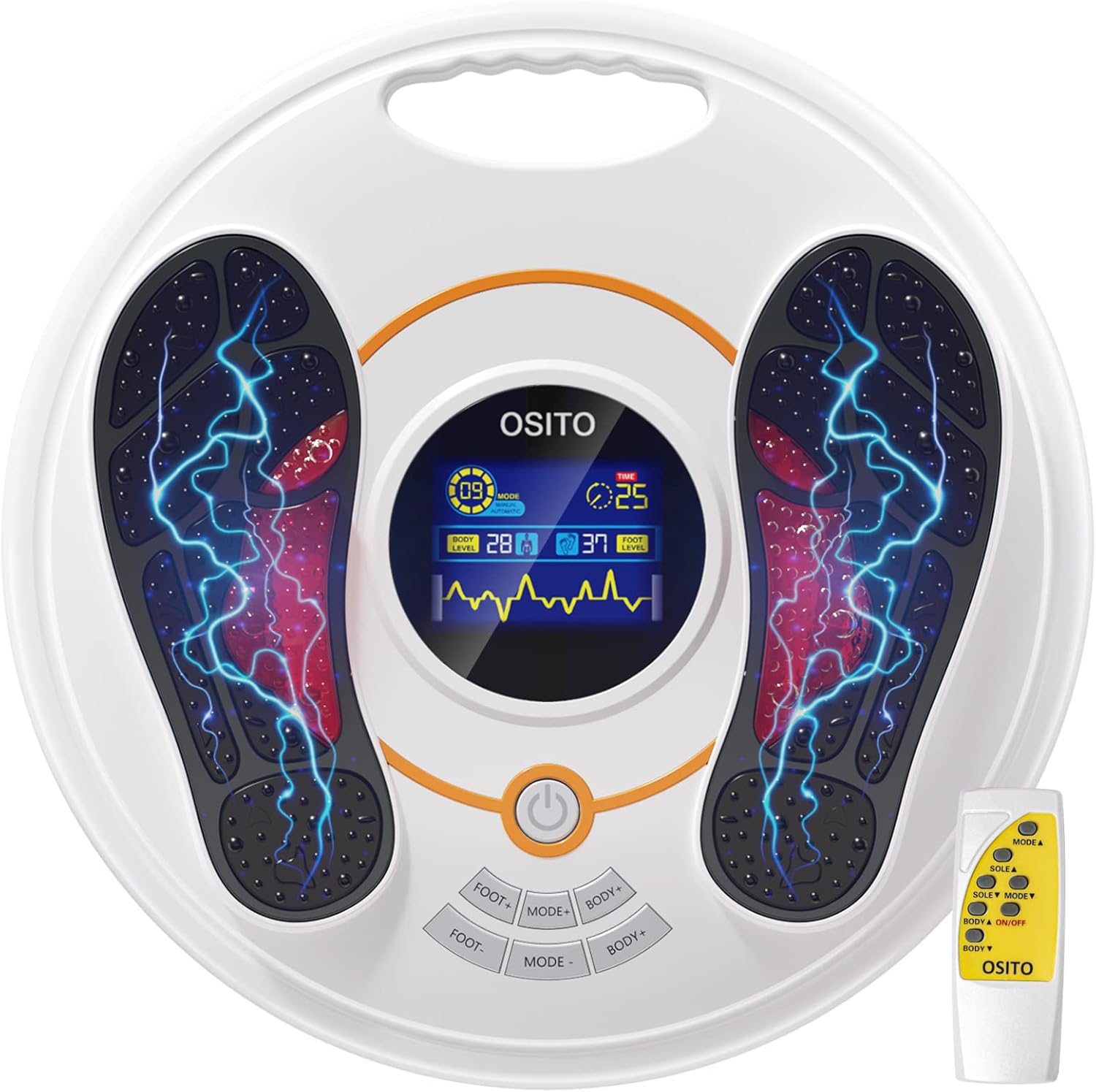
Image: The OSITO Foot Massager unit with its remote control, highlighting the main components.

Image: Visual representation of the key features of the OSITO Foot Massager, including intensity levels, modes, auto-off, and quiet operation.
Setup
- Unpack the Device: Carefully remove the OSITO Foot Massager and all accessories from the packaging.
- Power Connection: Plug the power adapter into the DC input port on the side of the foot massager unit. Connect the other end of the adapter to a standard electrical outlet.
- Remote Control: Ensure the remote control has working batteries.
- Electrode Pads (Optional): If using the TENS pads for body stimulation, connect the provided connection cables to the ports on the side of the main unit. Attach the electrode pads to the other end of the cables.

Image: Step-by-step guide for setting up and using the device, including power connection and pad usage.
Operating Instructions
Foot Stimulation:
- Power On: Press the On/Off button on the main unit or the remote control to activate the machine.
- Position Feet: Place your bare feet directly onto the foot pads of the device. For optimal results, ensure good contact.
- Select Mode: Use the "MODE" buttons on the unit or remote to cycle through the 25 available stimulation modes. Each mode offers a different pulse pattern.
- Adjust Intensity: Use the "FOOT+" and "FOOT-" buttons on the unit or remote to increase or decrease the intensity level (from 1 to 99). Start with a low intensity and gradually increase until you feel a comfortable, yet effective, sensation.
- Session Duration: The device has a default 25-minute auto-off timer. You can adjust the session duration if desired (refer to the full manual for advanced settings).

Image: A user demonstrating the foot stimulation function of the OSITO device.
Body Stimulation (with TENS Pads):
- Prepare Pads: Ensure the electrode pads are clean and adhere well to the skin. Apply to clean and smooth skin. After each use, moisten and store pads on plastic film for longevity.
- Attach Pads: Place the electrode pads on the desired body areas (e.g., legs, arms, shoulders, neck) where pain relief is needed.
- Connect Cables: Plug the electrode pad cables into the designated ports on the main unit.
- Adjust Intensity: Use the "BODY+" and "BODY-" buttons on the unit or remote to adjust the intensity for the electrode pads.
- Simultaneous Use: Both foot and body stimulation can be used simultaneously or separately.

Image: A user demonstrating the use of TENS pads for body pain relief with the OSITO device.

Image: Illustration of common application areas for the TENS electrode pads.
Maintenance
- Cleaning: Wipe the main unit with a soft, damp cloth. Do not use abrasive cleaners or immerse the device in water.
- Electrode Pads: For best TENS pad adhesion, apply to clean and smooth skin with water drops. After each use, moisten and store pads on plastic film for longevity. Replace pads when they lose their stickiness.
- Storage: Store the device in a cool, dry place away from direct sunlight and extreme temperatures.
Troubleshooting
| Problem | Possible Cause | Solution |
|---|---|---|
| Device does not turn on. | Power adapter not connected or faulty; remote control batteries dead. | Ensure power adapter is securely plugged in. Replace remote control batteries. |
| No sensation or weak sensation. | Feet not making good contact; intensity too low; electrode pads dry or worn out. | Ensure bare feet are firmly on the pads. Increase intensity (more than 20 if low intensity is not effective). Moisten or replace electrode pads. |
| Remote control not working. | Batteries are dead or incorrectly inserted. | Replace batteries, ensuring correct polarity. |
If the problem persists after attempting these solutions, please contact customer support.
Specifications
- Model Number: AST-300H
- Product Dimensions: 18.39 x 18.39 x 3.86 inches
- Weight: 5.1 Pounds
- Power Source: Corded Electric
- Material: Metal
- Color: White-orange
- Manufacturer: Shenzhen OSTO Technology Co.,Ltd.
- First Available: June 20, 2019
Warranty and Support
OSITO offers a lifetime limited warranty for this product. We also provide a free 30-day trial period. If you are not satisfied, please contact us directly via email.
For customer support, warranty claims, or further assistance, please refer to the contact information provided with your purchase or visit the official OSITO website.
Contact Information: Please refer to the contact details provided in your product packaging or on the official OSITO brand store on Amazon: OSITO Amazon Store