
1. Introduction
Thank you for choosing the PRITECH PBP-250 Wired Keyboard. This manual provides essential information for the proper setup, operation, and maintenance of your new keyboard. Designed for both office and leisure use, this keyboard offers a comfortable and efficient typing experience with its QWERTY Spanish layout and durable construction.
Key Features:
- QWERTY Spanish Layout: Full 104-key layout including the 'Ñ' key.
- High Sensitivity: Responsive keys for comfortable and efficient typing.
- Durable Design: Built to withstand daily use.
- Spill-Resistant: Designed to allow liquids to drain, protecting internal components from accidental spills.
- Flat Profile: Ergonomic design for natural hand positioning.
- Resistant Keys: Keys are tested for up to 10 million keystrokes.
- Adjustable Feet: Sturdy, foldable feet provide an 8° inclination for enhanced ergonomics.
- Plug and Play USB: Easy connection without the need for additional software installation.
- Easy-to-Read Keys: Characters printed in bright white for improved visibility and wear resistance.
2. Setup Instructions
The PRITECH PBP-250 keyboard features a simple Plug and Play setup, requiring no drivers or complex installation steps.
Connecting the Keyboard:
- Locate an available USB port on your desktop computer, laptop, or netbook.
- Insert the USB connector of the PRITECH PBP-250 keyboard firmly into the USB port.
- Your operating system will automatically detect and configure the keyboard. No additional software is required.
- The keyboard is now ready for use.
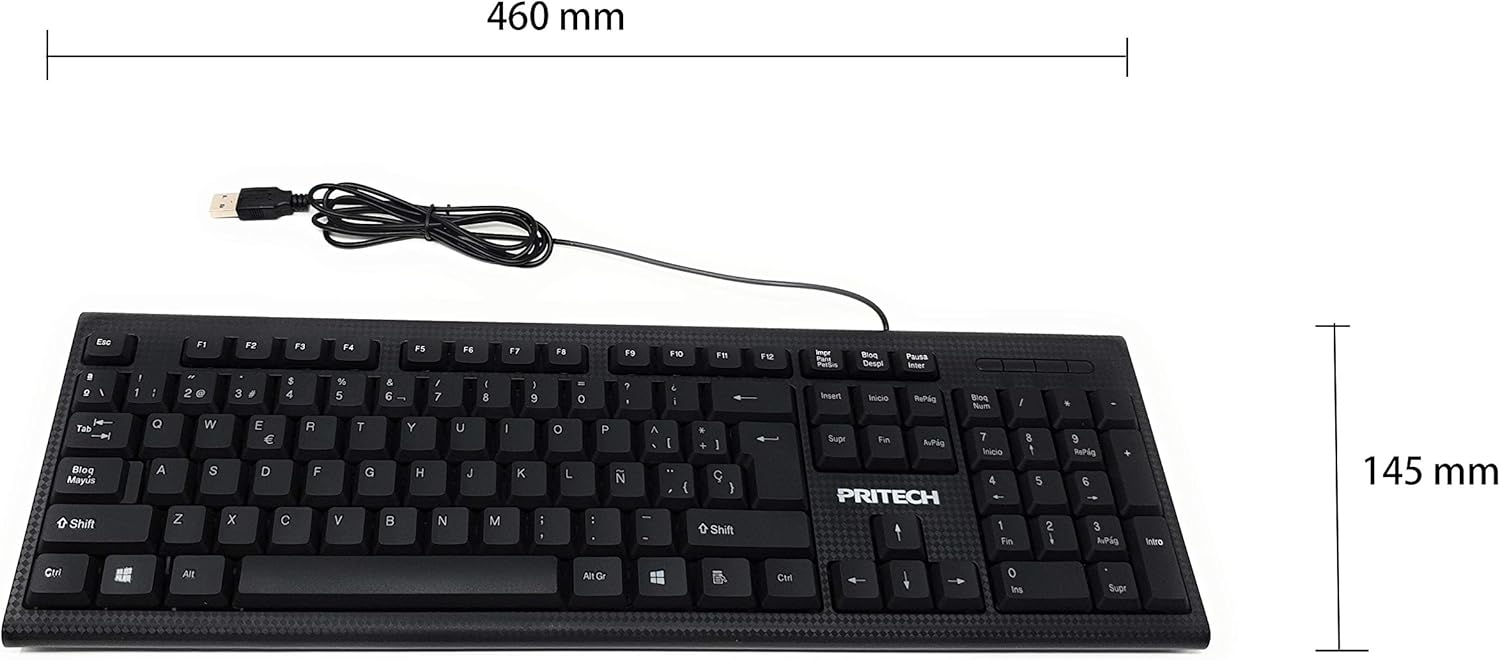
Image 1: PRITECH PBP-250 Wired Keyboard showing its USB connector and overall dimensions (460mm width, 145mm height).
3. Operating the Keyboard
The PRITECH PBP-250 is a standard 104-key QWERTY Spanish keyboard. Its operation is intuitive and similar to most conventional keyboards.
Basic Usage:
- Typing: Press the desired keys to input characters into your computer.
- Function Keys (F1-F12): These keys perform various functions depending on the application or operating system.
- Numeric Keypad: Use the dedicated numeric keypad on the right for efficient data entry. Ensure 'Num Lock' is active.
- Special Characters: Access special characters using the Shift key or Alt Gr key in combination with other keys, as indicated on the keycaps.
- 'Ñ' Key: The keyboard includes the 'Ñ' key, essential for Spanish language typing.

Image 2: Close-up view highlighting the 'Ñ' key on the PRITECH PBP-250 Spanish keyboard layout.
Ergonomic Features:
The keyboard is designed with a flat profile to promote a natural hand and wrist position. For additional comfort, you can deploy the adjustable feet located on the underside of the keyboard to achieve an 8° typing angle.

Image 3: Side view of the PRITECH PBP-250 keyboard demonstrating its ergonomic inclination when the adjustable feet are extended.
4. Maintenance
Proper maintenance ensures the longevity and optimal performance of your PRITECH PBP-250 keyboard.
Cleaning Instructions:
- Disconnect: Always disconnect the keyboard from your computer before cleaning.
- Surface Cleaning: Use a soft, lint-free cloth lightly dampened with water or a mild, non-abrasive cleaning solution to wipe the keycaps and keyboard surface.
- Dust Removal: Use compressed air to remove dust and debris from between the keys.
- Spill Management: While the keyboard is spill-resistant, it is recommended to immediately disconnect it and allow it to dry completely if liquids are spilled. Do not attempt to use it while wet.
- Avoid Harsh Chemicals: Do not use strong solvents, alcohol, or abrasive cleaners, as these can damage the keycap legends or plastic finish.
5. Troubleshooting
If you encounter issues with your PRITECH PBP-250 keyboard, refer to the following common troubleshooting steps.
Common Issues and Solutions:
- Keyboard is not recognized or not responding:
- Ensure the USB cable is securely connected to a working USB port on your computer.
- Try connecting the keyboard to a different USB port.
- Restart your computer.
- Test the keyboard on another computer to determine if the issue is with the keyboard or the computer's USB port/drivers.
- Keys are not typing correctly or are sticky:
- Clean the keyboard as described in the Maintenance section to remove any debris or residue under the keys.
- Ensure no foreign objects are lodged beneath the keycaps.
- Numeric keypad is not working:
- Press the 'Num Lock' key to activate the numeric keypad. An indicator light (if present) should illuminate.
6. Specifications
Technical specifications for the PRITECH PBP-250 Wired Keyboard.
| Feature | Specification |
|---|---|
| Model | PBP-250 |
| Connectivity Technology | Wired (USB) |
| Keyboard Layout | QWERTY Spanish |
| Number of Keys | 104 |
| Keyboard Description | Membrane |
| Dimensions (L x W x H) | 460 x 145 x 25 mm |
| Cable Length | 1450 mm (1.45 meters) |
| Compatible Devices | Laptop, Desktop PC |
| Special Features | Ergonomic, Spill-Resistant |
| Color | Black |
7. Warranty and Support
PRITECH is committed to providing quality products and customer satisfaction.
Warranty Information:
This PRITECH PBP-250 keyboard comes with a two-year warranty from the date of purchase. This warranty covers manufacturing defects and ensures that your product performs as expected under normal use. Please retain your proof of purchase for warranty claims.
Customer Support:
Should you have any questions, concerns, or require assistance with your PRITECH PBP-250 keyboard, our customer service team is available to help. Please contact us through the retailer where you purchased the product or refer to the PRITECH official website for contact details. Our customer support is dedicated to assisting you within 24 hours.