
ONKRON TS1661
Contents
ONKRON Mobile TV Stand TS1661 Instruction Manual
Model: TS1661
Product Overview
The ONKRON Mobile TV Stand TS1661 is a versatile and robust solution designed to support flat or curved LCD/LED TVs ranging from 32 to 65 inches, with a maximum weight capacity of 72 lbs. This stand features a heavy-duty aluminum column, adjustable AV shelves, and lockable wheels for easy mobility and stability. It is ideal for various settings, including homes, offices, and educational spaces.

Image: The ONKRON Mobile TV Stand TS1661, showcasing its design with a television mounted.
Key Features
- Universal Compatibility: Fits most 32-65 inch LCD, LED flat or curved screens with VESA mounting patterns from 100x100mm (min) to 600x400mm (max).
- Height Adjustable: Easily adjust the TV cart height from 38.2 to 59.8 inches (from the center of your TV) in 2-inch increments without tools.
- Robust Construction: Features a heavy-duty aluminum column providing stable and durable support for TVs up to 72 lbs.
- Mobile Design: Equipped with 4 lockable wheels for smooth movement on various floor types and secure positioning.
- Integrated Shelves: Includes two adjustable AV shelves for holding laptops, soundbars, gaming consoles, or other media devices.
- Cable Management: Built-in cable management system within the telescopic column helps keep cables organized and out of sight.

Image: Detailed view of the stand's features, including the height adjustment button, adjustable trays, aluminum pole, and locking wheels.
Setup and Assembly
The ONKRON Mobile TV Stand TS1661 is designed for straightforward assembly. Please follow the detailed manual included in the packaging. Ensure all parts are present before beginning assembly.
Before You Begin:
- Unpack all components and verify against the parts list in your manual.
- Identify all hardware. The stand comes with various screws (M5, M6, M8) and washers for different TV models.
- Ensure you have the necessary tools (e.g., Phillips head screwdriver, Allen wrench - typically included).

Image: A visual guide to checking all included hardware and components before assembly.
Assembly Steps (General Overview):
- Attach the wheels to the base of the stand. Ensure they are securely fastened.
- Assemble the main column sections.
- Install the adjustable AV shelves onto the main column at your desired height.
- Attach the TV mounting brackets to the back of your television, selecting the appropriate VESA screws.
- Carefully lift and hang the television onto the stand's mounting plate. Secure the TV using the provided locking mechanisms.
For detailed, step-by-step instructions, refer to the assembly manual provided in the product packaging. It is recommended to have assistance when mounting the television.
Operating Instructions
Adjusting TV Height:
To adjust the height of your television on the stand, locate the height adjustment button on the main column. Press the button and carefully slide the upper section of the column up or down to the desired height. Release the button to lock the column in place. No tools are required for this adjustment.
Moving the Stand:
The stand is equipped with four lockable wheels. To move the stand, ensure all wheels are unlocked. Gently push or pull the stand to its new location. Once positioned, press down on the wheel locks to secure the stand in place and prevent accidental movement.
Cable Management:
Utilize the integrated cable management system within the telescopic column to route and conceal power cords and AV cables. This helps maintain a tidy appearance and prevents tripping hazards.
Maintenance
- Cleaning: Wipe the stand with a soft, dry cloth. For stubborn marks, a slightly damp cloth can be used, followed by immediate drying. Avoid abrasive cleaners or solvents.
- Hardware Check: Periodically check all screws and bolts to ensure they remain tight. Loose connections can compromise stability.
- Wheel Maintenance: Keep the wheels free of debris to ensure smooth movement. If wheels become stiff, clean them and apply a small amount of silicone lubricant if necessary.
- Weight Capacity: Do not exceed the maximum weight capacity of 72 lbs for the TV or 10 lbs per AV shelf. Overloading can cause damage or instability.
Troubleshooting
| Problem | Possible Cause | Solution |
|---|---|---|
| Stand is wobbly or unstable. | Loose connections; uneven floor; overloaded. | Ensure all bolts are tightened. Move to a level surface. Verify TV and shelf weights are within limits. |
| Wheels do not roll smoothly. | Wheels are locked; debris in wheels. | Unlock all wheels. Clean any debris from the wheel casters. |
| TV cannot be mounted. | Incorrect VESA pattern; wrong screws used. | Verify your TV's VESA pattern matches the stand's compatibility (100x100mm to 600x400mm). Use the correct screws and spacers as per your TV manual and the stand's hardware kit. |
| Height adjustment mechanism is stuck. | Button not fully depressed; internal obstruction. | Ensure the adjustment button is fully pressed. Check for any foreign objects obstructing the column. Do not force the mechanism. |
If you encounter issues not listed here or require further assistance, please contact ONKRON customer support.
Specifications
| Feature | Detail |
|---|---|
| Model Number | TS1661 |
| Compatible TV Sizes | 32 - 65 Inches |
| Maximum TV Weight Capacity | 72 lbs (32.5 kg) |
| VESA Compatibility | 100x100mm to 600x400mm |
| Height Adjustment Range | 38.2 - 59.8 inches (from center of TV) |
| Number of AV Shelves | 2 |
| Shelf Weight Capacity | 10 lbs per shelf |
| Material | Aluminum |
| Color | Black |
| Product Dimensions (L x W x H) | 38.62 x 24.76 x 5.16 inches (packaged) |
| Item Weight | 35.4 pounds |
| Manufacturer | Evigor international Co., Limited |

Image: Dimensional drawing of the ONKRON Mobile TV Stand TS1661, indicating key measurements.
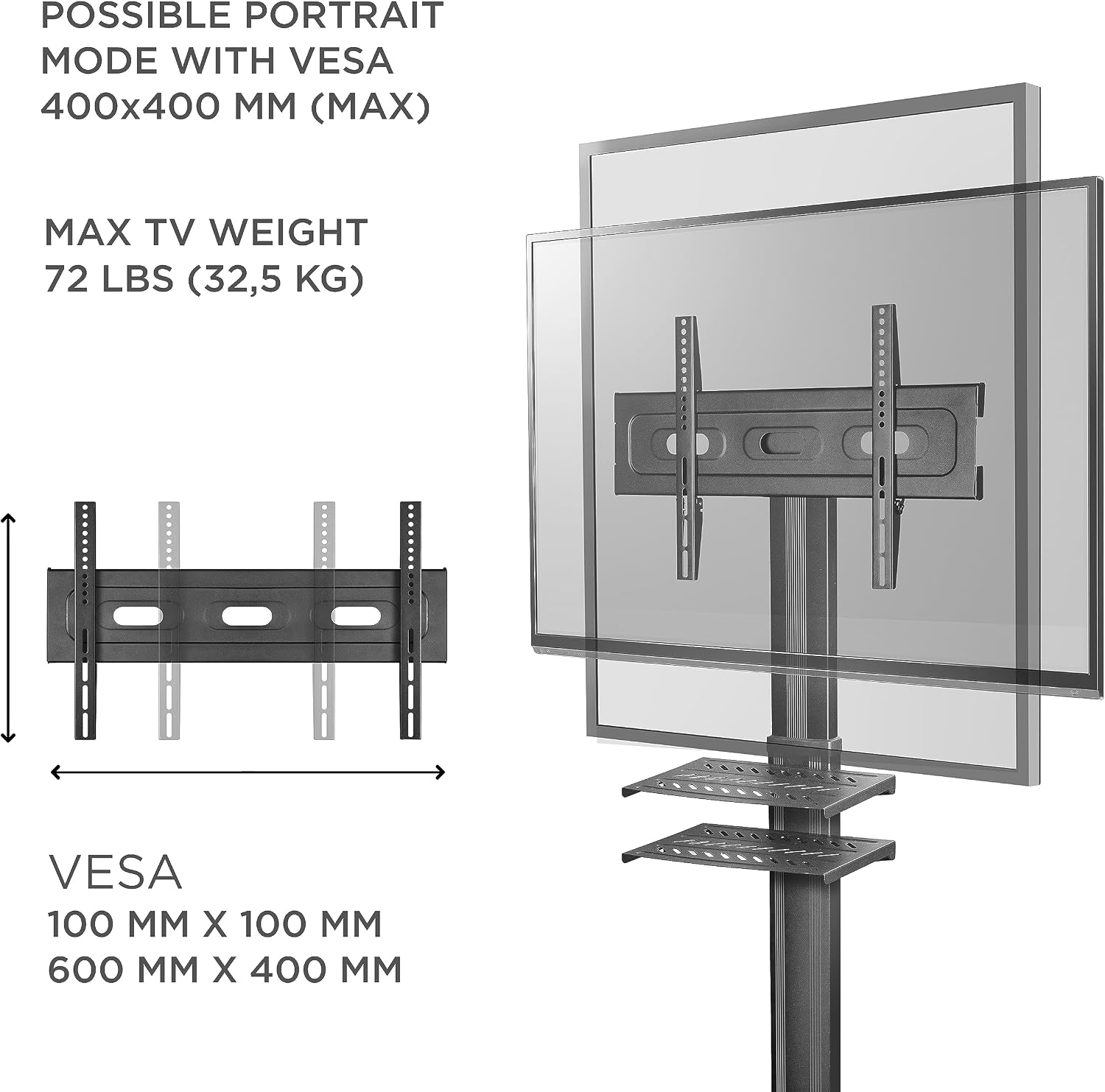
Image: Visual representation of VESA mounting compatibility and maximum TV weight capacity.
Warranty and Support
ONKRON products are designed for reliability and durability. For specific warranty information regarding your TS1661 Mobile TV Stand, please refer to the warranty card included with your product or visit the official ONKRON website.
For technical support, assembly assistance, or any product-related inquiries, please contact ONKRON customer service. Contact details can typically be found on the product packaging, the included manual, or the ONKRON official website.
You can also visit the ONKRON Store on Amazon for more information and support resources.
Ask a question about this manual
Ask about setup, troubleshooting, compatibility, parts, safety, or missing instructions. Manuals+ will review the question and use this page’s manual context to help answer it.