
Introduction
This manual provides detailed instructions for the setup, operation, maintenance, and troubleshooting of your Jamo Concert 9 Series II C95 Floorstanding Speaker. Please read this manual thoroughly before using your speakers to ensure proper installation and optimal performance.
What's in the Box
- Two Jamo Concert 9 Series II C95 Floorstanding Speakers
- User Manual (this document)
Please inspect the contents for any damage or missing parts. Contact your retailer immediately if any items are missing or damaged.
Setup
1. Unpacking
Carefully remove the speakers from their packaging. Retain the packaging for future transport or storage.
2. Speaker Placement
Proper speaker placement is crucial for optimal sound quality. Consider the following guidelines:
- Stereo Setup: Place the two speakers equidistant from your primary listening position, forming an equilateral triangle.
- Distance from Walls: Experiment with placing speakers a few feet from walls to reduce bass reflections and improve soundstage.
- Toe-in: Angle the speakers slightly inward towards the listening position for better imaging.
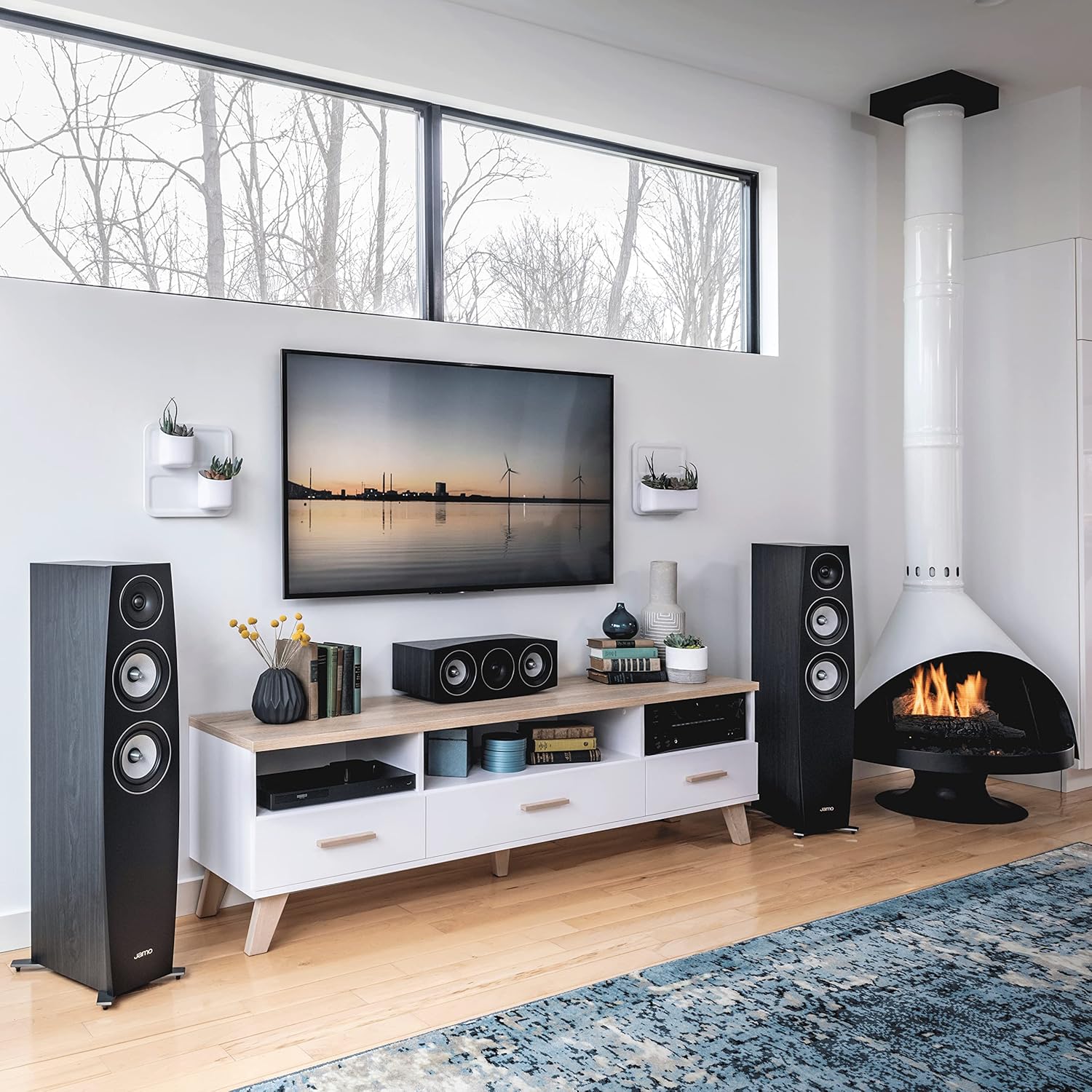
Image: Example of Jamo C95 II speakers positioned in a typical living room environment.

Image: Jamo C95 II speakers with grilles removed, showcasing the woofer and tweeter drivers, in a living room setting.
3. Connecting to an Amplifier/Receiver
The C95 II speakers connect to your amplifier or receiver using standard speaker wire. Ensure your amplifier is turned off before making any connections.
- Speaker Wire: Use high-quality speaker wire (16-gauge or thicker is recommended for runs under 50 feet) for optimal performance.
- Polarity: Connect the positive (+) terminal (red) on the speaker to the positive (+) terminal on your amplifier. Connect the negative (-) terminal (black) on the speaker to the negative (-) terminal on your amplifier. Incorrect polarity will result in poor sound quality.
- Binding Posts: The C95 II speakers feature dual binding posts, allowing for bi-wiring or bi-amping if your amplifier supports it. For standard connections, ensure the metal jumpers are in place between the upper and lower binding posts.

Image: Rear panel of the Jamo C95 II speaker, illustrating the speaker terminals and bass reflex port.
Operating Instructions
1. Initial Power On
After connecting your speakers, turn on your amplifier/receiver. Start with the volume at its lowest setting and gradually increase it to a comfortable listening level.
2. Break-in Period
Like many high-fidelity speakers, the Jamo C95 II benefits from a break-in period. Allow approximately 50-100 hours of normal listening to achieve optimal performance. During this time, the speaker drivers will loosen up, resulting in improved bass response and overall sound clarity.
3. Optimizing Sound
- Volume Control: Adjust the volume on your amplifier/receiver. Avoid excessively high volumes that cause audible distortion.
- Tone Controls/Equalizer: Use your amplifier's tone controls (bass/treble) or equalizer settings to fine-tune the sound to your preference and room acoustics.
- Subwoofer Integration: For enhanced low-frequency performance, consider integrating a powered subwoofer. Adjust the subwoofer's crossover frequency and volume to blend seamlessly with the C95 II speakers.

Image: Jamo C95 II speaker shown alongside a matching subwoofer, illustrating a potential system configuration.
Maintenance
1. Cleaning the Cabinet
Wipe the speaker cabinet with a soft, dry cloth. For stubborn marks, a slightly damp cloth can be used, followed by a dry cloth. Avoid using abrasive cleaners, solvents, or polishes, as these can damage the finish.
2. Cleaning the Grilles
The speaker grilles can be gently vacuumed with a soft brush attachment to remove dust. If necessary, they can be carefully removed and hand-washed with mild soap and water, then allowed to air dry completely before reattaching.
3. Driver Care
Avoid touching the speaker cones (woofers and tweeters) directly, as this can cause damage. Keep the grilles on when not actively listening to protect the drivers from dust and accidental impact.
Troubleshooting
If you experience issues with your Jamo C95 II speakers, refer to the following common problems and solutions:
| Problem | Possible Cause | Solution |
|---|---|---|
| No sound from one or both speakers |
|
|
| Distorted or unclear sound |
|
|
| Weak or lacking bass |
|
|
Technical Specifications
| Feature | Specification |
|---|---|
| Model Name | C 95 II |
| Speaker Type | Floor Standing, Woofer |
| Woofer Diameter | 6 Inches (x2) |
| Tweeter Diameter | 1 Inch (25mm) |
| Connectivity Technology | Wired |
| Audio Output Mode | Stereo |
| Mounting Type | Floor Standing |
| Power Source | Corded Electric (via amplifier) |
| Color | Black Ash |
| Brand | Jamo |
Warranty Information
The Jamo Concert 9 Series II C95 Floorstanding Speaker comes with a 5-year manufacturer's warranty. This warranty covers defects in materials and workmanship under normal use. Please retain your proof of purchase for warranty claims.
For detailed warranty terms and conditions, or to initiate a warranty claim, please refer to the official Jamo website or contact Jamo customer support.
Customer Support
If you require further assistance or have questions not covered in this manual, please visit the official Jamo website for FAQs, support resources, and contact information.
Jamo Official Website: www.jamo.com


