
1. Introduction
This document provides comprehensive instructions for the Easytry123 replacement remote control, designed for specific Panasonic room air conditioner models. This remote is a direct replacement and does not require any programming or setup. Please verify your air conditioner model number against the list provided to ensure compatibility.
Important Note: This remote control is not universal. It is specifically designed for the Panasonic air conditioner models listed above. Batteries are not included with this product.
2. Product Overview
The Easytry123 replacement remote control features a standard layout for operating compatible Panasonic air conditioners. It includes buttons for power, mode selection, temperature adjustment, fan speed, air swing, and timer functions. The display screen shows current settings.
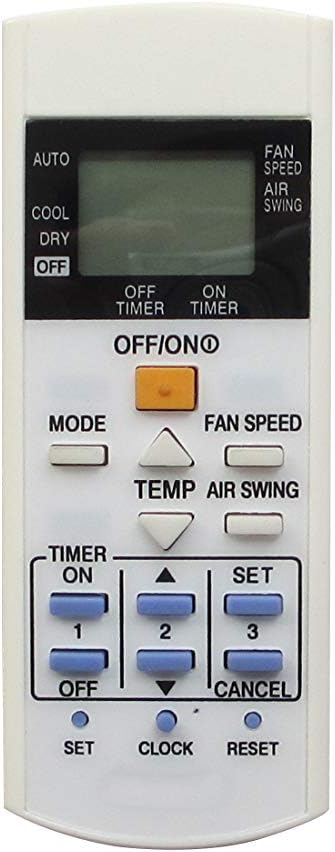
Figure 2.1: Front view of the remote control, displaying the LCD screen and all operational buttons.

Figure 2.2: Back view of the remote control, highlighting the battery compartment.
The remote is constructed from durable ABS plastic, designed for longevity and ease of use. Its ergonomic design ensures comfortable handling.
3. Setup
3.1 Battery Installation
- Locate the battery compartment on the back of the remote control (refer to Figure 2.2).
- Slide the battery compartment cover downwards to open it.
- Insert two (2) AAA batteries, ensuring the positive (+) and negative (-) terminals align correctly with the markings inside the compartment.
- Slide the battery compartment cover back into place until it clicks securely.
Note: Batteries are not included and must be purchased separately. Use new AAA alkaline batteries for optimal performance.
3.2 Initial Use
No programming or setup is required for this replacement remote control. Once batteries are installed, the remote is ready for immediate use with compatible Panasonic air conditioner models. Point the remote directly at the air conditioner's receiver when operating.
4. Operating Instructions
Familiarize yourself with the buttons on your remote control (refer to Figure 2.1) and their functions:
- OFF/ON (Power Button): Press to turn the air conditioner ON or OFF.
- MODE: Cycles through operating modes:
- AUTO: Automatically selects cooling or fan-only operation based on room temperature.
- COOL: Provides cooling operation.
- DRY: Reduces humidity in the room.
- FAN: Operates the fan without cooling.
- TEMP (Temperature Up/Down Arrows): Adjusts the desired temperature setting.
- FAN SPEED: Adjusts the fan speed (e.g., Low, Medium, High, Auto).
- AIR SWING: Activates or deactivates the automatic louver swing function.
- TIMER ON/OFF: Used to set the air conditioner to turn ON or OFF automatically at a specified time.
- SET (for Timer/Clock): Confirms timer or clock settings.
- CLOCK: Used to set the current time on the remote's display.
- RESET: Resets certain settings or the remote itself.
- CANCEL: Cancels active timer settings.
Ensure a clear line of sight between the remote control and the air conditioner's receiver for proper communication.
5. Troubleshooting
- Remote Not Responding:
- Check if the batteries are inserted correctly with the correct polarity (+/-).
- Replace old batteries with new AAA alkaline batteries.
- Ensure there are no obstructions between the remote control and the air conditioner's receiver.
- Confirm that the remote is pointed directly at the air conditioner.
- Air Conditioner Not Responding to Specific Buttons:
- Visually inspect the buttons on the remote for any physical damage or sticking.
- Ensure the air conditioner is powered on and in a state where the function is applicable (e.g., cannot set COOL temperature if in FAN mode).
- Display Screen is Blank or Dim:
- This typically indicates low battery power. Replace the batteries.
If issues persist after following these steps, please refer to the support information in Section 7.
6. Specifications
- Brand: Easytry123
- Model Number (Remote): Easytry7851
- Compatible Devices: Panasonic Room Air Conditioners (Models: CWA75C3623, CS-PC12NKQ, CS-PC12NKT, CS-PC12NKT-1, CS-PC18KKF, CS-PC18KKF-2, CS-PC18KKH, CS-PC18KKP)
- Controller Type: Button Control
- Special Features: No Programming Required, Not Universal
- Power Source: 2 x AAA Batteries (not included)
- Material: ABS Plastic
7. Warranty and Support
Specific warranty information for this Easytry123 replacement remote control is not provided in the product details. For any warranty claims, technical support, or further assistance, please contact the seller directly through your purchase platform.
Please retain your purchase receipt as proof of purchase for any support inquiries.