Introduction
This manual provides essential information for the safe and efficient operation, installation, and maintenance of your new Whirlpool 265 L 4 Star Inverter Frost-Free Double Door Refrigerator. Please read these instructions thoroughly before using the appliance and retain them for future reference.
Important Safety Instructions
WARNING: To reduce the risk of fire, electric shock, or injury, follow these basic precautions:
- Ensure the refrigerator is properly grounded.
- Do not use extension cords or ungrounded adapters.
- Unplug the refrigerator before cleaning or performing any maintenance.
- Keep ventilation openings clear of obstruction.
- Do not store explosive substances such as aerosol cans with a flammable propellant in this appliance.
- This appliance is not intended for use by persons (including children) with reduced physical, sensory or mental capabilities, or lack of experience and knowledge, unless they have been given supervision or instruction concerning use of the appliance by a person responsible for their safety.
Setup and Installation
Unpacking
Carefully remove all packaging materials. Ensure all components listed in the "What's in the Box" section are present. The package includes: 1 refrigerator, 1 user manual, and 1 warranty card.
Location
- Place the refrigerator on a firm, level surface.
- Allow adequate space around the appliance for proper ventilation (minimum 10 cm at the back and sides).
- Avoid direct sunlight or proximity to heat sources (e.g., stoves, radiators).
- Ensure the ambient temperature is within the recommended range for optimal performance.
Power Connection
Connect the refrigerator to a dedicated, properly grounded electrical outlet. Do not use multi-plugs or extension cords. Allow the refrigerator to stand upright for at least 2-4 hours before plugging it in to allow refrigerants to settle.

Image: Front view of the Whirlpool Double Door Refrigerator. This image shows the overall design and the control panel on the upper door.

Image: The Whirlpool refrigerator integrated into a modern kitchen environment, demonstrating its freestanding installation.
Operating Instructions
Initial Start-up
After plugging in the refrigerator, allow it to run for several hours (at least 4-6 hours) before placing food inside. This ensures the interior reaches the optimal temperature.
Temperature Control
Your refrigerator features Adaptive Intelligence Technology with 3 Intellisensors that sense load, outside temperature, and usage patterns to provide optimum cooling. The control panel allows for temperature adjustments. Refer to the specific controls on your model for detailed settings.

Image: Close-up of the refrigerator's control panel, displaying indicators for various functions and modes.
Convertible Freezer with 5-in-1 Modes
The freezer section offers five distinct modes to adapt to your storage needs:
- All Season Mode: Standard operation for general use.
- Chef Mode: Optimizes cooling for specific food items, potentially saving energy.
- Dessert Mode: Ideal for chilling desserts to perfection.
- Party Mode: Provides enhanced cooling for beverages and party food.
- Deep Freeze Mode: For rapid freezing and long-term storage.
To switch between modes, use the dedicated controls on the refrigerator's panel. Consult the visual guide below for mode selection.

Image: Diagram illustrating the five convertible freezer modes: All Season, Chef, Dessert, Party, and Deep Freeze, powered by Adaptive Intelligence.
Food Storage Recommendations

Image: Interior view of the refrigerator with various food items stored on shelves and in compartments, demonstrating typical usage.
- Utilize the Fresh Flow Air Tower with Flexi Vents for uniform cooling throughout the refrigerator compartment.
- Store fruits and vegetables in the dedicated crisper drawer, which features MICROBLOCK technology to prevent bacterial growth.
- The Active Deo feature helps maintain a fresh and odor-free environment.
- Use the Easy Access Tray for frequently used items.
- The Arctic Fresh ice tray provides convenient ice production.
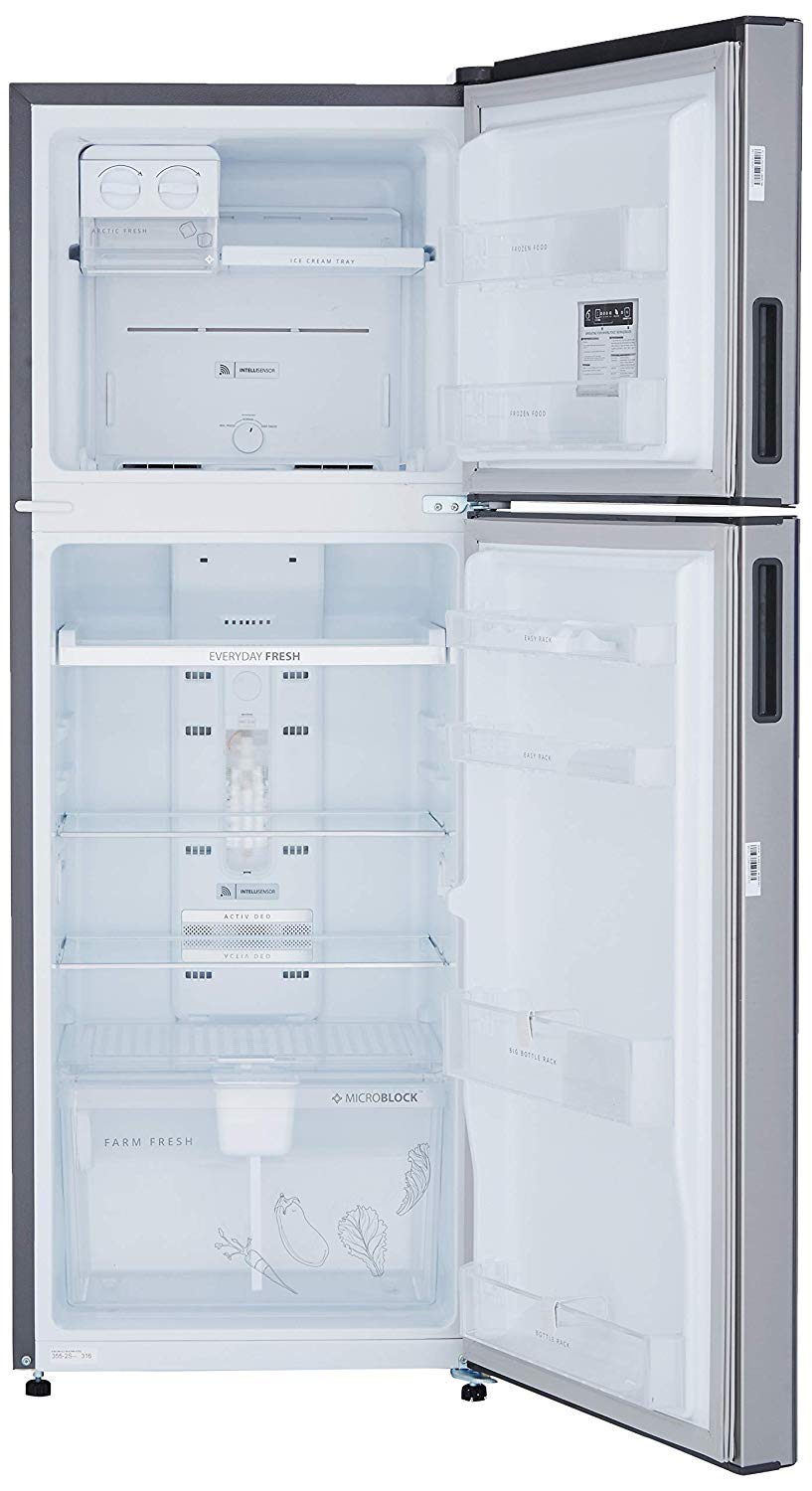
Image: Empty interior of the refrigerator, showcasing the shelves, drawers, and door compartments for storage organization.

Image: Close-up of the "Easy Access Tray" inside the refrigerator, highlighting its design for convenient item retrieval.

Image: View of the Arctic Fresh ice tray in the freezer compartment, showing ice cubes and the ice-making mechanism.
Maintenance and Care
Cleaning the Interior
Regularly clean the interior with a mild detergent and warm water. Wipe dry with a soft cloth. Avoid abrasive cleaners or harsh chemicals. Remove shelves and drawers for thorough cleaning.
Cleaning the Exterior
Wipe the exterior surfaces with a soft, damp cloth. For stainless steel finishes, use a specialized stainless steel cleaner. Do not spray water directly onto the refrigerator.
Condenser Coils
Periodically clean the condenser coils located at the back of the refrigerator to ensure efficient operation. Unplug the appliance before cleaning. Use a soft brush or vacuum cleaner to remove dust and debris.

Image: Rear view of the refrigerator, showing the compressor unit, power cord, and condenser coils at the bottom. This area requires periodic cleaning for optimal performance.
Door Gaskets
Inspect and clean door gaskets regularly to ensure a tight seal. A damaged or dirty gasket can lead to inefficient cooling.
Troubleshooting Guide
Before contacting service, review this section for common issues and solutions.
| Problem | Possible Cause | Solution |
|---|---|---|
| Refrigerator not cooling | Power cord unplugged; thermostat set too warm; door left open; condenser coils dirty. | Check power connection; adjust thermostat; ensure door is closed; clean condenser coils. |
| Unusual noises | Refrigerator not level; items vibrating inside; compressor noise (normal). | Level the refrigerator; rearrange items; normal compressor operation sounds are expected. |
| Excessive frost in freezer | Door not sealed properly; frequent door opening; high humidity. | Check door gasket; minimize door openings; ensure food is properly sealed. |
| Odor inside refrigerator | Food spoilage; strong-smelling foods uncovered; Active Deo not functioning. | Remove spoiled food; cover all food items; ensure Active Deo is clean and functioning. |
Product Specifications
| Feature | Detail |
|---|---|
| Brand | Whirlpool |
| Model | IF INV CNV 278 ELT COOL ILLUSIA (4S) |
| Capacity | 265 litres |
| Energy Efficiency | 4 Star Rating |
| Annual Energy Consumption | 190 Kilowatt Hours |
| Refrigerator Fresh Food Capacity | 190 litres |
| Freezer Capacity | 75 Litres |
| Installation Type | Freestanding |
| Form Factor | Double Door |
| Special Features | Convertible, Inverter, Adaptive Intelligence Technology, Microblock, Active Deo, Fresh Flow Air Tower with Flexi Vents |
| Colour | Cool Illusia |
| Defrost System | Frost Free |
| Shelf Type | Toughened Glass |
| Material | Steel |
| Item Weight | 56 kg |
| Item Dimensions (LxWxH) | 57 x 67 x 159 Centimeters |
Warranty Information
Your Whirlpool refrigerator comes with a comprehensive warranty:
- Product Warranty: 1 year on the entire product.
- Compressor Warranty: 10 years on the compressor.
Please refer to the warranty card included with your product for full terms and conditions, including details on how to register your product and make a claim.
Customer Support
For technical assistance, service requests, or any questions regarding your Whirlpool refrigerator, please contact Whirlpool customer support. Contact details can typically be found on the Whirlpool official website or in the warranty card provided with your appliance.
When contacting support, please have your model number (IF INV CNV 278 ELT COOL ILLUSIA (4S)) and serial number ready.


