
1. Introduction
This manual provides essential information for the safe and effective use of your ZIPRO Dunk iConsole+ Magnetic Elliptical Trainer. Please read all instructions carefully before assembly and operation. Keep this manual for future reference.
The ZIPRO Dunk iConsole+ is designed for home fitness, offering a smooth and quiet workout experience with its magnetic resistance system. It features an advanced computer and compatibility with the iConsole+ mobile application for enhanced training programs and tracking.
2. Safety Information
- Consult a physician before starting any exercise program.
- Ensure all parts are correctly assembled and tightened before use.
- Place the elliptical trainer on a flat, stable surface.
- Keep children and pets away from the equipment during operation.
- The maximum user weight capacity is 150 kg. Do not exceed this limit.
- Wear appropriate exercise clothing and footwear.
- Stop exercising immediately if you feel faint, dizzy, or experience pain.
- Regularly inspect the equipment for wear and tear. Do not use if damaged.
3. Product Overview and Dimensions
The ZIPRO Dunk iConsole+ Elliptical Trainer is designed for efficient full-body workouts. Below are the general dimensions of the assembled unit.

Image: ZIPRO Dunk Elliptical Trainer with dimensions: 151 cm length, 68 cm width, 165 cm height.
Key features include pulse sensors, a stand for mobile devices, 16-step electric magnetic resistance, and an advanced computer with built-in training programs.

Image: Key features of the ZIPRO Dunk Elliptical Trainer.
4. Assembly Instructions
Unpack all components and ensure you have all parts listed in the packing list (refer to your separate assembly guide for a detailed list). Follow the steps below for general assembly.
4.1. Stabilizer and Transport Wheels
Attach the front and rear stabilizers to the main frame. The front stabilizer typically includes transport wheels for easy relocation.

Image: Transport wheels and adjustable feet for leveling the elliptical trainer.
4.2. Main Frame and Pedals
Connect the main upright post to the base. Then, attach the pedal arms and pedals according to the specific instructions in your assembly guide. Ensure all bolts are securely tightened.
4.3. Handlebars and Console
Attach the moving handlebars and the fixed handlebars. Connect the console cables to the main unit. Mount the console onto the upright post.
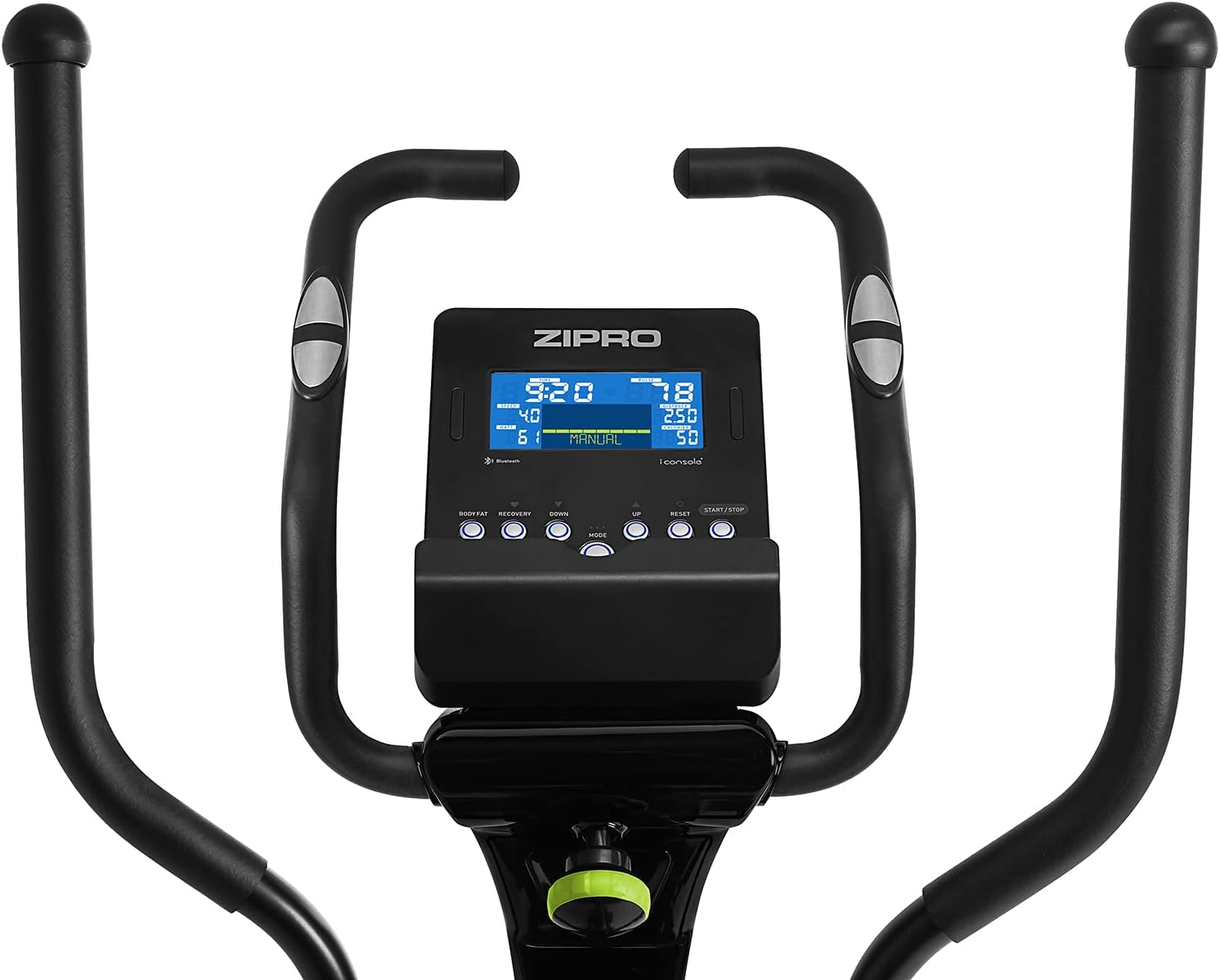
Image: Console and handlebars with integrated pulse sensors.
4.4. Power Connection
Connect the power adapter to the designated port on the elliptical trainer and then to a power outlet.

Image: Power input port.
5. Operating Instructions
5.1. Console Functions
The advanced computer console displays various workout metrics to help you track your progress.

Image: Console display showing workout data such as Time, Calories, Speed, Pulse, Body Fat, and Recovery.
- TIME: Duration of your workout.
- CALORIES: Estimated calories burned.
- SPEED: Current speed.
- PULSE: Heart rate measured via hand sensors.
- BODY FAT: Body fat percentage measurement (if supported by console).
- RECOVERY: Heart rate recovery test.
5.2. Adjusting Resistance
The elliptical trainer features 12 levels of electric magnetic resistance, providing a quiet and smooth operation. Resistance can be adjusted via the computer panel.

Image: Electric magnetic resistance system, known for quiet and smooth operation.
5.3. iConsole+ App Integration
The console is equipped with Bluetooth connectivity, allowing you to connect your smartphone or tablet via the iConsole+ app. This unlocks additional training possibilities, including workout programs and virtual routes (e.g., Kinomap).

Image: Console with a tablet connected via Bluetooth, showcasing the iConsole+ app and Kinomap for interactive training.
The Kinomap app tracks your progress and offers opportunities to compete with other users.
5.4. Handlebar Adjustment
To adjust the height or position of certain components, locate the 'LOOSEN & PULL' knob. Turn it counter-clockwise to loosen, pull it out, adjust the component, and then release and tighten clockwise.

Image: 'LOOSEN & PULL' adjustment knob for component positioning.
6. Maintenance
- Cleaning: Wipe down the equipment with a damp cloth after each use to remove sweat and dust. Avoid abrasive cleaners.
- Inspection: Periodically check all bolts, nuts, and moving parts for tightness and wear. Tighten any loose fasteners.
- Lubrication: Apply a silicone-based lubricant to moving joints and pivot points as needed to ensure smooth operation and prevent squeaking.
- Storage: Store the elliptical trainer in a dry, cool place away from direct sunlight and extreme temperatures.
7. Troubleshooting
| Problem | Possible Cause | Solution |
|---|---|---|
| Console not powering on | Power adapter not connected; loose cable connection; power outlet issue. | Ensure power adapter is securely plugged into the elliptical and a working outlet. Check console cable connections. |
| Squeaking or grinding noise | Loose bolts; lack of lubrication on moving parts; worn bearings. | Check and tighten all assembly bolts. Lubricate moving joints. If noise persists, contact customer support. |
| Resistance not changing | Cable disconnection; electronic fault. | Check resistance control cable connections. Restart the console. If issue persists, contact customer support. |
| Pulse reading inaccurate | Hands not firmly on sensors; dry hands; electronic interference. | Ensure hands are clean and firmly gripping the pulse sensors. Maintain consistent contact. |
8. Specifications
| Feature | Detail |
|---|---|
| Brand | ZIPRO |
| Model Name | Dunk |
| Model Number | 1592674 |
| Resistance Mechanism | Magnetic |
| Number of Resistance Levels | 12 |
| Maximum Weight Capacity | 150 kg |
| Product Dimensions (L x W x H) | 149.5 x 73 x 162.5 cm |
| Item Weight | 63.3 kg |
| Maximum Stride Length | 38 cm |
| Main Material | Aluminium |
| Color | Grey |
| Included Components | Elliptical Trainer |
| Service | Unisex |
| Supported Languages (Manual) | German, French, Italian |
9. Warranty and Support
For warranty information, please refer to the documentation included with your purchase or visit the official ZIPRO website. If you encounter any issues not covered in this manual or require further assistance, please contact ZIPRO customer support.
Manufacturer: Morele.net Sp. z o.o.


