
ZEBRONICS Zeb-Bro
Zeb-Bro In-Ear Wired Earphones User Manual
Model: Zeb-Bro
Brand: ZEBRONICS
Introduction
The Zeb-Bro in-ear wired earphones are designed to provide a comfortable and immersive audio experience. Featuring a 3.5mm audio jack for universal compatibility and 10mm drivers for clear sound, these earphones are suitable for various devices including mobile phones and tablets. The snug fit ensures comfort during extended use and contributes to passive noise cancellation, allowing for an enhanced listening experience. This manual provides essential information on setup, operation, maintenance, and troubleshooting.
Important Safety Information
- Avoid listening at high volume levels for prolonged periods to prevent hearing damage.
- Do not use the earphones in situations where inability to hear ambient sounds could be dangerous (e.g., while driving, cycling, or walking in traffic).
- Keep the earphones dry. Do not expose them to water or moisture. The product is not water resistant.
- Handle the earphones with care. Avoid dropping or subjecting them to strong impacts.
- Keep out of reach of children. Small parts may pose a choking hazard.
Package Contents
- 1 unit of Zeb-Bro Earphone
Product Overview
The Zeb-Bro earphones feature a classic in-ear design with a durable cable and a standard 3.5mm audio jack for broad compatibility.
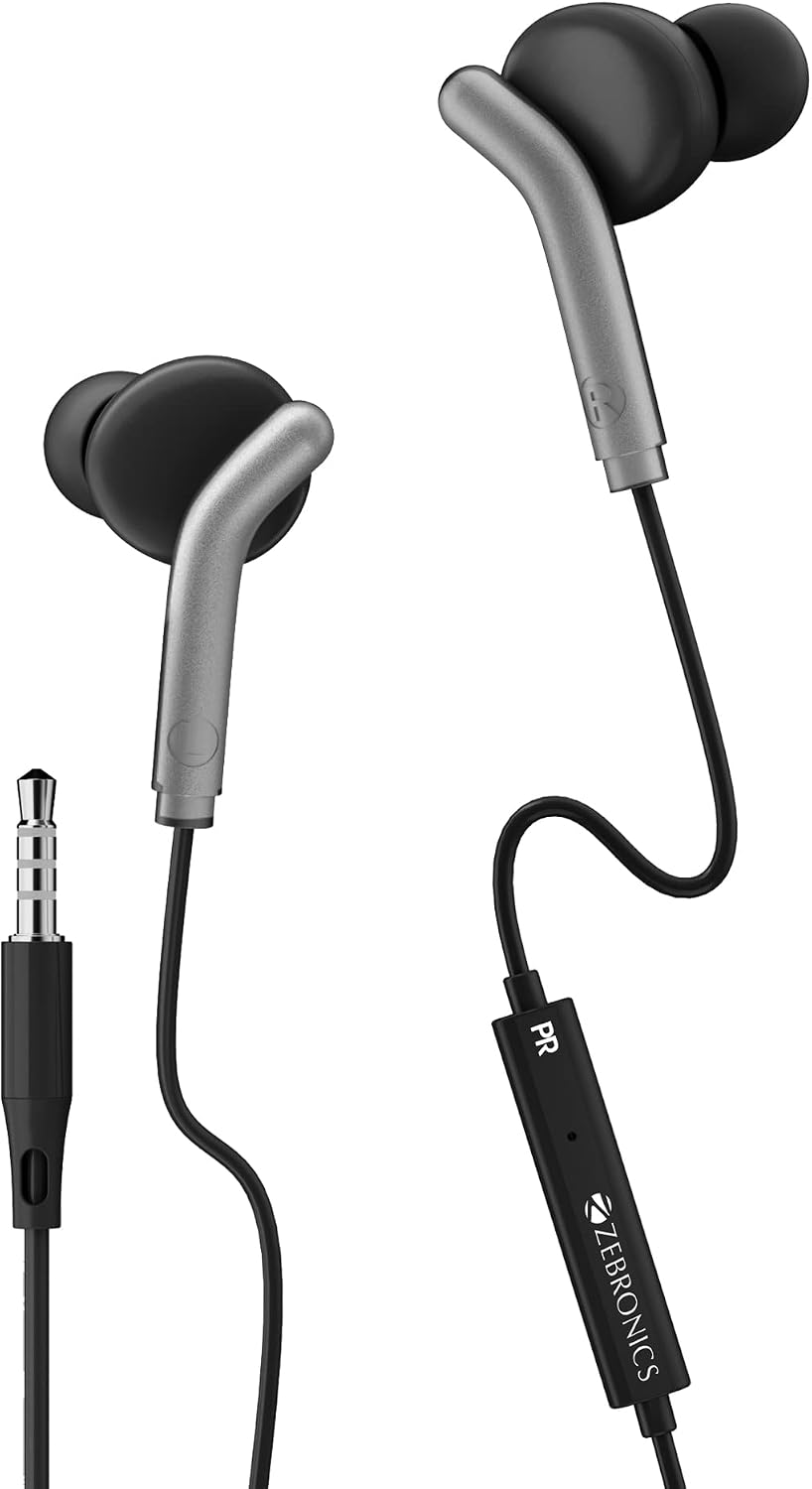
Figure 1: Overall view of Zeb-Bro In-Ear Wired Earphones with 3.5mm jack and in-line controls.
The earphones are equipped with 10mm dynamic drivers designed to deliver clear audio across a frequency range of 20Hz to 20kHz.

Figure 2: Close-up of the earbud highlighting the 10mm driver.
An integrated microphone and in-line controls allow for convenient call management and media playback.

Figure 3: The in-line control unit with built-in microphone for call functions.
Setup
Connecting your Zeb-Bro earphones is a simple process:
- Locate the 3.5mm audio jack on your smartphone, tablet, or other compatible audio device.
- Insert the 3.5mm plug of the Zeb-Bro earphones firmly into the audio jack of your device.
- Wait a few seconds for the earphones to synchronize with your device.
- Adjust the volume on your device to a comfortable listening level.

Figure 4: The 3.5mm audio jack for connecting to devices.
Operating Instructions
Audio Playback
Once connected, audio from your device will automatically play through the earphones. The snug-fit design provides passive noise cancellation for an enhanced listening experience.

Figure 5: Illustration of the earphone's snug fit for optimal audio and passive noise cancellation.
Call Function
The built-in microphone allows you to make and receive calls hands-free. When a call comes in, the audio will switch from media playback to the call. Use the in-line controls to manage calls.
In-line Controls
The in-line control unit typically includes buttons for:
- Play/Pause: Press once to play or pause music.
- Answer/End Call: Press once to answer an incoming call or end an ongoing call.
- Next Track: Double-press to skip to the next song.
- Previous Track: Triple-press to go back to the previous song.
- Volume Control: The control unit may include dedicated volume up/down buttons or a slider. (Refer to the specific design of your unit for exact functionality).
Care and Maintenance
- Cleaning: Gently wipe the earbuds and cable with a soft, dry, lint-free cloth. Do not use harsh chemicals or abrasive materials.
- Storage: When not in use, store the earphones in a clean, dry place, preferably in a pouch or case to prevent tangling and damage.
- Cable Management: Avoid sharp bends or excessive pulling on the cable to prevent internal wire damage. The cable is designed to be tangle-free.
- Temperature: Do not expose the earphones to extreme temperatures (hot or cold) or high humidity.
Troubleshooting
| Problem | Possible Cause | Solution |
|---|---|---|
| No sound from earphones | 3.5mm jack not fully inserted; Device volume too low; Incorrect audio output selected on device; Damaged cable/earphones. | Ensure the jack is fully inserted; Increase device volume; Check device audio settings; Test with another device; If still no sound, earphones may be faulty. |
| Sound is distorted or crackling | Loose connection; Volume too high; Audio source issue; Damaged cable. | Re-insert the jack; Lower device volume; Try a different audio source; Inspect cable for damage. |
| Microphone not working | Microphone port blocked; Device microphone settings; Incompatible device. | Ensure microphone is not covered; Check device's audio input settings; Test with another device. |
| In-line controls not responding | Incompatible device; Software glitch; Damaged control unit. | Ensure device supports in-line controls; Restart your device; If persistent, the control unit may be damaged. |
Technical Specifications
| Feature | Specification |
|---|---|
| Model Name | Zeb-Bro |
| Connectivity Technology | Wired |
| Headphones Jack | 3.5 mm Jack |
| Ear Placement | In Ear |
| Driver Size | 10mm (Dynamic Driver) |
| Impedance | 16 Ohm |
| Frequency Response | 20Hz - 20kHz |
| Cable Length | 1.2 Meters |
| Control Type | Noise Control, Volume Control, Media Control (Touch) |
| Noise Control | Passive Noise Cancellation |
| Material | Rubber |
| Item Weight | 41 Grams (1.45 ounces) |
| Water Resistance Level | Not Water Resistant |
| Compatible Devices | Mobile, Tablet |
Official Product Videos
No official product videos are available for this model at this time.
Warranty and Support
For warranty information and customer support, please refer to the warranty card included with your product or visit the official ZEBRONICS website. You may also contact the retailer where you purchased the product for assistance.
Related documentsZeb-Bro


Ask a question about this manual
Ask about setup, troubleshooting, compatibility, parts, safety, or missing instructions. Manuals+ will review the question and use this page’s manual context to help answer it.