
1. Introduction
This manual provides essential information for the proper setup, operation, and maintenance of your Theater Solutions B42S Fully Wireless Bluetooth Rock Speaker Set. These speakers are designed to deliver high-quality audio in outdoor environments with the convenience of wireless connectivity and rechargeable batteries.

Image 1.1: Overview of the four Theater Solutions B42S rock speakers.
2. Package Contents
Please verify that all items listed below are present in your package:
- 4 x Theater Solutions B42S Battery Powered Bluetooth Rock Speakers
- 4 x DC to USB Battery Charge Cables
- 1 x Instruction Manual (this document)
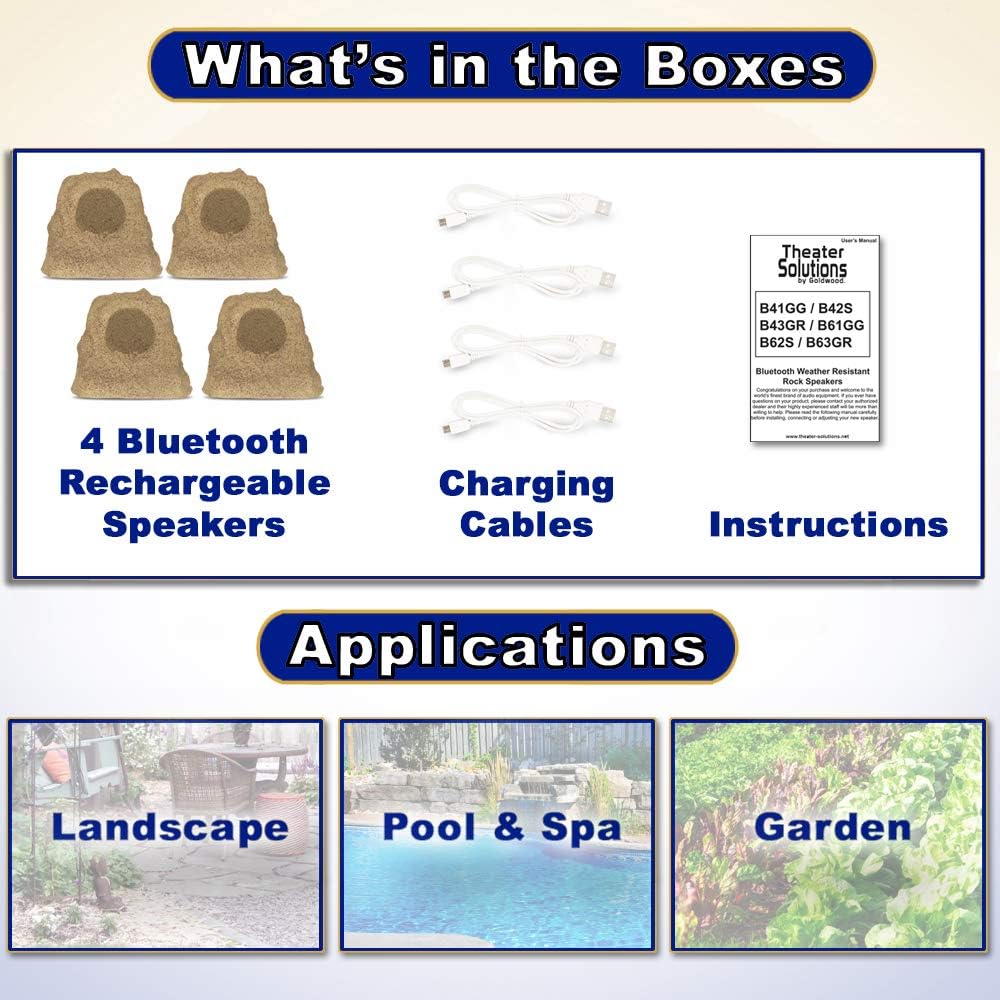
Image 2.1: Contents included in the B42S speaker set package.
3. Setup
Follow these steps to set up your B42S speakers for the first time:
- Initial Charge: Before first use, fully charge each speaker. Connect the provided DC to USB charge cables to each speaker and a standard USB power adapter (not included). A full charge takes approximately 7 hours.
- Placement: Position the rock speakers in your desired outdoor area. The woofers are angled 20 degrees upward to optimize sound direction.
- Power On: Locate the power button on each speaker and press it to turn the speakers on.
- Bluetooth Pairing (First Speaker): Activate Bluetooth on your audio streaming device (e.g., smartphone, tablet). Search for available devices and select the B42S speaker. Once connected, the speaker will indicate successful pairing.
- Linking Additional Speakers: To link multiple B42S speakers, ensure all speakers are powered on. After the first speaker is paired to your device, press the 'Link' button on the paired speaker, then press the 'Link' button on each additional speaker you wish to connect. The speakers will automatically connect to form a synchronized audio system. You can link up to 99 speakers.

Image 3.1: Visual guide for initial setup, including charging, Bluetooth connection, and linking.
4. Operating Instructions
4.1. Bluetooth Connectivity
Once paired, your device will automatically connect to the primary B42S speaker when both are powered on and within range. If connection is lost, ensure the speaker is on and Bluetooth is active on your device, then attempt to reconnect from your device's Bluetooth settings.
4.2. Multi-Speaker Linking
After the primary speaker is connected to your Bluetooth device, you can link additional B42S speakers. Press the 'Link' button on the primary speaker, then sequentially press the 'Link' button on each secondary speaker. The speakers will establish a wireless connection, playing synchronized audio from your device.
4.3. Battery Life
The sealed rechargeable battery provides approximately 6 hours of playtime at standard volume levels. Actual battery life may vary based on volume, audio content, and environmental conditions. Recharge the speakers when the battery indicator shows low power.
4.4. Weather Resistance
The B42S speakers are designed to be weatherproof, resistant to rain, snow, salt, ice, and pool chemicals. The cabinets are constructed from multi-layer composite material and silicone sealed, with rust-resistant steel grills. While durable, avoid submerging the speakers in water.

Image 4.1: Key features and dimensions of the B42S speaker.
5. Maintenance
To ensure the longevity and optimal performance of your B42S speakers, follow these maintenance guidelines:
- Cleaning: Wipe the speaker cabinets with a damp cloth to remove dirt or debris. Avoid using harsh chemicals or abrasive cleaners.
- Battery Care: For best battery life, avoid completely draining the battery frequently. Recharge the speakers regularly, especially if they will be stored for an extended period.
- Storage: If storing the speakers for a long duration, ensure they are fully charged and stored in a cool, dry place.
- Environmental Exposure: While weatherproof, prolonged exposure to extreme conditions (e.g., direct sunlight for extended periods, freezing temperatures) may affect performance and lifespan.
6. Troubleshooting
If you encounter issues with your B42S speakers, refer to the following common problems and solutions:
- No Power:
- Ensure the speaker is fully charged. Connect the charging cable and allow sufficient time for charging.
- Verify the power button is pressed firmly.
- No Bluetooth Connection:
- Ensure the speaker is powered on and in pairing mode (usually indicated by a flashing LED).
- Check that Bluetooth is enabled on your audio device and that the speaker is within range (typically up to 30 feet).
- Forget the device from your audio device's Bluetooth settings and attempt to re-pair.
- No Sound or Distorted Sound:
- Adjust the volume on both your audio device and the speaker.
- Ensure the speaker is properly paired and, if applicable, linked to other speakers.
- Check for obstructions between the audio device and the speaker, or between linked speakers.
- Move the speaker closer to your audio device to rule out range issues.
- Speakers Not Linking:
- Ensure all speakers are powered on and within close proximity during the linking process.
- Repeat the linking steps, pressing the 'Link' button on the primary speaker first, then on each secondary speaker.
7. Specifications
| Feature | Specification |
|---|---|
| Model Name | B42S |
| Item Model Number | B42S-4S |
| Speaker Type | Outdoor Rock Speaker |
| Subwoofer Diameter | 4 Inches |
| Total System Power | 60 Watts per speaker |
| Frequency Response | 40Hz-20 kHz |
| Sensitivity | 88dB at 8ohm |
| Wireless Technology | Bluetooth |
| Power Source | Battery Powered |
| Battery Play Time | Approximately 6 hours (at standard volume) |
| Battery Charge Time | Approximately 7 hours |
| Product Dimensions (H x W x D) | 8.86" x 9.45" x 7.87" (each) |
| Item Weight | 6 Pounds (each) |
| Cabinet Material | Multi-layer composite, silicone sealed |
| Grill Material | Rust resistant steel |
| Weatherproof | Yes |
| UPC | 849155059262 |

Image 7.1: Various views of a single B42S rock speaker.
8. Warranty and Support
Information regarding the product warranty and customer support details is not provided within this instruction manual. For warranty claims, technical assistance, or further inquiries, please refer to the manufacturer's official website or contact their customer service directly. The manufacturer is Theater Solutions by Goldwood.