
Introduction
This manual provides essential information for the safe and efficient operation of your Candy CDPN 2D522PW Dishwasher. Please read these instructions carefully before using the appliance to ensure proper installation, usage, and maintenance. Retain this manual for future reference.
Important Safety Information
Always follow basic safety precautions when using electrical appliances to reduce the risk of fire, electric shock, and injury to persons.
- Read all instructions before using the dishwasher.
- This appliance is intended for household use only.
- Do not operate the dishwasher if it is damaged or malfunctioning.
- Keep children away from the dishwasher, especially when the door is open.
- Use only detergents and rinse aids specifically designed for dishwashers.
- Ensure the appliance is properly grounded.
- Do not tamper with controls.
- Disconnect the appliance from the power supply before cleaning or maintenance.
Product Overview
The Candy CDPN 2D522PW is a modern dishwasher designed for efficient cleaning of up to 15 place settings. It features advanced connectivity options and multiple washing programs to suit various needs.
Key Features:
- Capacity: 15 place settings
- Connectivity: Wi-Fi + Bluetooth for remote control and additional program downloads
- Programs: 9 washing programs, including Rapid 24 min, Eco, Intensive, and Auto-daily
- Baskets: Third basket for cups and small utensils, height-adjustable upper basket
- Convenience: Delayed start up to 23 hours, remaining time display, Express and Tablet options
Appliance Components:

Figure 1: Front view of the Candy CDPN 2D522PW Dishwasher with the door open, revealing the three internal baskets for dishes, cutlery, and small items. The control panel is visible on the top edge of the door.
The dishwasher features a user-friendly control panel, typically located on the top edge of the door, allowing for program selection and option activation. The interior is designed with flexible baskets to accommodate various types of dinnerware.
Setup and Installation
Proper installation is crucial for the performance and safety of your dishwasher. It is recommended that installation be performed by a qualified technician.
Installation Guidelines:
- Ensure the dishwasher is placed on a level surface.
- Connect the water inlet hose to a cold water supply.
- Connect the drain hose to a suitable drain system.
- Plug the power cord into a grounded electrical outlet.
- Verify there are no kinks in the hoses or power cord.
First Use Preparation:
- Salt Dispenser: Fill the salt dispenser with dishwasher salt. This helps soften hard water and prevent limescale. Refer to the water hardness settings in your full manual.
- Rinse Aid Dispenser: Fill the rinse aid dispenser. Rinse aid improves drying performance and prevents water spots.
- Detergent Dispenser: Add an appropriate amount of dishwasher detergent to the dispenser.
Operating Instructions
Operating your Candy CDPN 2D522PW Dishwasher involves selecting a program and any desired options. The touch control panel provides an intuitive interface.
Program Selection:
Your dishwasher offers 9 main programs. Select the program that best suits the soil level and type of dishes.
- Eco: Energy-efficient program for normally soiled dishes.
- Intensive: For heavily soiled dishes and pots.
- Rapid 24 min: Quick wash for lightly soiled dishes.
- Auto-daily: Automatically adjusts wash parameters based on soil level.
- Zoom: Fast wash and dry for 8 place settings.
- Other programs include Universal, Night, Delicate, and Pre-wash.
Additional Options:
- Delayed Start: Postpone the start of a wash cycle by up to 23 hours.
- Express: Reduces the wash time for selected programs.
- Tablet: Optimizes washing for multi-function detergent tablets.
Wi-Fi and Bluetooth Connectivity:
Your dishwasher can be connected to your home Wi-Fi network and controlled via Bluetooth using the dedicated Candy app. This allows for remote control, downloading additional programs, and accessing smart features. Refer to the app's instructions for pairing and usage.
Loading the Dishwasher
Proper loading ensures optimal cleaning and drying results. Avoid overcrowding and ensure spray arms can rotate freely.
- Lower Basket: Ideal for large items like plates, bowls, pots, and pans.
- Upper Basket: Suitable for glasses, cups, smaller plates, and delicate items. This basket is height-adjustable to accommodate taller items in the lower basket.
- Third Basket: Designed for cutlery, small cups, and other small utensils. Ensure items do not block the spray arm.
- Place items with soiled surfaces facing the center of the dishwasher.
- Do not allow items to obstruct the detergent dispenser.
Maintenance and Care
Regular maintenance helps prolong the life of your dishwasher and ensures consistent cleaning performance.
Cleaning the Filters:
- Locate the filter assembly at the bottom of the dishwasher tub.
- Twist and remove the coarse filter, then separate the fine filter.
- Rinse all filter components under running water to remove food particles.
- Reassemble the filters and securely place them back into the dishwasher.
Cleaning the Spray Arms:
Periodically check the spray arm nozzles for blockages. If blocked, remove the spray arms and clear the holes with a thin object.
Exterior and Interior Cleaning:
- Wipe the exterior with a damp cloth. Do not use abrasive cleaners.
- Clean the door seal regularly to remove food residue.
- Run a dishwasher cleaning cycle periodically using a specialized dishwasher cleaner.
Salt and Rinse Aid Indicators:
The dishwasher will indicate when salt or rinse aid levels are low. Refill these dispensers as needed to maintain optimal performance.
Troubleshooting
Before contacting service, review the following common issues and their potential solutions.
| Problem | Possible Cause | Solution |
|---|---|---|
| Dishwasher does not start | Power supply issue, door not closed properly, program not selected. | Check power connection, ensure door is latched, select a program and press start. |
| Dishes are not clean | Incorrect loading, clogged spray arms, insufficient detergent, clogged filters. | Reload dishes correctly, clean spray arms, use appropriate detergent, clean filters. |
| Water not draining | Clogged drain hose or filter, drain pump malfunction. | Clean filters, check drain hose for kinks or blockages. |
| Excessive noise | Items obstructing spray arms, foreign object in pump, improper installation. | Ensure dishes do not interfere with spray arms, check for foreign objects. |
For more detailed troubleshooting or issues not listed here, consult the full product manual available via the Candy app or contact customer support.
Technical Specifications
| Feature | Detail |
|---|---|
| Model Number | CDPN 2D522PW |
| Brand | Candy |
| Dimensions (WxDxH) | 60 x 60 x 85 cm |
| Weight | 38.1 kg |
| Capacity | 15 Place Settings |
| Noise Level | 43 dB |
| Control Type | Full Control Panel (Touch) |
| Special Features | Rapid Wash, Wi-Fi + Bluetooth Connectivity, Third Basket, Adjustable Upper Basket, Delayed Start (up to 23h), Remaining Time Display |
| Energy Efficiency Class | E |
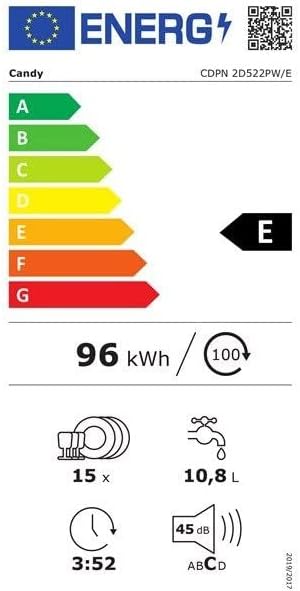
Figure 2: Energy label for the Candy CDPN 2D522PW Dishwasher, indicating an energy efficiency class of E, 96 kWh per 100 cycles, capacity for 15 place settings, water consumption of 10.8 liters, and a noise level of 45 dB.
Warranty and Support
For warranty information, please refer to the documentation provided with your purchase or visit the official Candy website. In case of technical issues or questions not covered in this manual, please contact Candy customer support.
Online Resources: For additional support, FAQs, and the complete user manual, please check the Candy official website or the Candy app.


