
Easytry123 AKB73756206, AKB73756207, AKB73795706, LW1817IVSM, LP1419IVSM, LW1517IVSM, LW1019IVSM, LW2217IVSM
User Manual for Easytry123 Replacement Remote Control
Compatible with LG Air Conditioner Models: AKB73756206, AKB73756207, AKB73795706, LW1817IVSM, LP1419IVSM, LW1517IVSM, LW1019IVSM, LW2217IVSM
1. Product Overview
This document provides instructions for the Easytry123 replacement remote control, designed to operate various LG air conditioner models. This remote offers essential functions for controlling your air conditioning unit.

Image: Front view of the Easytry123 replacement remote control. It is white with a grey LCD screen at the top and several circular and rectangular buttons below, including Power, Temperature Up/Down, Mode, Sleep Timer, Fan Speed, Swing, and Timer.
2. Setup and Battery Installation
The remote control requires two AAA batteries (not included) for operation. Follow these steps to install the batteries:
- Locate the battery compartment on the back of the remote control.
- Press down on the tab and slide the battery cover downwards to open it.
- Insert two AAA batteries, ensuring the positive (+) and negative (-) terminals align correctly with the markings inside the compartment.
- Slide the battery cover back into place until it clicks securely.
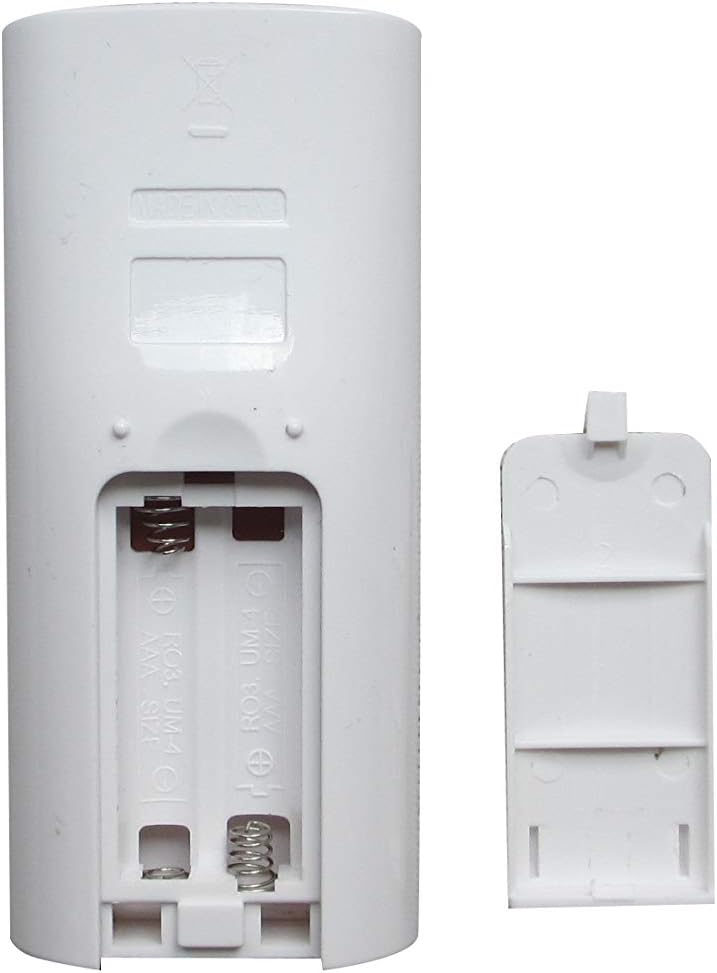
Image: Back view of the remote control showing the open battery compartment. Two slots for AAA batteries are visible, along with the spring contacts for the negative terminals.
3. Operating Instructions
Point the remote control directly at the air conditioner's receiver. Ensure there are no obstructions between the remote and the unit.
Button Functions:
| Button | Function |
|---|---|
| Power (⏻) | Turns the air conditioner ON or OFF. |
| TEMP (▲ / ▼) | Adjusts the desired temperature setting up or down. |
| MODE | Cycles through operating modes such as Cool, Fan, Dry, Heat (if supported by AC unit). |
| SLEEP TIMER | Activates or adjusts the sleep mode timer for comfortable overnight operation. |
| FAN SPEED | Adjusts the fan speed (e.g., Low, Medium, High, Auto). |
| SWING | Controls the vertical or horizontal swing of the air deflector. |
| TIMER (⏱) | Sets a timer for the air conditioner to turn ON or OFF automatically. |
Note: The functionality of certain buttons may vary depending on the specific LG air conditioner model you are using. This replacement remote may not support all advanced functions of your original remote.
4. Maintenance
- Cleaning: Wipe the remote control with a soft, dry cloth. Do not use liquid cleaners or abrasive materials.
- Battery Replacement: Replace batteries when the remote's range decreases or it stops responding. Always replace both batteries at the same time with new ones of the same type (AAA).
- Storage: If the remote will not be used for an extended period, remove the batteries to prevent leakage and damage. Store in a cool, dry place.
5. Troubleshooting
| Problem | Possible Cause / Solution |
|---|---|
| Remote not responding. |
|
| Some functions do not work. |
|
| Temperature displays in Celsius only. |
|
6. Specifications
- Brand: Easytry123
- Compatible Devices: LG Air Conditioners (models including AKB73756206, AKB73756207, AKB73795706, LW1817IVSM, LP1419IVSM, LW1517IVSM, LW1019IVSM, LW2217IVSM)
- Connectivity Technology: Infrared (IR)
- Controller Type: Button Control
- Power Source: 2 x AAA Batteries (not included)
- Special Feature: Ergonomic design
- Manufacturer: Easytry123
7. Warranty and Support
Specific warranty information for Easytry123 products is not provided in the product details. For any support or warranty inquiries, please refer to the seller or retailer from whom you purchased this product.
For general troubleshooting, please refer to the "Troubleshooting" section of this manual.
Ask a question about this manual
Ask about setup, troubleshooting, compatibility, parts, safety, or missing instructions. Manuals+ will review the question and use this page’s manual context to help answer it.