
Shure TH53T/O-MTQG
Contents
Shure TwinPlex TH53T/O-MTQG Omnidirectional Headset Microphone User Manual
Model: TH53T/O-MTQG
1. Introduction and Overview
The Shure TwinPlex TH53T/O-MTQG is a high-performance, tan-colored omnidirectional headset microphone designed for professional audio applications. It features an ultra-compact dual-diaphragm capsule, providing exceptional clarity, natural sound reproduction, and superior off-axis consistency. Its lightweight and fully adjustable headset frame ensures comfort and optimal microphone placement for various users and applications, including theater, broadcast, presentations, and live performances. The integrated cable terminates with a TA4F connector, making it compatible with a wide range of wireless bodypack transmitters.
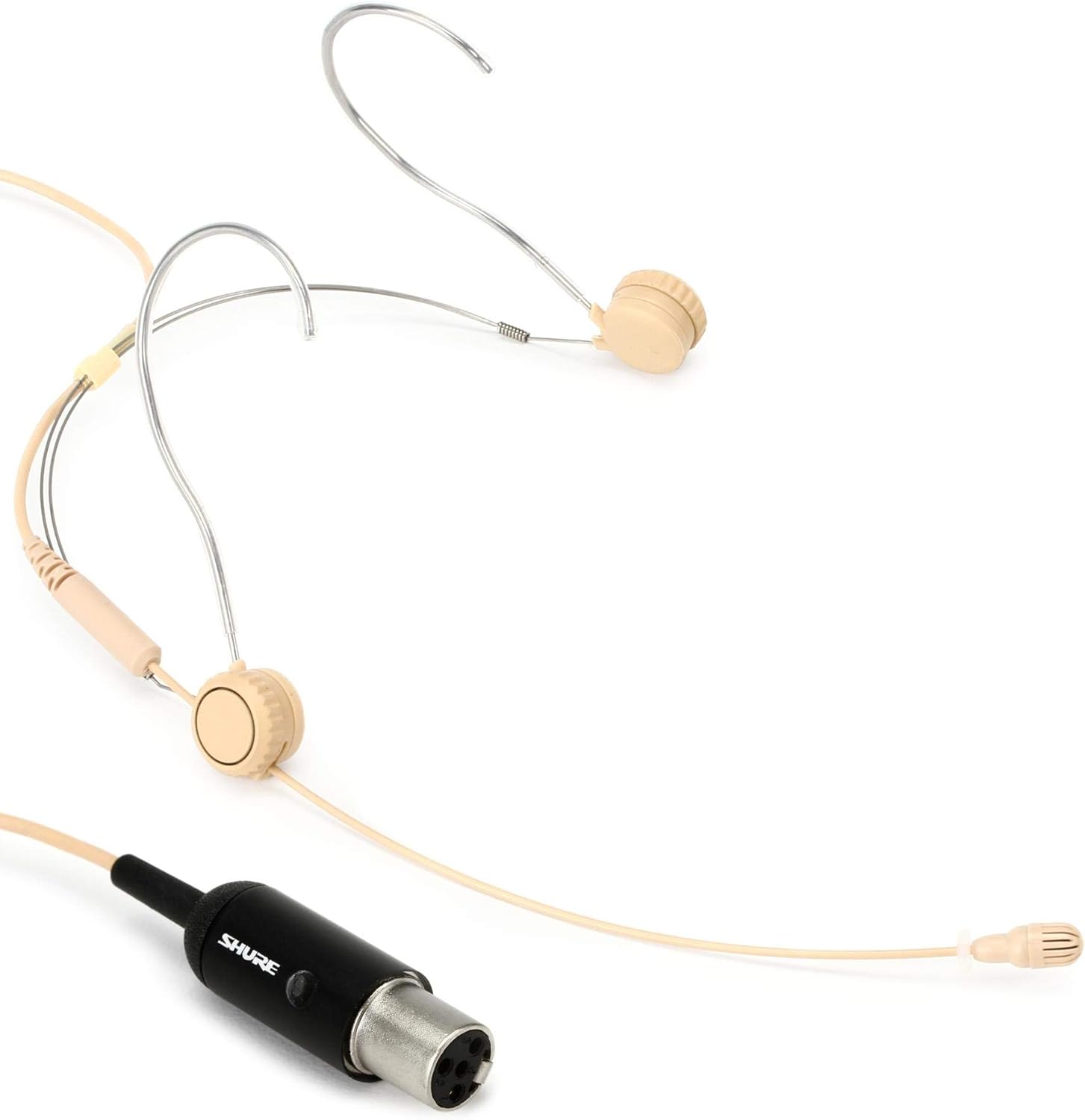
Image: The Shure TwinPlex TH53T/O-MTQG headset microphone, showing the tan-colored earpieces, thin boom arm, and the black TA4F connector at the end of the cable.
2. What's in the Box
Upon opening the package, please verify that all components are present and in good condition:
- 1 x Shure TwinPlex TH53T/O-MTQG Omnidirectional Headset Microphone (Tan)
- 1 x Integrated Cable with TA4F Connector
3. Setup
3.1 Wearing the Headset
- Gently place the headset frame over your ears, ensuring a comfortable and secure fit. The earpieces should rest comfortably behind your ears.
- Adjust the flexible boom arm so that the microphone capsule is positioned approximately 1-2 cm (0.5-1 inch) from the corner of your mouth. This optimal distance helps capture clear audio while minimizing plosives and breath noises.
- Ensure the cable runs discreetly down your back or side, away from clothing that might cause rubbing noise.
3.2 Connecting to a Transmitter
- Locate the TA4F connector on the microphone cable.
- Align the TA4F connector with the input jack on your compatible Shure wireless bodypack transmitter.
- Push the connector firmly into the jack until it clicks into place, ensuring a secure connection.
- Before use, ensure the bodypack transmitter has fresh batteries and is powered on.
4. Operating Instructions
The Shure TwinPlex TH53T/O-MTQG is an omnidirectional microphone, meaning it picks up sound equally from all directions. This characteristic makes it forgiving in terms of precise aiming but still benefits from proper placement for optimal sound quality.
- Gain Setting: Adjust the gain (input sensitivity) on your wireless bodypack transmitter and/or mixing console to achieve a strong signal without clipping or distortion. Start with a lower gain setting and gradually increase it while speaking at your normal volume.
- Sound Check: Always perform a sound check before a live event or recording session to ensure the microphone is functioning correctly and the audio levels are appropriate.
- Proximity Effect: While omnidirectional microphones exhibit less proximity effect than directional microphones, speaking too close to the capsule can still result in an unnatural bass boost. Maintain the recommended distance of 1-2 cm from the mouth.
- Wind Noise: For outdoor use or in windy conditions, consider using an additional foam windscreen (not included) to minimize wind noise.
5. Maintenance
Proper care and maintenance will extend the life and performance of your Shure TwinPlex TH53T/O-MTQG microphone.
- Cleaning: Use a soft, dry cloth to wipe down the microphone and cable after each use. For stubborn dirt, a slightly damp cloth with mild soap can be used, but ensure no moisture enters the microphone capsule or connector. Do not use harsh chemicals or abrasive cleaners.
- Storage: Store the microphone in its original packaging or a protective case when not in use. Avoid tangling the cable, as this can lead to internal damage over time. Keep the microphone away from extreme temperatures, high humidity, and direct sunlight.
- Cable Care: Do not pull on the cable to disconnect the microphone. Always grasp the connector itself. Avoid sharp bends or kinks in the cable.
6. Troubleshooting
If you encounter issues with your microphone, refer to the following common problems and solutions:
| Problem | Possible Cause | Solution |
|---|---|---|
| No Sound Output |
|
|
| Distorted Sound |
|
|
| Intermittent Sound |
|
|
7. Specifications
| Feature | Detail |
|---|---|
| Brand | Shure |
| Model Number | TH53T/O-MTQG |
| Microphone Form Factor | Headset |
| Polar Pattern | Omnidirectional |
| Connector Type | TA4F |
| Color | Tan |
| Item Weight | 12.2 ounces (0.34 kg) |
| Product Dimensions (L x W x H) | 8.75 x 7.75 x 2.3 inches (22.2 x 19.7 x 5.8 cm) |
| Audio Sensitivity | -45 dBV (5.6 mV) at 1 Pa |
| Signal-to-Noise Ratio | 65 dB |
| Power Source | Corded Electric (via compatible transmitter) |
| Recommended Uses | Speech, Vocal Performance |
| Special Feature | Lightweight, Dual-Diaphragm Capsule |
| UPC | 042406517034 |
8. Warranty and Support
Shure products are manufactured to the highest quality standards and are backed by a limited warranty. For detailed warranty information, including terms, conditions, and duration, please refer to the official Shure website or the warranty card included with your product.
For technical support, service, or additional product information, please visit the official Shure support page:
When contacting support, please have your product model number (TH53T/O-MTQG) and serial number (if applicable) ready.
Documents and downloads
Ask a question about this manual
Ask about setup, troubleshooting, compatibility, parts, safety, or missing instructions. Manuals+ will review the question and use this page’s manual context to help answer it.