
Sauder 424150
Contents
Sauder Viabella Storage Cabinet/Pantry Cabinet User Manual
Model: 424150
Introduction
This user manual provides detailed instructions for the assembly, operation, maintenance, and troubleshooting of your Sauder Viabella Storage Cabinet/Pantry Cabinet. Please read this manual thoroughly before beginning assembly or use to ensure proper installation and safe operation.
The Sauder Viabella Storage Cabinet offers versatile storage with a stylish design. It features adjustable shelves behind three doors, providing flexible storage for various items. The cabinet is finished in Curado Cherry and includes a graphic tile pattern on the door fronts.
Important Safety Information
WARNING: To prevent serious injury, ensure the cabinet is properly installed and secured to avoid tipping. Do not place heavy items on top that exceed the cabinet's weight capacity. Always follow assembly instructions carefully.
- Keep all small parts and packaging materials away from children.
- Assemble on a soft, clean surface to prevent scratching.
- Use only the provided hardware.
- Periodically check all connections to ensure they remain tight.
- Do not stand on or climb on the cabinet.
Setup and Assembly
Your Sauder Viabella Storage Cabinet requires assembly. A detailed instruction book is included with the product to guide you through the process. Please ensure you have all components and tools listed before starting.
Unpacking and Inventory
Carefully unpack all components from the packaging. Lay them out on a clean, soft surface to prevent damage. Verify that all parts listed in the instruction manual are present. If any parts are missing or damaged, contact Sauder customer support immediately.
Assembly Steps
- Prepare the Area: Clear a spacious area for assembly. Ensure the floor is level and protected.
- Identify Components: Refer to the parts list in your instruction manual to identify each piece.
- Follow Step-by-Step Instructions: The included instruction book provides diagrams and sequential steps for assembly. Follow them precisely.
- Secure Connections: Ensure all screws, cam locks, and other fasteners are tightened securely. Do not overtighten.
- Install Doors and Shelves: Attach the three doors and install the adjustable shelves as per the instructions. The adjustable shelves allow for flexible storage configurations.
- Wall Anchoring (Recommended): For safety, it is highly recommended to anchor the cabinet to a wall using the provided anti-tip hardware. This prevents accidental tipping.
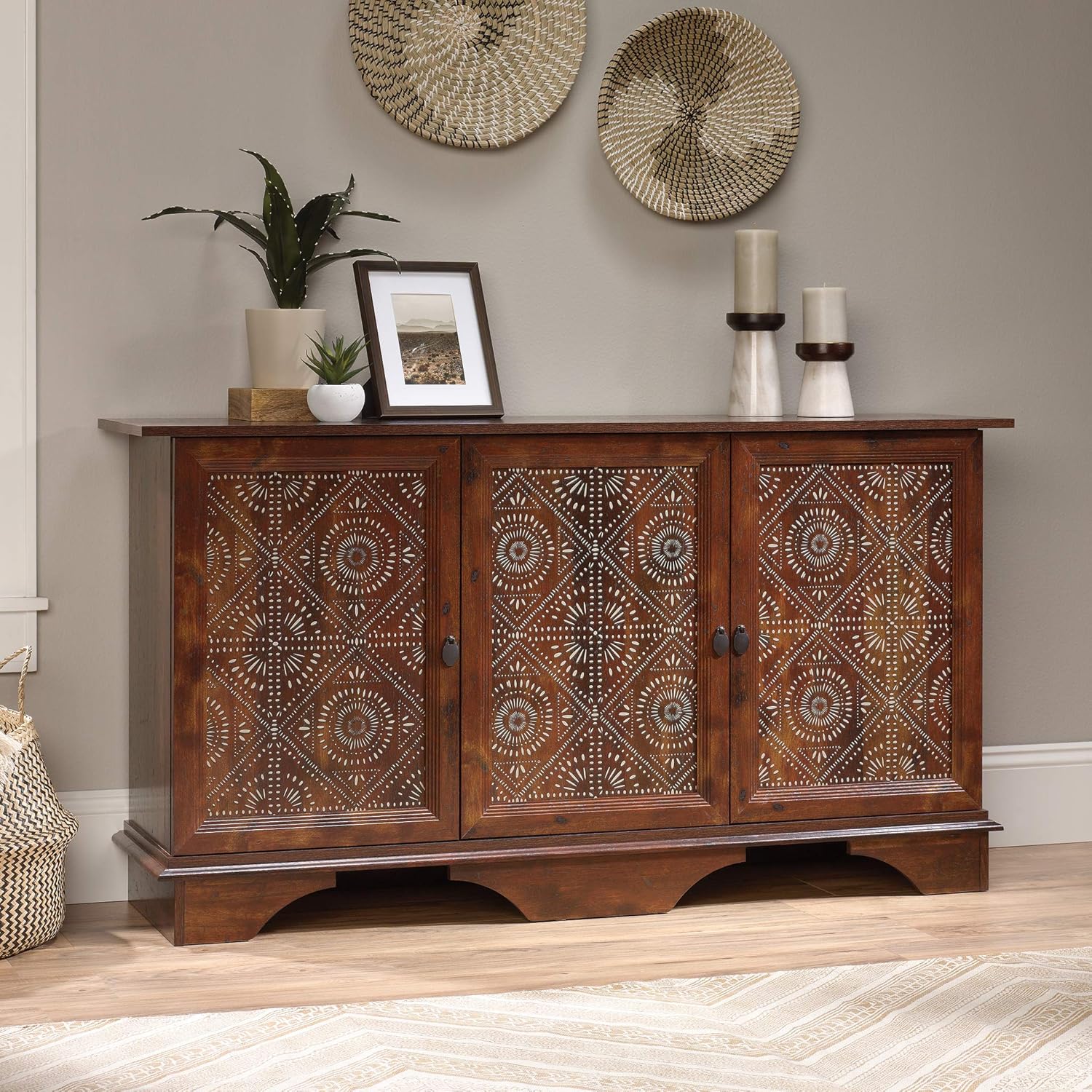
Image: The Sauder Viabella Storage Cabinet, fully assembled, positioned in a room to illustrate its appearance and scale.

Image: A close-up of the unique graphic tile pattern featured on the doors of the Sauder Viabella Storage Cabinet, highlighting the design detail.
Operation
Adjusting Shelves
The Sauder Viabella Storage Cabinet features adjustable shelves behind each of its three doors. To adjust a shelf:
- Empty the shelf of all contents.
- Remove the shelf by lifting it and pulling it out from the shelf pins.
- Relocate the shelf pins to the desired height. Ensure pins are securely inserted into corresponding holes on both sides.
- Place the shelf back onto the pins, ensuring it is level and stable.

Image: An interior view of the Sauder Viabella Storage Cabinet, demonstrating the adjustable shelf feature with various items stored, such as books and dinnerware.
Loading the Cabinet
Distribute weight evenly across shelves. Avoid overloading any single shelf or compartment. Place heavier items on lower shelves to maintain stability.
Care and Maintenance
Proper care will help maintain the appearance and longevity of your Sauder Viabella Storage Cabinet.
Cleaning
Wipe the cabinet surfaces with a damp cloth. Avoid using harsh chemicals, abrasive cleaners, or polishes that may damage the Curado Cherry finish. Dry immediately with a soft, clean cloth.
General Care
- Avoid direct sunlight exposure to prevent fading.
- Keep the cabinet away from excessive heat or moisture.
- Periodically check all hardware connections and tighten if necessary.
- Do not drag the cabinet when moving; always lift it to prevent damage to the base and floor.
Troubleshooting
| Problem | Possible Cause | Solution |
|---|---|---|
| Cabinet wobbles or is unstable. | Uneven floor; loose hardware; improper assembly. | Ensure cabinet is on a level surface. Check and tighten all assembly hardware. Verify all parts are correctly assembled according to the manual. |
| Doors do not close properly or are misaligned. | Loose hinge screws; cabinet not level; warped door. | Adjust hinge screws as per assembly instructions. Ensure the cabinet is level. If the door is warped, contact customer support. |
| Shelves sag or are not secure. | Overloaded shelf; shelf pins not fully inserted. | Reduce weight on the shelf. Ensure shelf pins are fully and securely inserted into the designated holes. |
Specifications
| Feature | Detail |
|---|---|
| Brand | Sauder |
| Model Name | Viabella |
| Model Number | 424150 |
| Color | Brown (Curado Cherry Finish) |
| Product Dimensions (Assembled) | L: 59.06" x W: 15.32" x H: 31.54" (150.0 cm x 38.0 cm x 80.1 cm) |
| Item Weight | 90 Pounds (40.8 kg) |
| Material | Engineered Wood |
| Number of Doors | 3 |
| Number of Adjustable Shelves | 3 (one behind each door) |
| Assembly Required | Yes |
| UPC | 042666049351 |

Image: A technical diagram illustrating the overall dimensions of the Sauder Viabella Storage Cabinet, including width, depth, and height, along with internal compartment measurements.
Warranty Information
The Sauder Viabella Storage Cabinet comes with a 5-year limited warranty on parts. This warranty covers manufacturing defects and missing parts. For specific details regarding coverage and claims, please refer to the warranty documentation included with your product or contact Sauder customer support.
Customer Support
For assistance with assembly, missing parts, or any other inquiries, please contact Sauder customer support. Have your model number (424150) and purchase information ready when contacting support.
Sauder Customer Support:
- Visit the official Sauder website for contact information and FAQs: www.sauder.com
- Refer to the contact details provided in your product's assembly instruction manual.

Image: An icon representing customer support services, indicating availability for assistance.
Ask a question about this manual
Ask about setup, troubleshooting, compatibility, parts, safety, or missing instructions. Manuals+ will review the question and use this page’s manual context to help answer it.