
1. Introduction
This manual provides detailed instructions for the assembly, operation, and maintenance of your Sky-Watcher StarTravel 120mm f/5 AZ3 Refractor Telescope. This instrument is designed for both astronomical and terrestrial observations, offering clear and wide-field views. Please read this manual thoroughly before using your telescope to ensure proper setup and optimal performance.
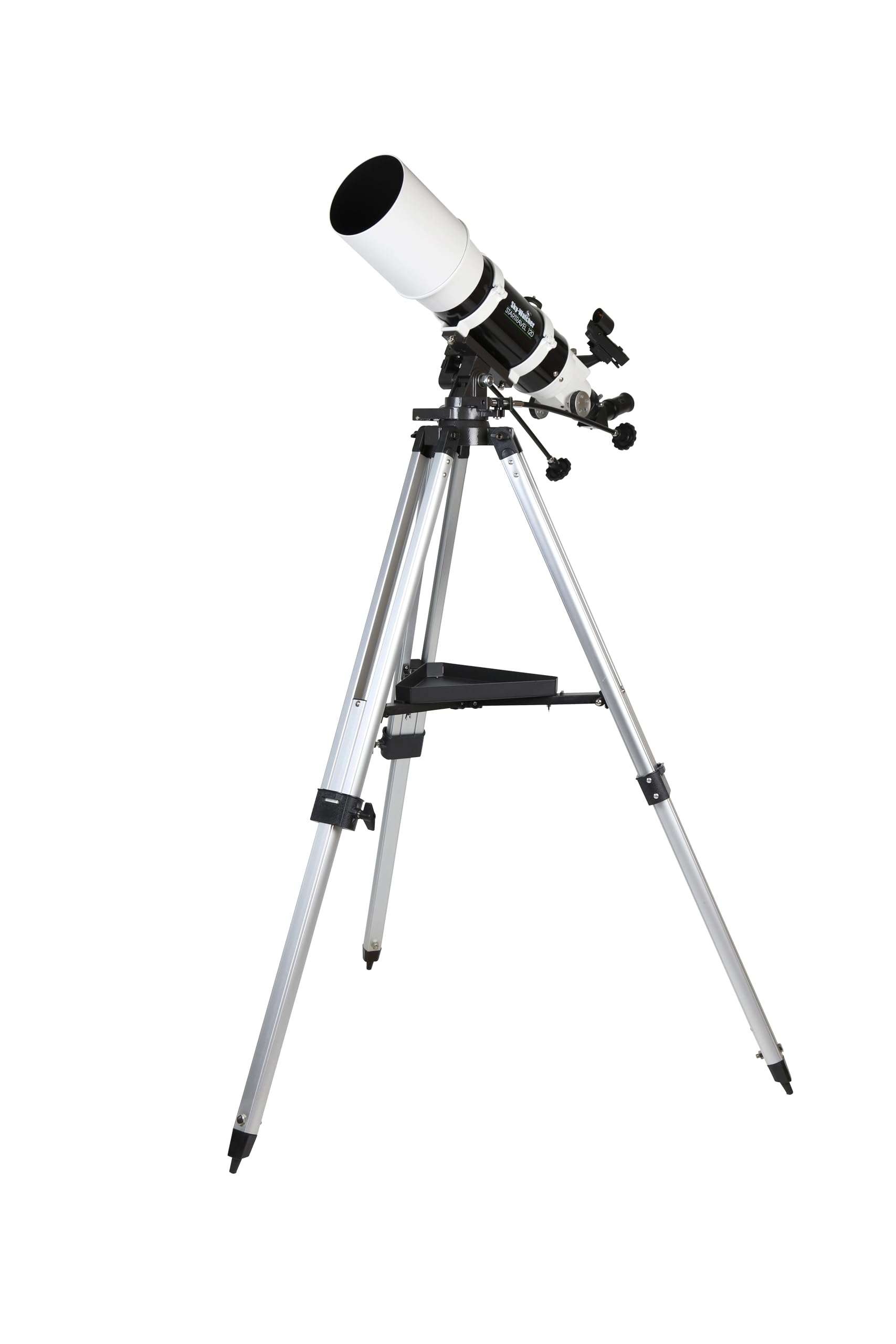
Figure 1: Fully assembled Sky-Watcher StarTravel 120mm f/5 AZ3 Refractor Telescope.
2. Safety Information
- Never look directly at the Sun through the telescope or its finder scope without a professionally manufactured solar filter. Permanent eye damage or blindness can result.
- Do not leave the telescope unsupervised, especially when children are present.
- Handle optical components with care to avoid scratches or damage.
- Ensure all knobs and screws are securely tightened during assembly and use to prevent accidental falls of components.
- Use caution when adjusting the tripod legs to maintain stability.
3. Package Contents
Verify that all components listed below are present in your package:
- Optical Tube Assembly (OTA) - 120mm Refractor
- AZ3 Alt-Azimuth Mount
- Adjustable Aluminum Tripod
- Accessory Tray
- 25mm 1.25" Super Eyepiece
- 10mm 1.25" Super Eyepiece
- Red Dot Finder
- 1.25" 45-degree Erecting Prism
- Tube Mounting Rings (pre-attached to OTA)
4. Setup
4.1. Assembling the Tripod and Mount
- Carefully remove all components from the packaging.
- Spread the tripod legs apart until they are fully extended. Tighten the leg brace knob to secure them.
- Extend the lower sections of the tripod legs to your desired height. Secure them with the leg lock clamps.
- Attach the accessory tray to the central leg brace using the provided screw.
- Place the AZ3 mount head onto the tripod's mounting platform. Secure it by tightening the large knob from underneath the tripod head.

Figure 2: Side view of the telescope, illustrating the tripod and mount assembly.
4.2. Attaching the Optical Tube Assembly (OTA)
- Loosen the knobs on the tube mounting rings (pre-attached to the OTA) and open the rings.
- Place the OTA into the mounting rings, ensuring it is balanced. Close the rings and tighten the knobs securely.
- Attach the mounting rings to the AZ3 mount head using the dovetail clamp. Ensure the clamp is fully tightened.

Figure 3: Detail of the optical tube assembly mounted on the AZ3 head.
4.3. Installing the Eyepiece and Erecting Prism
- Loosen the thumbscrew on the focuser drawtube.
- Insert the 45-degree erecting prism into the focuser drawtube. Tighten the thumbscrew to secure it.
- Insert either the 25mm or 10mm eyepiece into the erecting prism. Tighten the thumbscrew on the prism to secure the eyepiece. The 25mm eyepiece provides lower magnification and a wider field of view, ideal for initial targeting.

Figure 4: Eyepiece and erecting prism installation on the focuser.
4.4. Installing the Red Dot Finder
- Slide the red dot finder into the dovetail base located on the optical tube.
- Tighten the small thumbscrew on the finder base to secure it.
- Remove the plastic battery tab from the red dot finder to activate the battery.

Figure 5: Red dot finder attached to the telescope.
5. Operating the Telescope
5.1. Aligning the Red Dot Finder
The red dot finder must be aligned with the main telescope for accurate targeting.
- Point the main telescope at a distant, easily identifiable object (e.g., a distant tree or street light) during daylight hours.
- Look through the 25mm eyepiece and center the object in the field of view.
- Turn on the red dot finder. Look through the finder and use the adjustment knobs to move the red dot until it is centered on the same object you see in the main telescope's eyepiece.
- Once aligned, the red dot finder will indicate where the main telescope is pointing.
5.2. Focusing
To achieve a sharp image, rotate the focuser knobs until the object appears clear and crisp. For astronomical viewing, focus on a bright star or the Moon. For terrestrial viewing, focus on a distant land object.
5.3. Observing Celestial Objects
- Start with the 25mm eyepiece for a wide field of view, making it easier to locate objects.
- Use the red dot finder to point the telescope at your desired celestial object.
- Look through the 25mm eyepiece and center the object. Adjust focus as needed.
- For higher magnification, switch to the 10mm eyepiece. Refocus after changing eyepieces.
- Use the slow-motion controls on the AZ3 mount for fine adjustments to track objects as they move across the sky.
5.4. Terrestrial Viewing
The 45-degree erecting prism provides a correctly oriented image, making the telescope suitable for terrestrial observations. Follow the same steps as for celestial viewing, focusing on land objects. The AZ3 mount's alt-azimuth design is intuitive for tracking objects horizontally and vertically.
6. Maintenance
- Cleaning Optics: Use a soft, clean brush or compressed air to remove loose dust. For smudges, use a specialized optical cleaning solution and a microfiber cloth. Apply solution to the cloth, not directly to the lens.
- Cleaning Mechanical Parts: Wipe down the telescope tube and mount with a soft, damp cloth. Avoid harsh chemicals.
- Storage: Store the telescope in a dry, dust-free environment. Use dust caps for the objective lens and focuser opening when not in use.
- Collimation: The refractor telescope is factory-collimated and generally does not require user adjustment. If you suspect collimation issues, contact Sky-Watcher support.
7. Troubleshooting
| Problem | Possible Cause | Solution |
|---|---|---|
| Image is blurry/out of focus | Incorrect focus setting | Adjust the focuser knobs until the image is sharp. |
| Cannot find objects | Red dot finder not aligned; using too high magnification | Align the red dot finder (Section 5.1). Start with the 25mm eyepiece. |
| Image appears upside down or reversed | Erecting prism not used (for terrestrial viewing) | Ensure the 45-degree erecting prism is installed for terrestrial viewing. For astronomical viewing, an inverted image is normal. |
| Wobbly image | Tripod or mount not stable; loose connections | Ensure tripod legs are fully extended and locked. Tighten all mounting knobs and screws. |
8. Specifications
| Feature | Detail |
|---|---|
| Optical Design | Achromatic Refractor |
| Aperture | 120 mm |
| Focal Length | 600 mm |
| Focal Ratio | f/5 |
| Optical Coatings | Fully Multi-Coated |
| Mount Type | AZ3 Alt-Azimuth Mount with Slow-Motion Controls |
| Tripod | Adjustable Aluminum |
| Eyepieces Included | 25mm Super (1.25"), 10mm Super (1.25") |
| Finder Scope | Red Dot Finder |
| Erecting Prism | 1.25" 45-degree |
| Optical Tube Length | 558 mm (22 inches) |
| Total Weight | Approximately 17 lbs |
| Model Number | S10105 |
9. Warranty and Support
9.1. Warranty Information
This Sky-Watcher telescope comes with a Two Year Limited Warranty. Please refer to the warranty card included in your package for full terms and conditions. Keep your proof of purchase for warranty claims.
9.2. Customer Support
For technical assistance, troubleshooting, or warranty service, please contact Sky-Watcher customer support. Visit the official Sky-Watcher website for contact details and additional resources.
Online resources and support: Sky-Watcher Store on Amazon
