
Introduction
This document provides instructions for the Easytry123 replacement remote control, designed for use with various Sanyo LCD LED HDTV TV models. This remote is intended to function as a direct replacement for your original remote control. Please note that while it offers core functionalities, some advanced or specific features of your original TV remote may not be fully supported by this replacement unit.
Package Contents
- 1 x Easytry123 Replacement Remote Control (Model: DP26670)
- Note: Batteries are not included and must be purchased separately.
Setup
1. Battery Installation
The remote control requires two AAA batteries for operation. Follow these steps to install them:
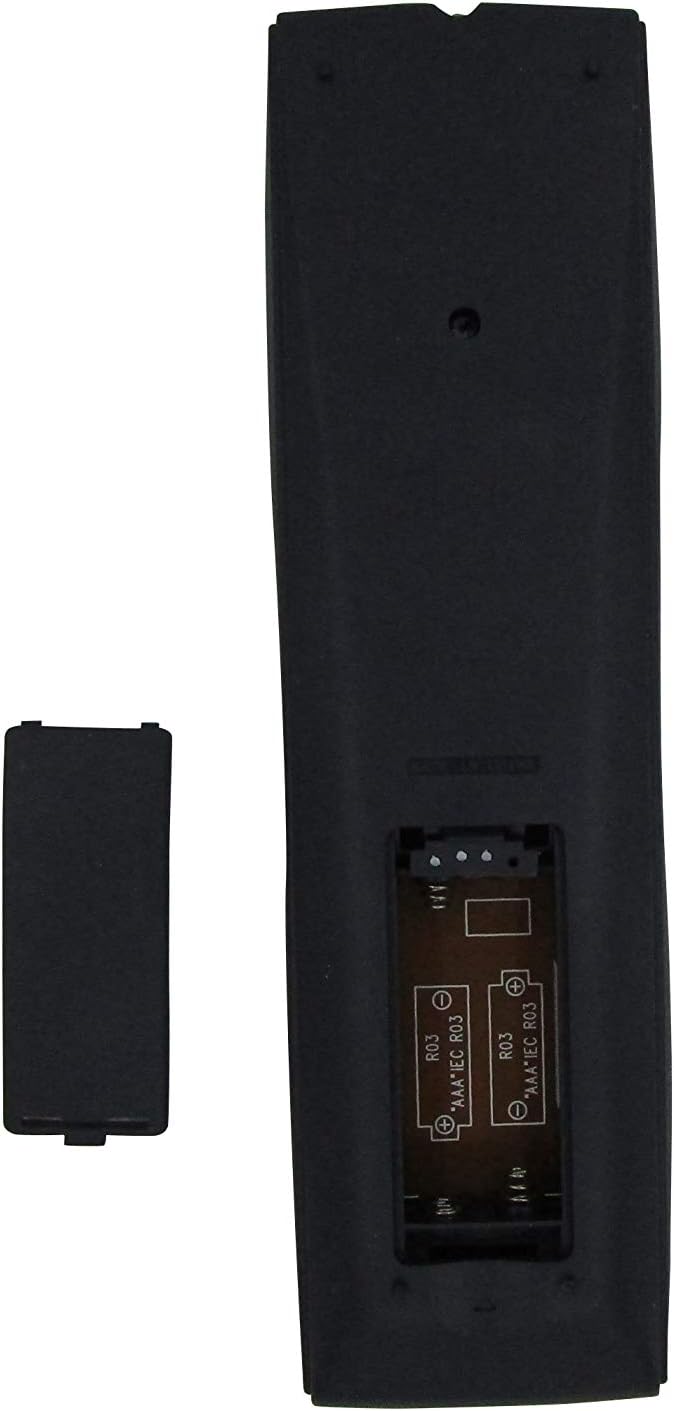
Image: Rear view of the remote control with the battery cover removed, illustrating the battery compartment where two AAA batteries are to be inserted.
- Locate the battery compartment on the back of the remote control.
- Slide the battery cover downwards to open it.
- Insert two (2) AAA batteries, ensuring that the positive (+) and negative (-) terminals align correctly with the markings inside the compartment.
- Slide the battery cover back into place until it clicks securely.
2. Initial Use
This replacement remote control is designed for immediate use with compatible Sanyo TV models. No programming or pairing is typically required. Simply install the batteries and point the remote towards your television.
Operating the Remote Control
Familiarize yourself with the button layout and their primary functions:

Image: Front view of the Sanyo replacement remote control, displaying all buttons and their respective labels for easy identification of functions.
- POWER: Turns the television on or off.
- INPUT: Cycles through available input sources (e.g., HDMI, AV, Component).
- RESET: May reset certain television settings. Refer to your TV's original manual for specific functionality.
- Number Buttons (0-9): Directly select television channels.
- CAPTION: Activates or deactivates closed captions.
- SLEEP: Sets a timer for the TV to automatically power off.
- MENU: Accesses the television's main menu for settings and adjustments.
- RECALL: Switches between the current and the previously viewed channel.
- CH (Channel Up/Down): Navigates sequentially through television channels.
- VOL +/- (Volume Up/Down): Adjusts the audio volume level.
- MUTE: Silences or restores the television's audio.
- DISPLAY: Shows on-screen information such as current channel, time, or input source.
- V-GUIDE: Accesses the video guide function, if supported by your television model.
Maintenance
Proper care will extend the life of your remote control:
- Keep the remote control clean by wiping it with a soft, dry cloth. Avoid using liquid cleaners or abrasive materials.
- Avoid exposing the remote to extreme temperatures, high humidity, or direct sunlight, as these can damage internal components.
- If the remote control will not be used for an extended period, remove the batteries to prevent potential leakage and damage.
- Do not drop the remote control or subject it to strong impacts.
Troubleshooting
If you encounter issues with your remote control, consider the following:
- Remote not responding:
- Verify that the batteries are inserted correctly, observing the positive (+) and negative (-) polarity markings.
- Replace old or depleted batteries with new AAA batteries.
- Ensure there are no physical obstructions between the remote control and the TV's infrared sensor.
- Confirm that the remote control is pointed directly at the TV's infrared sensor.
- Some functions do not work:
- This replacement remote may not support all advanced or unique functions present on your original TV remote. Functionality is primarily for standard TV operations.
- Double-check that your specific Sanyo TV model is listed as compatible with this remote control. Incompatibility can lead to partial or no functionality.
Specifications
| Brand | Easytry123 |
| Model Number | DP26670 |
| Compatible Sanyo TV Models | DP26670, DP26671, DP32670, DP32671, DP36671 |
| Connectivity Technology | Infrared (IR) |
| Power Source | 2 x AAA Batteries (not included) |
| Controller Type | Button Control |
Warranty and Support
This product is a replacement remote control. Specific warranty terms and conditions are typically provided by the retailer or manufacturer at the time of purchase. No explicit warranty details are included with this replacement unit.
For further assistance, troubleshooting, or inquiries regarding your purchase, please contact the seller directly through the platform where the item was acquired.