
1. Introduction
This manual provides essential information for the safe operation, maintenance, and troubleshooting of your Kobalt Hybrid 24-Volt Max Jobsite Fan. Please read this manual thoroughly before operating the fan and retain it for future reference. This fan is designed for air circulation in various indoor and outdoor environments, offering both battery-powered portability and corded operation.
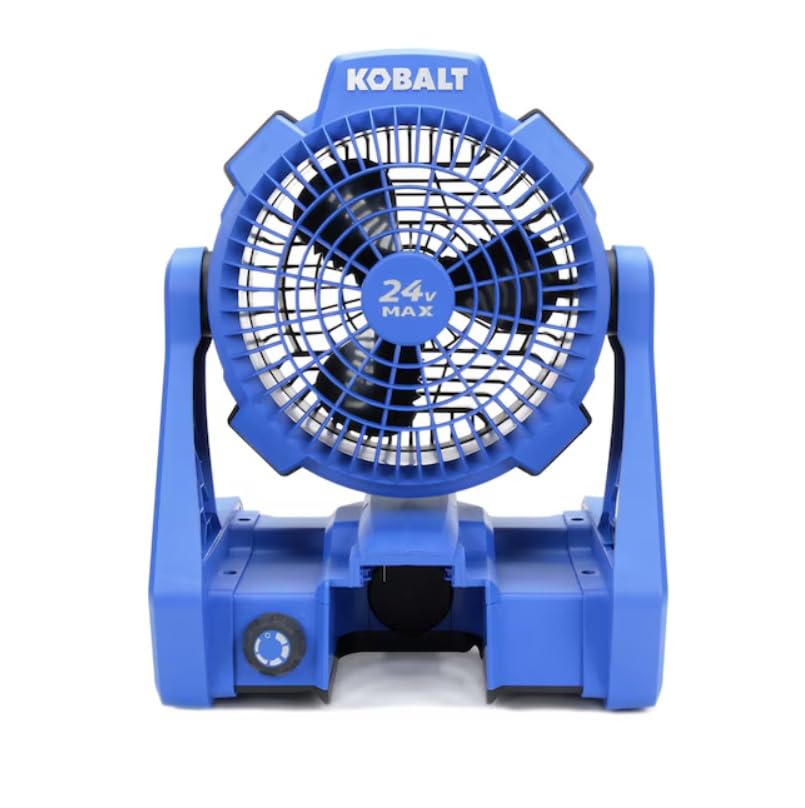
Figure 1: Kobalt Hybrid 24-Volt Max Jobsite Fan. This image displays the fan in its upright position, highlighting its robust blue and black casing and the 24V MAX branding on the fan grille.
2. Safety Information
Always observe basic safety precautions to reduce the risk of fire, electric shock, and personal injury.
- Do not operate the fan with a damaged cord or plug.
- Avoid placing hands or objects near the fan blades during operation.
- Ensure the fan is placed on a stable, level surface to prevent tipping.
- Keep the fan away from water or wet environments when using AC power.
- Use only Kobalt 24-Volt Max batteries and chargers with this product.
- Disconnect power before cleaning or performing any maintenance.
3. Package Contents
Verify that all items are present upon unpacking:
- Kobalt Hybrid 24-Volt Max Jobsite Fan (Model KJF 124B-03)
- AC Power Cord
Note: Battery and charger are sold separately.
4. Features
The Kobalt Hybrid 24-Volt Max Jobsite Fan offers versatile performance with the following key features:
- Hybrid Power Source: Operates on a Kobalt 24-Volt Max battery or standard AC power.
- Variable Speed Control: A rotary knob allows for precise adjustment of airflow from low to high.
- Adjustable Fan Head: The fan head pivots to direct airflow where needed.
- Integrated Hanging Hooks: Convenient hooks on the frame allow for easy suspension in various locations.
- Durable Construction: Built to withstand demanding jobsite conditions.
- Lightweight Design: Facilitates easy transport and repositioning.
5. Setup and Assembly
5.1 Battery Installation/Removal
- To install the battery (not included), align the battery pack with the battery port on the fan base.
- Slide the battery into the port until it clicks securely into place.
- To remove the battery, press the battery release button (usually located on the battery pack) and slide the battery out.
5.2 AC Power Connection
- Locate the AC power inlet on the fan base.
- Insert the provided AC power cord firmly into the inlet.
- Plug the other end of the power cord into a standard 120V AC electrical outlet.
6. Operating Instructions
6.1 Powering On/Off
The fan features a rotary knob that controls both power and speed.
- To turn on the fan, rotate the knob clockwise from the 'OFF' position.
- To turn off the fan, rotate the knob counter-clockwise until it reaches the 'OFF' position.
6.2 Adjusting Fan Speed
The rotary knob provides variable speed control:
- Rotate the knob clockwise to increase the fan speed.
- Rotate the knob counter-clockwise to decrease the fan speed.
6.3 Adjusting Fan Angle
The fan head can be manually tilted to direct airflow:
- Grasp the fan housing firmly and gently tilt it to the desired angle. The fan head will hold its position.
6.4 Using Hanging Hooks
For elevated airflow, utilize the integrated hanging hooks:
- Extend the metal hooks located on the sides of the fan frame.
- Hang the fan from a secure overhead structure, such as a tent frame or scaffolding. Ensure the structure can support the fan's weight.
7. Maintenance
7.1 Cleaning
- Always disconnect the fan from its power source (remove battery or unplug AC cord) before cleaning.
- Wipe the exterior surfaces of the fan with a soft, damp cloth. Do not use abrasive cleaners or solvents.
- Use a vacuum cleaner with a brush attachment to remove dust and debris from the fan grille and blades.
7.2 Battery Care
- Store batteries in a cool, dry place away from direct sunlight and extreme temperatures.
- Charge batteries fully before storage and periodically during long storage periods to maintain battery health.
8. Troubleshooting
If you encounter issues with your fan, refer to the following common problems and solutions:
| Problem | Possible Cause | Solution |
|---|---|---|
| Fan does not turn on. | No power supply; Battery depleted; AC cord not plugged in. | Ensure battery is charged and properly installed, or AC cord is securely plugged into a live outlet. |
| Low airflow. | Fan speed set too low; Obstruction in front/rear grille; Dirty blades. | Increase fan speed; Remove any obstructions; Clean fan blades and grilles. |
| Fan makes unusual noise. | Loose components; Debris in fan housing. | Inspect for loose parts; Disconnect power and carefully remove any debris. |
9. Specifications
| Feature | Specification |
|---|---|
| Brand | Kobalt |
| Model Name | KJF 124B-03 |
| Power Source | Battery Powered (24V Max) / AC Cord |
| Voltage | 24 Volts |
| Wattage | 288 watts |
| Speed | Up to 1000 RPM |
| Number of Blades | 3 |
| Number of Power Levels | Variable (via rotary knob) |
| Control Method | Button Control (Rotary Knob) |
| Mounting Type | Tabletop Mount, Hanging |
| Item Weight | 5.5 Pounds |
| Indoor/Outdoor Usage | Indoor, Outdoor |
| Material | Plastic |
10. Warranty and Support
This Kobalt product is covered by the manufacturer's warranty. For specific warranty details, please refer to the warranty card included with your purchase or visit the official Kobalt website. For technical support, replacement parts, or service inquiries, please contact Kobalt customer service through their official channels.

